
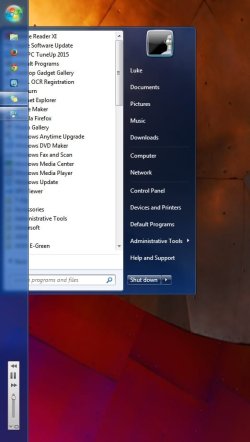
Hopefully my attachment went through, but basically when clicking the home button for the start menu, the taskbar overlaps it and makes all my applications impossible to read. Is there any way to keep this from happening? I have killed explorer.exe and restarted it as well as going through all taskbar settings and moving to all four sides of the screen. It will still always cover some portion of the start menu. Thank you for replies.
My Computer
At a glance
Windows 7 Home 64 bitIntel I7 2600k4x4 gb G.SkillAsus GTX780 Poesidon
- Computer type
- PC/Desktop
- Computer Manufacturer/Model Number
- Custom Build
- OS
- Windows 7 Home 64 bit
- CPU
- Intel I7 2600k
- Motherboard
- Asus P8Z68 Deluxe
- Memory
- 4x4 gb G.Skill
- Graphics Card(s)
- Asus GTX780 Poesidon
- Hard Drives
- Hodge podge of approx. 11 TB.
Important one is a 1TB Barracuda for OS
- Antivirus
- AVG
- Browser
- Chrome

