Solved windows 7 taskbar staying present on fullscreen programs and games

BDogg464

New member
Local time
10:54 AM
Messages
31
Location
north carolina
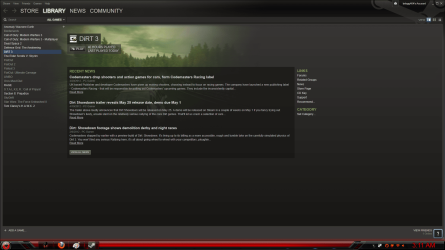
Please help. I have seen multiple post about taskbar problems but all seem to be directed a different way, there problem is getting autohide to work. This is not my problem. my problem is i just did a fresh instal (which i have done recently without a problem). now after finishing this last install and i set all my games programs up and everything i decide, hey time to play a game. open set game and the task bar is at the bottom of the screen when i start the game. the game is in fullscreen in all settings. tried alt tab, alt enter, f11, all have been tried, some games will act correctly so not exactly sure what the problem is, minecraft, special ops the line, any web browser, all these still do the same in fullscreen with task bar still showing. and i know for a fact directly before reinstalling (exactly the way i have multiple times before on same machine with same reinstall cd from alienware dell that came with computer) have tried all the common fixes i have seen around the internet in regards to other taskbar problems to try to straiten mine out but not fix yet. closed and reopened explorer.exe i can auto hide it fine, but even if i autohide it and the picture from the game covers the whole screen i can still see the window and minimize and close buttons on top and border. so it's still in windowed mode and not full screen.... pulling my hair out over this any help is greatly appreciated.
have correctly installed my video drivers due to multiple reinstalls have perfected the method lol.. so no problem there have 6970m stock blackcomb xt drivers with 12.6 drivers installed over it no issues and can easily switch back and forth between igp and 6970m easy and clean so don't think that's any issue. any input is greatly appreciated
 
Last edited:

My Computer

Computer Manufacturer/Model Number
M17xR3
OS
windows 7 64bit home premium
CPU
2630qm
Memory
8 gb kingston hyperx 1866
Graphics Card(s)
6970m 2gb ddr5 with switchable graphics
Sound Card
Klipsch idt high def audio 5.1
Monitor(s) Displays
led backlit
Screen Resolution
1920 by 1080
Hard Drives
120gb kingston hyperx ssd
750gb stock seagate dell harddrive
Cooling
self made desk with built in cooler fan
Mouse
mamba elite 2012
Internet Speed
Fast
Do me a favor please.
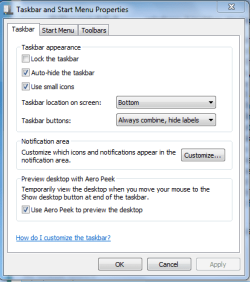
sometimes settings get changed without our help. would you right-click on the Start Orb, choose properties, taskbar tab.

Here's what I see:

taskbar.PNG

If you use WIN + TAB key combo to select your game window, is the taskbar now hidden?

WIN=key with microsoft logo on top
 

My Computer

Computer Manufacturer/Model Number
Toshiba Satellite S875D-S7239 laptop
OS
MS Windows 7 Ultimate SP1 64-bit
CPU
AMD A10-4600M
Motherboard
AMD Pumori (Socket FT1)
Memory
6.00 GB Dual-Channel DDR3 @ 798MHz (11-11-12-28)
Graphics Card(s)
AMD Radeon HD 7660G
Sound Card
High Definition Audio Device
Monitor(s) Displays
Generic PnP Monitor (1600x900@60Hz)
Screen Resolution
1600x900@60Hz
Hard Drives
SSD 119GB Corsair CSSD-V128GB2 ATA Device
Keyboard
Standard PS/2 Keyboard
Mouse
HP Wireless Optical Mobile Mouse Model FHA-3410
Internet Speed
What the local pub, local coffee shop offers.
Other Info
Optical Drive:MATSHITA BD-CMB UJ160B ATA Device


Also have an Asus ha1002xp netbook with Win 7 Ultimate installed.
yea grabbing a couple screen shots real quick to show ya.....
 

My Computer

Computer Manufacturer/Model Number
M17xR3
OS
windows 7 64bit home premium
CPU
2630qm
Memory
8 gb kingston hyperx 1866
Graphics Card(s)
6970m 2gb ddr5 with switchable graphics
Sound Card
Klipsch idt high def audio 5.1
Monitor(s) Displays
led backlit
Screen Resolution
1920 by 1080
Hard Drives
120gb kingston hyperx ssd
750gb stock seagate dell harddrive
Cooling
self made desk with built in cooler fan
Mouse
mamba elite 2012
Internet Speed
Fast
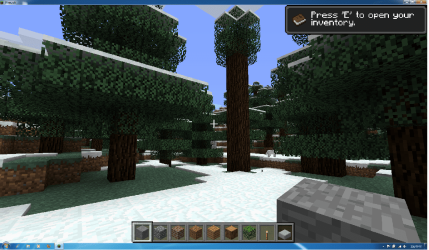
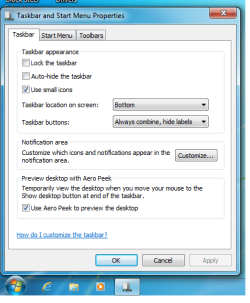
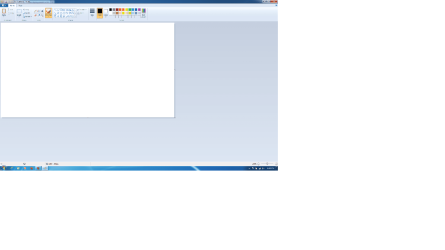
screenshots

not trying to auto hide task bar... just want it to not show up on stuff i have set to run fullscreen. and its not all the time. just know it did'nt do it before with same setup. but am open to any suggestions you have and enlightenment if im just thinking wrong or mistaken. very open and appreciate all help. just to expand a little more with couple questions. if you open a web browser it should override the taskbar correct? also it should open a game set to fullscreen in fullscreen without having to hit f11 or alt enter right?? and some wont even go full screen at all f11, alt enter, winkey tab, alt tab, (thanks for the win key tab command, does a really cool effect switch between windows as opposed to the default alt tab lol) i know it will not go fullscreen on all games but just a coulple i can hit f11 or alt tab to force it fullscreen but should open like that by default because of settings. f
 

Attachments

  • Minecraft.png
    Minecraft.png
    214 KB · Views: 72
  • webbrowser.png
    webbrowser.png
    222.2 KB · Views: 58
  • task.png
    task.png
    20.8 KB · Views: 76

My Computer

Computer Manufacturer/Model Number
M17xR3
OS
windows 7 64bit home premium
CPU
2630qm
Memory
8 gb kingston hyperx 1866
Graphics Card(s)
6970m 2gb ddr5 with switchable graphics
Sound Card
Klipsch idt high def audio 5.1
Monitor(s) Displays
led backlit
Screen Resolution
1920 by 1080
Hard Drives
120gb kingston hyperx ssd
750gb stock seagate dell harddrive
Cooling
self made desk with built in cooler fan
Mouse
mamba elite 2012
Internet Speed
Fast
minecraft with autohide on fullscreen
 

Attachments

  • Paint.png
    Paint.png
    32.5 KB · Views: 28
  • newmine.png
    newmine.png
    192.8 KB · Views: 58

My Computer

Computer Manufacturer/Model Number
M17xR3
OS
windows 7 64bit home premium
CPU
2630qm
Memory
8 gb kingston hyperx 1866
Graphics Card(s)
6970m 2gb ddr5 with switchable graphics
Sound Card
Klipsch idt high def audio 5.1
Monitor(s) Displays
led backlit
Screen Resolution
1920 by 1080
Hard Drives
120gb kingston hyperx ssd
750gb stock seagate dell harddrive
Cooling
self made desk with built in cooler fan
Mouse
mamba elite 2012
Internet Speed
Fast
problem not solved still have the border around the minecraft and all aplications steam origin everything, still at a loss here
 

My Computer

Computer Manufacturer/Model Number
M17xR3
OS
windows 7 64bit home premium
CPU
2630qm
Memory
8 gb kingston hyperx 1866
Graphics Card(s)
6970m 2gb ddr5 with switchable graphics
Sound Card
Klipsch idt high def audio 5.1
Monitor(s) Displays
led backlit
Screen Resolution
1920 by 1080
Hard Drives
120gb kingston hyperx ssd
750gb stock seagate dell harddrive
Cooling
self made desk with built in cooler fan
Mouse
mamba elite 2012
Internet Speed
Fast
What size is set in Screen Resolution > "Make text and other items larger or smaller" ?

If it's > 100%, try changing it to something smaller.
 

My Computer

Computer type
PC/Desktop
Computer Manufacturer/Model Number
home built
OS
Multi-Boot W7_Pro_x64 W8.1_Pro_x64 W10_Pro_x64 +Linux_VMs +Chromium_VM
CPU
AMD Athlon II x4 620
Motherboard
Gigabyte GA-MA785G-UD3H
Memory
6GB GSkill DDR2 800
Graphics Card(s)
AMD 4670 GPU + AMD 4200 IGP
Sound Card
on board Realtek ALC889A
Monitor(s) Displays
RCA 40" LCD TV, Insignia 32" LCD TV, HP 15" LCD monitor
Screen Resolution
1680 x 1050
Hard Drives
OCZ Vertex 3 120GB,
Samsung F3 1TB (3),
Several others - WD, Seagate, Hitachi, ...
PSU
Corsair 500 W
Case
Rosewill mid tower
Cooling
CM 90mm rifle
Keyboard
Gyration wireless, Logitech wireless, Dell USB wired
Mouse
Gyration wireless, Logitech wireless, V7 USB wired
Internet Speed
Spectrum - 100Mbps D / 10Mbps U
Antivirus
Avast, MBAM3, EMET, WinPatrol
Browser
Pale Moon, Firefox, IE
Other Info
2 multi-boot PC's
Mainly HTPC/Office/Gen purpose (no gaming).
Trendnet USB KVM.
LG DVD burner/Blue Ray Player.
Tray system for removable SATA backup drives.

Not currently OCd, under-volted.
I use Hybrid sleep, rarely re-boot or shutdown.

Hauppauge HD-PVR, Avermedia PCIe TV Tuner, Hauppauge PCI TV Tuner.
just tried that. my resolution was 1920 by 1080 changed it to 1600 by 900 and back again with no change. did the same with text size and whatnot was 100% changed it bigger then to biggest checking inbetween each setting with no change. it's like the task bar settings are set to always be on top of everything causing my games not to run full screen and making me having to try to manually force them fullscreen even if all settings are preset for fullscreen. i mean ok that can be fixed by manually forcing it with f11 or alt enter, but ssssoooooooooo anoying, but this still doesnt fix the fact that every application from any web browser to any app steam app origin, adobe photoshop, anything the taskbar stays at the bottom... don't know if that cleared anything up, but still open to any suggestion or try's or any questions to better understand my issue. many thanks in advance for an fix to this issue.
 

My Computer

Computer Manufacturer/Model Number
M17xR3
OS
windows 7 64bit home premium
CPU
2630qm
Memory
8 gb kingston hyperx 1866
Graphics Card(s)
6970m 2gb ddr5 with switchable graphics
Sound Card
Klipsch idt high def audio 5.1
Monitor(s) Displays
led backlit
Screen Resolution
1920 by 1080
Hard Drives
120gb kingston hyperx ssd
750gb stock seagate dell harddrive
Cooling
self made desk with built in cooler fan
Mouse
mamba elite 2012
Internet Speed
Fast
just to update a little

tried changing all my themes and everything back after clean install hoping it would change some setting back and solve the problem but no go :(
 

Attachments

  • newdesssk.jpg
    newdesssk.jpg
    239 KB · Views: 52
  • sssteam.png
    sssteam.png
    172.1 KB · Views: 41

My Computer

Computer Manufacturer/Model Number
M17xR3
OS
windows 7 64bit home premium
CPU
2630qm
Memory
8 gb kingston hyperx 1866
Graphics Card(s)
6970m 2gb ddr5 with switchable graphics
Sound Card
Klipsch idt high def audio 5.1
Monitor(s) Displays
led backlit
Screen Resolution
1920 by 1080
Hard Drives
120gb kingston hyperx ssd
750gb stock seagate dell harddrive
Cooling
self made desk with built in cooler fan
Mouse
mamba elite 2012
Internet Speed
Fast

My Computer

Computer type
PC/Desktop
Computer Manufacturer/Model Number
home built
OS
Multi-Boot W7_Pro_x64 W8.1_Pro_x64 W10_Pro_x64 +Linux_VMs +Chromium_VM
CPU
AMD Athlon II x4 620
Motherboard
Gigabyte GA-MA785G-UD3H
Memory
6GB GSkill DDR2 800
Graphics Card(s)
AMD 4670 GPU + AMD 4200 IGP
Sound Card
on board Realtek ALC889A
Monitor(s) Displays
RCA 40" LCD TV, Insignia 32" LCD TV, HP 15" LCD monitor
Screen Resolution
1680 x 1050
Hard Drives
OCZ Vertex 3 120GB,
Samsung F3 1TB (3),
Several others - WD, Seagate, Hitachi, ...
PSU
Corsair 500 W
Case
Rosewill mid tower
Cooling
CM 90mm rifle
Keyboard
Gyration wireless, Logitech wireless, Dell USB wired
Mouse
Gyration wireless, Logitech wireless, V7 USB wired
Internet Speed
Spectrum - 100Mbps D / 10Mbps U
Antivirus
Avast, MBAM3, EMET, WinPatrol
Browser
Pale Moon, Firefox, IE
Other Info
2 multi-boot PC's
Mainly HTPC/Office/Gen purpose (no gaming).
Trendnet USB KVM.
LG DVD burner/Blue Ray Player.
Tray system for removable SATA backup drives.

Not currently OCd, under-volted.
I use Hybrid sleep, rarely re-boot or shutdown.

Hauppauge HD-PVR, Avermedia PCIe TV Tuner, Hauppauge PCI TV Tuner.
so far no help searching thru those post diasabling dpi and what not, closeing explorer.exe and reopening. going to bed, no hair left to pull out..... hopefully will get somegood ideas on here when i get back. thanks for any help posted so far in my search for an elusive solution
 

My Computer

Computer Manufacturer/Model Number
M17xR3
OS
windows 7 64bit home premium
CPU
2630qm
Memory
8 gb kingston hyperx 1866
Graphics Card(s)
6970m 2gb ddr5 with switchable graphics
Sound Card
Klipsch idt high def audio 5.1
Monitor(s) Displays
led backlit
Screen Resolution
1920 by 1080
Hard Drives
120gb kingston hyperx ssd
750gb stock seagate dell harddrive
Cooling
self made desk with built in cooler fan
Mouse
mamba elite 2012
Internet Speed
Fast
sill no solution yet :(
 

My Computer

Computer Manufacturer/Model Number
M17xR3
OS
windows 7 64bit home premium
CPU
2630qm
Memory
8 gb kingston hyperx 1866
Graphics Card(s)
6970m 2gb ddr5 with switchable graphics
Sound Card
Klipsch idt high def audio 5.1
Monitor(s) Displays
led backlit
Screen Resolution
1920 by 1080
Hard Drives
120gb kingston hyperx ssd
750gb stock seagate dell harddrive
Cooling
self made desk with built in cooler fan
Mouse
mamba elite 2012
Internet Speed
Fast
still no solution but gave up temporarly and hid it with task eliminator and disabled the task bar with objectdock hide taskbar. and set it to auto hide on taskbar proerties then just made a extra zoomdock with system tray icons, a very round about way to achieve what i want and a crappy fix in my mind because something is screwy and this is NOT fixing the issue just disguising it. So still activly looking for a fix or bug issue or any idea to what is causing this in windows 7 taskbar :[.................
 

My Computer

Computer Manufacturer/Model Number
M17xR3
OS
windows 7 64bit home premium
CPU
2630qm
Memory
8 gb kingston hyperx 1866
Graphics Card(s)
6970m 2gb ddr5 with switchable graphics
Sound Card
Klipsch idt high def audio 5.1
Monitor(s) Displays
led backlit
Screen Resolution
1920 by 1080
Hard Drives
120gb kingston hyperx ssd
750gb stock seagate dell harddrive
Cooling
self made desk with built in cooler fan
Mouse
mamba elite 2012
Internet Speed
Fast
that is a bummer :(
if i find anything else about this, i'll post it...
 

My Computer

Computer type
PC/Desktop
Computer Manufacturer/Model Number
home built
OS
Multi-Boot W7_Pro_x64 W8.1_Pro_x64 W10_Pro_x64 +Linux_VMs +Chromium_VM
CPU
AMD Athlon II x4 620
Motherboard
Gigabyte GA-MA785G-UD3H
Memory
6GB GSkill DDR2 800
Graphics Card(s)
AMD 4670 GPU + AMD 4200 IGP
Sound Card
on board Realtek ALC889A
Monitor(s) Displays
RCA 40" LCD TV, Insignia 32" LCD TV, HP 15" LCD monitor
Screen Resolution
1680 x 1050
Hard Drives
OCZ Vertex 3 120GB,
Samsung F3 1TB (3),
Several others - WD, Seagate, Hitachi, ...
PSU
Corsair 500 W
Case
Rosewill mid tower
Cooling
CM 90mm rifle
Keyboard
Gyration wireless, Logitech wireless, Dell USB wired
Mouse
Gyration wireless, Logitech wireless, V7 USB wired
Internet Speed
Spectrum - 100Mbps D / 10Mbps U
Antivirus
Avast, MBAM3, EMET, WinPatrol
Browser
Pale Moon, Firefox, IE
Other Info
2 multi-boot PC's
Mainly HTPC/Office/Gen purpose (no gaming).
Trendnet USB KVM.
LG DVD burner/Blue Ray Player.
Tray system for removable SATA backup drives.

Not currently OCd, under-volted.
I use Hybrid sleep, rarely re-boot or shutdown.

Hauppauge HD-PVR, Avermedia PCIe TV Tuner, Hauppauge PCI TV Tuner.
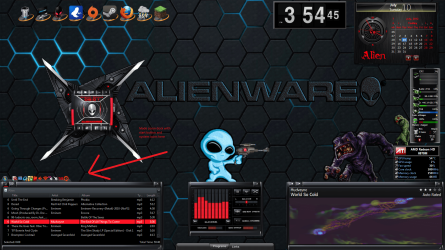
yea really not sure what's up here a great mystery lol...... oh well i guess just made me explore other options on how to setup desktop better with other apps. here's a screen shot to my half a$$ solution.....


Like i said before to anyone that missed in the earlier post on this, task bar is acting like it's set to always, ALWAYS be on top of everything and making fullscreen apps and games start windowed even if manually set to open fullscreen by default. as always any help or suggestions is greatly appreciated and will make sure i check thru other post to see if i can offer any advice to others having problems with issues i know how to solve, (which may not be much).
 

Attachments

  • newsetup.png
    newsetup.png
    717.9 KB · Views: 15

My Computer

Computer Manufacturer/Model Number
M17xR3
OS
windows 7 64bit home premium
CPU
2630qm
Memory
8 gb kingston hyperx 1866
Graphics Card(s)
6970m 2gb ddr5 with switchable graphics
Sound Card
Klipsch idt high def audio 5.1
Monitor(s) Displays
led backlit
Screen Resolution
1920 by 1080
Hard Drives
120gb kingston hyperx ssd
750gb stock seagate dell harddrive
Cooling
self made desk with built in cooler fan
Mouse
mamba elite 2012
Internet Speed
Fast
What's even funnier is i want some full screen apps to display the taskbar :)
I've fought the same battle but for the other side!

In an HTPC i usually like having the taskbar visible while watching Full Screen media.
I've got some programs to work, not others...
I've got an HD-PVR viewing live cable full screen with the taskbar...
go figure !
 

My Computer

Computer type
PC/Desktop
Computer Manufacturer/Model Number
home built
OS
Multi-Boot W7_Pro_x64 W8.1_Pro_x64 W10_Pro_x64 +Linux_VMs +Chromium_VM
CPU
AMD Athlon II x4 620
Motherboard
Gigabyte GA-MA785G-UD3H
Memory
6GB GSkill DDR2 800
Graphics Card(s)
AMD 4670 GPU + AMD 4200 IGP
Sound Card
on board Realtek ALC889A
Monitor(s) Displays
RCA 40" LCD TV, Insignia 32" LCD TV, HP 15" LCD monitor
Screen Resolution
1680 x 1050
Hard Drives
OCZ Vertex 3 120GB,
Samsung F3 1TB (3),
Several others - WD, Seagate, Hitachi, ...
PSU
Corsair 500 W
Case
Rosewill mid tower
Cooling
CM 90mm rifle
Keyboard
Gyration wireless, Logitech wireless, Dell USB wired
Mouse
Gyration wireless, Logitech wireless, V7 USB wired
Internet Speed
Spectrum - 100Mbps D / 10Mbps U
Antivirus
Avast, MBAM3, EMET, WinPatrol
Browser
Pale Moon, Firefox, IE
Other Info
2 multi-boot PC's
Mainly HTPC/Office/Gen purpose (no gaming).
Trendnet USB KVM.
LG DVD burner/Blue Ray Player.
Tray system for removable SATA backup drives.

Not currently OCd, under-volted.
I use Hybrid sleep, rarely re-boot or shutdown.

Hauppauge HD-PVR, Avermedia PCIe TV Tuner, Hauppauge PCI TV Tuner.
is there a better way to disable the task bar from ever showing, like i said im using the taskbar eliminator, but it still freaks out and pops up and down at the bottom when logging in and off. no biggie it's not moving anything around because i have three programs hiding it and disabling it but just ocd about crap. sorta why this whole post started. and yea funny on your issue, i need to send u my copy of windows lol..... that does bring up another thought though. i am using the dell windows alienware sp1 install cd, do you think they have some crazy dell driver on that cd that's different than normal non dell alienware cd? because it does load up all the alienware stuff by just installing with cd.
 

My Computer

Computer Manufacturer/Model Number
M17xR3
OS
windows 7 64bit home premium
CPU
2630qm
Memory
8 gb kingston hyperx 1866
Graphics Card(s)
6970m 2gb ddr5 with switchable graphics
Sound Card
Klipsch idt high def audio 5.1
Monitor(s) Displays
led backlit
Screen Resolution
1920 by 1080
Hard Drives
120gb kingston hyperx ssd
750gb stock seagate dell harddrive
Cooling
self made desk with built in cooler fan
Mouse
mamba elite 2012
Internet Speed
Fast
oh yea and is there a way to give object dock more power? or resorces, it doesnt drain anything from my processing power but seems like its own limit is tuned down as not to kill smaller systems, just did'nt know the best trick to give a program more resorces or priority to run stronger
 

My Computer

Computer Manufacturer/Model Number
M17xR3
OS
windows 7 64bit home premium
CPU
2630qm
Memory
8 gb kingston hyperx 1866
Graphics Card(s)
6970m 2gb ddr5 with switchable graphics
Sound Card
Klipsch idt high def audio 5.1
Monitor(s) Displays
led backlit
Screen Resolution
1920 by 1080
Hard Drives
120gb kingston hyperx ssd
750gb stock seagate dell harddrive
Cooling
self made desk with built in cooler fan
Mouse
mamba elite 2012
Internet Speed
Fast

My Computer

Computer type
PC/Desktop
Computer Manufacturer/Model Number
home built
OS
Multi-Boot W7_Pro_x64 W8.1_Pro_x64 W10_Pro_x64 +Linux_VMs +Chromium_VM
CPU
AMD Athlon II x4 620
Motherboard
Gigabyte GA-MA785G-UD3H
Memory
6GB GSkill DDR2 800
Graphics Card(s)
AMD 4670 GPU + AMD 4200 IGP
Sound Card
on board Realtek ALC889A
Monitor(s) Displays
RCA 40" LCD TV, Insignia 32" LCD TV, HP 15" LCD monitor
Screen Resolution
1680 x 1050
Hard Drives
OCZ Vertex 3 120GB,
Samsung F3 1TB (3),
Several others - WD, Seagate, Hitachi, ...
PSU
Corsair 500 W
Case
Rosewill mid tower
Cooling
CM 90mm rifle
Keyboard
Gyration wireless, Logitech wireless, Dell USB wired
Mouse
Gyration wireless, Logitech wireless, V7 USB wired
Internet Speed
Spectrum - 100Mbps D / 10Mbps U
Antivirus
Avast, MBAM3, EMET, WinPatrol
Browser
Pale Moon, Firefox, IE
Other Info
2 multi-boot PC's
Mainly HTPC/Office/Gen purpose (no gaming).
Trendnet USB KVM.
LG DVD burner/Blue Ray Player.
Tray system for removable SATA backup drives.

Not currently OCd, under-volted.
I use Hybrid sleep, rarely re-boot or shutdown.

Hauppauge HD-PVR, Avermedia PCIe TV Tuner, Hauppauge PCI TV Tuner.
Minecraft Full Screen Setting

Hey, I was actually trying to find out how to make the taskbar show up and I ran across this post. I am glad cause it made me realize my settings on Minecraft themselves were on Full Screen Mode. I changed the Full Screen mode to OFF and the taskbar showed up again. So, I would recommend you just turn your full screen to ON, it is a setting on the actual Minecraft Video Options itself.

Well hope this helps someone.
Cheers,
mexico1975 (mc ID)
 

Attachments

  • MC Settings.JPG
    MC Settings.JPG
    39.4 KB · Views: 18

My Computer

Computer type
PC/Desktop
Computer Manufacturer/Model Number
Alienware X51 R2
OS
Windows 7 - 64 Bit
CPU
i5-4440 CPU @ 3.10
Memory
8 GB
Graphics Card(s)
NVIDEA 745 GTX
Back
Top