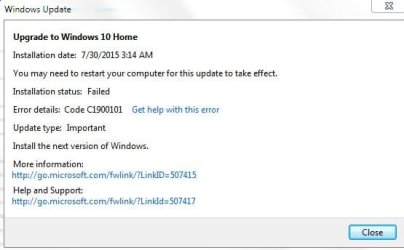
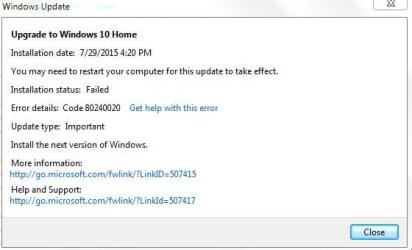
Hello all Windows 7 users,
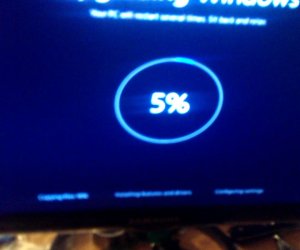
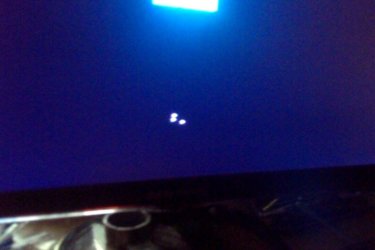
I am not positive that this is the place to be posting something like this, but I have been trying to update my windows 7 to windows 10 but have been having one big complication. Every time when the whole verification for the download is good and that I have the right specs, the download freezes, the screen says "Your PC may restart several times, take a break" or something like that, but it is a ring that shows your progress with a percentage in the middle(look at pictures). After this download ring hits 30% it will do its first reboot, so naturally, the PC will reboot about twice, after the second time rebooting, little bubbles below a windows 10 logo will appear but they will freeze(the little bubbles are supposed to spin). So to myself, I just said, "alright, lets just let it sit for an hour, it probably needs time to think and download." So I went to bed and left the computer running over night for 5 hours. As I woke up the next morning, nope, still the same screen of the bubbles being frozen(last picture).
Before you ask, yes I have the SR1 package, yes my antivirus has done a full scan, yes I did all the necessary updates. But yet I still can't figure this out.
Any suggestions?
I am not positive that this is the place to be posting something like this, but I have been trying to update my windows 7 to windows 10 but have been having one big complication. Every time when the whole verification for the download is good and that I have the right specs, the download freezes, the screen says "Your PC may restart several times, take a break" or something like that, but it is a ring that shows your progress with a percentage in the middle(look at pictures). After this download ring hits 30% it will do its first reboot, so naturally, the PC will reboot about twice, after the second time rebooting, little bubbles below a windows 10 logo will appear but they will freeze(the little bubbles are supposed to spin). So to myself, I just said, "alright, lets just let it sit for an hour, it probably needs time to think and download." So I went to bed and left the computer running over night for 5 hours. As I woke up the next morning, nope, still the same screen of the bubbles being frozen(last picture).
Before you ask, yes I have the SR1 package, yes my antivirus has done a full scan, yes I did all the necessary updates. But yet I still can't figure this out.
Any suggestions?
Attachments
My Computer
At a glance
Windows 7 64 biti7forgotnvidia 760
- Computer type
- PC/Desktop
- Computer Manufacturer/Model Number
- custom build
- OS
- Windows 7 64 bit
- CPU
- i7
- Motherboard
- forgot
- Memory
- forgot
- Graphics Card(s)
- nvidia 760
- Hard Drives
- some crappy 400 gig
- Antivirus
- norton
- Browser
- chrome mainly