
Windows 7 to XP

dobata

Banned
Local time
10:27 AM
Messages
18
Location
Bulgaria
Hi, im new here :D

Well now i saw my pc cant take windows 7 cuz my pc is old and better with 32 bit ...
I was wondering if i can change my windows back to windows xp?
Or should i buy a new pc?
Cuz i see when i start the windows XP installation it doesn't let me start..
Please Help me... ;D
 

My Computer

Computer Manufacturer/Model Number
Enclosure Type: Desktop
OS
Windows 7 Ultimate x32
Memory
1408 Megabytes
Graphics Card(s)
NVIDIA GeForce 6100 nForce 405
Sound Card
Realtek High Definition Audio
Monitor(s) Displays
NVIDIA GeForce 6100 nForce 405
Screen Resolution
1152 x 864
Hard Drives
164,69 Gigabytes Usable Hard Drive Capacity
126,82 Gigabytes Hard Drive Free Space

HL-DT-ST DVDRAM GSA-4167B ATA Device [Optical drive]
3.5" format removeable media [Floppy drive]

HDT722516DLAT80 ATA Device [Hard drive] (164,69 GB) -- drive 0
Internet Speed
100.0 mbps
Other Info
Standard PS/2 Keyboard
Microsoft PS/2 Mouse
USB Root Hub (2x)
Generic volume shadow copy
Hi, welcome to the forums :)

If you could fill in your System Specs then we may be able to advise as to a better course of action for you to take.


OS
 

My Computer

Computer Manufacturer/Model Number
Compaq Desktop
OS
Windows 7 Ultimate x64
CPU
AMD Sempron Dual Core
Memory
3GB
Graphics Card(s)
NVIDIA GeForce 6150SE nForce 430
Screen Resolution
1024x768
Hard Drives
150GB Sata
Im not so good at this, but see my information and tell me what should i write or edit.
I used Belarc Advisor to get the information.
 

My Computer

Computer Manufacturer/Model Number
Enclosure Type: Desktop
OS
Windows 7 Ultimate x32
Memory
1408 Megabytes
Graphics Card(s)
NVIDIA GeForce 6100 nForce 405
Sound Card
Realtek High Definition Audio
Monitor(s) Displays
NVIDIA GeForce 6100 nForce 405
Screen Resolution
1152 x 864
Hard Drives
164,69 Gigabytes Usable Hard Drive Capacity
126,82 Gigabytes Hard Drive Free Space

HL-DT-ST DVDRAM GSA-4167B ATA Device [Optical drive]
3.5" format removeable media [Floppy drive]

HDT722516DLAT80 ATA Device [Hard drive] (164,69 GB) -- drive 0
Internet Speed
100.0 mbps
Other Info
Standard PS/2 Keyboard
Microsoft PS/2 Mouse
USB Root Hub (2x)
Generic volume shadow copy
Thanks for the new info.

Looking at your system you should be able to handle Windows 7 with no issues. The only thing I'd advise is installing Windows 7 Ultimate 32Bit as opposed to 64 as you only have 1408MB memory. You can easily re-install XP (if you wish) by booting your machine with the XP CD in the drive and booting from that to do the installation.
   Note
You will need to have CD/DVD set as your 1st boot device in your BIOS. Please refer to your documentation for exact BIOS configuration details
 

My Computer

Computer Manufacturer/Model Number
Compaq Desktop
OS
Windows 7 Ultimate x64
CPU
AMD Sempron Dual Core
Memory
3GB
Graphics Card(s)
NVIDIA GeForce 6150SE nForce 430
Screen Resolution
1024x768
Hard Drives
150GB Sata
Hi,
I would say Ultimate isn't that good advice for such a machine -I would recommend HomePremium, though.

Bogdan
 

My Computer

Computer type
PC/Desktop
Computer Manufacturer/Model Number
custom build
OS
Windows 7 HomePremium 64bit
CPU
i5-6600
Motherboard
Asus H170-PRO
Memory
16GB
Graphics Card(s)
Radeon RX470 4GB
Monitor(s) Displays
Dell U2415
Screen Resolution
1920x1200
Hard Drives
Samsung SSD-850PRO 256GB
WD Green 1TB
PSU
Corsair CX-600
Case
CoolerMaster Silencio-550
Browser
Firefox
Truth is I've had Ultimate working flawlessly on a 1GB machine but I see your point ;)
 

My Computer

Computer Manufacturer/Model Number
Compaq Desktop
OS
Windows 7 Ultimate x64
CPU
AMD Sempron Dual Core
Memory
3GB
Graphics Card(s)
NVIDIA GeForce 6150SE nForce 430
Screen Resolution
1024x768
Hard Drives
150GB Sata
Can i upgrade from ultimate to another windows 7? Some windows 7 *32-bit,x84* i have a bit lag with this windows.
 

My Computer

Computer Manufacturer/Model Number
Enclosure Type: Desktop
OS
Windows 7 Ultimate x32
Memory
1408 Megabytes
Graphics Card(s)
NVIDIA GeForce 6100 nForce 405
Sound Card
Realtek High Definition Audio
Monitor(s) Displays
NVIDIA GeForce 6100 nForce 405
Screen Resolution
1152 x 864
Hard Drives
164,69 Gigabytes Usable Hard Drive Capacity
126,82 Gigabytes Hard Drive Free Space

HL-DT-ST DVDRAM GSA-4167B ATA Device [Optical drive]
3.5" format removeable media [Floppy drive]

HDT722516DLAT80 ATA Device [Hard drive] (164,69 GB) -- drive 0
Internet Speed
100.0 mbps
Other Info
Standard PS/2 Keyboard
Microsoft PS/2 Mouse
USB Root Hub (2x)
Generic volume shadow copy

My Computer

Computer Manufacturer/Model Number
Compaq Desktop
OS
Windows 7 Ultimate x64
CPU
AMD Sempron Dual Core
Memory
3GB
Graphics Card(s)
NVIDIA GeForce 6150SE nForce 430
Screen Resolution
1024x768
Hard Drives
150GB Sata
I just installed it ;D
 

My Computer

Computer Manufacturer/Model Number
Enclosure Type: Desktop
OS
Windows 7 Ultimate x32
Memory
1408 Megabytes
Graphics Card(s)
NVIDIA GeForce 6100 nForce 405
Sound Card
Realtek High Definition Audio
Monitor(s) Displays
NVIDIA GeForce 6100 nForce 405
Screen Resolution
1152 x 864
Hard Drives
164,69 Gigabytes Usable Hard Drive Capacity
126,82 Gigabytes Hard Drive Free Space

HL-DT-ST DVDRAM GSA-4167B ATA Device [Optical drive]
3.5" format removeable media [Floppy drive]

HDT722516DLAT80 ATA Device [Hard drive] (164,69 GB) -- drive 0
Internet Speed
100.0 mbps
Other Info
Standard PS/2 Keyboard
Microsoft PS/2 Mouse
USB Root Hub (2x)
Generic volume shadow copy
Hi there
In general if your machine will run XP it WILL run W7. You can even get W7 to run on a 512MB machine -- although if you have this size machine then use the W7 Home Basic or Starter edition.

On a 1GB machine -- no problem running even W7 Pro (32 bit)..

However if you INSIST on wanting to run XP (or downgrade back to XP) you will need to do the following actions.

1) Totally reformat the partition you want to install XP on -- and remove if you have it the 100MB system reserved partition W7 sometimes creates. - Tip for W7 users -- if you don't want a System reserved partition when you install W7 then ensure your HDD has only ONE PRIMARY partition when you install W7 even if you have a 1 TB disk. Then AFTERWARDS reduce the size and create other partitions with GPARTED or Partitition manager etc (Free software).

2) SLIPSTREAM the XP3 service pack with windows XP before you start. Also if you have SATA drives XP won't recognize these so to avoid the "XP cannot find any hard disk drives" you will need to add the SATA drivers to your Slipstreamed XP.

You can do this by looking at this link and following on from there

All DriverPacks | DriverPacks.net

Documentation Docs | DriverPacks.net

It makes an interesting exercise in learning how to Slipstream your OS -- but honestly unless you have a VERY good reason to revert back to Windows XP I wouldn't bother -- I still have stuff that CAN only run on XP but I prefer to run an XP Virtual Machine rather than boot up an XP system.

Cheers
jimbo
 

My Computer

Computer type
PC/Desktop
Computer Manufacturer/Model Number
Custom built, several laptops HP/ASUS
OS
Linux CENTOS 7 / various Windows OS'es and servers
CPU
Intel i7 Intel i5
Memory
8GB, 16GB
Graphics Card(s)
On Motherboard
Sound Card
Realtek HD audio
Monitor(s) Displays
Apple Cinema display, Samsung LCD
Screen Resolution
1920 X 1080
Hard Drives
4 X 1TB SATA
Mouse
Toshiba wireless laser
Internet Speed
> 20MB up
My system says 32-bit Belarc Advisor says 64-bit ready.

Which is the true one?
And why are my games lagging so much? At windows XP they didn't lag.
 

My Computer

Computer Manufacturer/Model Number
Enclosure Type: Desktop
OS
Windows 7 Ultimate x32
Memory
1408 Megabytes
Graphics Card(s)
NVIDIA GeForce 6100 nForce 405
Sound Card
Realtek High Definition Audio
Monitor(s) Displays
NVIDIA GeForce 6100 nForce 405
Screen Resolution
1152 x 864
Hard Drives
164,69 Gigabytes Usable Hard Drive Capacity
126,82 Gigabytes Hard Drive Free Space

HL-DT-ST DVDRAM GSA-4167B ATA Device [Optical drive]
3.5" format removeable media [Floppy drive]

HDT722516DLAT80 ATA Device [Hard drive] (164,69 GB) -- drive 0
Internet Speed
100.0 mbps
Other Info
Standard PS/2 Keyboard
Microsoft PS/2 Mouse
USB Root Hub (2x)
Generic volume shadow copy
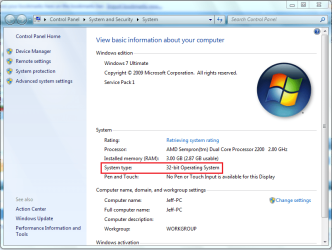
You will have 32Bit, but for piece of mind click Start then right-click Computer and select Properties. This will tell you if you have installed 32 bit or 64 bit.

System Properties.PNG

   Note
64 bit compatibility is dependent on whether your CPU has 64 bit architecture
 

My Computer

Computer Manufacturer/Model Number
Compaq Desktop
OS
Windows 7 Ultimate x64
CPU
AMD Sempron Dual Core
Memory
3GB
Graphics Card(s)
NVIDIA GeForce 6150SE nForce 430
Screen Resolution
1024x768
Hard Drives
150GB Sata

My Computer

Computer Manufacturer/Model Number
Compaq Desktop
OS
Windows 7 Ultimate x64
CPU
AMD Sempron Dual Core
Memory
3GB
Graphics Card(s)
NVIDIA GeForce 6150SE nForce 430
Screen Resolution
1024x768
Hard Drives
150GB Sata
I would also look at downloading the latest nVidia drivers for your GFX card

NVIDIA DRIVERS 260.99 WHQL

I installed it already. But why is windows 7 more laggy? I need a better processor? RAM? Video card? at XP it didnt lag that much with the same stuff and i had then 185.99 vesion nvidia installed.
 

My Computer

Computer Manufacturer/Model Number
Enclosure Type: Desktop
OS
Windows 7 Ultimate x32
Memory
1408 Megabytes
Graphics Card(s)
NVIDIA GeForce 6100 nForce 405
Sound Card
Realtek High Definition Audio
Monitor(s) Displays
NVIDIA GeForce 6100 nForce 405
Screen Resolution
1152 x 864
Hard Drives
164,69 Gigabytes Usable Hard Drive Capacity
126,82 Gigabytes Hard Drive Free Space

HL-DT-ST DVDRAM GSA-4167B ATA Device [Optical drive]
3.5" format removeable media [Floppy drive]

HDT722516DLAT80 ATA Device [Hard drive] (164,69 GB) -- drive 0
Internet Speed
100.0 mbps
Other Info
Standard PS/2 Keyboard
Microsoft PS/2 Mouse
USB Root Hub (2x)
Generic volume shadow copy
1 thing you could try is disabling desktop composition...

1, Right-click the game icon and select Properties
2, In the Compatibility tab select Disable Desktop Composition
3, click ok

This will cause Windows 7 to default to the standard theme, no transparency or special effects, thus allowing for more memory allocation for the game process.
 

My Computer

Computer Manufacturer/Model Number
Compaq Desktop
OS
Windows 7 Ultimate x64
CPU
AMD Sempron Dual Core
Memory
3GB
Graphics Card(s)
NVIDIA GeForce 6150SE nForce 430
Screen Resolution
1024x768
Hard Drives
150GB Sata
If you are playing older games which you think are laggy, you may either have to get a new video card driver or run those games in compatibility mode.

http://www.sevenforums.com/tutorials/316-compatibility-mode.html

And you may have to disable the eye candy on Windows 7, so you can reserve more resources such as RAM for your games. I do have a system with just 1GB RAM and it even feels faster than XP and Vista, but I think I tweaked and maintained it well enough to make it look good and perform nicely at the same time. I have Quake III Arena (which is a 10-11 year old game) still installed, I have run it in compatibility mode and it works with no lags. I even watch live TV in it with Windows Media Center and it can still take it.

I did not see you state what kind of processor you have. And yes, there are times we have to move on with newer and better hardware to make the best of computer performance.
 

My Computer

Computer Manufacturer/Model Number
Custom Built
OS
Windows 7 Ultimate 32 Bit, Windows Developer Preview, Linux Mint 9 Gnome 32 Bit
CPU
Intel Pentium Dual CPU E2180@2GHz
Motherboard
Elitegroup 671T-M3
Graphics Card(s)
NVIDIA GeForce 7200 GS
Monitor(s) Displays
AOC TFT1560 15" LCD Monitor
Screen Resolution
1024x768
Keyboard
Logitech USB Keyboard
If you have a Windows 7 installer you don't need third party software to do a complete wipe of a Hard Disk Drive / SSD, have a look through this information below and be sure to post back with any further questions you may have and to keep us informed.


After you have copied out or made back-ups of the data you need to save to external media, use Step One of this tutorial at the link below to do a wipe (secure erase) to the entire Hard Disk Drive / Solid State Drive.
  • Then if you do not want to create the new Windows 7 "System Reserved" partition use the outline in Step Two #2 to create, format and mark Active a single 100GB partition to do the installation to.
  • If you do want to create the "System Reserved" partition use the outline in Step Two #3 to create, format and mark Active the System Reserved partition and then create and format the 100GB partition to do the installation to.
Either way, running the "clean all" then creating and formatting the partition(s) using diskpart will get you the best possible space to do a clean install of Windows 7 to; you can always extend the Windows partition to include the remaining unallocated space on the HDD / SSD or create additional partitions after the installation completes if you choose.

SSD / HDD : Optimize for Windows Reinstallation

DISKPART : At PC Startup

Do a Clean Install with a Upgrade Windows 7 Version
 

My Computer

Computer Manufacturer/Model Number
* BFK Customs *
OS
W 7 64-bit Ultimate
CPU
Intel Q9550 Yorkfield
Motherboard
ASUS P5Q Pro
Memory
8GB Dominator 8500C5D
Graphics Card(s)
ATI : XFX 5870
Sound Card
Realtek HD Audio 7-1
Monitor(s) Displays
1x 47" LCD HDMI & 3x 26" LCD HDMI
Screen Resolution
1920x1080P & 1920x1200
Hard Drives
1x 80GB Intel X25-M G2 SSD : 1x 500GB & 1x 640GB WD Caviar Black(s)
PSU
Corsair 620HX
Case
Cooler Master RC-690
Cooling
Tuniq Tower 120, 2x 140mm and 3x 120mm case fans
Keyboard
Microsoft 500
Mouse
Razer Diamondback 3G
Internet Speed
14 Mb/s
Other Info
1x Koutech 3Gb/s SATA HDD Hot Swap Rack
Is windows 7 Home Premium abit faster for me or its the same as Ultimate? Cuz i need a windows for abit low ramed pc.
With windows XP Home Edition it was much faster than the Windows 7 that i have now, why is that?

Is windows XP for low ram and windows 7 for higher?
 

My Computer

Computer Manufacturer/Model Number
Enclosure Type: Desktop
OS
Windows 7 Ultimate x32
Memory
1408 Megabytes
Graphics Card(s)
NVIDIA GeForce 6100 nForce 405
Sound Card
Realtek High Definition Audio
Monitor(s) Displays
NVIDIA GeForce 6100 nForce 405
Screen Resolution
1152 x 864
Hard Drives
164,69 Gigabytes Usable Hard Drive Capacity
126,82 Gigabytes Hard Drive Free Space

HL-DT-ST DVDRAM GSA-4167B ATA Device [Optical drive]
3.5" format removeable media [Floppy drive]

HDT722516DLAT80 ATA Device [Hard drive] (164,69 GB) -- drive 0
Internet Speed
100.0 mbps
Other Info
Standard PS/2 Keyboard
Microsoft PS/2 Mouse
USB Root Hub (2x)
Generic volume shadow copy
Or maybe Professional?
 

My Computer

Computer Manufacturer/Model Number
Enclosure Type: Desktop
OS
Windows 7 Ultimate x32
Memory
1408 Megabytes
Graphics Card(s)
NVIDIA GeForce 6100 nForce 405
Sound Card
Realtek High Definition Audio
Monitor(s) Displays
NVIDIA GeForce 6100 nForce 405
Screen Resolution
1152 x 864
Hard Drives
164,69 Gigabytes Usable Hard Drive Capacity
126,82 Gigabytes Hard Drive Free Space

HL-DT-ST DVDRAM GSA-4167B ATA Device [Optical drive]
3.5" format removeable media [Floppy drive]

HDT722516DLAT80 ATA Device [Hard drive] (164,69 GB) -- drive 0
Internet Speed
100.0 mbps
Other Info
Standard PS/2 Keyboard
Microsoft PS/2 Mouse
USB Root Hub (2x)
Generic volume shadow copy
Back
Top