
Can anyone please help me figure this out.
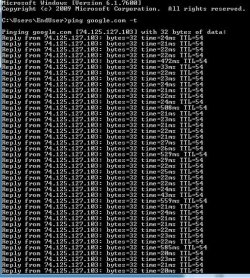
My internet connection is spiking every 7 seconds or so. It is frequent and never ending.
What I did try:
- Install latest driver for everything (Audio, Wireless adapter, graphic card, etc)
- I currently use linksys WUSB600N as my wireless adapter and did install the latest driver for Windows 7 64BIT straight from Linksys Support.
- I thought it was my DLink PCI Wireless Adapter that I was using before the USB Wireless adapter, but it kept on going with the USB wireless adapter too.
Speedtest Download speed: 20 Mbps
Upload speed: 0.5 Mbps
(Which are normal)
By opening cmd.exe and ping google.com it shows: (You can see the spikes)
Can anyone please help me figure out the problem??
Please and thank you.
I gave up on figuring how to fix this.
My system specs:
CPU: Intel Quad Core Q6600 2.4GHz
Motherboard: Gigabyte 965P DS3
Memory(RAM): Muskin Redlines 4GB
Graphics Card: Sapphire 4870HD Radeon 514MB with Custom Cooling
Sound Card: Realtek High Def Audio
Hard Drives: 2 x 320GB Western Digital
PSU: OCZ 750W
Case: NZXT Case 5
Cooling: Thermalright Ultra with Panaflo 3000rpm Fan
OS: Windows 7 Ultimate 64bit - updated (legit)
Wireless Adapter: Linksys WUSB600N
My internet connection is spiking every 7 seconds or so. It is frequent and never ending.
What I did try:
- Install latest driver for everything (Audio, Wireless adapter, graphic card, etc)
- I currently use linksys WUSB600N as my wireless adapter and did install the latest driver for Windows 7 64BIT straight from Linksys Support.
- I thought it was my DLink PCI Wireless Adapter that I was using before the USB Wireless adapter, but it kept on going with the USB wireless adapter too.
Speedtest Download speed: 20 Mbps
Upload speed: 0.5 Mbps
(Which are normal)
By opening cmd.exe and ping google.com it shows: (You can see the spikes)
Can anyone please help me figure out the problem??
Please and thank you.
I gave up on figuring how to fix this.
My system specs:
CPU: Intel Quad Core Q6600 2.4GHz
Motherboard: Gigabyte 965P DS3
Memory(RAM): Muskin Redlines 4GB
Graphics Card: Sapphire 4870HD Radeon 514MB with Custom Cooling
Sound Card: Realtek High Def Audio
Hard Drives: 2 x 320GB Western Digital
PSU: OCZ 750W
Case: NZXT Case 5
Cooling: Thermalright Ultra with Panaflo 3000rpm Fan
OS: Windows 7 Ultimate 64bit - updated (legit)
Wireless Adapter: Linksys WUSB600N
My Computer
- OS
- Windows 7
- CPU
- Intel Quad Core Q6600 2.4GHz
- Motherboard
- Gigabyte 965P DS3
- Memory
- Muskin Redlines 4GB
- Graphics Card(s)
- Sapphire 4870HD Radeon 514MB with Custom Cooling
- Sound Card
- Realtek High Def Audio
- Monitor(s) Displays
- Asus 23.6"
- Hard Drives
- 2 x 320GB Western Digital
- PSU
- OCZ 750W
- Case
- NZXT Case 5
- Cooling
- Thermalright Ultra with Panaflo 3000rpm Fan
- Keyboard
- DiNovo Edge Keyboard
- Mouse
- MX Revolution
- Internet Speed
- SHAW


