Solved Windows 7 Ultimate, equalizer settings issue.

Incomplete

New member
Local time
10:00 PM
Messages
11
Well, hello everyone,

lately, I've formatted my system, and re-installed Windows 7.
I tried to play with the equalizer settings manually, but there was no option to do so. I had Windows 7 Ultimate before formatting, and I was able to change the settings manually, but now it doesn't work. It just has some sound effects (e.g.: pop, rock, club etc..) and that's all I have.

Each reply and a try to help, is very much appreciated. :)
Once again thanks all.

Sincerely,
Incomplete.
 

My Computer

Computer type
PC/Desktop
OS
Windows 7 Ultimate, 32 bit

My Computer

Computer type
Laptop
Computer Manufacturer/Model Number
Dell
OS
Windows 7 Professional x64
CPU
Intel Core i5 2430M (2.4GHz)
Memory
4096Mb 1333Mhz DDR3 SDRAM
Graphics Card(s)
Intel Integrated HD
Monitor(s) Displays
17.3 Inch HD Anti Glare
Screen Resolution
1600 x 900
Hard Drives
320Gb 7200rpm serial ATA
Keyboard
Illuminated standard
Mouse
Microsoft 3500
Internet Speed
40Mb
Antivirus
Security Essentials
Browser
IE11 x64
Well, first of all thanks for your help.

The solution you have brought to the table, half-helped me. Because, in a way, it will increase the volume only when I listen to music using Windows Media Player. But, on the other hand, it will not increase the volume when I am for example watching a video on YouTube.

I have been surfing through some websites, and most of the people say that the equalizer icon in the: Control Panel > Sound > Manage Audio Devices > Speaker > Enhancements, doesn't show up.

So, I wanted to ask if there is a way to enable that option, maybe? Or just another method to play with the Windows' equalizer not the Media Player's.

Thank you for your help, Mooly.

Sincerely,
Incomplete.
 

My Computer

Computer type
PC/Desktop
OS
Windows 7 Ultimate, 32 bit
I'm pleased it helped a little :)

OK, you're mentioning a couple of things here, equaliser and volume. I think the equalizer settings carry over to other applications, in other words if you set the graphic eq to a specific response curve and then close media player, then those settings remain. Volume... maybe I'm misunderstanding you but if you have reinstalled Windows, have you reinstalled the appropriate drivers, not just basic audio drivers but any machine specific applications that allocate the correct keys for volume up/down etc.
 

My Computer

Computer type
Laptop
Computer Manufacturer/Model Number
Dell
OS
Windows 7 Professional x64
CPU
Intel Core i5 2430M (2.4GHz)
Memory
4096Mb 1333Mhz DDR3 SDRAM
Graphics Card(s)
Intel Integrated HD
Monitor(s) Displays
17.3 Inch HD Anti Glare
Screen Resolution
1600 x 900
Hard Drives
320Gb 7200rpm serial ATA
Keyboard
Illuminated standard
Mouse
Microsoft 3500
Internet Speed
40Mb
Antivirus
Security Essentials
Browser
IE11 x64
Alright, the equalizer settings from Media Player do actually carry over to other applications, or sound generally. But, I was smart enough not to realize it.

However, I still am interested in knowing why the system equalizer isn't showing anywhere. Because, many other people were talking about how they weren't able to manually change the equalizer settings.

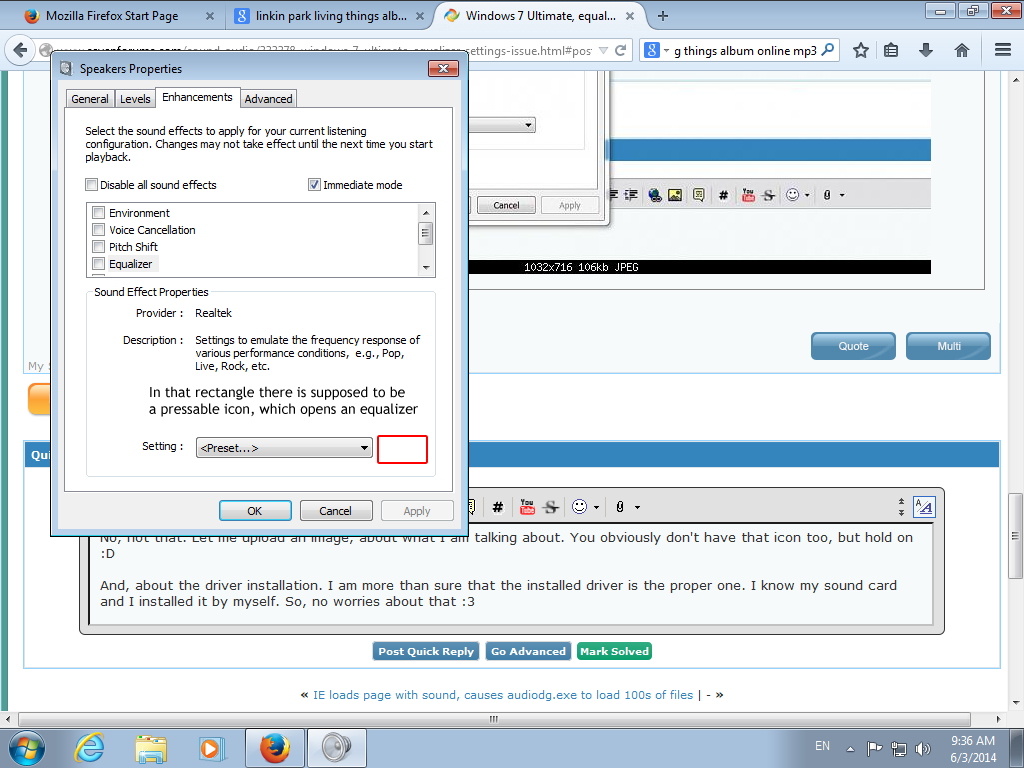
And with equalizer, I mean the one you get when: Click the speaker icon on the far right bottom corner > when the volume bar pops up, click the other speaker icon in the top of that bar > Speaker, then properties > enhancements > Equalizer > then the part where it doesn't show to me, the equalizer menu, where you get by clicking that icon on the right of the "Presets".

Thanks for half solving the issue buddy. :D
 

My Computer

Computer type
PC/Desktop
OS
Windows 7 Ultimate, 32 bit
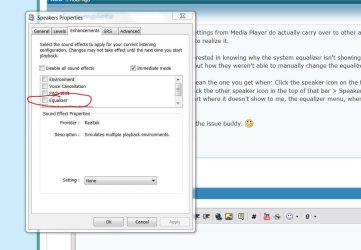
You mean this one (image). You are not seeing that ? Not sure what to suggest beyond making sure that you have the correct audio driver/application installed (with you saying this is a reinstall) and that you are not relying on the generic Windows driver that would be installed by default.
 

Attachments

  • Capture3.JPG
    Capture3.JPG
    106.1 KB · Views: 2

My Computer

Computer type
Laptop
Computer Manufacturer/Model Number
Dell
OS
Windows 7 Professional x64
CPU
Intel Core i5 2430M (2.4GHz)
Memory
4096Mb 1333Mhz DDR3 SDRAM
Graphics Card(s)
Intel Integrated HD
Monitor(s) Displays
17.3 Inch HD Anti Glare
Screen Resolution
1600 x 900
Hard Drives
320Gb 7200rpm serial ATA
Keyboard
Illuminated standard
Mouse
Microsoft 3500
Internet Speed
40Mb
Antivirus
Security Essentials
Browser
IE11 x64
No, not that. Let me upload an image, about what I am talking about. You obviously don't have that icon too, but hold on :D

a8W2Vd1.png


And, about the driver installation. I am more than sure that the installed driver is the proper one. I know my sound card and I installed it by myself. So, no worries about that :3

Also, here is a video on how some guy did it. www.youtube.com/watch?v=XTfEWxCnBno
 

My Computer

Computer type
PC/Desktop
OS
Windows 7 Ultimate, 32 bit
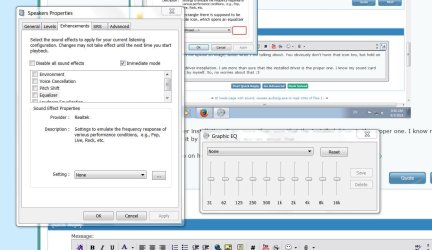
Do you mean this. If I tick the eq box in my image above I can select this.
 

Attachments

  • Capture4.JPG
    Capture4.JPG
    132.9 KB · Views: 1

My Computer

Computer type
Laptop
Computer Manufacturer/Model Number
Dell
OS
Windows 7 Professional x64
CPU
Intel Core i5 2430M (2.4GHz)
Memory
4096Mb 1333Mhz DDR3 SDRAM
Graphics Card(s)
Intel Integrated HD
Monitor(s) Displays
17.3 Inch HD Anti Glare
Screen Resolution
1600 x 900
Hard Drives
320Gb 7200rpm serial ATA
Keyboard
Illuminated standard
Mouse
Microsoft 3500
Internet Speed
40Mb
Antivirus
Security Essentials
Browser
IE11 x64
Yep, that. It won't open for me, whatever I do.
 

My Computer

Computer type
PC/Desktop
OS
Windows 7 Ultimate, 32 bit
I'm slightly at a loss then as to what the problem may be. When you click the speaker icon (lower right) and then hover your cursor over the top speaker symbol does it say "xxxxxx the name of your audio card and drivers" or just some generic name. Mine says "Realtek High Definition Audio" when I hover over the speaker symbol (after clicking the tray icon)
 

My Computer

Computer type
Laptop
Computer Manufacturer/Model Number
Dell
OS
Windows 7 Professional x64
CPU
Intel Core i5 2430M (2.4GHz)
Memory
4096Mb 1333Mhz DDR3 SDRAM
Graphics Card(s)
Intel Integrated HD
Monitor(s) Displays
17.3 Inch HD Anti Glare
Screen Resolution
1600 x 900
Hard Drives
320Gb 7200rpm serial ATA
Keyboard
Illuminated standard
Mouse
Microsoft 3500
Internet Speed
40Mb
Antivirus
Security Essentials
Browser
IE11 x64
Yep, it says the same as yours. "Speakers (Realtek High Definition Audio)"
 

My Computer

Computer type
PC/Desktop
OS
Windows 7 Ultimate, 32 bit
Another thought. I looked on mine and didn't see anything but as you are on ultimate you might...

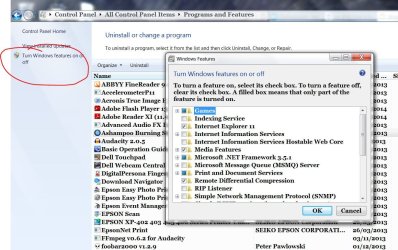
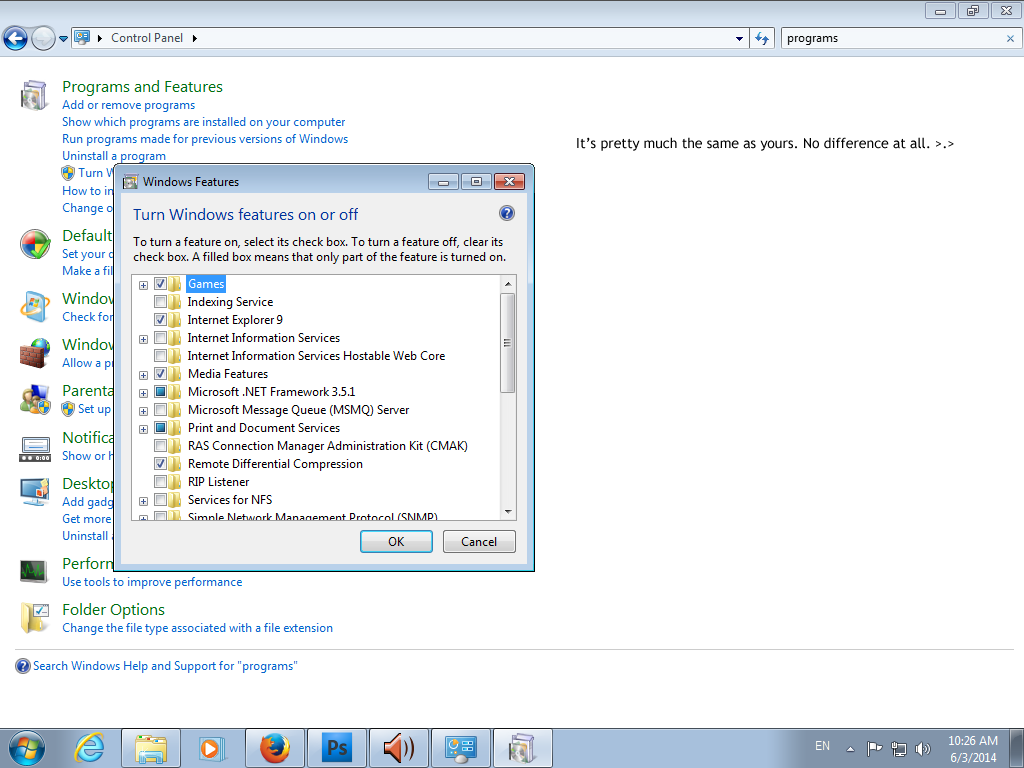
Goto control panel and "programs and features". Select "turn on windows features". Do you have anything audio related in your list which may be different to mine.
 

Attachments

  • Capture5.JPG
    Capture5.JPG
    203.2 KB · Views: 0

My Computer

Computer type
Laptop
Computer Manufacturer/Model Number
Dell
OS
Windows 7 Professional x64
CPU
Intel Core i5 2430M (2.4GHz)
Memory
4096Mb 1333Mhz DDR3 SDRAM
Graphics Card(s)
Intel Integrated HD
Monitor(s) Displays
17.3 Inch HD Anti Glare
Screen Resolution
1600 x 900
Hard Drives
320Gb 7200rpm serial ATA
Keyboard
Illuminated standard
Mouse
Microsoft 3500
Internet Speed
40Mb
Antivirus
Security Essentials
Browser
IE11 x64
b9OkvEX.png


As you can see, I have the same things ticked as yours.
 

My Computer

Computer type
PC/Desktop
OS
Windows 7 Ultimate, 32 bit

My Computer

Computer type
Laptop
Computer Manufacturer/Model Number
Dell
OS
Windows 7 Professional x64
CPU
Intel Core i5 2430M (2.4GHz)
Memory
4096Mb 1333Mhz DDR3 SDRAM
Graphics Card(s)
Intel Integrated HD
Monitor(s) Displays
17.3 Inch HD Anti Glare
Screen Resolution
1600 x 900
Hard Drives
320Gb 7200rpm serial ATA
Keyboard
Illuminated standard
Mouse
Microsoft 3500
Internet Speed
40Mb
Antivirus
Security Essentials
Browser
IE11 x64
Let me check if I have any softwares.
Thank you.
 

My Computer

Computer type
PC/Desktop
OS
Windows 7 Ultimate, 32 bit
OK, I'll look in later.
 

My Computer

Computer type
Laptop
Computer Manufacturer/Model Number
Dell
OS
Windows 7 Professional x64
CPU
Intel Core i5 2430M (2.4GHz)
Memory
4096Mb 1333Mhz DDR3 SDRAM
Graphics Card(s)
Intel Integrated HD
Monitor(s) Displays
17.3 Inch HD Anti Glare
Screen Resolution
1600 x 900
Hard Drives
320Gb 7200rpm serial ATA
Keyboard
Illuminated standard
Mouse
Microsoft 3500
Internet Speed
40Mb
Antivirus
Security Essentials
Browser
IE11 x64
I looked in every corner in my computer, and no equalizer softwares or such programs were found.

I think that it's just an issue that Windows 7 Ultimate latest update created. As I think they disabled manually changing the equalizer, but only made you able to choose one of the presets (Pop, Rock, etc..), which sucks if it's true, to be honest.

Anyways, thank you so much for your help. If you have any more of your brilliant ideas bring them up :D

I'll keep looking for a solution and I'll re-post here as soon as I find one.

Incomplete.
 

My Computer

Computer type
PC/Desktop
OS
Windows 7 Ultimate, 32 bit
I'm afraid I can't think of anything specific. If you open the sound mixer (speaker icon bottom right) have you got Realtek set as the default device to use for playback. This is one of those things you need in front of you really.

One thing I would always do in a case like this, and that is to make a disk image of your system... I use Acronis but W7 has disk imaging inbuilt,
Back up your programs, system settings, and files - Windows Help

Once you have that you can try anything without worry... such as uninstalling Realtek drivers, even reinstalling W7 again (no need to even go online with it or update it) and see if it works then . If it does then add just the Realtek drivers and test again. And so on. Then you can hopefully come back to your disk image and apply a fix.
 

My Computer

Computer type
Laptop
Computer Manufacturer/Model Number
Dell
OS
Windows 7 Professional x64
CPU
Intel Core i5 2430M (2.4GHz)
Memory
4096Mb 1333Mhz DDR3 SDRAM
Graphics Card(s)
Intel Integrated HD
Monitor(s) Displays
17.3 Inch HD Anti Glare
Screen Resolution
1600 x 900
Hard Drives
320Gb 7200rpm serial ATA
Keyboard
Illuminated standard
Mouse
Microsoft 3500
Internet Speed
40Mb
Antivirus
Security Essentials
Browser
IE11 x64
I have tried that before, it's a great method but my system is just stupid :D

Anyways, that you so much for your help, I'll just turn the speaker to louder sounds, but it will be a problem only on my headphones.

If you get to another solution, please tell me :)

Thank you very much again.

Incomplete
 

My Computer

Computer type
PC/Desktop
OS
Windows 7 Ultimate, 32 bit
OK, if I come up with anything else then I'll post here but its really one of those things where you need the pc in front of you to get a feel for what is happening.

Good luck.
 

My Computer

Computer type
Laptop
Computer Manufacturer/Model Number
Dell
OS
Windows 7 Professional x64
CPU
Intel Core i5 2430M (2.4GHz)
Memory
4096Mb 1333Mhz DDR3 SDRAM
Graphics Card(s)
Intel Integrated HD
Monitor(s) Displays
17.3 Inch HD Anti Glare
Screen Resolution
1600 x 900
Hard Drives
320Gb 7200rpm serial ATA
Keyboard
Illuminated standard
Mouse
Microsoft 3500
Internet Speed
40Mb
Antivirus
Security Essentials
Browser
IE11 x64
Back
Top