Solved Windows 7 Ultimate SP1 Problems

Cool Sir

Banned
Local time
4:32 AM
Messages
42
Location
India,Punjab
Hey windows 7 staff members.
First of all Hi...
Now come to my Problem.
Two problems came after i installed SP1.i'll post screenshot if u need.
Now i'm on mobile.

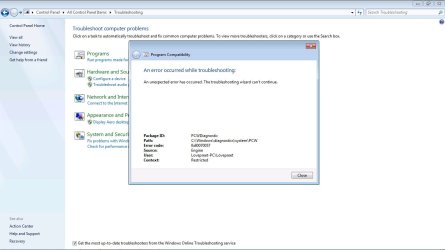
1. None of my troubleshooting wizard working e.g Run programs made for previous version of windows,network diagnosis,run manintance tasks etc etc
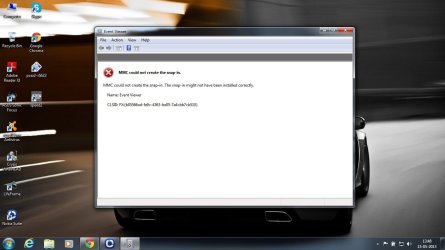
2. Event viewer giving error when open it.MMC could not create snap in.

I installed standalone installer of windows 7 SP1.not from windows update.

Plz help me to solve these problems.i don't want to uninstall SP1.Thanks In Advance :)
 

My Computer

Computer type
Laptop
Computer Manufacturer/Model Number
Asus K54L
OS
Windows 7 Ultimate x86 SP1
CPU
Intel(R) Pentium(R) B950 CPU @ 2.10 Ghz
Motherboard
ASUSTek Computer Inc.
Memory
2GB DDR3
Graphics Card(s)
Intel HD Graphics 3000
Sound Card
Realtek High Definiton Audio
Screen Resolution
1366x768 (60Hz)
Hard Drives
320GB SATA
Antivirus
Avast Free Antivirus 7.0.1474
Browser
Google Chrome
Hey windows 7 staff members.
First of all Hi...
Now come to my Problem.
Two problems came after i installed SP1.i'll post screenshot if u need.
Now i'm on mobile.

1. None of my troubleshooting wizard working e.g Run programs made for previous version of windows,network diagnosis,run manintance tasks etc etc
2. Event viewer giving error when open it.MMC could not create snap in.

I installed standalone installer of windows 7 SP1.not from windows update.

Plz help me to solve these problems.i don't want to uninstall SP1.Thanks In Advance :)
Hi Surviver! First off, we do not work for Microsoft. Second, can you either post a screenshot or describe your problems? That way, we can try to help you with these problems.
 

My Computer

Computer type
PC/Desktop
Computer Manufacturer/Model Number
HP Pavilion P7-1010
OS
Windows 7 Professional x64 Service Pack 1
CPU
AMD Athlon X4 645
Motherboard
Foxxcon N-Alvorix RS880
Memory
6GB DDR3 1066
Graphics Card(s)
Sapphire Radeon HD 5670 512MB GDDR5
Sound Card
Realtek Integrated Audio
Monitor(s) Displays
HP 2011x
Screen Resolution
1600x900
Hard Drives
1. Crucial M4 128GB SSD
2. 1TB Seagate Barracuda 7200.12 RPM
3. 1TB Western Digital Caviar Green 5400RPM
PSU
Seasonic S12 II Bronze 380 Watt
Case
HP OEM
Cooling
Coolermaster Heatsink, AVC Case Fan
Keyboard
HP OEM- Made by Chicony
Mouse
HP OEM- Made by Logitech
Internet Speed
20MBit Down/4 Up
Antivirus
Microsoft Security Essentials
Browser
Internet Explorer 10
Hey windows 7 staff members.
First of all Hi...
Now come to my Problem.
Two problems came after i installed SP1.i'll post screenshot if u need.
Now i'm on mobile.

1. None of my troubleshooting wizard working e.g Run programs made for previous version of windows,network diagnosis,run manintance tasks etc etc
2. Event viewer giving error when open it.MMC could not create snap in.

I installed standalone installer of windows 7 SP1.not from windows update.

Plz help me to solve these problems.i don't want to uninstall SP1.Thanks In Advance :)
Hi Surviver! First off, we do not work for Microsoft. Second, can you either post a screenshot or describe your problems? That way, we can try to help you with these problems.

ok no problem.as i already said i'm on mobile.
I described my problems.
I joined this forum because it's really good.
Ok First problem is none of my troubleshooting wizard working.
It says troubleshooting wizard canot continue.error 0x8005007 (something like it don't remember)
second problem Event viewer not working. it gives error mmc could not create snap in.
 

My Computer

Computer type
Laptop
Computer Manufacturer/Model Number
Asus K54L
OS
Windows 7 Ultimate x86 SP1
CPU
Intel(R) Pentium(R) B950 CPU @ 2.10 Ghz
Motherboard
ASUSTek Computer Inc.
Memory
2GB DDR3
Graphics Card(s)
Intel HD Graphics 3000
Sound Card
Realtek High Definiton Audio
Screen Resolution
1366x768 (60Hz)
Hard Drives
320GB SATA
Antivirus
Avast Free Antivirus 7.0.1474
Browser
Google Chrome
What are you trying to troubleshoot ?

Windows update is the only place you should have gotten Service Pack 1 from.

Have you tried a system restore yet ?
 

My Computer

Computer type
PC/Desktop
Computer Manufacturer/Model Number
Skylake Special #666
OS
Windows 10 Pro x64
CPU
Intel Core i7 6700K
Motherboard
Asus Sabertooth Z170 Mark 1
Memory
GSkill TridentZ RGB 16GB 3600 16-16-16-36
Graphics Card(s)
EVGA GTX 980 Ti SC x2
Sound Card
Realtek High Definition
Monitor(s) Displays
AOC G2460PG
Screen Resolution
1920 x 1080 144Hz
Hard Drives
Samsung 860 Pro 256GB, Seagate Barracuda 4TB x2
PSU
EVGA 1000 P2, EVGA White Custom Braided Cables
Case
Corsair Vengeance C70 Gunmetal Black
Cooling
Corsair H100i v2, Corsair ML120 x2, Thermal Grizzly Kryonaut
Keyboard
Logitech G910 Orion Spectrum
Mouse
Logitech G700s
Internet Speed
Verizon Fios Quantum Gateway 75/75
Antivirus
Windows Defender, Malwarebytes Free 3.8.3
Browser
Chrome
Other Info
Corsair SP120 x4, LG Blu-ray Drive, Durabrand HT-395 100 Watt Dolby Digital Amp, Corsair H2100 Wireless 7.1 Headset
No i don't want to restore system.
I want to keep service pack 1.
I already run sfc scannow.
Problem not sloved.
And i don't have any recent restore points when i installed service pack 1.
Any other suggestions for solve these problems in service pack 1.

No i didn't get it from windows update.i downloaded it's standalone offline installer.

Greg that's a huge work.i don't want to do all that.
can anyone help me to solve it without reinsalling windows ?

now i'm going to post screenshot of event viewer & troubleshooting wizard.Thanks for further help !
 

Attachments

  • Event viewer Error.jpg
    Event viewer Error.jpg
    69.4 KB · Views: 14
  • Troubleshooting wizard error.jpg
    Troubleshooting wizard error.jpg
    68.6 KB · Views: 11
Last edited:

My Computer

Computer type
Laptop
Computer Manufacturer/Model Number
Asus K54L
OS
Windows 7 Ultimate x86 SP1
CPU
Intel(R) Pentium(R) B950 CPU @ 2.10 Ghz
Motherboard
ASUSTek Computer Inc.
Memory
2GB DDR3
Graphics Card(s)
Intel HD Graphics 3000
Sound Card
Realtek High Definiton Audio
Screen Resolution
1366x768 (60Hz)
Hard Drives
320GB SATA
Antivirus
Avast Free Antivirus 7.0.1474
Browser
Google Chrome
It will take less time to do the Clean Reinstall than you've spent in this thread.

Everything needed to get a perfect install is in the blue link tutorials.

Preinstalled Win7 is a corrupt install to begin with which no tech enthusiast will run. You owe it to yourself to get Win7 native performance and have the very best install, not what you have now which is the worst possible install that is bloated, buggy and unfixable.
 
The problem is my internet connection.it's very slow.
i'm using my mobile as a modem.so forget to download that huge 2.38 GB file.
btw all other things working fine except these two.
if anyone have quick solution,plz tell me Thanks !
 

My Computer

Computer type
Laptop
Computer Manufacturer/Model Number
Asus K54L
OS
Windows 7 Ultimate x86 SP1
CPU
Intel(R) Pentium(R) B950 CPU @ 2.10 Ghz
Motherboard
ASUSTek Computer Inc.
Memory
2GB DDR3
Graphics Card(s)
Intel HD Graphics 3000
Sound Card
Realtek High Definiton Audio
Screen Resolution
1366x768 (60Hz)
Hard Drives
320GB SATA
Antivirus
Avast Free Antivirus 7.0.1474
Browser
Google Chrome
If you're going to reject all our advice then why did you come here?

Brian suggested to System Restore which would be easiest. He also told you that you should have gotten SP1 from Windows Updates, along with any other Important and Optional Updates offered until they are all exhausted.

So if you want the worst possible install of WIn7 - which is what the factory preinstall always is - and cannot run a Repair Install to try to sort out the mess you have, then I would System Restore as far back as you can and run Updates until they are complete.
 
Sorry i have no restore point before service pack 1.
And i already said i not installed it from windows update.
I installed it through offline installer which i downloaded from microsoft official site.anyway if nobody have solution for this.
Then fine,i'll re-install service pack.
Can u tell me how to uninstall it ?
It's not in program & features list !
 

My Computer

Computer type
Laptop
Computer Manufacturer/Model Number
Asus K54L
OS
Windows 7 Ultimate x86 SP1
CPU
Intel(R) Pentium(R) B950 CPU @ 2.10 Ghz
Motherboard
ASUSTek Computer Inc.
Memory
2GB DDR3
Graphics Card(s)
Intel HD Graphics 3000
Sound Card
Realtek High Definiton Audio
Screen Resolution
1366x768 (60Hz)
Hard Drives
320GB SATA
Antivirus
Avast Free Antivirus 7.0.1474
Browser
Google Chrome
Hi Survivor

Before moving on, could you please follow the steps below to verify MMC Snap-in settings.

1. Click Start, in the Start Search box type "mmc" and press Enter.
2. Click "File->Add/Remove Snap-ins".
3. In the box of "Selected Snap-ins", please click on and remove all entries except "Console root".

Please click OK to quit.

If any error message is encountered, please let us know details.

Thanks.
 

My Computer

Computer type
PC/Desktop
Computer Manufacturer/Model Number
Custom Built
OS
Windows 7 Ultimate x64
CPU
Intel Core i7-920
Motherboard
Gigabyte GA-EX58-UD3R
Memory
8GB Kingston DDR3 1333MHz (4 x 2GB)
Graphics Card(s)
Gigabyte GV-N26OC-896H-B
Sound Card
N/A - On Board via SPDIF
Monitor(s) Displays
BenQ 24" E2420HD
Screen Resolution
1920 x 1080p Full HD
Hard Drives
Western Digital
1 x TB Sata
1 x 320GB Sata
PSU
Zalman 1000 Watt
Case
Antec Twelve Hundred
Cooling
1 x 200mm fan, 6 x 120mm fans, CPU & GPU fan
Keyboard
Cordless Logitech MX 5500 Revolution
Mouse
Bluetooth Logitech MX 5500 Laser
Antivirus
Avast Antivirus-Malwarebytes Anti-Malware-Comodo Firewall
Browser
Internet Explorer 10
Hi Survivor

Try uninstalling all .NET installations or:

MMC error in IIS

If you get the following error while opening IIS,

MMC could not create the Snap-In

Then execute the steps given below to fix this issue.

1. Register the .dll files "mmcndmgr.dll" and "inetmgr.dll"

Commands:


i) Start | Run | cd %SystemRoot%\system32

Here, 'SystemRoot' refers 'C:\Windows'.


ii) regsvr32 mmcndmgr.dll

iii) regsvr32 inetmgr.dll


Tips: 'regsrv32' is a command line tool to register the .dll in the registry.

2. Uninstall and Re-install IIS


To uninstall, Start | Control Panel | Add/Remove Windows Components | Check 'Application Server', click 'Details' | Uncheck 'Internet Information Services' | Click 'OK'

To install, Start | Control Panel | Add/Remove Windows Components | Check 'Application Server', click 'Details' | check 'Internet Information Services' | Click 'OK'

Now you can access IIS without any error.

Let us know how you get on.
Cheers, Neil.
 

My Computer

Computer type
PC/Desktop
Computer Manufacturer/Model Number
Custom Built
OS
Windows 7 Ultimate x64
CPU
Intel Core i7-920
Motherboard
Gigabyte GA-EX58-UD3R
Memory
8GB Kingston DDR3 1333MHz (4 x 2GB)
Graphics Card(s)
Gigabyte GV-N26OC-896H-B
Sound Card
N/A - On Board via SPDIF
Monitor(s) Displays
BenQ 24" E2420HD
Screen Resolution
1920 x 1080p Full HD
Hard Drives
Western Digital
1 x TB Sata
1 x 320GB Sata
PSU
Zalman 1000 Watt
Case
Antec Twelve Hundred
Cooling
1 x 200mm fan, 6 x 120mm fans, CPU & GPU fan
Keyboard
Cordless Logitech MX 5500 Revolution
Mouse
Bluetooth Logitech MX 5500 Laser
Antivirus
Avast Antivirus-Malwarebytes Anti-Malware-Comodo Firewall
Browser
Internet Explorer 10
Hi Survivor

Before moving on, could you please follow the steps below to verify MMC Snap-in settings.

1. Click Start, in the Start Search box type "mmc" and press Enter.
2. Click "File->Add/Remove Snap-ins".
3. In the box of "Selected Snap-ins", please click on and remove all entries except "Console root".

Please click OK to quit.

If any error message is encountered, please let us know details.

Thanks.

ok i did this.actually there was no snap ins except console root.so that means i didn't create any snap ins before.
 

My Computer

Computer type
Laptop
Computer Manufacturer/Model Number
Asus K54L
OS
Windows 7 Ultimate x86 SP1
CPU
Intel(R) Pentium(R) B950 CPU @ 2.10 Ghz
Motherboard
ASUSTek Computer Inc.
Memory
2GB DDR3
Graphics Card(s)
Intel HD Graphics 3000
Sound Card
Realtek High Definiton Audio
Screen Resolution
1366x768 (60Hz)
Hard Drives
320GB SATA
Antivirus
Avast Free Antivirus 7.0.1474
Browser
Google Chrome
Hi Survivor

Try uninstalling all .NET installations or:

MMC error in IIS

If you get the following error while opening IIS,

MMC could not create the Snap-In

Then execute the steps given below to fix this issue.

1. Register the .dll files "mmcndmgr.dll" and "inetmgr.dll"

Commands:


i) Start | Run | cd %SystemRoot%\system32

Here, 'SystemRoot' refers 'C:\Windows'.


ii) regsvr32 mmcndmgr.dll

iii) regsvr32 inetmgr.dll


Tips: 'regsrv32' is a command line tool to register the .dll in the registry.

2. Uninstall and Re-install IIS


To uninstall, Start | Control Panel | Add/Remove Windows Components | Check 'Application Server', click 'Details' | Uncheck 'Internet Information Services' | Click 'OK'

To install, Start | Control Panel | Add/Remove Windows Components | Check 'Application Server', click 'Details' | check 'Internet Information Services' | Click 'OK'

Now you can access IIS without any error.

Let us know how you get on.
Cheers, Neil.

Hi Mr Smiley,could you please more detailed in this.because i can't understand it.
ok i tried uninstalling all .net installations,not worked.
what is cd would i have to put my windows 7 cd in computer ? & what is system root ?
how to resgister mmcndmgr.dll & inetmgr.dll ?
what is IIS & how to install or re install it ?
there was no add/remove windows components option in control panel.Plz help Thanks in advance :)
 

My Computer

Computer type
Laptop
Computer Manufacturer/Model Number
Asus K54L
OS
Windows 7 Ultimate x86 SP1
CPU
Intel(R) Pentium(R) B950 CPU @ 2.10 Ghz
Motherboard
ASUSTek Computer Inc.
Memory
2GB DDR3
Graphics Card(s)
Intel HD Graphics 3000
Sound Card
Realtek High Definiton Audio
Screen Resolution
1366x768 (60Hz)
Hard Drives
320GB SATA
Antivirus
Avast Free Antivirus 7.0.1474
Browser
Google Chrome
Ok now all problems solved.
It was .net framework giving problems.
Uninstalled .net framework 4.5 & did updates from windows update of .net 3.5 security updates for service pack 1.
Now everything working fine.
Thanks for u'r help mr smiley.
1 question can i install .net 4.5 now.i have downloaded it before.this is offline installer of .net 4.5.
I really need this.because an apllication need this.
So can i install it over pre-installed .net 3.5 ?
1 more thing i really need all qusestion answers listed in my above post,Thanks :)
 

My Computer

Computer type
Laptop
Computer Manufacturer/Model Number
Asus K54L
OS
Windows 7 Ultimate x86 SP1
CPU
Intel(R) Pentium(R) B950 CPU @ 2.10 Ghz
Motherboard
ASUSTek Computer Inc.
Memory
2GB DDR3
Graphics Card(s)
Intel HD Graphics 3000
Sound Card
Realtek High Definiton Audio
Screen Resolution
1366x768 (60Hz)
Hard Drives
320GB SATA
Antivirus
Avast Free Antivirus 7.0.1474
Browser
Google Chrome
Ok now all problems solved.
It was .net framework giving problems.
Uninstalled .net framework 4.5 & did updates from windows update of .net 3.5 security updates for service pack 1.
Now everything working fine.
Thanks for u'r help mr smiley.
1 question can i install .net 4.5 now.i have downloaded it before.this is offline installer of .net 4.5.
I really need this.because an apllication need this.
So can i install it over pre-installed .net 3.5 ?
1 more thing i really need all qusestion answers listed in my above post,Thanks :)

Hi Survivor

Yes as I understand it there should be no issue with regard to installing Microsoft.Net Framework NGEN v4.5 (X86/X64) with the offline installer.

Are you happy for us to mark this thread as 'Problem Solved' now Survivor ? Please advise.

Kind Regards

Neil.
 

My Computer

Computer type
PC/Desktop
Computer Manufacturer/Model Number
Custom Built
OS
Windows 7 Ultimate x64
CPU
Intel Core i7-920
Motherboard
Gigabyte GA-EX58-UD3R
Memory
8GB Kingston DDR3 1333MHz (4 x 2GB)
Graphics Card(s)
Gigabyte GV-N26OC-896H-B
Sound Card
N/A - On Board via SPDIF
Monitor(s) Displays
BenQ 24" E2420HD
Screen Resolution
1920 x 1080p Full HD
Hard Drives
Western Digital
1 x TB Sata
1 x 320GB Sata
PSU
Zalman 1000 Watt
Case
Antec Twelve Hundred
Cooling
1 x 200mm fan, 6 x 120mm fans, CPU & GPU fan
Keyboard
Cordless Logitech MX 5500 Revolution
Mouse
Bluetooth Logitech MX 5500 Laser
Antivirus
Avast Antivirus-Malwarebytes Anti-Malware-Comodo Firewall
Browser
Internet Explorer 10
Ok now all problems solved.
It was .net framework giving problems.
Uninstalled .net framework 4.5 & did updates from windows update of .net 3.5 security updates for service pack 1.
Now everything working fine.
Thanks for u'r help mr smiley.
1 question can i install .net 4.5 now.i have downloaded it before.this is offline installer of .net 4.5.
I really need this.because an apllication need this.
So can i install it over pre-installed .net 3.5 ?
1 more thing i really need all qusestion answers listed in my above post,Thanks :)

Hi Survivor

Yes as I understand it there should be no issue with regard to installing Microsoft.Net Framework NGEN v4.5 (X86/X64) with the offline installer.

Are you happy for us to mark this thread as 'Problem Solved' now Survivor ? Please advise.

Kind Regards

Neil.

Hi mr smiley,yeah u can mark this thread as solved.
but u'll be very kind if u can answer these questions.
that u suggested me before in u'r post.

what is cd would i have to put my windows 7 cd in computer ? & what is system root ?
how to resgister mmcndmgr.dll & inetmgr.dll ?
what is IIS & how to install or re install it ?
there was no add/remove windows components option in control panel.where i can find it ?

Thanks :)
 

My Computer

Computer type
Laptop
Computer Manufacturer/Model Number
Asus K54L
OS
Windows 7 Ultimate x86 SP1
CPU
Intel(R) Pentium(R) B950 CPU @ 2.10 Ghz
Motherboard
ASUSTek Computer Inc.
Memory
2GB DDR3
Graphics Card(s)
Intel HD Graphics 3000
Sound Card
Realtek High Definiton Audio
Screen Resolution
1366x768 (60Hz)
Hard Drives
320GB SATA
Antivirus
Avast Free Antivirus 7.0.1474
Browser
Google Chrome
Ok now all problems solved.
It was .net framework giving problems.
Uninstalled .net framework 4.5 & did updates from windows update of .net 3.5 security updates for service pack 1.
Now everything working fine.
Thanks for u'r help mr smiley.
1 question can i install .net 4.5 now.i have downloaded it before.this is offline installer of .net 4.5.
I really need this.because an apllication need this.
So can i install it over pre-installed .net 3.5 ?
1 more thing i really need all qusestion answers listed in my above post,Thanks :)

Hi Survivor

Yes as I understand it there should be no issue with regard to installing Microsoft.Net Framework NGEN v4.5 (X86/X64) with the offline installer.

Are you happy for us to mark this thread as 'Problem Solved' now Survivor ? Please advise.

Kind Regards

Neil.

Hi mr smiley,yeah u can mark this thread as solved.
but u'll be very kind if u can answer these questions.
that u suggested me before in u'r post.

what is cd would i have to put my windows 7 cd in computer ? & what is system root ?
how to resgister mmcndmgr.dll & inetmgr.dll ?
what is IIS & how to install or re install it ?
there was no add/remove windows components option in control panel.where i can find it ?

Thanks :)

No need to worry about System Root or how to register those .dll files Survivor and IIS is irrelevant. That was information I obtained by doing a search for you. What is relevant is that uninstalling .NET updates was the issue and has fixed your problem. You know what they say ... 'If it ain't broke, don't fix it ! lol.

You can put your Windows 7 installation cd in any of the cd/dvd drives associated with your computer.

Glad we could help you.

Neil.
 

My Computer

Computer type
PC/Desktop
Computer Manufacturer/Model Number
Custom Built
OS
Windows 7 Ultimate x64
CPU
Intel Core i7-920
Motherboard
Gigabyte GA-EX58-UD3R
Memory
8GB Kingston DDR3 1333MHz (4 x 2GB)
Graphics Card(s)
Gigabyte GV-N26OC-896H-B
Sound Card
N/A - On Board via SPDIF
Monitor(s) Displays
BenQ 24" E2420HD
Screen Resolution
1920 x 1080p Full HD
Hard Drives
Western Digital
1 x TB Sata
1 x 320GB Sata
PSU
Zalman 1000 Watt
Case
Antec Twelve Hundred
Cooling
1 x 200mm fan, 6 x 120mm fans, CPU & GPU fan
Keyboard
Cordless Logitech MX 5500 Revolution
Mouse
Bluetooth Logitech MX 5500 Laser
Antivirus
Avast Antivirus-Malwarebytes Anti-Malware-Comodo Firewall
Browser
Internet Explorer 10
Ok 1 more question,forgive me for doing too much questions :p
ok..i think i mistakely wrote surviver instead of survivor.
How to change my username ?
There is no option for change it.

Thanks For All u'r help :)
 

My Computer

Computer type
Laptop
Computer Manufacturer/Model Number
Asus K54L
OS
Windows 7 Ultimate x86 SP1
CPU
Intel(R) Pentium(R) B950 CPU @ 2.10 Ghz
Motherboard
ASUSTek Computer Inc.
Memory
2GB DDR3
Graphics Card(s)
Intel HD Graphics 3000
Sound Card
Realtek High Definiton Audio
Screen Resolution
1366x768 (60Hz)
Hard Drives
320GB SATA
Antivirus
Avast Free Antivirus 7.0.1474
Browser
Google Chrome

My Computer

Computer type
Laptop
Computer Manufacturer/Model Number
Sager NP9170
OS
Win 7 Pro x64 / Win 10 Pro
CPU
Intel(R) Core(TM) i7-3630QM CPU @ 2.40GHz
Motherboard
CLEVO P170EM
Memory
12 GB
Graphics Card(s)
(1) Intel(R) HD Graphics 4000 (2) NVIDIA GeForce GTX 675M
Sound Card
(1) Realtek High Definition Audio (2) Intel(R) Display Aud
Monitor(s) Displays
17.3
Screen Resolution
1920x1080
Hard Drives
(1) Samsung 860 EVO 500GB(OS) (1) Samsung 860 EVO 500GB(Data)
Keyboard
Backlite
Antivirus
MSE, Malwarebytes Pro
Browser
Firefox
Other Info
DESKTOP: Custom-built.
OS: Win 10 Pro x64.
CASE: Rosewill R5.
CPU: Intel I5 4670K CPU @ 3.40GHz.
CPU COOLER: Cool Master Hyper 212 EVO.
MOTHERBOARD: Asus Z87-A.
MEMORY: Kingston HyperX 2x4 GB.
GPU: Nvidia Geforce 650 TI.
PSU: Corsair TX750.
DRIVES: (1) Samsung 840 120 GB SSD (2) Western Digital blue 500 GB 7200 RPM.
Back
Top