Windows 7 Ultimate x64 Language Problem.

wind74

New member
Local time
3:49 PM
Messages
3
Hello everyone, I recently installed Windows 7 Ultimate x64 on a new ssd and since then I'm facing a problem with the keyboard languages.Ι currently have two languages isntalled, Greek (EL) and English (EN) but instead of only switching between them whenever I press Shift+Alt it keeps changing on Greek when I open a programm and back to English when I click on the desktop,the same thing happens when I minimize the programm running (it changes back to English) and when I click on the taskbar.Could anybody help me solve this problem? It's getting really annoying.
 

My Computer

Computer type
PC/Desktop
OS
Windows 7 Ultimate x64
CPU
Intel I3
Motherboard
Asus Z97-P
Browser
Google Chrome
Hello and welcome to Seven Forums, wind74

What happens if you use :orb: key + space , instead of Shift+Alt, to change language?
 

My Computer

Computer type
PC/Desktop
OS
Windows 7 x64, Vista x64, 8.1 smartphone
CPU
Intel E8400 65W 64-bit
Motherboard
Gigabyte EP45-UD3LR
Memory
DDR2 2 x 2GB, 1GB x 2
Graphics Card(s)
XFX Radeon HD5750
Sound Card
AMD High Definition Audio; Realtek High Definition Audio
Monitor(s) Displays
iiyama prolite X2377HDS
Screen Resolution
1920 x 1080
Hard Drives
500GB 7200 rpm Seagate ST3500413AS 16MB, 500GB 5400 rpm Toshiba MQ02ABF050H 32MB, 200GB 7200 rpm Seagate ST3200820AS 8MB, 2TB 7200 rpm Western Digital WD20EZRX 64MB
PSU
Enermax Liberty Modular
Case
Antec P193 Midi Tower
Keyboard
Mionix ZIBAL 60
Mouse
Razer USB 2.0 Diamondback Mouse or Huion Graphics Tablet
Browser
Internet Explorer, Lunascape, Firefox, Opera, Avast Safezone
Hello and welcome to Seven Forums, wind74

What happens if you use :orb: key + space , instead of Shift+Alt, to change language?
If i'm into a programm it shows me the desktop and if i'm already in the desktop it does nothing.
 

My Computer

Computer type
PC/Desktop
OS
Windows 7 Ultimate x64
CPU
Intel I3
Motherboard
Asus Z97-P
Browser
Google Chrome
Hi

Id go into the region/language >> keyboard tab input section and swap them around. default you require should be at the top of the list.

Roy
 

My Computer

Computer type
PC/Desktop
Computer Manufacturer/Model Number
medionl/Aspire 6930G/acer x55a
OS
W7 home premium 32bit/W7HP 64bit/w10 tp insider ring
CPU
E5300 dual core
Motherboard
medion MS7366
Memory
3gb
Graphics Card(s)
Nvidia Geforce 7100 Nforce 630i
Monitor(s) Displays
avixc
Internet Speed
n (isp resticted to 72)
Antivirus
mse/pands
Browser
palemoon
Other Info
Belkin Fd7050 n USB using Railink RT2870 drivers, more upto date
Hi

Id go into the region/language >> keyboard tab input section and swap them around. default you require should be at the top of the list.

Roy
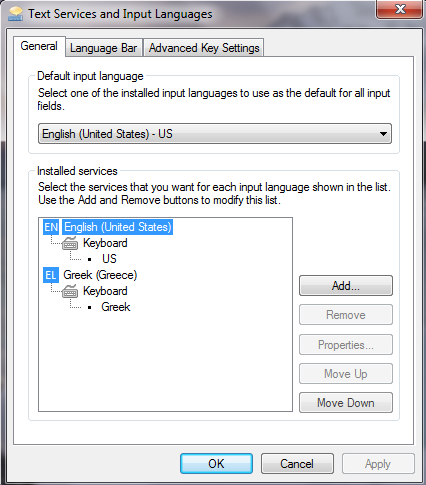
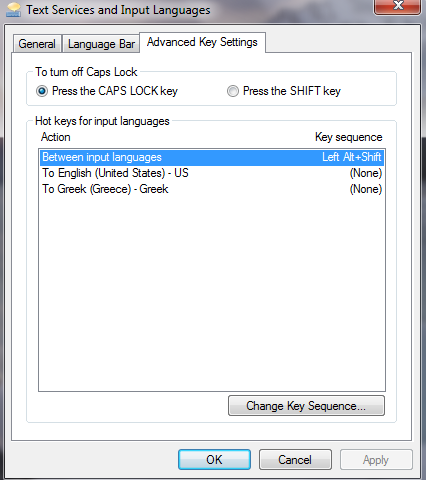
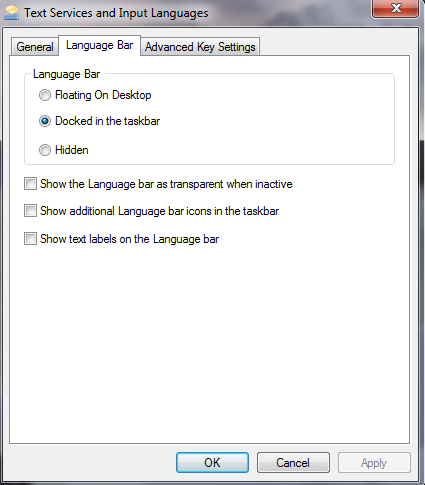
I've previously tried changing the settings on the Region/Language tab but had no luck.Below I'm posting some screenshots of my current settings so you can inspect them and tell me if you see anything wrong.

Screenshot-3.png


Screenshot-2.png


Screenshot-1.png
 

My Computer

Computer type
PC/Desktop
OS
Windows 7 Ultimate x64
CPU
Intel I3
Motherboard
Asus Z97-P
Browser
Google Chrome
Hi

Your default is EN-US, is this the language you set the system up with?

so whenever you goto a new window it will be english, if you want it to be Greek, click on Greek keyboard, (screenshot 3) and then the move-up option.

Roy
 

My Computer

Computer type
PC/Desktop
Computer Manufacturer/Model Number
medionl/Aspire 6930G/acer x55a
OS
W7 home premium 32bit/W7HP 64bit/w10 tp insider ring
CPU
E5300 dual core
Motherboard
medion MS7366
Memory
3gb
Graphics Card(s)
Nvidia Geforce 7100 Nforce 630i
Monitor(s) Displays
avixc
Internet Speed
n (isp resticted to 72)
Antivirus
mse/pands
Browser
palemoon
Other Info
Belkin Fd7050 n USB using Railink RT2870 drivers, more upto date
Back
Top