Windows 7 unable install

joe2005

New member
Local time
1:09 AM
Messages
8
I have dual boot with XP and Windows 7.Of late windows 7 started to have random freezes and display changing often so decided to reinstall.After inserting the DVD after Copying of files expanding of files it restarts again set up starts and is becoming a loop.Iam unable to find a cause.The allocated partition have 60 gb capacity.Request guidance.thanks
 

My Computer

OS
windows 7 rc
By your system specs as far as the OS "windows 7 rc" would be the Release Candidate? which has expired in all forms. If that is a type and you have the Home Premium or other retail edition you may want to run a hard drive diagnostics just to insure the drive hasn't started seeing bad sectors appear.

Inspecting the 7 dvd itself from handling as well as the optical drive is also something to add to the list in the event a lens cleaner is needed or if the optical drive itself is having problem. A usb installation key then would become the option for seeing 7 installed fresh when booting from the flash drive install key. I've had a few optical drives belly up over the last few years between ddiferent builds and now mainly run with a usb key.

To see how a USB Install Key is made off review the guide seen at http://www.sevenforums.com/tutorials/2432-usb-windows-7-installation-key-drive-create.html
 

My Computers

System One System Two

  • Computer type
    PC/Desktop
    Computer Manufacturer/Model Number
    Custom builds = 2
    OS
    W7 Ultimate x64/W10 Pro x64/W11 Pro Triple Boot - Main PC W7 Remote PC Micro ATX W7 Pro x64/W11 Pro
    CPU
    AMD Phenom II X4 975 Deneb 3.6ghz - 965 2nd remote pc
    Motherboard
    Gigabyte GA-790XTA-UD4-Gigabyte GA-880GM-D2H remote pc
    Memory
    Kingston Hyper X DDR3 1600 1.5v 16gb - Hyper X Fury 8gb 2nd
    Graphics Card(s)
    MSI HD Radeon 5750 1gb - MSI HD Radeon 6450 on mini tower
    Sound Card
    Creative Labs X-Fi Xtreme Audio P - Realtek onooard 2nd case
    Monitor(s) Displays
    ASUS VW199T-P 19" HP 2082a Main-HP 2082a 20" remote pc
    Screen Resolution
    Asus 1440x900 - HP 1600x900
    Hard Drives
    WD Black 1TB HD per OS W7, W10, and pending W11 presently on 500gb OS Drive - Pending Triple 1TB HDs for Spanned Storage/backup volume
    Single 2TB external USB enclosure, single 1TB System 7 Host/Boot drive, Pending 8TB external HD for system image b
    PSU
    Corsair 750TX - primary / Corsair CX600 - second
    Case
    Antec 900-2 - SSD compatible / NZXT Vulcan mini tower
    Cooling
    Zalman CNPS9900A
    Keyboard
    AZIO L70 Backlit Letters Gaming - ONN Cordless/USB
    Mouse
    MSI DS200 Programmable, Logitech Cordless
    Internet Speed
    30mbps upgrade - primary hard wired - mini tower usb WiFi
    Antivirus
    GFI VIPRE Internet Security 2014 on W7 2016 beta on W10,
    Browser
    Cyberfox, WaterFox 64bit FF variants, FireFox x64, Pale Moon
    Other Info
    Accomdata fan cooled usb 2.0 PIDE/Sata II, III external enclosure.
    Sambient usb/eSata PATA/Sata II, III external enclosure.
  • Computer type
    PC/Desktop
    System Manufacturer/Model Number
    CUSTOM ASSEMBLY
    OS
    W7 Pro x64/W11 Pro
    CPU
    AMD Deneb 3.6ghz - 965
    Motherboard
    Gigabyte GA-880GM-D2H remote pc
    Memory
    Kingston Hyper X Fury 8gb
    Graphics Card(s)
    MSI HD Radeon 6450 DVI Output
    Sound Card
    Realtek onooard Creative or Other separate PENDING
    Monitor(s) Displays
    VIZIO 32" LCD TV Separate LCD Pending
    Screen Resolution
    1600x1080
    Hard Drives
    WD 500GB OS Host/Boot WD Green 1TB Storage/Backup
    PSU
    Corsair 600W - THERMALTAKE 600W spare case
    Case
    NZXT Vulcan mini tower
    Cooling
    Twin 120mm Top Fans - 240mm Side Cover
    Keyboard
    ONN Cordless/USB Logitech Cordless
    Mouse
    ONN USB/Cordless - Logitech Cordless
    Internet Speed
    DSL 5G
    Browser
    MS Edge, FireFox, WaterFox x64, FireFox Nightly
    Other Info
    OS Testing-Remote Access to Main TeamViewer
After coming to you i was trying and able to re -install windows 7.In the bargain I am not able boot into XP eventhough i get the option such as earlier version of windows and windows 7.I think i messedup the boot record of XP and XP was installed first.Can you please help in this mess ? thanks
 

My Computer

OS
windows 7 rc
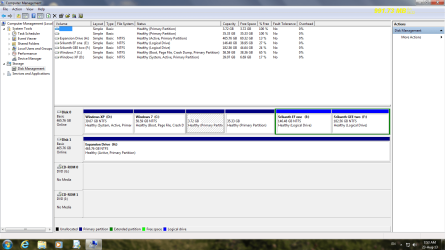
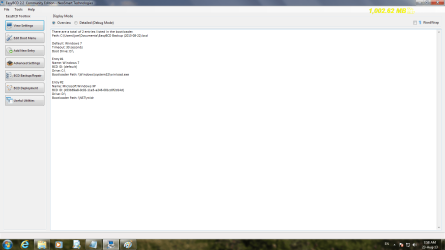
I have posted the details as desired.please give me a clue to overcome this.
 

Attachments

  • Disk_mgmt.png
    Disk_mgmt.png
    62 KB · Views: 4
  • bcd.png
    bcd.png
    52.7 KB · Views: 2

My Computer

OS
windows 7 rc
We know by the System Active flags on D that Win7 is still booting off the XP partition even though XP won't start.

Since Win7 will start then as I already suggested you can try installing EasyBCD to delete the XP boot entry: EasyBCD (click Download - no Name or Email required)
Deleting Menu Entries - EasyBCD - NeoSmart Technologies Wiki

Then add it back:


If this fails, Mark Win7 Partition Active, then reboot into Win7 installer or System Repair Disk to run Startup Repair - Run up to 3 Separate Times until Win7 starts and now holds the System Active flags on it's partition signifying it's booting the System.

Then if XP has not been included in a Dual Boot menu you should be able to add it from Win7 using EasyBCD.

Let us know how this goes.
 
You may find it a bit easier following the steps outlined in the guide for setting up a http://www.sevenforums.com/tutorials/8057-dual-boot-installation-windows-7-xp.html

The guide explains how to correct the booting problems whether XP is installed first or last. When 7 the newer version goes on last the boot entry for XP is automatically added in as the Previous version option you see at startup. If you are booting across two drives then the XP boot files and boot.in file are copied over to the boot drive if the second drive not default is used.

The EasyBCD tool is also referred to there. 7 however is no longer booting from the first but second primary as indicated by the screenshot of the DM showing the C volume marked as boot. This is why XP is not loading up when selected and why you will want to review the guide for setting up a dual boot between the two versions due to the differences in boot loaders.

 

My Computers

System One System Two

  • Computer type
    PC/Desktop
    Computer Manufacturer/Model Number
    Custom builds = 2
    OS
    W7 Ultimate x64/W10 Pro x64/W11 Pro Triple Boot - Main PC W7 Remote PC Micro ATX W7 Pro x64/W11 Pro
    CPU
    AMD Phenom II X4 975 Deneb 3.6ghz - 965 2nd remote pc
    Motherboard
    Gigabyte GA-790XTA-UD4-Gigabyte GA-880GM-D2H remote pc
    Memory
    Kingston Hyper X DDR3 1600 1.5v 16gb - Hyper X Fury 8gb 2nd
    Graphics Card(s)
    MSI HD Radeon 5750 1gb - MSI HD Radeon 6450 on mini tower
    Sound Card
    Creative Labs X-Fi Xtreme Audio P - Realtek onooard 2nd case
    Monitor(s) Displays
    ASUS VW199T-P 19" HP 2082a Main-HP 2082a 20" remote pc
    Screen Resolution
    Asus 1440x900 - HP 1600x900
    Hard Drives
    WD Black 1TB HD per OS W7, W10, and pending W11 presently on 500gb OS Drive - Pending Triple 1TB HDs for Spanned Storage/backup volume
    Single 2TB external USB enclosure, single 1TB System 7 Host/Boot drive, Pending 8TB external HD for system image b
    PSU
    Corsair 750TX - primary / Corsair CX600 - second
    Case
    Antec 900-2 - SSD compatible / NZXT Vulcan mini tower
    Cooling
    Zalman CNPS9900A
    Keyboard
    AZIO L70 Backlit Letters Gaming - ONN Cordless/USB
    Mouse
    MSI DS200 Programmable, Logitech Cordless
    Internet Speed
    30mbps upgrade - primary hard wired - mini tower usb WiFi
    Antivirus
    GFI VIPRE Internet Security 2014 on W7 2016 beta on W10,
    Browser
    Cyberfox, WaterFox 64bit FF variants, FireFox x64, Pale Moon
    Other Info
    Accomdata fan cooled usb 2.0 PIDE/Sata II, III external enclosure.
    Sambient usb/eSata PATA/Sata II, III external enclosure.
  • Computer type
    PC/Desktop
    System Manufacturer/Model Number
    CUSTOM ASSEMBLY
    OS
    W7 Pro x64/W11 Pro
    CPU
    AMD Deneb 3.6ghz - 965
    Motherboard
    Gigabyte GA-880GM-D2H remote pc
    Memory
    Kingston Hyper X Fury 8gb
    Graphics Card(s)
    MSI HD Radeon 6450 DVI Output
    Sound Card
    Realtek onooard Creative or Other separate PENDING
    Monitor(s) Displays
    VIZIO 32" LCD TV Separate LCD Pending
    Screen Resolution
    1600x1080
    Hard Drives
    WD 500GB OS Host/Boot WD Green 1TB Storage/Backup
    PSU
    Corsair 600W - THERMALTAKE 600W spare case
    Case
    NZXT Vulcan mini tower
    Cooling
    Twin 120mm Top Fans - 240mm Side Cover
    Keyboard
    ONN Cordless/USB Logitech Cordless
    Mouse
    ONN USB/Cordless - Logitech Cordless
    Internet Speed
    DSL 5G
    Browser
    MS Edge, FireFox, WaterFox x64, FireFox Nightly
    Other Info
    OS Testing-Remote Access to Main TeamViewer
You may find it a bit easier following the steps outlined in the guide for setting up a http://www.sevenforums.com/tutorials/8057-dual-boot-installation-windows-7-xp.html

The guide explains how to correct the booting problems whether XP is installed first or last. When 7 the newer version goes on last the boot entry for XP is automatically added in as the Previous version option you see at startup. If you are booting across two drives then the XP boot files and boot.in file are copied over to the boot drive if the second drive not default is used.

The EasyBCD tool is also referred to there. 7 however is no longer booting from the first but second primary as indicated by the screenshot of the DM showing the C volume marked as boot. This is why XP is not loading up when selected and why you will want to review the guide for setting up a dual boot between the two versions due to the differences in boot loaders.

Incorrect. Please do not state misinformation as fact.

Win7 is booting from XP partition as signified by the System Active flags, as I just wrote above.

The "Boot" flag only refers to the partition which is booted at the present time, Windows 7.

While it is true Win7 is supposed to create a working Dual Boot menu during it's install, the point of the thread is that it didn't. I showed two ways to try to remedy this. These are not dealt with in Dual Boot Installation with Windows 7 and XP because when Win7 is installed last it is assumed it will correctly configure the Dual Boot.
 
Yes As told created a repair disc booted into Windows 7 now I am able to get both systems.However after selecting XP option two more appears on the screen viz.1 Microsoft Window XP and 2. Windows (default). Able to boot into XP only choosing the second option.Hope requires some finer tuning.Ihave attached details of both bcds.please advise
 

Attachments

My Computer

OS
windows 7 rc
Again back to square one.In order to take msconfig print tried to boot into XP unable to do so.I find the win 7 bcd default windows 7 on D.is it ok attached the same.I think I am becoming a bit of nuisance bear with me and get me out of this jam.The two options earlier seen for XP is not there now and only windows xp an WIN 7
 

Attachments

Last edited:

My Computer

OS
windows 7 rc
Go back to Post #7 and follow the steps I typed out for you. Report back the results for those steps and only those steps.

We work from steps here. You have been given what normally works best. I have now typed them out twice.
 
I am glad to report that I am able to boot into XP also using the RECREATE/REPAIR boot files option available in easyBCD. Thanks for the help and advise


My Computer

OS
windows 7 rc
Back
Top