Windows 7 unbareably slow after hard shutdown

Captain Jeff

New member
Local time
4:10 AM
Messages
9
Hello,
I am having trouble with my sony laptop VPCF115FM
i bought it brand new about 6 months ago.
Its been working great all along

i heard some knocking noises comming from it about an hour ago and everything slowed wayyyyyyy down,i thought it froze, ctrl alt del didnt work or maybe i didnt give it long enough to pop up so i hard shutdown.

When i rebooted i thought it was "stuck" on the welcome screen just after I input a password to login, i went down to find my restore discs and when i came back the desktop was up. it turns out it's running incredibly slow. i did notice that when i shutdown there was a system update waiting to be installed but it didnt take long at all... i thought that was odd,

i have a program on sidebar that monitors my cpu and memory.
memory useage is at 30% and cpu useage seems to be below 3% on all 8 cores
with the occasional jump to 10% on one of them every once in a while.

i opened device manage and there are no yellow exclimations

Tried to run system restore but it came back as failed "couldnt write shadow file" or something like that.

opened Resource monitor and cpu useage was around 2% but maximum frequency was about 65% whatever that means
memory is at 24% used physical memory (1503mb) in use
Disk tab is 0 k/b a sec DISK I/O but 100% highest active time constant, no fluxuation

When i try to run video
"The application is not responding, the program may respond again if you wait, click end process to terminate program"
if i wait 5-10 seconds it will load,

I opened MSCONFIG and selected diagnostic startup and restarted computer and after 10 minutes of looking at the shutting down screen it finally rebooted.

30 seconds into the welcome screen i heard a series of clicks maybe 15 or 20 of them about half a second apart.
5minutes later the desktop appeared and actually things seemed to move alot more smoothly. so i tried system restore again.
"system restore does not appear to be functioning correctly on this system"
A volume shadow copy service component encountered an unexpected error check the application event log for more information
0x80042302

however firefox opened right away and im getting immediate response from my mouse clicks and folder openings and so on... much faster...

so i decide to restart and right away it shuts down this time but when i log in it makes me wait 5 minutes again on the welcome screen.

its 2am and im becomming rapidly discouraged maybe when i wake up i will try the recovery disks :'-( please help!
 

My Computer My Computer

At a glance

windows 7 home 64bit
Computer Manufacturer/Model Number
Sony VPCF115FM
OS
windows 7 home 64bit
Hi Capt. Jeff,

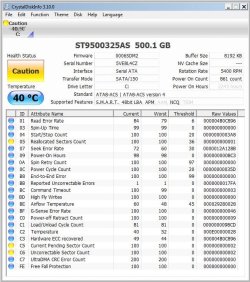
It could be a few things, but the "clicking sounds" you are hearing are symptomatic of a hard disk problem. Lets start with that assumption for now, and lets check that using a program that can determine if your hard disk has any defects.

Please follow these steps:

1. Download and install CrystalDiskInfo
2. Once installed, run the program on the disk giving the issues
3. Once it it is finished, it will summarise the health status of the disk
4. Please take a screen capture of that, and post it here so we can look at it

Based on what we see, we can offer you further guidance to fix the problem.

Regards,
Golden
 

My Computer My Computer

At a glance

Windows 10 Pro x64 ; Xubuntu x64Intel i7 860 @ 2.80 GHz O/C'ed to 4.0GHz16GB Corsair Vengance DDR3 @ 661 MHz Dual Cha...EVGA NVidia GTX 560 1024MB
Computer type
PC/Desktop
Computer Manufacturer/Model Number
Golden Mk. I.4
OS
Windows 10 Pro x64 ; Xubuntu x64
CPU
Intel i7 860 @ 2.80 GHz O/C'ed to 4.0GHz
Motherboard
Gigabyte P55A-UD3R Rev.1. Award BIOS F13
Memory
16GB Corsair Vengance DDR3 @ 661 MHz Dual Channel (9-9-9-24)
Graphics Card(s)
EVGA NVidia GTX 560 1024MB
Sound Card
Realtek Integrated
Monitor(s) Displays
Dual Samsung SyncMaster 2494HS
Screen Resolution
1920*1080 and 1920*1080
Hard Drives
1*Samsung 840 EVO 120GB SSD;
1*OCZ Vertex 2 60GB SSD;
2*Samsung F3 SpinPoint 1TB in RAID0;
1*Samsung F1 SpinPoint 1TB;
2*Western Digital 1TB External USB 3.0
1*Western Digital 500GB External USB 3.0
1*Seagate 500GB External USB 2.0
PSU
Thermaltake ToughPower QFan 750W
Case
Thermaltake Element S VK60001W2Z
Cooling
Corsair H60 Water Cooling, 2*230mm and 2*80mm case fans
Keyboard
Logitech G110
Mouse
Logitech MX518
Thankyou for your reply Golden!

I downloaded the program onto a thumbdrive from another computer and when i tried to read the thumbdrive to install the program on the affected computer the drive wouldnt open, something like D:\ not available, i tried a few thumbdrives and all the same thing, i ended up using my phone on the same usb port to transfer the file.
 

Attachments

  • crystaldisksnapshot.JPG
    crystaldisksnapshot.JPG
    100.8 KB · Views: 146
Last edited:

My Computer My Computer

At a glance

windows 7 home 64bit
Computer Manufacturer/Model Number
Sony VPCF115FM
OS
windows 7 home 64bit
crap i already started chkdsk before i got your reply, it's a 500gb HD and im currently "stuck" on 46%
i created a boot disk with seatools on it, will it be as effective if i run it after the chkdsk?
 

My Computer My Computer

At a glance

windows 7 home 64bit
Computer Manufacturer/Model Number
Sony VPCF115FM
OS
windows 7 home 64bit

My Computer My Computer

At a glance

Windows 7 X86 SP1 V.741Amd Athlon Xp mobile 2500@3200+ (socket 462)1 Gb DDR ( GSKILL F1-3200PHU2-2GBZX )Asus AH3650 SILENT/HTDI/512M ( agp )
Computer Manufacturer/Model Number
Test Computer
OS
Windows 7 X86 SP1 V.741
CPU
Amd Athlon Xp mobile 2500@3200+ (socket 462)
Motherboard
Asrock K7S8XE+
Memory
1 Gb DDR ( GSKILL F1-3200PHU2-2GBZX )
Graphics Card(s)
Asus AH3650 SILENT/HTDI/512M ( agp )
Sound Card
Onboard
Monitor(s) Displays
Benq FP91GP 19"
Hard Drives
OCZ VerteX 2 - 60GB ( SSD )
PSU
Chieftec GPS-450AA
Case
Chieftec GIGA
crap i already started chkdsk before i got your reply, it's a 500gb HD and im currently "stuck" on 46%
i created a boot disk with seatools on it, will it be as effective if i run it after the chkdsk?

Just let chkdsk finish, then run Seatools. If chkdsk can't finsih, force a restart with the Seatools CD in your optical drive. Make sure your bios is set to boot from the CD first (or use the boot menu).


James
 

My Computer My Computer

At a glance

Win7U 64 RTMQ95508GB GskillASUS|EAH4850/HTDI/1GD3/A
OS
Win7U 64 RTM
CPU
Q9550
Motherboard
GA-EP45-UD3R
Memory
8GB Gskill
Graphics Card(s)
ASUS|EAH4850/HTDI/1GD3/A
Sound Card
xfi Plat
Monitor(s) Displays
Dell 2405fpw
Screen Resolution
1920x1200
Hard Drives
Seagate & WD sata Drives
PSU
Antec
Case
Antec
Keyboard
MS Natural Ergonomic 4000
Mouse
Logitech MX610 USB Cordless
Yes, they need to be run together (in either order) as one repairs the file system, the other the disk surface. So carry on.

I have repaired many HD's which returned to full life of service afterward.
 
so far chkdsk replaced bad clusters in 2 files (usrclass.dat)and(mov02622.mpg)
and now its on stage 5 of 5 (verifying free space)
still 46% (29878578 of 76335155 free clusters processed)
about every 5 minutes the number changes by 1000
at this rate my computer should be done sometime next week!!! is that right?

A couple of concerns,
after chkdsk finishes it will restart the computer automatically. Do i need to be here when that happens so i can tell it to boot from CD?

Based on the snapshot i provided does it indicate that the hard drive is the culprit?

My computes is still covered under warrany 1 yr for parts - i bought it about 6 months ago from bestbuy.

also i do have the 2 recovery dvds if it comes to that,

sorry about the long post just want to provide all the facts.
 

My Computer My Computer

At a glance

windows 7 home 64bit
Computer Manufacturer/Model Number
Sony VPCF115FM
OS
windows 7 home 64bit
chkdsk does take a long time, especially on a 500Gb HDD. I would definitely be concerned about the bad sectors, which should not happen with a HDD on a 6 month old laptop.

Back up your files as soon as possible and return your laptop for a HDD replacement
 

My Computer My Computer

At a glance

Windows 7 Professional 64 bitxeon x5680 x296 GBnVidia quadro FX 5800 x2
Computer Manufacturer/Model Number
HP z800
OS
Windows 7 Professional 64 bit
CPU
xeon x5680 x2
Motherboard
hp
Memory
96 GB
Graphics Card(s)
nVidia quadro FX 5800 x2
Monitor(s) Displays
HP zr30w x4
Hard Drives
4 HP SAS 600GB HDDs RAID 0
PSU
1100w
Case
ATX
Cooling
factory installed liquid cooling
After Disk Check, check performance for awhile to see if things have improved before running Seatools Extended CD scan.

After that, check performance again before deciding whether to call tech support to RMA the HD. Tell them about the diagnostics. They may suggest other tests or want you to do a Full Factory REcovery which is the solution about 90% of the time from Tech Support. Keep on them until you get it fixed or replaced if the HD continues to present problems.

Are those Recovery DVD's you made from the Recovery utility? Be aware that running the partition itself is more stable than the disks if your HD wiill run it.
 
54%done! :)
 

My Computer My Computer

At a glance

windows 7 home 64bit
Computer Manufacturer/Model Number
Sony VPCF115FM
OS
windows 7 home 64bit
Hi,

You seem to be getting somewhere then. Hows it behaving now?

Regards,
Golden
 

My Computer My Computer

At a glance

Windows 10 Pro x64 ; Xubuntu x64Intel i7 860 @ 2.80 GHz O/C'ed to 4.0GHz16GB Corsair Vengance DDR3 @ 661 MHz Dual Cha...EVGA NVidia GTX 560 1024MB
Computer type
PC/Desktop
Computer Manufacturer/Model Number
Golden Mk. I.4
OS
Windows 10 Pro x64 ; Xubuntu x64
CPU
Intel i7 860 @ 2.80 GHz O/C'ed to 4.0GHz
Motherboard
Gigabyte P55A-UD3R Rev.1. Award BIOS F13
Memory
16GB Corsair Vengance DDR3 @ 661 MHz Dual Channel (9-9-9-24)
Graphics Card(s)
EVGA NVidia GTX 560 1024MB
Sound Card
Realtek Integrated
Monitor(s) Displays
Dual Samsung SyncMaster 2494HS
Screen Resolution
1920*1080 and 1920*1080
Hard Drives
1*Samsung 840 EVO 120GB SSD;
1*OCZ Vertex 2 60GB SSD;
2*Samsung F3 SpinPoint 1TB in RAID0;
1*Samsung F1 SpinPoint 1TB;
2*Western Digital 1TB External USB 3.0
1*Western Digital 500GB External USB 3.0
1*Seagate 500GB External USB 2.0
PSU
Thermaltake ToughPower QFan 750W
Case
Thermaltake Element S VK60001W2Z
Cooling
Corsair H60 Water Cooling, 2*230mm and 2*80mm case fans
Keyboard
Logitech G110
Mouse
Logitech MX518
Okay so the chkdsk finally finished and now im running Seatools for DOS,
 

My Computer My Computer

At a glance

windows 7 home 64bit
Computer Manufacturer/Model Number
Sony VPCF115FM
OS
windows 7 home 64bit
Unfortunately i cant afford to wait 2 weeks for sony to replace a $60 part.

I Just got back from Bestbuy, i bought a seagate Momentus XT 500GB 7200rpm hybrid drive HD+SSD4GB (is this any good)and i also bought a blackwidow dual hard drive docking station, my thought is that i can install the new hard drive into the laptop, run the recovery DVD on it then access the old HD thru the eSATA docking station to copy my files . Im very enthusiastic but i really have never done anything like this before, im going to attempt to install the new HD in 15 minutes. i'd appreciate any words of caution or tips.
 

My Computer My Computer

At a glance

windows 7 home 64bit
Computer Manufacturer/Model Number
Sony VPCF115FM
OS
windows 7 home 64bit

My Computer My Computer

At a glance

Win7U 64 RTMQ95508GB GskillASUS|EAH4850/HTDI/1GD3/A
OS
Win7U 64 RTM
CPU
Q9550
Motherboard
GA-EP45-UD3R
Memory
8GB Gskill
Graphics Card(s)
ASUS|EAH4850/HTDI/1GD3/A
Sound Card
xfi Plat
Monitor(s) Displays
Dell 2405fpw
Screen Resolution
1920x1200
Hard Drives
Seagate & WD sata Drives
PSU
Antec
Case
Antec
Keyboard
MS Natural Ergonomic 4000
Mouse
Logitech MX610 USB Cordless
Okay the hard disk seems to be repaired for the moment, i managed to copy all of my personal files to my 2TB eSATA external HDD. the first time i got the clicking noise back after copying about half the files then i got the blue screen of death.

i rebooted and everything was fast again and i was able to copy the rest of my files to the HDD and about 3 minutes after completion i got the clicking HDD again and the blue screen, seems like this HDD is on its last leg and i cant tell you guys how much i appreciate you guiding me out of this burning building before it completely collapsed. i have all my files and im ready to attempt to install the new drive and run system recovery dvd's

should i instead attempt to use this blackwidow dual hard drive docking station to duplicate the drive??

also did i make a mistake by buying a hybrid drive?Momentus XT | 7200 RPM | Seagate
 

My Computer My Computer

At a glance

windows 7 home 64bit
Computer Manufacturer/Model Number
Sony VPCF115FM
OS
windows 7 home 64bit
I've never used hybrid drives before, so I can't offer a knowlegable comparison. I dont think you will have any issues to be honest - from what I can see of it, it seems like a good, fast relaible drive.

Regards,
Golden
 

My Computer My Computer

At a glance

Windows 10 Pro x64 ; Xubuntu x64Intel i7 860 @ 2.80 GHz O/C'ed to 4.0GHz16GB Corsair Vengance DDR3 @ 661 MHz Dual Cha...EVGA NVidia GTX 560 1024MB
Computer type
PC/Desktop
Computer Manufacturer/Model Number
Golden Mk. I.4
OS
Windows 10 Pro x64 ; Xubuntu x64
CPU
Intel i7 860 @ 2.80 GHz O/C'ed to 4.0GHz
Motherboard
Gigabyte P55A-UD3R Rev.1. Award BIOS F13
Memory
16GB Corsair Vengance DDR3 @ 661 MHz Dual Channel (9-9-9-24)
Graphics Card(s)
EVGA NVidia GTX 560 1024MB
Sound Card
Realtek Integrated
Monitor(s) Displays
Dual Samsung SyncMaster 2494HS
Screen Resolution
1920*1080 and 1920*1080
Hard Drives
1*Samsung 840 EVO 120GB SSD;
1*OCZ Vertex 2 60GB SSD;
2*Samsung F3 SpinPoint 1TB in RAID0;
1*Samsung F1 SpinPoint 1TB;
2*Western Digital 1TB External USB 3.0
1*Western Digital 500GB External USB 3.0
1*Seagate 500GB External USB 2.0
PSU
Thermaltake ToughPower QFan 750W
Case
Thermaltake Element S VK60001W2Z
Cooling
Corsair H60 Water Cooling, 2*230mm and 2*80mm case fans
Keyboard
Logitech G110
Mouse
Logitech MX518
Im 76% done with my system restore, replacing the hard drive was incredibly easy, thank all you guys for your help, im excited to see how much faster this new hard drive is,

you guys helped me take a problem and turn it into an upgrade. thankyou.
 

My Computer My Computer

At a glance

windows 7 home 64bit
Computer Manufacturer/Model Number
Sony VPCF115FM
OS
windows 7 home 64bit
Back
Top