Windows 7 Universal Installation Disc - Create

How to Create a Windows 7 Universal Installation Disc

Introduction

For Windows users who installed or upgraded Windows Vista, there is one big difference that will be immediately noticed when installing or upgrading to Windows 7: The Windows 7 installation wizard no longer prompts, or asks, for the user to select which edition of the operating system to install. Instead, each Windows 7 DVD disc will automatically install the specific edition which it’s limited to. So a Windows 7 Home Premium disc will only install Windows 7 HP, a Pro disc will only install Pro, etc.

Although Microsoft does not provide any such universal Windows 7 installation media, the function is indeed feasible. (see Screenshot below) A disc such as this can be especially helpful to PC technicians, IT staff, and the like who need to reinstall Win7 frequently. Remember you will still need a valid license key specific to the version you are installing. In addition, Microsoft has eliminated the differences between the retail and OEM install discs with Windows 7, so this disc can be used to reinstall Win7 on PC’s where the owner has lost, or is unable to find, the OEM restore discs. In order to create such a disc; just delete and remove the ei.cfg from any Windows 7 ISO to convert that image into a universal disc for all editions of Windows 7.
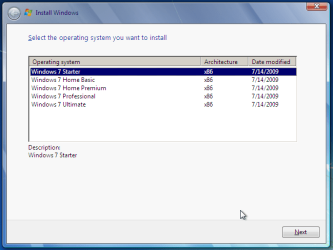
Win7 Universal Install Disc SS.PNG


STAGE 1 UNIVERSAL DVD - ALL 32 OR 64 BIT ON 1 DVD

For any user who has the Windows 7 install DVD or ISO and wishes to make a universal installer disc now there is an easier way to modify the ISO. Normally this was accomplished by manually unpacking and extracting the contents of the ISO image (or copying files from DVD to HDD), deleting the ei.cfg and then repacking the installation files back into an ISO to burn. Users can now eliminate these tedious procedures by making use of the “ei.cfg Removal Utility”.

The ei.cfg Removal Utility is a simple tool that will disable the ei.cfg from any Windows 7 ISO disc image, thereby converting the image into a “universal disc” that will prompt the user to select their preferred edition during setup. The ei.cfg Removal Utility works directly to patch the ISO image, by toggling the deletion bit in the UDF file table to instruct the operating system to ignore and remove ei.cfg, or treat it as if it does not exist. Best of all, the ei.cfg Removal Utility can reverse the patching to restore the ISO disc image to its original state when the tool is been used to apply on a disc image that previously been patched by the utility.

The ei.cfg Removal Utility is a standalone portable app, and requires no installation. In fact, the program does not have much of a user interface at all. Simply selecting the target Windows 7 ISO, and the disc image (ISO) will be patched right away. So make sure a backup copy of your ISO is created beforehand.

Download the ei.cfg Removal Utility here:eicfg_removal_utility.zip


STAGE 2 UNIVERSAL DVD - ALL 32 AND ALL 64 BIT ON 1 DVD

I was amazed at how easy it is to merge Win7 x86 and Win7 x64 editions (DVDs) in a single DVD or 4GB USB. The process is pretty simple, you need a copy of both any 32 bit and any 64 bit Windows 7 install DVD or ISO. Either copy the DVD's contents to a folder on a HDD, or extract the ISO's contents to a folder. Run 4 commands from the prompt, then create and burn your new Universal install DVD/USB.


Requirements:

  1. WAIK (Windows Automation Installation Kit) Download WAIK
  2. Windows Win7 x86 and Windows Win7 x64 DVDs.
  3. An application that can extract the files from an ISO (if using a downloaded ISO). I use WinRAR, but many apps can do this extraction.
  4. An application that allows you to build a new iso or create a bootable DVD/USB. I use UltraISO for this.
  5. Single Layer DVD, compatible DVD Burner and, of course DVD burning software… or a 4GB USB flash drive.
We will merge the four Windows 7 x64 editions into the Win7 x86 DVD contents, because Win7 x64 DVD has 64-bit content that can’t run some of the Win32 installation components.


Getting Started


1. Install WAIK in your Windows (doesn’t matter you are running Win7 or Windows XP)

2. Make two folders, in my examples I use Win7_64 and Win7_32. Now copy both Windows 7 x64 and x86 DVDs contents into their respective folders. Or extract your downloaded ISO’s into their respective folder.

   Note
If copying files over from a DVD to the above folders, you actually only need the Sources\install.wim file from the Windows 7 x64 DVD.


3. Run WAIK command prompt (Run as Administrator if UAC enabled):
Start à All Programs àWindows AIK àWindows AIK and PE Command Prompt

4. Each and every Win7 edition has an index no. in the install.wim (WIM file), you can check using the following command:
Code:
Imagex/info G:\Win7_32\Sources\install.wim
   Note
Where G:\Win7_32 represents the location of your 32 bit DVD files
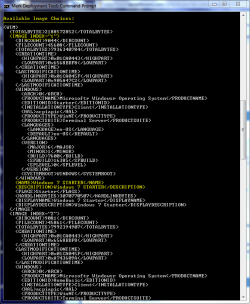

Win7 Universal Install Disc cmd 1.PNG

The results will look something like above.
This shows that INDEX=1 denotes Windows 7 Starter and so on… (you may have to scroll down to observe these entries)

5. We will use the Imagex /export command to move our x64 WIM entries into the x86 wim file.
   Note
The syntax for this command is:
   Note

imagex /export src_file src_number src_name dest_file dest_name


Now execute the following commands with appropriate INDEX no. to export a copy of the specified image to the Windows 7 32bit (x86) WIM file.

For Win7 Home Basic x64:
Code:
Imagex/export G:\Win7_64\Sources\install.wim 1 G:\Win7_32\Sources\install.wim "Windows 7 Home Basic (x64)"
For Win7 Home Premium x64:
Code:
Imagex/export G:\Win7_64\Sources\install.wim 2 G:\Win7_32\Sources\install.wim "Windows 7 Home Premium (x64)"
For Win7 Professional x64:
Code:
Imagex/export G:\Win7_64\Sources\install.wim 3 G:\Win7_32\Sources\install.wim "Windows 7 Professional (x64)"
For Win7 Ultimate x64:
Code:
Imagex /export G:\Win7_64\Sources\install.wim 4 G:\Win7_32\Sources\install.wim "Windows 7 Ultimate (x64)"
6. After execution of above commands Win7_32's WIM file will be the universal WIM file that contains all version of Win7. You can export only desired versions into the image. For example you could make a Win7 DVD, which includes Win7 Ultimate x86 and x64 version only.

7. Now to make bootable DVD image...


Last edited by a moderator:
That worked too and a very easy step, thank you again and collaborators for the great help.
 

My Computer

Computer type
Laptop
Computer Manufacturer/Model Number
Acer Aspire 5810T8929
OS
Windows 10 Home 64b
CPU
Intel Core Solo 1.4Ghz 800Mhz FSB
Memory
Samsung 4GB DDR3
Graphics Card(s)
Intel GMA 4500MHD
Screen Resolution
1366x768
Hard Drives
Seagate Momentus XT (Hybrid HD) 750GB
Internet Speed
40 Mbs
Antivirus
Kaspersky Free Antivirus
Browser
Chrome 60.0.3112.113 (Official Build) (64-bit)
Save yourself a lot of time and rename Source64 to Sourc64 - just remove the letter e.

That worked perfectly, you're awesome SIW2.

Thanks.
 

My Computer

Computer type
PC/Desktop
Computer Manufacturer/Model Number
Self Built
OS
Win 10 Pro x64
CPU
Intel I5-2500K @3.3GHz
Motherboard
Asrock P67 Extreme4
Memory
16GB G.Skill Ripjaws X (4x4GB)
Graphics Card(s)
EVGA GeForce 750 Ti SC 2GB
Sound Card
ASUS Xonar DG 5.1 Channels 24-bit 96KHz PCI Interface Sound
Monitor(s) Displays
auria eq2367
Screen Resolution
1920 x 1080
Hard Drives
250GB Samsung 850 EVO SSD
1TB WD Blue
1TB Hitachi
PSU
SeaSonic X 650W 80 Plus Gold
Case
Corsair Obsidian 750D
Cooling
Corsair H60, Three 140mm case fans
Keyboard
Logitech Wireless Keyboard K520
Mouse
Logitech Wireless Mouse M310
Internet Speed
Wave Broadband ~ 100 dn 5 up
Antivirus
Windows Defender, Malwarebytes Premium
Browser
Edge, IE11, Chrome
Other Info
Laptop specs: HP g7-1365dx /
CPU: AMD A6-3420M APU with Radeon(tm) HD Graphics /
RAM: Crucial 8Gb (2x4Gb) /
SSD: Crucial M4-CT128M4SSD2 ATA Device/ FW 000F /
GFX: AMD Radeon HD 6520G /
OS: Windows 10 Pro x64
Save yourself a lot of time and rename Source64 to Sourc64 - just remove the letter e.
In the bootmanager of WINAIO you can select X86 or "X64 recovery mode". The last option is for startup repair of X64 windows 7 installations. It loads [boot]/source64/Boot.wim !!

Why should Source64 be renamed to Sourc64? just run setup.exe instead of setup64.exe does that work?
 

My Computer

Computer type
Laptop
Computer Manufacturer/Model Number
ACER ASPIRE 5742G
OS
Microsoft Windows 7 Home Premium 64-bits 7601 Multiprocessor Free Service Pack 1
CPU
Intel(R) Core(TM) i3 CPU M 370 @ 2.40GHz
Motherboard
Acer Aspire 5742G
Memory
4,00 GB
Graphics Card(s)
ATI Mobility Radeon HD 5400 Series
Sound Card
(1) AMD High Definition Audio Device (2) Realtek High Defi
Screen Resolution
1366 x 768 x 32 bits (4294967296 colors) @ 60 Hz
Hard Drives
WDC WD5000BEVT-22ZAT0
Completed it with a Patriot Xporter XT Boost and it worked perfect, but with the 8 GB, it did not worked with 4 GB (if doing all versions).
 

My Computer

Computer type
Laptop
Computer Manufacturer/Model Number
Acer Aspire 5810T8929
OS
Windows 10 Home 64b
CPU
Intel Core Solo 1.4Ghz 800Mhz FSB
Memory
Samsung 4GB DDR3
Graphics Card(s)
Intel GMA 4500MHD
Screen Resolution
1366x768
Hard Drives
Seagate Momentus XT (Hybrid HD) 750GB
Internet Speed
40 Mbs
Antivirus
Kaspersky Free Antivirus
Browser
Chrome 60.0.3112.113 (Official Build) (64-bit)
I know this is only for Windows 7, but is there away to put windows 7 and windows xp setups in just one usb and pick at boot which OS i want to install?
 
Last edited:

My Computer

Computer type
Laptop
Computer Manufacturer/Model Number
Acer Aspire 5810T8929
OS
Windows 10 Home 64b
CPU
Intel Core Solo 1.4Ghz 800Mhz FSB
Memory
Samsung 4GB DDR3
Graphics Card(s)
Intel GMA 4500MHD
Screen Resolution
1366x768
Hard Drives
Seagate Momentus XT (Hybrid HD) 750GB
Internet Speed
40 Mbs
Antivirus
Kaspersky Free Antivirus
Browser
Chrome 60.0.3112.113 (Official Build) (64-bit)
AIO DVD

I found something very interesting on Google. Someone has created a 50 in 1 Windows 7 DVD. I'm wondering how to do it. I made a disc before with both x86 and x64 all editions, no problem. I noticed someone had created a disc with both 7 and server 2008. I want to create something more complicated with a USB or HDD Drive. I want to have a external drive with the following OSes. Basically I just want to combine all the variant versions of the 7. I'm hopefully someone could have me a hint. Thanks.

Vista x86
Vista x64
Vista x86 SP1
Vista x64 SP1
Vista x86 SP2
Vista x64 SP2
Vista x86 Dell edition
Vista x64 Dell edition
Windows 7 x86
Windows 7 x64
Windows 7 x86 SP1
Windows 7 x64 SP1
Windows 7 x86 Dell edition
Windows 7 x64 Dell edition
Windows 7 x86 Chinese
Windows 7 x64 Chinese
Windows 7 x86 Spanish
Windows 7 x64 Spanish
 

My Computer

OS
Windows 7 Ultimate x64
I found something very interesting on Google. Someone has created a 50 in 1 Windows 7 DVD. I'm wondering how to do it. I made a disc before with both x86 and x64 all editions, no problem. I noticed someone had created a disc with both 7 and server 2008. I want to create something more complicated with a USB or HDD Drive. I want to have a external drive with the following OSes. Basically I just want to combine all the variant versions of the 7. I'm hopefully someone could have me a hint. Thanks.

Vista x86
Vista x64
Vista x86 SP1
Vista x64 SP1
Vista x86 SP2
Vista x64 SP2
Vista x86 Dell edition
Vista x64 Dell edition
Windows 7 x86
Windows 7 x64
Windows 7 x86 SP1
Windows 7 x64 SP1
Windows 7 x86 Dell edition
Windows 7 x64 Dell edition
Windows 7 x86 Chinese
Windows 7 x64 Chinese
Windows 7 x86 Spanish
Windows 7 x64 Spanish

Make 1 unviversal VISTA installdisk How to Create All-in-One Setup DVD to Install All Windows Vista x86 and x64 Editions? - Tweaking with Vishal
and one for Win7. Win7 is explained in this thread so you already know!
 

My Computer

Computer type
Laptop
Computer Manufacturer/Model Number
ACER ASPIRE 5742G
OS
Microsoft Windows 7 Home Premium 64-bits 7601 Multiprocessor Free Service Pack 1
CPU
Intel(R) Core(TM) i3 CPU M 370 @ 2.40GHz
Motherboard
Acer Aspire 5742G
Memory
4,00 GB
Graphics Card(s)
ATI Mobility Radeon HD 5400 Series
Sound Card
(1) AMD High Definition Audio Device (2) Realtek High Defi
Screen Resolution
1366 x 768 x 32 bits (4294967296 colors) @ 60 Hz
Hard Drives
WDC WD5000BEVT-22ZAT0
I found something very interesting on Google. Someone has created a 50 in 1 Windows 7 DVD. I'm wondering how to do it. I made a disc before with both x86 and x64 all editions, no problem. I noticed someone had created a disc with both 7 and server 2008. I want to create something more complicated with a USB or HDD Drive. I want to have a external drive with the following OSes. Basically I just want to combine all the variant versions of the 7. I'm hopefully someone could have me a hint. Thanks.

Vista x86
Vista x64
Vista x86 SP1
Vista x64 SP1
Vista x86 SP2
Vista x64 SP2
Vista x86 Dell edition
Vista x64 Dell edition
Windows 7 x86
Windows 7 x64
Windows 7 x86 SP1
Windows 7 x64 SP1
Windows 7 x86 Dell edition
Windows 7 x64 Dell edition
Windows 7 x86 Chinese
Windows 7 x64 Chinese
Windows 7 x86 Spanish
Windows 7 x64 Spanish

Make 1 unviversal VISTA installdisk How to Create All-in-One Setup DVD to Install All Windows Vista x86 and x64 Editions? - Tweaking with Vishal
and one for Win7. Win7 is explained in this thread so you already know!
Code:
Imagex /export G:\Win7_64\Sources\install.wim 4 G:\Win7_32\Sources\install.wim "[B]English -[/B] Windows 7 Ultimate (x64)"

so put the the language in front of the version so you see it in the selection list!

with imagex/info you can change the description of the wim
 

My Computer

Computer type
Laptop
Computer Manufacturer/Model Number
ACER ASPIRE 5742G
OS
Microsoft Windows 7 Home Premium 64-bits 7601 Multiprocessor Free Service Pack 1
CPU
Intel(R) Core(TM) i3 CPU M 370 @ 2.40GHz
Motherboard
Acer Aspire 5742G
Memory
4,00 GB
Graphics Card(s)
ATI Mobility Radeon HD 5400 Series
Sound Card
(1) AMD High Definition Audio Device (2) Realtek High Defi
Screen Resolution
1366 x 768 x 32 bits (4294967296 colors) @ 60 Hz
Hard Drives
WDC WD5000BEVT-22ZAT0
Is there a way to name/rename the versions listed in Setup?

I ask because .. for me .. I'd like each version to say 32 bit or 64 bit also. I know a column is there for architecture .. but also having 32/64 bit in the name would be nice.
 

My Computer

Computer Manufacturer/Model Number
Asus V2-M3M8200 Barebones
OS
Windows 7 Professional x64
CPU
AMD Phenom II X4 925
Motherboard
V2-M3M8200 (basically a M3N78-VM)
Memory
4x1024mb Kingston HyperX DDR2-1066 KHX8500D2/1G
Graphics Card(s)
Asus GTS 450 OC
Sound Card
Creative Sound Blaster X-Fi Titanium PCIe
Monitor(s) Displays
Asus 24" LCD VH242H
Screen Resolution
1920x1080
Hard Drives
WDC WD5000AAKS
WDC WD5002ABYS
Seagate ST325062 USB-to-IDE
Fujitsu 160GB Pocket USB HDD
PSU
Antec Earthwatts EA-430D
Case
Asus V2-M3M8200
Cooling
120mm side fan & 80mm front & 92mm rear fan
Keyboard
Dell USB mini Multimedia
Mouse
Logitech MX518
Internet Speed
Comcast Xfinity
Other Info
Logitech Webcam Pro 9000
Accurian 40-1462 Speakers
little dot MKII Headphone Amp
Is there a way to name/rename the versions listed in Setup?

I ask because .. for me .. I'd like each version to say 32 bit or 64 bit also. I know a column is there for architecture .. but also having 32/64 bit in the name would be nice.
imagex/info can rename the description name in wim-file.
 

My Computer

Computer type
Laptop
Computer Manufacturer/Model Number
ACER ASPIRE 5742G
OS
Microsoft Windows 7 Home Premium 64-bits 7601 Multiprocessor Free Service Pack 1
CPU
Intel(R) Core(TM) i3 CPU M 370 @ 2.40GHz
Motherboard
Acer Aspire 5742G
Memory
4,00 GB
Graphics Card(s)
ATI Mobility Radeon HD 5400 Series
Sound Card
(1) AMD High Definition Audio Device (2) Realtek High Defi
Screen Resolution
1366 x 768 x 32 bits (4294967296 colors) @ 60 Hz
Hard Drives
WDC WD5000BEVT-22ZAT0
I found a program called WinAIO Maker Professional v1.3. It seems pretty easy to use. Now I want to modify it a bit, I want to add unattended installation for each setup too, since I can create one unattended xml file. I used to cdshell script for my xp setup. Any idea.

I found something very interesting on Google. Someone has created a 50 in 1 Windows 7 DVD. I'm wondering how to do it. I made a disc before with both x86 and x64 all editions, no problem. I noticed someone had created a disc with both 7 and server 2008. I want to create something more complicated with a USB or HDD Drive. I want to have a external drive with the following OSes. Basically I just want to combine all the variant versions of the 7. I'm hopefully someone could have me a hint. Thanks.

Vista x86
Vista x64
Vista x86 SP1
Vista x64 SP1
Vista x86 SP2
Vista x64 SP2
Vista x86 Dell edition
Vista x64 Dell edition
Windows 7 x86
Windows 7 x64
Windows 7 x86 SP1
Windows 7 x64 SP1
Windows 7 x86 Dell edition
Windows 7 x64 Dell edition
Windows 7 x86 Chinese
Windows 7 x64 Chinese
Windows 7 x86 Spanish
Windows 7 x64 Spanish

Make 1 unviversal VISTA installdisk How to Create All-in-One Setup DVD to Install All Windows Vista x86 and x64 Editions? - Tweaking with Vishal
and one for Win7. Win7 is explained in this thread so you already know!
Code:
Imagex /export G:\Win7_64\Sources\install.wim 4 G:\Win7_32\Sources\install.wim "[B]English -[/B] Windows 7 Ultimate (x64)"
so put the the language in front of the version so you see it in the selection list!

with imagex/info you can change the description of the wim
 

My Computer

OS
Windows 7 Ultimate x64
http://www.rt7lite.com/

Features List:

  • Updates, drivers, language packs and 3rd party applications integration
  • Unwanted components removal
  • Several tweaks to speedup Windows
  • Unattended installation
  • Customization including themes, wallpapers, icons, gadgets, etc
  • Create Bootable ISO or DVD
I found a program called WinAIO Maker Professional v1.3. It seems pretty easy to use. Now I want to modify it a bit, I want to add unattended installation for each setup too, since I can create one unattended xml file. I used to cdshell script for my xp setup. Any idea.
 
Last edited:

My Computer

Computer Manufacturer/Model Number
Asus V2-M3M8200 Barebones
OS
Windows 7 Professional x64
CPU
AMD Phenom II X4 925
Motherboard
V2-M3M8200 (basically a M3N78-VM)
Memory
4x1024mb Kingston HyperX DDR2-1066 KHX8500D2/1G
Graphics Card(s)
Asus GTS 450 OC
Sound Card
Creative Sound Blaster X-Fi Titanium PCIe
Monitor(s) Displays
Asus 24" LCD VH242H
Screen Resolution
1920x1080
Hard Drives
WDC WD5000AAKS
WDC WD5002ABYS
Seagate ST325062 USB-to-IDE
Fujitsu 160GB Pocket USB HDD
PSU
Antec Earthwatts EA-430D
Case
Asus V2-M3M8200
Cooling
120mm side fan & 80mm front & 92mm rear fan
Keyboard
Dell USB mini Multimedia
Mouse
Logitech MX518
Internet Speed
Comcast Xfinity
Other Info
Logitech Webcam Pro 9000
Accurian 40-1462 Speakers
little dot MKII Headphone Amp
Is there a way to name/rename the versions listed in Setup?

I ask because .. for me .. I'd like each version to say 32 bit or 64 bit also. I know a column is there for architecture .. but also having 32/64 bit in the name would be nice.
imagex/info can rename the description name in wim-file.

Sweet .. I wasn't sure exactly how, but found some examples from Google.
 

Attachments

  • w7_x86_sp1.png
    w7_x86_sp1.png
    18.6 KB · Views: 1,364

My Computer

Computer Manufacturer/Model Number
Asus V2-M3M8200 Barebones
OS
Windows 7 Professional x64
CPU
AMD Phenom II X4 925
Motherboard
V2-M3M8200 (basically a M3N78-VM)
Memory
4x1024mb Kingston HyperX DDR2-1066 KHX8500D2/1G
Graphics Card(s)
Asus GTS 450 OC
Sound Card
Creative Sound Blaster X-Fi Titanium PCIe
Monitor(s) Displays
Asus 24" LCD VH242H
Screen Resolution
1920x1080
Hard Drives
WDC WD5000AAKS
WDC WD5002ABYS
Seagate ST325062 USB-to-IDE
Fujitsu 160GB Pocket USB HDD
PSU
Antec Earthwatts EA-430D
Case
Asus V2-M3M8200
Cooling
120mm side fan & 80mm front & 92mm rear fan
Keyboard
Dell USB mini Multimedia
Mouse
Logitech MX518
Internet Speed
Comcast Xfinity
Other Info
Logitech Webcam Pro 9000
Accurian 40-1462 Speakers
little dot MKII Headphone Amp
Use WinAIO Maker Professional. You can rename everything easily.

Is there a way to name/rename the versions listed in Setup?

I ask because .. for me .. I'd like each version to say 32 bit or 64 bit also. I know a column is there for architecture .. but also having 32/64 bit in the name would be nice.
imagex/info can rename the description name in wim-file.

Sweet .. I wasn't sure exactly how, but found some examples from Google.
 

My Computer

OS
Windows 7 Ultimate x64
I want to create a external hdd with at least 60 windows editions. How to specify the unattended file for each installation. Whenever I created the unattended setup, it will limit to only 1 edition. I want to have about 30 editions for regular setup and rest will be unattended. How can I do it with rt7lite?


Welcome to RT Se7en Lite - Slipstream Service Pack,Integrate Updates,Integrate Drivers,Integrate LP,Remove Components,Enable or Disable features,Unattended Setup,Apply Tweaks,Add Icons,Wallpapers,Themes,Bootable USB or DVD

Features List:

  • Updates, drivers, language packs and 3rd party applications integration
  • Unwanted components removal
  • Several tweaks to speedup Windows
  • Unattended installation
  • Customization including themes, wallpapers, icons, gadgets, etc
  • Create Bootable ISO or DVD
I found a program called WinAIO Maker Professional v1.3. It seems pretty easy to use. Now I want to modify it a bit, I want to add unattended installation for each setup too, since I can create one unattended xml file. I used to cdshell script for my xp setup. Any idea.
 

My Computer

OS
Windows 7 Ultimate x64
I did the Universal CD but the Windows Starter is not on my list and its Windows Starter that I really want now!!! Can anyone help? What did i do wrong?
 

My Computer

OS
Windows 7 Starter
I did the Universal CD but the Windows Starter is not on my list and its Windows Starter that I really want now!!! Can anyone help? What did i do wrong?

Good question. Starter only comes on the 32bit disc/ISO so I would start by checking that.

Where did you get your discs/ISO's?

There are a couple methods listed in this tutorial, which one did you use?
 

My Computer

Computer type
PC/Desktop
Computer Manufacturer/Model Number
Self Built
OS
Win 10 Pro x64
CPU
Intel I5-2500K @3.3GHz
Motherboard
Asrock P67 Extreme4
Memory
16GB G.Skill Ripjaws X (4x4GB)
Graphics Card(s)
EVGA GeForce 750 Ti SC 2GB
Sound Card
ASUS Xonar DG 5.1 Channels 24-bit 96KHz PCI Interface Sound
Monitor(s) Displays
auria eq2367
Screen Resolution
1920 x 1080
Hard Drives
250GB Samsung 850 EVO SSD
1TB WD Blue
1TB Hitachi
PSU
SeaSonic X 650W 80 Plus Gold
Case
Corsair Obsidian 750D
Cooling
Corsair H60, Three 140mm case fans
Keyboard
Logitech Wireless Keyboard K520
Mouse
Logitech Wireless Mouse M310
Internet Speed
Wave Broadband ~ 100 dn 5 up
Antivirus
Windows Defender, Malwarebytes Premium
Browser
Edge, IE11, Chrome
Other Info
Laptop specs: HP g7-1365dx /
CPU: AMD A6-3420M APU with Radeon(tm) HD Graphics /
RAM: Crucial 8Gb (2x4Gb) /
SSD: Crucial M4-CT128M4SSD2 ATA Device/ FW 000F /
GFX: AMD Radeon HD 6520G /
OS: Windows 10 Pro x64
I did the Universal CD but the Windows Starter is not on my list and its Windows Starter that I really want now!!! Can anyone help? What did i do wrong?

Good question. Starter only comes on the 32bit disc/ISO so I would start by checking that.

Where did you get your discs/ISO's?

There are a couple methods listed in this tutorial, which one did you use?

I think I got a 64bit so it would make sense that Starter is not listed there. I just downloaded random Windows 7 iso than removed ei.cfg and booted it on my netbook. the list showed just like on the pictures but without Windows Starter. how can I find a good Windows 7 32bit iso??
 

My Computer

OS
Windows 7 Starter
I did the Universal CD but the Windows Starter is not on my list and its Windows Starter that I really want now!!! Can anyone help? What did i do wrong?

Good question. Starter only comes on the 32bit disc/ISO so I would start by checking that.

Where did you get your discs/ISO's?

There are a couple methods listed in this tutorial, which one did you use?

I think I got a 64bit so it would make sense that Starter is not listed there. I just downloaded random Windows 7 iso than removed ei.cfg and booted it on my netbook. the list showed just like on the pictures but without Windows Starter. how can I find a good Windows 7 32bit iso??

They are out there, just search for "Official Windows 7 ISO" which should lead you to Digital River.
 

My Computer

Computer type
PC/Desktop
Computer Manufacturer/Model Number
Self Built
OS
Win 10 Pro x64
CPU
Intel I5-2500K @3.3GHz
Motherboard
Asrock P67 Extreme4
Memory
16GB G.Skill Ripjaws X (4x4GB)
Graphics Card(s)
EVGA GeForce 750 Ti SC 2GB
Sound Card
ASUS Xonar DG 5.1 Channels 24-bit 96KHz PCI Interface Sound
Monitor(s) Displays
auria eq2367
Screen Resolution
1920 x 1080
Hard Drives
250GB Samsung 850 EVO SSD
1TB WD Blue
1TB Hitachi
PSU
SeaSonic X 650W 80 Plus Gold
Case
Corsair Obsidian 750D
Cooling
Corsair H60, Three 140mm case fans
Keyboard
Logitech Wireless Keyboard K520
Mouse
Logitech Wireless Mouse M310
Internet Speed
Wave Broadband ~ 100 dn 5 up
Antivirus
Windows Defender, Malwarebytes Premium
Browser
Edge, IE11, Chrome
Other Info
Laptop specs: HP g7-1365dx /
CPU: AMD A6-3420M APU with Radeon(tm) HD Graphics /
RAM: Crucial 8Gb (2x4Gb) /
SSD: Crucial M4-CT128M4SSD2 ATA Device/ FW 000F /
GFX: AMD Radeon HD 6520G /
OS: Windows 10 Pro x64

My Computer

Computer type
Laptop
Computer Manufacturer/Model Number
ACER ASPIRE 5742G
OS
Microsoft Windows 7 Home Premium 64-bits 7601 Multiprocessor Free Service Pack 1
CPU
Intel(R) Core(TM) i3 CPU M 370 @ 2.40GHz
Motherboard
Acer Aspire 5742G
Memory
4,00 GB
Graphics Card(s)
ATI Mobility Radeon HD 5400 Series
Sound Card
(1) AMD High Definition Audio Device (2) Realtek High Defi
Screen Resolution
1366 x 768 x 32 bits (4294967296 colors) @ 60 Hz
Hard Drives
WDC WD5000BEVT-22ZAT0
Back
Top