Windows 7 Universal Installation Disc - Create

How to Create a Windows 7 Universal Installation Disc

Introduction

For Windows users who installed or upgraded Windows Vista, there is one big difference that will be immediately noticed when installing or upgrading to Windows 7: The Windows 7 installation wizard no longer prompts, or asks, for the user to select which edition of the operating system to install. Instead, each Windows 7 DVD disc will automatically install the specific edition which it’s limited to. So a Windows 7 Home Premium disc will only install Windows 7 HP, a Pro disc will only install Pro, etc.

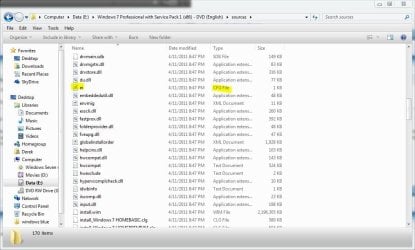
Although Microsoft does not provide any such universal Windows 7 installation media, the function is indeed feasible. (see Screenshot below) A disc such as this can be especially helpful to PC technicians, IT staff, and the like who need to reinstall Win7 frequently. Remember you will still need a valid license key specific to the version you are installing. In addition, Microsoft has eliminated the differences between the retail and OEM install discs with Windows 7, so this disc can be used to reinstall Win7 on PC’s where the owner has lost, or is unable to find, the OEM restore discs. In order to create such a disc; just delete and remove the ei.cfg from any Windows 7 ISO to convert that image into a universal disc for all editions of Windows 7.
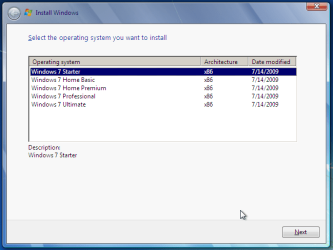
Win7 Universal Install Disc SS.PNG


STAGE 1 UNIVERSAL DVD - ALL 32 OR 64 BIT ON 1 DVD

For any user who has the Windows 7 install DVD or ISO and wishes to make a universal installer disc now there is an easier way to modify the ISO. Normally this was accomplished by manually unpacking and extracting the contents of the ISO image (or copying files from DVD to HDD), deleting the ei.cfg and then repacking the installation files back into an ISO to burn. Users can now eliminate these tedious procedures by making use of the “ei.cfg Removal Utility”.

The ei.cfg Removal Utility is a simple tool that will disable the ei.cfg from any Windows 7 ISO disc image, thereby converting the image into a “universal disc” that will prompt the user to select their preferred edition during setup. The ei.cfg Removal Utility works directly to patch the ISO image, by toggling the deletion bit in the UDF file table to instruct the operating system to ignore and remove ei.cfg, or treat it as if it does not exist. Best of all, the ei.cfg Removal Utility can reverse the patching to restore the ISO disc image to its original state when the tool is been used to apply on a disc image that previously been patched by the utility.

The ei.cfg Removal Utility is a standalone portable app, and requires no installation. In fact, the program does not have much of a user interface at all. Simply selecting the target Windows 7 ISO, and the disc image (ISO) will be patched right away. So make sure a backup copy of your ISO is created beforehand.

Download the ei.cfg Removal Utility here:eicfg_removal_utility.zip


STAGE 2 UNIVERSAL DVD - ALL 32 AND ALL 64 BIT ON 1 DVD

I was amazed at how easy it is to merge Win7 x86 and Win7 x64 editions (DVDs) in a single DVD or 4GB USB. The process is pretty simple, you need a copy of both any 32 bit and any 64 bit Windows 7 install DVD or ISO. Either copy the DVD's contents to a folder on a HDD, or extract the ISO's contents to a folder. Run 4 commands from the prompt, then create and burn your new Universal install DVD/USB.


Requirements:

  1. WAIK (Windows Automation Installation Kit) Download WAIK
  2. Windows Win7 x86 and Windows Win7 x64 DVDs.
  3. An application that can extract the files from an ISO (if using a downloaded ISO). I use WinRAR, but many apps can do this extraction.
  4. An application that allows you to build a new iso or create a bootable DVD/USB. I use UltraISO for this.
  5. Single Layer DVD, compatible DVD Burner and, of course DVD burning software… or a 4GB USB flash drive.
We will merge the four Windows 7 x64 editions into the Win7 x86 DVD contents, because Win7 x64 DVD has 64-bit content that can’t run some of the Win32 installation components.


Getting Started


1. Install WAIK in your Windows (doesn’t matter you are running Win7 or Windows XP)

2. Make two folders, in my examples I use Win7_64 and Win7_32. Now copy both Windows 7 x64 and x86 DVDs contents into their respective folders. Or extract your downloaded ISO’s into their respective folder.

   Note
If copying files over from a DVD to the above folders, you actually only need the Sources\install.wim file from the Windows 7 x64 DVD.


3. Run WAIK command prompt (Run as Administrator if UAC enabled):
Start à All Programs àWindows AIK àWindows AIK and PE Command Prompt

4. Each and every Win7 edition has an index no. in the install.wim (WIM file), you can check using the following command:
Code:
Imagex/info G:\Win7_32\Sources\install.wim
   Note
Where G:\Win7_32 represents the location of your 32 bit DVD files
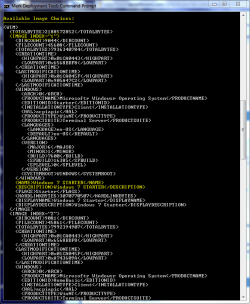

Win7 Universal Install Disc cmd 1.PNG

The results will look something like above.
This shows that INDEX=1 denotes Windows 7 Starter and so on… (you may have to scroll down to observe these entries)

5. We will use the Imagex /export command to move our x64 WIM entries into the x86 wim file.
   Note
The syntax for this command is:
   Note

imagex /export src_file src_number src_name dest_file dest_name


Now execute the following commands with appropriate INDEX no. to export a copy of the specified image to the Windows 7 32bit (x86) WIM file.

For Win7 Home Basic x64:
Code:
Imagex/export G:\Win7_64\Sources\install.wim 1 G:\Win7_32\Sources\install.wim "Windows 7 Home Basic (x64)"
For Win7 Home Premium x64:
Code:
Imagex/export G:\Win7_64\Sources\install.wim 2 G:\Win7_32\Sources\install.wim "Windows 7 Home Premium (x64)"
For Win7 Professional x64:
Code:
Imagex/export G:\Win7_64\Sources\install.wim 3 G:\Win7_32\Sources\install.wim "Windows 7 Professional (x64)"
For Win7 Ultimate x64:
Code:
Imagex /export G:\Win7_64\Sources\install.wim 4 G:\Win7_32\Sources\install.wim "Windows 7 Ultimate (x64)"
6. After execution of above commands Win7_32's WIM file will be the universal WIM file that contains all version of Win7. You can export only desired versions into the image. For example you could make a Win7 DVD, which includes Win7 Ultimate x86 and x64 version only.

7. Now to make bootable DVD image...


Last edited by a moderator:
Yes, the same way.

You need the install media which contains install.wim. (MSDN/Technet editions of the iso)

The thing from download/upgrade assistant is no use.

I don't know if my download would be considered MSDN/Technet. I know that I go into the Volume Licensing Center to download it. I have access and have downloaded both the Full version and the Upgrade version of the ISO. If I copy all the files from the full version onto my computer then use the imagex to move it to my Custom Build Files, what number do I use in the extract command. Would I use 5 to make it load at the end of the list I have? I know that I used 1 through 4 for all the other items, but I know in the Enterprise version, its 1 in its install.wim file. Thanks
 

My Computer

Computer type
PC/Desktop
Computer Manufacturer/Model Number
Various, ie. Dell, HP, Compaq
OS
Windows 7 Enterprise x64, Windows 7 Ultimate 32/64, Windows 7 Pro 32/64
CPU
Various
Motherboard
Various
Memory
8+ Gigs
Graphics Card(s)
Various
Hard Drives
6+ TB
Internet Speed
DSL 5Mbps
Is is possible to do this with windows 8. I know this is not the Eight forums. But I did not know where to put this on the eight forums. I would like to do this is possible but with windows 8 on a USB drive.

Yes, the same way.

You need the install media which contains install.wim. (MSDN/Technet editions of the iso)

The thing from download/upgrade assistant is no use.

I don't know if my download would be considered MSDN/Technet. I know that I go into the Volume Licensing Center to download it. I have access and have downloaded both the Full version and the Upgrade version of the ISO. If I copy all the files from the full version onto my computer then use the imagex to move it to my Custom Build Files, what number do I use in the extract command. Would I use 5 to make it load at the end of the list I have? I know that I used 1 through 4 for all the other items, but I know in the Enterprise version, its 1 in its install.wim file. Thanks

@ southern,

I believe that response you quoted was directed to the Windows 8 question I added at the top of this post from Chiumiento.
 

My Computer

Computer type
PC/Desktop
Computer Manufacturer/Model Number
Self Built
OS
Win 10 Pro x64
CPU
Intel I5-2500K @3.3GHz
Motherboard
Asrock P67 Extreme4
Memory
16GB G.Skill Ripjaws X (4x4GB)
Graphics Card(s)
EVGA GeForce 750 Ti SC 2GB
Sound Card
ASUS Xonar DG 5.1 Channels 24-bit 96KHz PCI Interface Sound
Monitor(s) Displays
auria eq2367
Screen Resolution
1920 x 1080
Hard Drives
250GB Samsung 850 EVO SSD
1TB WD Blue
1TB Hitachi
PSU
SeaSonic X 650W 80 Plus Gold
Case
Corsair Obsidian 750D
Cooling
Corsair H60, Three 140mm case fans
Keyboard
Logitech Wireless Keyboard K520
Mouse
Logitech Wireless Mouse M310
Internet Speed
Wave Broadband ~ 100 dn 5 up
Antivirus
Windows Defender, Malwarebytes Premium
Browser
Edge, IE11, Chrome
Other Info
Laptop specs: HP g7-1365dx /
CPU: AMD A6-3420M APU with Radeon(tm) HD Graphics /
RAM: Crucial 8Gb (2x4Gb) /
SSD: Crucial M4-CT128M4SSD2 ATA Device/ FW 000F /
GFX: AMD Radeon HD 6520G /
OS: Windows 10 Pro x64
Ok, I was not sure, that is why I added mine. Never hurts to ask to clarification. Do you by chance know the answer that I am looking for. Before I burn my disk, I would like to make it complete, including Enterprise 32/64 so its all on the disk if its possible. Thanks
 

My Computer

Computer type
PC/Desktop
Computer Manufacturer/Model Number
Various, ie. Dell, HP, Compaq
OS
Windows 7 Enterprise x64, Windows 7 Ultimate 32/64, Windows 7 Pro 32/64
CPU
Various
Motherboard
Various
Memory
8+ Gigs
Graphics Card(s)
Various
Hard Drives
6+ TB
Internet Speed
DSL 5Mbps
Ok, I was not sure, that is why I added mine. Never hurts to ask to clarification. Do you by chance know the answer that I am looking for. Before I burn my disk, I would like to make it complete, including Enterprise 32/64 so its all on the disk if its possible. Thanks

No problem, I have made a few of these discs but never with Enterprise included, so I can't really answer your question on that, SIW2 may know how to accomplish that, sorry.
 

My Computer

Computer type
PC/Desktop
Computer Manufacturer/Model Number
Self Built
OS
Win 10 Pro x64
CPU
Intel I5-2500K @3.3GHz
Motherboard
Asrock P67 Extreme4
Memory
16GB G.Skill Ripjaws X (4x4GB)
Graphics Card(s)
EVGA GeForce 750 Ti SC 2GB
Sound Card
ASUS Xonar DG 5.1 Channels 24-bit 96KHz PCI Interface Sound
Monitor(s) Displays
auria eq2367
Screen Resolution
1920 x 1080
Hard Drives
250GB Samsung 850 EVO SSD
1TB WD Blue
1TB Hitachi
PSU
SeaSonic X 650W 80 Plus Gold
Case
Corsair Obsidian 750D
Cooling
Corsair H60, Three 140mm case fans
Keyboard
Logitech Wireless Keyboard K520
Mouse
Logitech Wireless Mouse M310
Internet Speed
Wave Broadband ~ 100 dn 5 up
Antivirus
Windows Defender, Malwarebytes Premium
Browser
Edge, IE11, Chrome
Other Info
Laptop specs: HP g7-1365dx /
CPU: AMD A6-3420M APU with Radeon(tm) HD Graphics /
RAM: Crucial 8Gb (2x4Gb) /
SSD: Crucial M4-CT128M4SSD2 ATA Device/ FW 000F /
GFX: AMD Radeon HD 6520G /
OS: Windows 10 Pro x64
Ok, I will wait and see if I can receive an answer on this. Thanks for your assistance.
 

My Computer

Computer type
PC/Desktop
Computer Manufacturer/Model Number
Various, ie. Dell, HP, Compaq
OS
Windows 7 Enterprise x64, Windows 7 Ultimate 32/64, Windows 7 Pro 32/64
CPU
Various
Motherboard
Various
Memory
8+ Gigs
Graphics Card(s)
Various
Hard Drives
6+ TB
Internet Speed
DSL 5Mbps

My Computer

Computer type
PC/Desktop
Computer Manufacturer/Model Number
Self Built
OS
Win 10 Pro x64
CPU
Intel I5-2500K @3.3GHz
Motherboard
Asrock P67 Extreme4
Memory
16GB G.Skill Ripjaws X (4x4GB)
Graphics Card(s)
EVGA GeForce 750 Ti SC 2GB
Sound Card
ASUS Xonar DG 5.1 Channels 24-bit 96KHz PCI Interface Sound
Monitor(s) Displays
auria eq2367
Screen Resolution
1920 x 1080
Hard Drives
250GB Samsung 850 EVO SSD
1TB WD Blue
1TB Hitachi
PSU
SeaSonic X 650W 80 Plus Gold
Case
Corsair Obsidian 750D
Cooling
Corsair H60, Three 140mm case fans
Keyboard
Logitech Wireless Keyboard K520
Mouse
Logitech Wireless Mouse M310
Internet Speed
Wave Broadband ~ 100 dn 5 up
Antivirus
Windows Defender, Malwarebytes Premium
Browser
Edge, IE11, Chrome
Other Info
Laptop specs: HP g7-1365dx /
CPU: AMD A6-3420M APU with Radeon(tm) HD Graphics /
RAM: Crucial 8Gb (2x4Gb) /
SSD: Crucial M4-CT128M4SSD2 ATA Device/ FW 000F /
GFX: AMD Radeon HD 6520G /
OS: Windows 10 Pro x64
I haven't been here much lately, and haven't looked at all the posts here .. I've made a AIO Win7 USB tumbstick .. and now want to burn that folder to a bootable DVD.

What do I need to do in Imgburn or whatever to make a bootable AIO Win 7 from the files/folder I have?
 

My Computer

Computer Manufacturer/Model Number
Asus V2-M3M8200 Barebones
OS
Windows 7 Professional x64
CPU
AMD Phenom II X4 925
Motherboard
V2-M3M8200 (basically a M3N78-VM)
Memory
4x1024mb Kingston HyperX DDR2-1066 KHX8500D2/1G
Graphics Card(s)
Asus GTS 450 OC
Sound Card
Creative Sound Blaster X-Fi Titanium PCIe
Monitor(s) Displays
Asus 24" LCD VH242H
Screen Resolution
1920x1080
Hard Drives
WDC WD5000AAKS
WDC WD5002ABYS
Seagate ST325062 USB-to-IDE
Fujitsu 160GB Pocket USB HDD
PSU
Antec Earthwatts EA-430D
Case
Asus V2-M3M8200
Cooling
120mm side fan & 80mm front & 92mm rear fan
Keyboard
Dell USB mini Multimedia
Mouse
Logitech MX518
Internet Speed
Comcast Xfinity
Other Info
Logitech Webcam Pro 9000
Accurian 40-1462 Speakers
little dot MKII Headphone Amp
I haven't been here much lately, and haven't looked at all the posts here .. I've made a AIO Win7 USB tumbstick .. and now want to burn that folder to a bootable DVD.

What do I need to do in Imgburn or whatever to make a bootable AIO Win 7 from the files/folder I have?

This worked for me,


My Computer

Computer type
PC/Desktop
Computer Manufacturer/Model Number
Self Built
OS
Win 10 Pro x64
CPU
Intel I5-2500K @3.3GHz
Motherboard
Asrock P67 Extreme4
Memory
16GB G.Skill Ripjaws X (4x4GB)
Graphics Card(s)
EVGA GeForce 750 Ti SC 2GB
Sound Card
ASUS Xonar DG 5.1 Channels 24-bit 96KHz PCI Interface Sound
Monitor(s) Displays
auria eq2367
Screen Resolution
1920 x 1080
Hard Drives
250GB Samsung 850 EVO SSD
1TB WD Blue
1TB Hitachi
PSU
SeaSonic X 650W 80 Plus Gold
Case
Corsair Obsidian 750D
Cooling
Corsair H60, Three 140mm case fans
Keyboard
Logitech Wireless Keyboard K520
Mouse
Logitech Wireless Mouse M310
Internet Speed
Wave Broadband ~ 100 dn 5 up
Antivirus
Windows Defender, Malwarebytes Premium
Browser
Edge, IE11, Chrome
Other Info
Laptop specs: HP g7-1365dx /
CPU: AMD A6-3420M APU with Radeon(tm) HD Graphics /
RAM: Crucial 8Gb (2x4Gb) /
SSD: Crucial M4-CT128M4SSD2 ATA Device/ FW 000F /
GFX: AMD Radeon HD 6520G /
OS: Windows 10 Pro x64
I haven't been here much lately, and haven't looked at all the posts here .. I've made a AIO Win7 USB tumbstick .. and now want to burn that folder to a bootable DVD.

What do I need to do in Imgburn or whatever to make a bootable AIO Win 7 from the files/folder I have?

After opening ImgBurn, choose "Create image file from files/folders."

One question. I downloaded the ISO file for Windows 7 Home Premium 32-bit. After it was finished downloading, I ran the ei.cfg Removal Utility on the file and created a Windows 7 bootable USB stick. However, when I installed Windows 7, I didn't get the option to choose any 32-bit version of Windows 7 (I wanted to install Starter for a friend since he has a valid key). Does the removal utility only work if the copy of Windows 7 is going to be burned to DVD as opposed to USB stick?
 

My Computer

Computer type
PC/Desktop
Computer Manufacturer/Model Number
Dell XPS8700
OS
Windows 7 Professional x64
CPU
Intel Core i7-4790 CPU @ 3.60GHz (Haswell)
Motherboard
Dell Lynx Point Z87 Chipset motherboard
Memory
16 GB
Graphics Card(s)
NVIDIA GeForce GTX 745 4GB DDR 3
Sound Card
NVIDIA High Definition Audio
Monitor(s) Displays
HP Pavilion 27bw 27"
Screen Resolution
1920 x 1080 @ 60 Hz
Hard Drives
Seagate ST2000DM001 2 TB
Internet Speed
150 mb/s
Antivirus
Microsoft Security Essentials
Browser
Google Chrome
Have a look and see if eicfg is still on your usb stick just rt click it and delete.
 

My Computers

System One System Two

  • Computer type
    PC/Desktop
    OS
    7 X64
    CPU
    i5 8400
    Motherboard
    gigabyte b365m ds3h
    Memory
    2x8gb 3200mhz
    Hard Drives
    various
    PSU
    pure power 11 400w cm
    Case
    Coolermaster
    Cooling
    cryorig m9i
  • Computer type
    PC/Desktop
    OS
    7x64
    CPU
    g5400
    Motherboard
    ga b365m ds3h
    Memory
    8gb ddr4 2400
    PSU
    xfx pro 450w
Have a look and see if eicfg is still on your usb stick just rt click it and delete.


eicfg isn't on the USB stick. I just downloaded the ISO again, removed eicfg again, copied it to a USB stick, and again, it says Windows 7 Home Premium. It doesn't give me the choice to choose Starter.
 

My Computer

Computer type
PC/Desktop
Computer Manufacturer/Model Number
Dell XPS8700
OS
Windows 7 Professional x64
CPU
Intel Core i7-4790 CPU @ 3.60GHz (Haswell)
Motherboard
Dell Lynx Point Z87 Chipset motherboard
Memory
16 GB
Graphics Card(s)
NVIDIA GeForce GTX 745 4GB DDR 3
Sound Card
NVIDIA High Definition Audio
Monitor(s) Displays
HP Pavilion 27bw 27"
Screen Resolution
1920 x 1080 @ 60 Hz
Hard Drives
Seagate ST2000DM001 2 TB
Internet Speed
150 mb/s
Antivirus
Microsoft Security Essentials
Browser
Google Chrome
Are you looking in the sources folder?
 

My Computer

Computer type
PC/Desktop
Computer Manufacturer/Model Number
Self Built
OS
Win 10 Pro x64
CPU
Intel I5-2500K @3.3GHz
Motherboard
Asrock P67 Extreme4
Memory
16GB G.Skill Ripjaws X (4x4GB)
Graphics Card(s)
EVGA GeForce 750 Ti SC 2GB
Sound Card
ASUS Xonar DG 5.1 Channels 24-bit 96KHz PCI Interface Sound
Monitor(s) Displays
auria eq2367
Screen Resolution
1920 x 1080
Hard Drives
250GB Samsung 850 EVO SSD
1TB WD Blue
1TB Hitachi
PSU
SeaSonic X 650W 80 Plus Gold
Case
Corsair Obsidian 750D
Cooling
Corsair H60, Three 140mm case fans
Keyboard
Logitech Wireless Keyboard K520
Mouse
Logitech Wireless Mouse M310
Internet Speed
Wave Broadband ~ 100 dn 5 up
Antivirus
Windows Defender, Malwarebytes Premium
Browser
Edge, IE11, Chrome
Other Info
Laptop specs: HP g7-1365dx /
CPU: AMD A6-3420M APU with Radeon(tm) HD Graphics /
RAM: Crucial 8Gb (2x4Gb) /
SSD: Crucial M4-CT128M4SSD2 ATA Device/ FW 000F /
GFX: AMD Radeon HD 6520G /
OS: Windows 10 Pro x64
Yes. There are 169 files in that folder, but ei.cfg isn't one of them.
 

My Computer

Computer type
PC/Desktop
Computer Manufacturer/Model Number
Dell XPS8700
OS
Windows 7 Professional x64
CPU
Intel Core i7-4790 CPU @ 3.60GHz (Haswell)
Motherboard
Dell Lynx Point Z87 Chipset motherboard
Memory
16 GB
Graphics Card(s)
NVIDIA GeForce GTX 745 4GB DDR 3
Sound Card
NVIDIA High Definition Audio
Monitor(s) Displays
HP Pavilion 27bw 27"
Screen Resolution
1920 x 1080 @ 60 Hz
Hard Drives
Seagate ST2000DM001 2 TB
Internet Speed
150 mb/s
Antivirus
Microsoft Security Essentials
Browser
Google Chrome
Yes. There are 169 files in that folder, but ei.cfg isn't one of them.

Just to be clear, you don't see this?

Not questioning your abilities, just curious.
 

Attachments

  • eicfg.JPG
    eicfg.JPG
    94.4 KB · Views: 162

My Computer

Computer type
PC/Desktop
Computer Manufacturer/Model Number
Self Built
OS
Win 10 Pro x64
CPU
Intel I5-2500K @3.3GHz
Motherboard
Asrock P67 Extreme4
Memory
16GB G.Skill Ripjaws X (4x4GB)
Graphics Card(s)
EVGA GeForce 750 Ti SC 2GB
Sound Card
ASUS Xonar DG 5.1 Channels 24-bit 96KHz PCI Interface Sound
Monitor(s) Displays
auria eq2367
Screen Resolution
1920 x 1080
Hard Drives
250GB Samsung 850 EVO SSD
1TB WD Blue
1TB Hitachi
PSU
SeaSonic X 650W 80 Plus Gold
Case
Corsair Obsidian 750D
Cooling
Corsair H60, Three 140mm case fans
Keyboard
Logitech Wireless Keyboard K520
Mouse
Logitech Wireless Mouse M310
Internet Speed
Wave Broadband ~ 100 dn 5 up
Antivirus
Windows Defender, Malwarebytes Premium
Browser
Edge, IE11, Chrome
Other Info
Laptop specs: HP g7-1365dx /
CPU: AMD A6-3420M APU with Radeon(tm) HD Graphics /
RAM: Crucial 8Gb (2x4Gb) /
SSD: Crucial M4-CT128M4SSD2 ATA Device/ FW 000F /
GFX: AMD Radeon HD 6520G /
OS: Windows 10 Pro x64
No. As I mentioned, I have 169 files as opposed to 170. That means ei.cfg is gone, but for whatever reason, when I take that modified ISO and copy it to a USB stick with the Windows 7 USB DVD Download Tool and try to install Windows 7 Starter, it is Windows 7 Home Premium. There is no option prior to the install to choose Starter or any other version of Windows 7.
 

My Computer

Computer type
PC/Desktop
Computer Manufacturer/Model Number
Dell XPS8700
OS
Windows 7 Professional x64
CPU
Intel Core i7-4790 CPU @ 3.60GHz (Haswell)
Motherboard
Dell Lynx Point Z87 Chipset motherboard
Memory
16 GB
Graphics Card(s)
NVIDIA GeForce GTX 745 4GB DDR 3
Sound Card
NVIDIA High Definition Audio
Monitor(s) Displays
HP Pavilion 27bw 27"
Screen Resolution
1920 x 1080 @ 60 Hz
Hard Drives
Seagate ST2000DM001 2 TB
Internet Speed
150 mb/s
Antivirus
Microsoft Security Essentials
Browser
Google Chrome
There is no option prior to the install to choose Starter or any other version of Windows 7.

How far have you gone into the install? It doesn't come up prior to clicking "Install Now".
 

My Computer

Computer type
PC/Desktop
Computer Manufacturer/Model Number
Self Built
OS
Win 10 Pro x64
CPU
Intel I5-2500K @3.3GHz
Motherboard
Asrock P67 Extreme4
Memory
16GB G.Skill Ripjaws X (4x4GB)
Graphics Card(s)
EVGA GeForce 750 Ti SC 2GB
Sound Card
ASUS Xonar DG 5.1 Channels 24-bit 96KHz PCI Interface Sound
Monitor(s) Displays
auria eq2367
Screen Resolution
1920 x 1080
Hard Drives
250GB Samsung 850 EVO SSD
1TB WD Blue
1TB Hitachi
PSU
SeaSonic X 650W 80 Plus Gold
Case
Corsair Obsidian 750D
Cooling
Corsair H60, Three 140mm case fans
Keyboard
Logitech Wireless Keyboard K520
Mouse
Logitech Wireless Mouse M310
Internet Speed
Wave Broadband ~ 100 dn 5 up
Antivirus
Windows Defender, Malwarebytes Premium
Browser
Edge, IE11, Chrome
Other Info
Laptop specs: HP g7-1365dx /
CPU: AMD A6-3420M APU with Radeon(tm) HD Graphics /
RAM: Crucial 8Gb (2x4Gb) /
SSD: Crucial M4-CT128M4SSD2 ATA Device/ FW 000F /
GFX: AMD Radeon HD 6520G /
OS: Windows 10 Pro x64
I completed the install. At no time did the option come up to choose the version of Windows 7.
 

My Computer

Computer type
PC/Desktop
Computer Manufacturer/Model Number
Dell XPS8700
OS
Windows 7 Professional x64
CPU
Intel Core i7-4790 CPU @ 3.60GHz (Haswell)
Motherboard
Dell Lynx Point Z87 Chipset motherboard
Memory
16 GB
Graphics Card(s)
NVIDIA GeForce GTX 745 4GB DDR 3
Sound Card
NVIDIA High Definition Audio
Monitor(s) Displays
HP Pavilion 27bw 27"
Screen Resolution
1920 x 1080 @ 60 Hz
Hard Drives
Seagate ST2000DM001 2 TB
Internet Speed
150 mb/s
Antivirus
Microsoft Security Essentials
Browser
Google Chrome
I completed the install. At no time did the option come up to choose the version of Windows 7.

I'm not sure why it's not working for you.

How did you create the USB?
 

My Computer

Computer type
PC/Desktop
Computer Manufacturer/Model Number
Self Built
OS
Win 10 Pro x64
CPU
Intel I5-2500K @3.3GHz
Motherboard
Asrock P67 Extreme4
Memory
16GB G.Skill Ripjaws X (4x4GB)
Graphics Card(s)
EVGA GeForce 750 Ti SC 2GB
Sound Card
ASUS Xonar DG 5.1 Channels 24-bit 96KHz PCI Interface Sound
Monitor(s) Displays
auria eq2367
Screen Resolution
1920 x 1080
Hard Drives
250GB Samsung 850 EVO SSD
1TB WD Blue
1TB Hitachi
PSU
SeaSonic X 650W 80 Plus Gold
Case
Corsair Obsidian 750D
Cooling
Corsair H60, Three 140mm case fans
Keyboard
Logitech Wireless Keyboard K520
Mouse
Logitech Wireless Mouse M310
Internet Speed
Wave Broadband ~ 100 dn 5 up
Antivirus
Windows Defender, Malwarebytes Premium
Browser
Edge, IE11, Chrome
Other Info
Laptop specs: HP g7-1365dx /
CPU: AMD A6-3420M APU with Radeon(tm) HD Graphics /
RAM: Crucial 8Gb (2x4Gb) /
SSD: Crucial M4-CT128M4SSD2 ATA Device/ FW 000F /
GFX: AMD Radeon HD 6520G /
OS: Windows 10 Pro x64
I don't know why, either. I used the Windows 7 USB DVD Download Tool to create the USB.

Months ago, I ran the ei.cfg removal tool on an X86 ISO file of Windows 7 Home Premium, burned it to DVD and was able to successfully install Starter on my wife's computer.

The only reason I'm copying it to a USB stick now is that the friend I am working on this for doesn't have a DVD drive on his computer. His computer is an Acer netbook.
 

My Computer

Computer type
PC/Desktop
Computer Manufacturer/Model Number
Dell XPS8700
OS
Windows 7 Professional x64
CPU
Intel Core i7-4790 CPU @ 3.60GHz (Haswell)
Motherboard
Dell Lynx Point Z87 Chipset motherboard
Memory
16 GB
Graphics Card(s)
NVIDIA GeForce GTX 745 4GB DDR 3
Sound Card
NVIDIA High Definition Audio
Monitor(s) Displays
HP Pavilion 27bw 27"
Screen Resolution
1920 x 1080 @ 60 Hz
Hard Drives
Seagate ST2000DM001 2 TB
Internet Speed
150 mb/s
Antivirus
Microsoft Security Essentials
Browser
Google Chrome
I see SIW2 here, maybe he can help.

I know what you mean about netbooks.
 

My Computer

Computer type
PC/Desktop
Computer Manufacturer/Model Number
Self Built
OS
Win 10 Pro x64
CPU
Intel I5-2500K @3.3GHz
Motherboard
Asrock P67 Extreme4
Memory
16GB G.Skill Ripjaws X (4x4GB)
Graphics Card(s)
EVGA GeForce 750 Ti SC 2GB
Sound Card
ASUS Xonar DG 5.1 Channels 24-bit 96KHz PCI Interface Sound
Monitor(s) Displays
auria eq2367
Screen Resolution
1920 x 1080
Hard Drives
250GB Samsung 850 EVO SSD
1TB WD Blue
1TB Hitachi
PSU
SeaSonic X 650W 80 Plus Gold
Case
Corsair Obsidian 750D
Cooling
Corsair H60, Three 140mm case fans
Keyboard
Logitech Wireless Keyboard K520
Mouse
Logitech Wireless Mouse M310
Internet Speed
Wave Broadband ~ 100 dn 5 up
Antivirus
Windows Defender, Malwarebytes Premium
Browser
Edge, IE11, Chrome
Other Info
Laptop specs: HP g7-1365dx /
CPU: AMD A6-3420M APU with Radeon(tm) HD Graphics /
RAM: Crucial 8Gb (2x4Gb) /
SSD: Crucial M4-CT128M4SSD2 ATA Device/ FW 000F /
GFX: AMD Radeon HD 6520G /
OS: Windows 10 Pro x64
Back
Top