Windows 7 Update disables system restore + new folder entry

Roy,

Thanks for your help again on this matter. I thought we knocked it out last time but it came back as the restore points filled up. As for the "vssadmin command" I'm not sure I understand how Allocated vs Maximum works within system restore as I increased the Maximum size to 18 GB on the system restore setting and NOT using vssadmin last time and the problem reappeared.

So this time I just increased it to 5GB using this command "vssadmin resize shadowstorage /On=C: /For=C: /Maxsize=5G"

Then I set the system restore slider setting for max size at 18GB (see attached photo for results)

Below are the services you mentioned and the one in red I changed:

Code:
[B]- "Remote Procedure Call" (RPCSS), Automatic.
[COLOR="Red"]- "COM+ Event System" (EventSystem), Manual. [B](Was Auto)[/B][/COLOR]
- "System Event Notification Service" (SENS), Automatic.
- "Volume Shadow Copy" (VSS), Manual.
- "Microsoft Software Shadow Copy Provider" (SWPRV) , manual.
- "Block Level Backup Engine Service", manual[/B]

Here are the new settings using the vssadmin list command and moving the system restore slider for max:

**Note** I moved this PC from Manual updates to Automatic updates so Windows is set for Automatic updates at this point. At the current 5.5GB Allocated I have about 4 restore points but it's my understanding (correct me if I'm wrong) that restore points will be created until it reaches the max of 18GB......Then it SHOULD delete the oldest restore point to make a new one.

That's what I think is NOT happening because currently the windows log's are showing NO errors with system restore since I located this problem again and restore points are now being created as normal. (That's after it wiped them all out last time)

What leads me this conclusion is another Event ID which points to windows not being able to locate the last restore point to be deleted>>>


Failed to delete shadow copy \\?\GLOBALROOT\Device\HarddiskVolumeShadowCopy3\ on volume \\?\Volume{c80f7f49-d375-11e6-8248-806e6f6e6963}\. VSS error: The specified object was not found. (0x80042308) User action Retry the deletion or examine the event log for related VSS entries.

Code:
- <Event xmlns="http://schemas.microsoft.com/win/2004/08/events/event">
- <System>
  <Provider Name="SPP" /> 
  <EventID Qualifiers="0">16388</EventID> 
  <Level>2</Level> 
  <Task>0</Task> 
  <Keywords>0x80000000000000</Keywords> 
  <TimeCreated SystemTime="2017-01-08T04:45:09.000000000Z" /> 
  <EventRecordID>14155</EventRecordID> 
  <Channel>Application</Channel> 
  <Computer>Microbell-PC</Computer> 
  <Security /> 
  </System>
- <EventData>
  <Data>\\?\Volume{c80f7f49-d375-11e6-8248-806e6f6e6963}\</Data> 
  <Data>\\?\GLOBALROOT\Device\HarddiskVolumeShadowCopy3\</Data> 
  <Data>The specified object was not found. (0x80042308)</Data> 
  <Binary>01000000502600003E2600000000000042BEB7C56AAFC921DB93674A0E00000000000000</Binary> 
  </EventData>
  </Event>
 

Attachments

  • storage2.JPG
    storage2.JPG
    19.7 KB · Views: 39
Last edited:

My Computer My Computer

Computer type
PC/Desktop
Computer Manufacturer/Model Number
Custom Build
OS
Windows 7 Pro 64bit SP1+Updates
CPU
Intel I3 6100
Motherboard
MSI Z170a Gaming 3 Bios ver a.4
Memory
G.Skill Ripjaws V Series 16GB (2 x 8GB) DDR4 2133mhz
Graphics Card(s)
MSI GTX 960 GAMING 100ME 2GB
Sound Card
X-Fi xtremegamer fatal1ty pro series
Monitor(s) Displays
LG 32MP58HQ-P 32"
Screen Resolution
1920X1080
Hard Drives
Samsung 850EVO SSD 250GB
4 WD HD
PSU
EVGA SuperNova 650 G2 650w
Case
Thermaltake Armor II Tower
Cooling
6 Fan air cooled modded case
Keyboard
Logitech G15
Mouse
Logitech G5
Internet Speed
Cable 120MB/3MB
Antivirus
Avast Ver 12.1.2272
Browser
Chrome

My Computer My Computer

Computer type
PC/Desktop
Computer Manufacturer/Model Number
medionl/Aspire 6930G/acer x55a
OS
W7 home premium 32bit/W7HP 64bit/w10 tp insider ring
CPU
E5300 dual core
Motherboard
medion MS7366
Memory
3gb
Graphics Card(s)
Nvidia Geforce 7100 Nforce 630i
Monitor(s) Displays
avixc
Internet Speed
n (isp resticted to 72)
Antivirus
mse/pands
Browser
palemoon
Other Info
Belkin Fd7050 n USB using Railink RT2870 drivers, more upto date
,

other drives being pulled/inserted during operation???

Roy

Nope.

I only have one other partition (encrypted container) that gets mounted from time to time but that's on another hard drive that's not being monitored by system restore. Only the SSD with Windows 7 on it is turned on.


Article pertains to Windows 2003 and a backup image as Windows 7 settings are not present. That said I checked the Volume Shadow Copy Service in services and it was on but set to manual. I changed it to automatic but I still don't think that's the issue or I would be seeing it now and my logs are clean (No System Restore errors) and I've had 4 restore points created since that last time I turned it back on.

Seams to only occur when it runs low on space to create a new restore point and somehow miss-fires deleting the oldest point to make a new one so it just says F it......I'll turn them all off....LOL

So the mystery continues.........................
 
Last edited:

My Computer My Computer

Computer type
PC/Desktop
Computer Manufacturer/Model Number
Custom Build
OS
Windows 7 Pro 64bit SP1+Updates
CPU
Intel I3 6100
Motherboard
MSI Z170a Gaming 3 Bios ver a.4
Memory
G.Skill Ripjaws V Series 16GB (2 x 8GB) DDR4 2133mhz
Graphics Card(s)
MSI GTX 960 GAMING 100ME 2GB
Sound Card
X-Fi xtremegamer fatal1ty pro series
Monitor(s) Displays
LG 32MP58HQ-P 32"
Screen Resolution
1920X1080
Hard Drives
Samsung 850EVO SSD 250GB
4 WD HD
PSU
EVGA SuperNova 650 G2 650w
Case
Thermaltake Armor II Tower
Cooling
6 Fan air cooled modded case
Keyboard
Logitech G15
Mouse
Logitech G5
Internet Speed
Cable 120MB/3MB
Antivirus
Avast Ver 12.1.2272
Browser
Chrome
Still looking for any Ideas anyone has on this issue.

I have confirmed that system restore fails to create a restore point and deletes all restore points and disables system restore for C: once it reaches the maximum storage that's set (25GB In my case) with event ID 8193.

Until that point it operates normally and increasing the storage by the vssadmin commands had no effect. I got about 7 restore points before it disabled itself again this time. :mad:
 

My Computer My Computer

Computer type
PC/Desktop
Computer Manufacturer/Model Number
Custom Build
OS
Windows 7 Pro 64bit SP1+Updates
CPU
Intel I3 6100
Motherboard
MSI Z170a Gaming 3 Bios ver a.4
Memory
G.Skill Ripjaws V Series 16GB (2 x 8GB) DDR4 2133mhz
Graphics Card(s)
MSI GTX 960 GAMING 100ME 2GB
Sound Card
X-Fi xtremegamer fatal1ty pro series
Monitor(s) Displays
LG 32MP58HQ-P 32"
Screen Resolution
1920X1080
Hard Drives
Samsung 850EVO SSD 250GB
4 WD HD
PSU
EVGA SuperNova 650 G2 650w
Case
Thermaltake Armor II Tower
Cooling
6 Fan air cooled modded case
Keyboard
Logitech G15
Mouse
Logitech G5
Internet Speed
Cable 120MB/3MB
Antivirus
Avast Ver 12.1.2272
Browser
Chrome
Hi Microbell,
MIGHT be getting somewhere:geek::)
Found a post that relates to the spp event id
please search for this GUID, bet yeh its not on the c drive

c80f7f49-d375-11e6-8248-806e6f6e6963
(post 21)

Now have a look at this thread where i found it
Unable to activate System Restore
@NoelDP is a genius
Follow the instructions from him.
and the follow up from CBIWEB

Roy
 

My Computer My Computer

Computer type
PC/Desktop
Computer Manufacturer/Model Number
medionl/Aspire 6930G/acer x55a
OS
W7 home premium 32bit/W7HP 64bit/w10 tp insider ring
CPU
E5300 dual core
Motherboard
medion MS7366
Memory
3gb
Graphics Card(s)
Nvidia Geforce 7100 Nforce 630i
Monitor(s) Displays
avixc
Internet Speed
n (isp resticted to 72)
Antivirus
mse/pands
Browser
palemoon
Other Info
Belkin Fd7050 n USB using Railink RT2870 drivers, more upto date
On a further note i think it may be Shellbag cleaner causing the problem, specifically
the MFT operation called by system restore option via Advanced settings.

I pulled this from another artical link below,

If passports.jpeg(READ AS GUID) resides on an NTFS volume, what will happen when the file is deleted by pressing SHIFT and DELETE in the Windows GUI?
(doesnt matter how its done just the deletion of it)

Well the MFT record for the file will be modified to reflect the fact that it relates to a deleted file; the index entry relating to the file in the parent folder will also be deleted.

Digital Forensics Today Blog: Examining Volume Shadow Copies – The Easy Way!


Roy
 

My Computer My Computer

Computer type
PC/Desktop
Computer Manufacturer/Model Number
medionl/Aspire 6930G/acer x55a
OS
W7 home premium 32bit/W7HP 64bit/w10 tp insider ring
CPU
E5300 dual core
Motherboard
medion MS7366
Memory
3gb
Graphics Card(s)
Nvidia Geforce 7100 Nforce 630i
Monitor(s) Displays
avixc
Internet Speed
n (isp resticted to 72)
Antivirus
mse/pands
Browser
palemoon
Other Info
Belkin Fd7050 n USB using Railink RT2870 drivers, more upto date
Roy,

c80f7f49-d375-11e6-8248-806e6f6e6963 is located on C: and has entries in the registry under both the BITS and Mountpoint2 keys. As for that other post while it's similar to my issue it's not the same as all works fine until MAX usage is reached.

I already tried those steps anyway with the same results. The article on your second post talked about recovery methods from the restore point but I could not find anything related to an error or corruption of the restore point.

As for Shellbag cleaner I previously considered both that and CCleaner as a possible cause but ruled them out as I created a restore point...used both. Rebooted then created another and everything worked as it should with no errors in event log and works fine during normal use and restore point creation. I then deleted the points to try and trigger that "Volume Not Found" error but it deleted them fine. This is why I'm so baffled with this issue as it only appears once the MAX restore point size is reached and usually with only the Event ID 8193 being created.

I do have one more avenue to try so tell me what you think of this:

Before this SSD was installed I had Windows 7 on a HD that had 3 partitions on it. That drive (Called G: ) is still active in the system so it does have 1 partition that still has Windows 7 on it but I'm using it for storage and the 2 other partitions contain games and movies. Even though it's NOT being monitored by system restore that old C: partition (that's now G: ) could be an issue (though I think it's not)

So I'm going to save what I need and format that partition. The only downside is any games that used that old Windows 7 partition will need to be reinstalled but most of them have been added back after the SSD was installed so their entries should be in the new Windows 7 SSD.

So will formatting that partition have any effect (besides files that needed the old Windows folder) on access to the other 2 partitions? I don't have the space to move both partitions data off the drive for a total format of the HD. I need to save those partition but can wipe everything that's part of the old Windows 7 partition.
 

My Computer My Computer

Computer type
PC/Desktop
Computer Manufacturer/Model Number
Custom Build
OS
Windows 7 Pro 64bit SP1+Updates
CPU
Intel I3 6100
Motherboard
MSI Z170a Gaming 3 Bios ver a.4
Memory
G.Skill Ripjaws V Series 16GB (2 x 8GB) DDR4 2133mhz
Graphics Card(s)
MSI GTX 960 GAMING 100ME 2GB
Sound Card
X-Fi xtremegamer fatal1ty pro series
Monitor(s) Displays
LG 32MP58HQ-P 32"
Screen Resolution
1920X1080
Hard Drives
Samsung 850EVO SSD 250GB
4 WD HD
PSU
EVGA SuperNova 650 G2 650w
Case
Thermaltake Armor II Tower
Cooling
6 Fan air cooled modded case
Keyboard
Logitech G15
Mouse
Logitech G5
Internet Speed
Cable 120MB/3MB
Antivirus
Avast Ver 12.1.2272
Browser
Chrome
Hi Micro,
Thats wierd you can find it -- it cant.

I've been havin fun as well , found out something that i thought was really strange
VSS uses the 100mb system reserved partition!!

Just like everything else in the world if you overfill-it it causes a mess.
How full is yours


Roy
 

My Computer My Computer

Computer type
PC/Desktop
Computer Manufacturer/Model Number
medionl/Aspire 6930G/acer x55a
OS
W7 home premium 32bit/W7HP 64bit/w10 tp insider ring
CPU
E5300 dual core
Motherboard
medion MS7366
Memory
3gb
Graphics Card(s)
Nvidia Geforce 7100 Nforce 630i
Monitor(s) Displays
avixc
Internet Speed
n (isp resticted to 72)
Antivirus
mse/pands
Browser
palemoon
Other Info
Belkin Fd7050 n USB using Railink RT2870 drivers, more upto date
Hi Micro,

I've been havin fun as well , found out something that i thought was really strange
VSS uses the 100mb system reserved partition!!

Roy

Hey Roy,

Didn't know VSS used that partition as it's reserved for the boot manager and configuration data along with the BitLocker Drive Encryption but I did find some posts talking about how system restore needs about 40MB sometimes and I'm well within that.

Most of the time I can figure these things out with a little google searching and trial and error but this one has me stumped as why it only happens when it reaches the max setting and until then everything is fine and works as it should.

Anyway for the reserved partition it's only using 29.6MB (76.3MB Free) of the 100MB so it's not even close to full.
 

My Computer My Computer

Computer type
PC/Desktop
Computer Manufacturer/Model Number
Custom Build
OS
Windows 7 Pro 64bit SP1+Updates
CPU
Intel I3 6100
Motherboard
MSI Z170a Gaming 3 Bios ver a.4
Memory
G.Skill Ripjaws V Series 16GB (2 x 8GB) DDR4 2133mhz
Graphics Card(s)
MSI GTX 960 GAMING 100ME 2GB
Sound Card
X-Fi xtremegamer fatal1ty pro series
Monitor(s) Displays
LG 32MP58HQ-P 32"
Screen Resolution
1920X1080
Hard Drives
Samsung 850EVO SSD 250GB
4 WD HD
PSU
EVGA SuperNova 650 G2 650w
Case
Thermaltake Armor II Tower
Cooling
6 Fan air cooled modded case
Keyboard
Logitech G15
Mouse
Logitech G5
Internet Speed
Cable 120MB/3MB
Antivirus
Avast Ver 12.1.2272
Browser
Chrome
Hi Micro
I DELIBERATLY posted that while you were off-line: and didn't comment further,
as the answer might provide us with a clue, before you went the format route .

You also made a comment regarding your lack of space,
W7 has limitations all over the system in regard to "lack of space" many functions rely on having a minimum of 10% free space HDD, i think SSD's are slightly higher, as the OS writes to this using it as a temporary work space/folder to perform PRE installation operations.
So it might not just be the system reserved partition, have you had a pop-up "system is running low on space"


Roy
 

My Computer My Computer

Computer type
PC/Desktop
Computer Manufacturer/Model Number
medionl/Aspire 6930G/acer x55a
OS
W7 home premium 32bit/W7HP 64bit/w10 tp insider ring
CPU
E5300 dual core
Motherboard
medion MS7366
Memory
3gb
Graphics Card(s)
Nvidia Geforce 7100 Nforce 630i
Monitor(s) Displays
avixc
Internet Speed
n (isp resticted to 72)
Antivirus
mse/pands
Browser
palemoon
Other Info
Belkin Fd7050 n USB using Railink RT2870 drivers, more upto date
Hi Micro,

This is going well past my current skills knowledge, but as i said leaning as we('re) go along.
couple of other threads suggested either resetting VSS, and checking Task Scheduler to confirm the correct GUID is being used.
note VSS restore points CAN be deleted, remove 1 prior to updating:geek:.

Im now totaly in the "this might help zone:confused:" and further TRY THIS is most likely a waste of effort :mad:

Earlier on i WAS going to suggest using a third party back up utility, macrium etc, but from what i've gleaned it uses VSS as a basis, so if that fails then it will as well:confused:, which im sure you've picked up as well.

Formating that partition should not be a problem, as long as its storage and not part of the primary OS.

As to why you can find SC3,(was it empty??), and the system cant or ignores it as its empty, is my last thought:sick:

Sorry i cant take it any further


Roy
 

My Computer My Computer

Computer type
PC/Desktop
Computer Manufacturer/Model Number
medionl/Aspire 6930G/acer x55a
OS
W7 home premium 32bit/W7HP 64bit/w10 tp insider ring
CPU
E5300 dual core
Motherboard
medion MS7366
Memory
3gb
Graphics Card(s)
Nvidia Geforce 7100 Nforce 630i
Monitor(s) Displays
avixc
Internet Speed
n (isp resticted to 72)
Antivirus
mse/pands
Browser
palemoon
Other Info
Belkin Fd7050 n USB using Railink RT2870 drivers, more upto date
So it might not just be the system reserved partition, have you had a pop-up "system is running low on space"
Roy

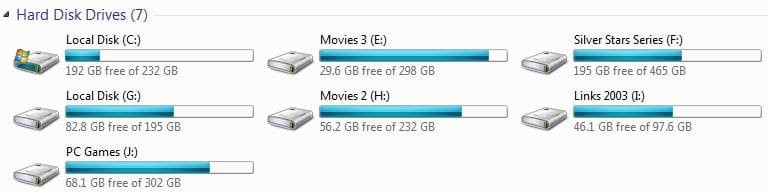
No Roy...no messages and the SSD that contains only Windows 7 has 192GB free. All other drives and partitions are used as storage and closest one that's almost filled still has 29GB.

G:,J:, and I: is 1 hard drive with 3 partitions and G: was the original C: drive and still has a copy of the old Windows 7 on it but I made sure it was NOT connected when I installed Windows 7 to the SSD to prevent conflicts in the boot manager and the only thing system restore is active on is C: drive on the SSD.

G: is what I'm considering formatting but I don't know it that will effect data access on J: and I:.

Ok Roy...Thanks for all your input. I'll try posting to a few other forums and see if I can figure out whats going on. Thanks again!
 

Attachments

  • HDspace.JPG
    HDspace.JPG
    26.1 KB · Views: 3

My Computer My Computer

Computer type
PC/Desktop
Computer Manufacturer/Model Number
Custom Build
OS
Windows 7 Pro 64bit SP1+Updates
CPU
Intel I3 6100
Motherboard
MSI Z170a Gaming 3 Bios ver a.4
Memory
G.Skill Ripjaws V Series 16GB (2 x 8GB) DDR4 2133mhz
Graphics Card(s)
MSI GTX 960 GAMING 100ME 2GB
Sound Card
X-Fi xtremegamer fatal1ty pro series
Monitor(s) Displays
LG 32MP58HQ-P 32"
Screen Resolution
1920X1080
Hard Drives
Samsung 850EVO SSD 250GB
4 WD HD
PSU
EVGA SuperNova 650 G2 650w
Case
Thermaltake Armor II Tower
Cooling
6 Fan air cooled modded case
Keyboard
Logitech G15
Mouse
Logitech G5
Internet Speed
Cable 120MB/3MB
Antivirus
Avast Ver 12.1.2272
Browser
Chrome
For anyone following this thread I'm not sure I corrected the problem yet but did locate the cause. It seams that the Windows Defender updates from MS was the cause as the system restore points would get deactivated right after Windows defender tried to create a restore point before installing the update.

I have now disabled Windows Defender and disabled it's service so I'll test to see if it happens again as I may need to catch an update via Windows Update and hide it as I'm not sure if updates would install for a disabled program. I'll update this thread with the final results.

And yes... I do have another AntiVirus and firewall running :O)
 

My Computer My Computer

Computer type
PC/Desktop
Computer Manufacturer/Model Number
Custom Build
OS
Windows 7 Pro 64bit SP1+Updates
CPU
Intel I3 6100
Motherboard
MSI Z170a Gaming 3 Bios ver a.4
Memory
G.Skill Ripjaws V Series 16GB (2 x 8GB) DDR4 2133mhz
Graphics Card(s)
MSI GTX 960 GAMING 100ME 2GB
Sound Card
X-Fi xtremegamer fatal1ty pro series
Monitor(s) Displays
LG 32MP58HQ-P 32"
Screen Resolution
1920X1080
Hard Drives
Samsung 850EVO SSD 250GB
4 WD HD
PSU
EVGA SuperNova 650 G2 650w
Case
Thermaltake Armor II Tower
Cooling
6 Fan air cooled modded case
Keyboard
Logitech G15
Mouse
Logitech G5
Internet Speed
Cable 120MB/3MB
Antivirus
Avast Ver 12.1.2272
Browser
Chrome
Your specs show you are using Avast, therefore Windows 7 Defender should of been turned off by you or Avast when Avast was installed.

Jack
 

My Computer My Computer

Computer type
PC/Desktop
Computer Manufacturer/Model Number
Home made Desktop
OS
Windows 10 Pro. 64/ version 1709 Windows 7 Pro/64
CPU
Intel i7-6800K @ 4.3
Motherboard
ASUS X-99 Deluxe II
Memory
Corsair Platinum 16 gig @2400
Graphics Card(s)
EVGA GTX 1070 OC
Monitor(s) Displays
Asus 27" LED LCD/VE278Q
Screen Resolution
1920-1080 or 1280-720 HDMI
Hard Drives
INTEL SSD 730-240 Gb Sata 3.0/
PSU
EVGA Platium 1200W
Case
Phanteks Luxe Tempered Glass 8 fans/ one radiator
Cooling
XSPC/ Water Cooled CPU
Keyboard
Das 4 Professional
Mouse
Logitech M705/MX Anywhere 2-S
Internet Speed
100 mbits
Antivirus
Microsoft Security Essentials/ Malwarebytes Premium 3.0/ SAS
Browser
I.E. 11 default/Firefox/ ISP Time Warner Cable/Spectrum
Other Info
LG BluRay Burner/
Sound system-KLipsch-THX/
Icy Dock ssd Hot Swap bays.
Your specs show you are using Avast, therefore Windows 7 Defender should of been turned off by you or Avast when Avast was installed.

Jack

Jack,

It was when I installed Avast but it can run along side a antivirus. Windows updates does some funky things sometimes (like every once in awhile turns my folder view back off for all files) and it got turned back on somehow (kinda like Messenger in the old days being enabled after an update even though the program was disabled). It's the same crapo...lol


As I was discussing with Roy it presented no issues as in Windows 7 it's not another antivirus but a anti-malware component if memory serves (Didn't go full Antivirus until Windows 8 I think or if you installed Microsoft Security Essentials for Windows 7) and the current problem is related to Windows Update of defender and system restore. Either way it's off and disabled at present (can't be removed/uninstalled from Windows 7). Anyway thanks for your input.
 

My Computer My Computer

Computer type
PC/Desktop
Computer Manufacturer/Model Number
Custom Build
OS
Windows 7 Pro 64bit SP1+Updates
CPU
Intel I3 6100
Motherboard
MSI Z170a Gaming 3 Bios ver a.4
Memory
G.Skill Ripjaws V Series 16GB (2 x 8GB) DDR4 2133mhz
Graphics Card(s)
MSI GTX 960 GAMING 100ME 2GB
Sound Card
X-Fi xtremegamer fatal1ty pro series
Monitor(s) Displays
LG 32MP58HQ-P 32"
Screen Resolution
1920X1080
Hard Drives
Samsung 850EVO SSD 250GB
4 WD HD
PSU
EVGA SuperNova 650 G2 650w
Case
Thermaltake Armor II Tower
Cooling
6 Fan air cooled modded case
Keyboard
Logitech G15
Mouse
Logitech G5
Internet Speed
Cable 120MB/3MB
Antivirus
Avast Ver 12.1.2272
Browser
Chrome
I know what the built in Windows 7 Defender is and I also know (IMO) that things would work better if Defender was kept off/disabled. One never knows what Defender will or will not do from update to update.

Windows Defender in W-8 and W-10 is basically MSE under another name.

My systems have MSE and Malwarebytes Premium. They have kept me clean without a bunch of jumping through hoops.

Jack
 

My Computer My Computer

Computer type
PC/Desktop
Computer Manufacturer/Model Number
Home made Desktop
OS
Windows 10 Pro. 64/ version 1709 Windows 7 Pro/64
CPU
Intel i7-6800K @ 4.3
Motherboard
ASUS X-99 Deluxe II
Memory
Corsair Platinum 16 gig @2400
Graphics Card(s)
EVGA GTX 1070 OC
Monitor(s) Displays
Asus 27" LED LCD/VE278Q
Screen Resolution
1920-1080 or 1280-720 HDMI
Hard Drives
INTEL SSD 730-240 Gb Sata 3.0/
PSU
EVGA Platium 1200W
Case
Phanteks Luxe Tempered Glass 8 fans/ one radiator
Cooling
XSPC/ Water Cooled CPU
Keyboard
Das 4 Professional
Mouse
Logitech M705/MX Anywhere 2-S
Internet Speed
100 mbits
Antivirus
Microsoft Security Essentials/ Malwarebytes Premium 3.0/ SAS
Browser
I.E. 11 default/Firefox/ ISP Time Warner Cable/Spectrum
Other Info
LG BluRay Burner/
Sound system-KLipsch-THX/
Icy Dock ssd Hot Swap bays.
I know what the built in Windows 7 Defender is and I also know (IMO) that things would work better if Defender was kept off/disabled. One never knows what Defender will or will not do from update to update.

Windows Defender in W-8 and W-10 is basically MSE under another name.

My systems have MSE and Malwarebytes Premium. They have kept me clean without a bunch of jumping through hoops.

Jack

:ditto: I am just the same I run Kaspersky with the free MBAM and SAS and have no problems because Kaspersky can be very picky who is on board my machines at times;)
 

My Computer My Computer

Computer type
PC/Desktop
Computer Manufacturer/Model Number
Own build (new) Desk1 / Asus ROG Win 7 / Desk2 1st build
OS
Desk1 7 Home Prem / Desk2 10 Pro / Main lap Asus ROG 10 Pro 2 laptop Toshiba 7 Pro Asus P2520 7 & 10
CPU
Desk1 i5 3750K / Laptop i7 GTX 860M / Desk2 i5 2500
Motherboard
Desk1 Asus P877-V / Desk2 Gigabyte H67 UD3H / Laptop ?
Memory
Desk1 8GB (1866) / Desk2 16GB (1333) / Laptop 8Gb DDR3
Graphics Card(s)
Desk 1& 2NVidia GTX 650 & Laptops on board Intel
Sound Card
Desk 1 & 2 -XONAR DG Realtek High Def audio Laptop
Monitor(s) Displays
Desk 1 Benq HD 2450 / Desk2 Philips 24" / Laptop 17.5"
Screen Resolution
1920x1080 D1 & D2 & Laptop 1
Hard Drives
Desk1 Samsung 120GB 830 SSD
Asus ROG 256GB 850 Pro SSD
Desk2 Samsung 840 256 SSD
Toshiba 120GB EVO
PSU
Desk 1 Corsair HX 1050/ Laptop ? / Desk 2 Corsair HX 650
Case
Desk 1 Cooler HAF XM ? Toshiba laptop / Desk2 Coolermaster
Cooling
Fans on all Desk1 -2 Desk2 - all Coolermasters 5 Laptop ?
Keyboard
Desk 1 MS Sidewinder X6 Desk 2 MS Sidewinder X 4
Mouse
Desk 1&2 - Gigabyte MS 900 gamer - laptop - Logitec wireless
Internet Speed
ADSL2+
Other Info
One other Desktop (tester) and spare Toshba laptop both with SSD's
Running Kaspersky 2016 ISS on all machines config'd identically
Logitec audio stereo systems on each machine (x3)
Canon MG5250MFC
Router/modem TP-Link running WPA2SK
Back
Top