
Windows 7 update error code C0000022

Rocks in Head

New member
Local time
8:09 PM
Messages
2
Hi,
Malware was found on this computer which I cleaned out (Malwarebytes etc.). But it left registry problems. I think I have those fixed (Tweaking.com - Windows Repair) and was able to install all but 6 or 7 updates so I cleaned things up again... now I'm left with "updates won't install error code C0000022". (See screenshot). I ran the SFC scan and the System Update Readiness Tool, but still the same error. I am attaching the CBS scan folder and am starting this new thread. Note: the CBS folder was too large to upload so I pulled out the CbsPersist_20170503220958.cab file in the zipped folder. The .cab file is 10MB by itself).
Because of this malware, I am also now getting a "not genuine Windows" message. I don't know if it's a chicken or the egg thing, but I'd like to get the updates installed as well as that message gone. I DO have a legitimate copy of Windows with the key of the side of the tower...
Any help with these errors would surely be appreciated!
Thank you!
 

Attachments
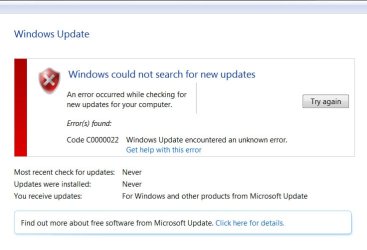
  • update_error_code.jpg
    update_error_code.jpg
    54.9 KB · Views: 15

My Computer

Computer type
PC/Desktop
Computer Manufacturer/Model Number
custom build
OS
Windows 7 professional 64bit
Antivirus
Kaspersky
Browser
Firefox
Hi,
Malware was found on this computer which I cleaned out (Malwarebytes etc.). But it left registry problems. I think I have those fixed (Tweaking.com - Windows Repair) and was able to install all but 6 or 7 updates so I cleaned things up again... now I'm left with "updates won't install error code C0000022". (See screenshot). I ran the SFC scan and the System Update Readiness Tool, but still the same error. I am attaching the CBS scan folder and am starting this new thread. Note: the CBS folder was too large to upload so I pulled out the CbsPersist_20170503220958.cab file in the zipped folder. The .cab file is 10MB by itself).
Because of this malware, I am also now getting a "not genuine Windows" message. I don't know if it's a chicken or the egg thing, but I'd like to get the updates installed as well as that message gone. I DO have a legitimate copy of Windows with the key of the side of the tower...
Any help with these errors would surely be appreciated!
Thank you!

Welcome to our forum Rocks in Head.

What I would do if it was my computer.
Save data of my choice to a external drive. Scan that data with security programs to make sure it wasn't infected.
Then I would do a Clean Install of Windows 7.

This tutorial by Brink will give you guidance.

Clean Install Windows 7 - Windows 7 Help Forums


Jack
 

My Computer

Computer type
PC/Desktop
Computer Manufacturer/Model Number
Home made Desktop
OS
Windows 10 Pro. 64/ version 1709 Windows 7 Pro/64
CPU
Intel i7-6800K @ 4.3
Motherboard
ASUS X-99 Deluxe II
Memory
Corsair Platinum 16 gig @2400
Graphics Card(s)
EVGA GTX 1070 OC
Monitor(s) Displays
Asus 27" LED LCD/VE278Q
Screen Resolution
1920-1080 or 1280-720 HDMI
Hard Drives
INTEL SSD 730-240 Gb Sata 3.0/
PSU
EVGA Platium 1200W
Case
Phanteks Luxe Tempered Glass 8 fans/ one radiator
Cooling
XSPC/ Water Cooled CPU
Keyboard
Das 4 Professional
Mouse
Logitech M705/MX Anywhere 2-S
Internet Speed
100 mbits
Antivirus
Microsoft Security Essentials/ Malwarebytes Premium 3.0/ SAS
Browser
I.E. 11 default/Firefox/ ISP Time Warner Cable/Spectrum
Other Info
LG BluRay Burner/
Sound system-KLipsch-THX/
Icy Dock ssd Hot Swap bays.
This forum has numerous threads from people with this same exact issue. In the forum instructions it says fixes for those issues are for those posters only. I was hoping for someone who was willing to help me with an answer like "run these commands... REG QUERY HKLM\SYSTEM\..." and tell me what it says..." and then come back with a fix, as in other posts. My wife really does not want to reinstall Windows and I'm reaching out here for help. Is there anything else I can run and post to help you figure this one out? Thank you!
 

My Computer

Computer type
PC/Desktop
Computer Manufacturer/Model Number
custom build
OS
Windows 7 professional 64bit
Antivirus
Kaspersky
Browser
Firefox
My thought are because you were infected and used tweaking programs a Clean Install would be the best and quickest way to solve your problem.
You also have error codes that can be caused by many things it would be a waste of time trying to figure out all the problems and causes. Not knowing what infections you had or have now is another reason I would do a Clean Install.

Just hang in there. Their may be others that have different ideas you could try.

Jack
 

My Computer

Computer type
PC/Desktop
Computer Manufacturer/Model Number
Home made Desktop
OS
Windows 10 Pro. 64/ version 1709 Windows 7 Pro/64
CPU
Intel i7-6800K @ 4.3
Motherboard
ASUS X-99 Deluxe II
Memory
Corsair Platinum 16 gig @2400
Graphics Card(s)
EVGA GTX 1070 OC
Monitor(s) Displays
Asus 27" LED LCD/VE278Q
Screen Resolution
1920-1080 or 1280-720 HDMI
Hard Drives
INTEL SSD 730-240 Gb Sata 3.0/
PSU
EVGA Platium 1200W
Case
Phanteks Luxe Tempered Glass 8 fans/ one radiator
Cooling
XSPC/ Water Cooled CPU
Keyboard
Das 4 Professional
Mouse
Logitech M705/MX Anywhere 2-S
Internet Speed
100 mbits
Antivirus
Microsoft Security Essentials/ Malwarebytes Premium 3.0/ SAS
Browser
I.E. 11 default/Firefox/ ISP Time Warner Cable/Spectrum
Other Info
LG BluRay Burner/
Sound system-KLipsch-THX/
Icy Dock ssd Hot Swap bays.
Back
Top