Hello!
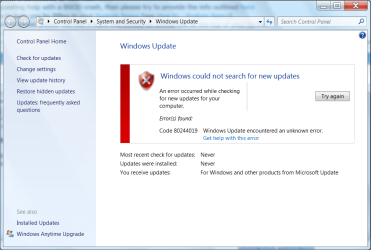
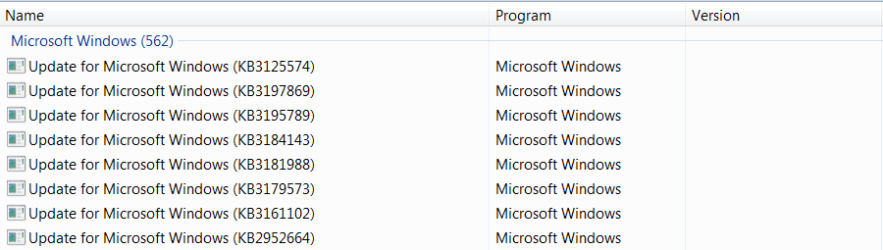
I followed Thrashzone's instructions from another thread to fix the update issue on my laptop, but it isn't working on our desktop, so here I am requesting some help.
HP Desktop P7-1019
Windows 7 Home Premium 64bit
Intel Pentium G620 @ 2.60GHz
4GB RAM
I've been playing around with different fixes and tools all day, but nothing seems to work.
Any help is appreciated...
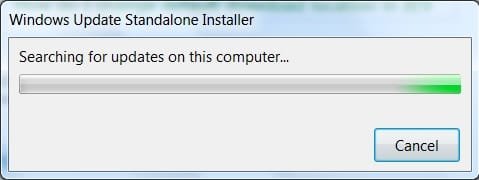
I downloaded and ran the latest System Update Readiness Tool (SURT) a couple of hours ago and it's been stuck on Searching for updates on this computer the entire time.
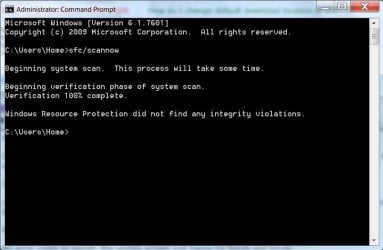
Ran an SFC Scan- did not find any integrity violations
No error codes to report- the update screen just hangs for hours and hours.
CBS Log- attached; hope the compression worked.
MSA Report:
Diagnostic Report (1.9.0027.0):
-----------------------------------------
Windows Validation Data-->
Validation Code: 0
Cached Online Validation Code: 0x0
Windows Product Key: *****-*****-73CQT-WMF7J-3Q6C9
Windows Product Key Hash: KaFG+RmurcM3ZxzWyfEP9WtPUJw=
Windows Product ID: 00359-OEM-8992687-00010
Windows Product ID Type: 2
Windows License Type: OEM SLP
Windows OS version: 6.1.7601.2.00010300.1.0.003
ID: {F0F1F059-6934-4BD8-816D-59323D416979}(3)
Is Admin: Yes
TestCab: 0x0
LegitcheckControl ActiveX: N/A, hr = 0x80070002
Signed By: N/A, hr = 0x80070002
Product Name: Windows 7 Home Premium
Architecture: 0x00000009
Build lab: 7601.win7sp1_ldr.160408-2045
TTS Error:
Validation Diagnostic:
Resolution Status: N/A
Vista WgaER Data-->
ThreatID(s): N/A, hr = 0x80070002
Version: N/A, hr = 0x80070002
Windows XP Notifications Data-->
Cached Result: N/A, hr = 0x80070002
File Exists: No
Version: N/A, hr = 0x80070002
WgaTray.exe Signed By: N/A, hr = 0x80070002
WgaLogon.dll Signed By: N/A, hr = 0x80070002
OGA Notifications Data-->
Cached Result: N/A, hr = 0x80070002
Version: N/A, hr = 0x80070002
OGAExec.exe Signed By: N/A, hr = 0x80070002
OGAAddin.dll Signed By: N/A, hr = 0x80070002
OGA Data-->
Office Status: 109 N/A
OGA Version: N/A, 0x80070002
Signed By: N/A, hr = 0x80070002
Office Diagnostics: 025D1FF3-364-80041010_025D1FF3-229-80041010_025D1FF3-230-1_025D1FF3-517-80040154_025D1FF3-237-80040154_025D1FF3-238-2_025D1FF3-244-80070002_025D1FF3-258-3
Browser Data-->
Proxy settings: N/A
User Agent: Mozilla/4.0 (compatible; MSIE 8.0; Win32)
Default Browser: C:\Program Files\Internet Explorer\iexplore.exe
Download signed ActiveX controls: Prompt
Download unsigned ActiveX controls: Disabled
Run ActiveX controls and plug-ins: Allowed
Initialize and script ActiveX controls not marked as safe: Disabled
Allow scripting of Internet Explorer Webbrowser control: Disabled
Active scripting: Allowed
Script ActiveX controls marked as safe for scripting: Allowed
File Scan Data-->
Other data-->
Office Details: <GenuineResults><MachineData><UGUID>{F0F1F059-6934-4BD8-816D-59323D416979}</UGUID><Version>1.9.0027.0</Version><OS>6.1.7601.2.00010300.1.0.003</OS><Architecture>x64</Architecture><PKey>*****-*****-*****-*****-3Q6C9</PKey><PID>00359-OEM-8992687-00010</PID><PIDType>2</PIDType><SID>S-1-5-21-2330671853-196079757-2331677344</SID><SYSTEM><Manufacturer>Hewlett-Packard</Manufacturer><Model>p7-1019</Model></SYSTEM><BIOS><Manufacturer>AMI</Manufacturer><Version>7.03</Version><SMBIOSVersion major="2" minor="6"/><Date>20110329000000.000000+000</Date></BIOS><HWID>A7D03707018400FE</HWID><UserLCID>1009</UserLCID><SystemLCID>0409</SystemLCID><TimeZone>Mountain Standard Time(GMT-07:00)</TimeZone><iJoin>0</iJoin><SBID><stat>3</stat><msppid></msppid><name></name><model></model></SBID><OEM><OEMID>HPQOEM</OEMID><OEMTableID>SLIC-CPC</OEMTableID></OEM><GANotification/></MachineData><Software><Office><Result>109</Result><Products/><Applications/></Office></Software></GenuineResults>
Spsys.log Content: 0x80070002
Licensing Data-->
Software licensing service version: 6.1.7601.17514
Name: Windows(R) 7, HomePremium edition
Description: Windows Operating System - Windows(R) 7, OEM_SLP channel
Activation ID: d2c04e90-c3dd-4260-b0f3-f845f5d27d64
Application ID: 55c92734-d682-4d71-983e-d6ec3f16059f
Extended PID: 00359-00178-926-800010-02-1033-7601.0000-0422011
Installation ID: 007894581610555470586182218181147724188154500983331656
Processor Certificate URL: SpcService Web Service
Machine Certificate URL: RacService Web Service
Use License URL: UseLicenseService Web Service
Product Key Certificate URL: PkcService Web Service
Partial Product Key: 3Q6C9
License Status: Licensed
Remaining Windows rearm count: 1
Trusted time: 12/01/16 7:03:08 PM
Windows Activation Technologies-->
HrOffline: 0x00000000
HrOnline: 0x00000000
HealthStatus: 0x0000000000000000
Event Time Stamp: 1:29:2016 07:24
ActiveX: Registered, Version: 7.1.7600.16395
Admin Service: Registered, Version: 7.1.7600.16395
HealthStatus Bitmask Output:
HWID Data-->
HWID Hash Current: LAAAAAEAAQABAAEAAAABAAAAAgABAAEA6GHsIfB1JOm6LbBAWKUklMBxLnM=
OEM Activation 1.0 Data-->
N/A
OEM Activation 2.0 Data-->
BIOS valid for OA 2.0: yes
Windows marker version: 0x20001
OEMID and OEMTableID Consistent: yes
BIOS Information:
ACPI Table Name OEMID Value OEMTableID Value
APIC HPQOEM SLIC-CPC
FACP HPQOEM SLIC-CPC
DBGP HPQOEM SLIC-CPC
HPET HPQOEM SLIC-CPC
MCFG HPQOEM SLIC-CPC
SSDT HPQOEM SLIC-CPC
SLIC HPQOEM SLIC-CPC
I followed Thrashzone's instructions from another thread to fix the update issue on my laptop, but it isn't working on our desktop, so here I am requesting some help.
HP Desktop P7-1019
Windows 7 Home Premium 64bit
Intel Pentium G620 @ 2.60GHz
4GB RAM
I've been playing around with different fixes and tools all day, but nothing seems to work.
Any help is appreciated...
I downloaded and ran the latest System Update Readiness Tool (SURT) a couple of hours ago and it's been stuck on Searching for updates on this computer the entire time.
Ran an SFC Scan- did not find any integrity violations
No error codes to report- the update screen just hangs for hours and hours.
CBS Log- attached; hope the compression worked.
MSA Report:
Diagnostic Report (1.9.0027.0):
-----------------------------------------
Windows Validation Data-->
Validation Code: 0
Cached Online Validation Code: 0x0
Windows Product Key: *****-*****-73CQT-WMF7J-3Q6C9
Windows Product Key Hash: KaFG+RmurcM3ZxzWyfEP9WtPUJw=
Windows Product ID: 00359-OEM-8992687-00010
Windows Product ID Type: 2
Windows License Type: OEM SLP
Windows OS version: 6.1.7601.2.00010300.1.0.003
ID: {F0F1F059-6934-4BD8-816D-59323D416979}(3)
Is Admin: Yes
TestCab: 0x0
LegitcheckControl ActiveX: N/A, hr = 0x80070002
Signed By: N/A, hr = 0x80070002
Product Name: Windows 7 Home Premium
Architecture: 0x00000009
Build lab: 7601.win7sp1_ldr.160408-2045
TTS Error:
Validation Diagnostic:
Resolution Status: N/A
Vista WgaER Data-->
ThreatID(s): N/A, hr = 0x80070002
Version: N/A, hr = 0x80070002
Windows XP Notifications Data-->
Cached Result: N/A, hr = 0x80070002
File Exists: No
Version: N/A, hr = 0x80070002
WgaTray.exe Signed By: N/A, hr = 0x80070002
WgaLogon.dll Signed By: N/A, hr = 0x80070002
OGA Notifications Data-->
Cached Result: N/A, hr = 0x80070002
Version: N/A, hr = 0x80070002
OGAExec.exe Signed By: N/A, hr = 0x80070002
OGAAddin.dll Signed By: N/A, hr = 0x80070002
OGA Data-->
Office Status: 109 N/A
OGA Version: N/A, 0x80070002
Signed By: N/A, hr = 0x80070002
Office Diagnostics: 025D1FF3-364-80041010_025D1FF3-229-80041010_025D1FF3-230-1_025D1FF3-517-80040154_025D1FF3-237-80040154_025D1FF3-238-2_025D1FF3-244-80070002_025D1FF3-258-3
Browser Data-->
Proxy settings: N/A
User Agent: Mozilla/4.0 (compatible; MSIE 8.0; Win32)
Default Browser: C:\Program Files\Internet Explorer\iexplore.exe
Download signed ActiveX controls: Prompt
Download unsigned ActiveX controls: Disabled
Run ActiveX controls and plug-ins: Allowed
Initialize and script ActiveX controls not marked as safe: Disabled
Allow scripting of Internet Explorer Webbrowser control: Disabled
Active scripting: Allowed
Script ActiveX controls marked as safe for scripting: Allowed
File Scan Data-->
Other data-->
Office Details: <GenuineResults><MachineData><UGUID>{F0F1F059-6934-4BD8-816D-59323D416979}</UGUID><Version>1.9.0027.0</Version><OS>6.1.7601.2.00010300.1.0.003</OS><Architecture>x64</Architecture><PKey>*****-*****-*****-*****-3Q6C9</PKey><PID>00359-OEM-8992687-00010</PID><PIDType>2</PIDType><SID>S-1-5-21-2330671853-196079757-2331677344</SID><SYSTEM><Manufacturer>Hewlett-Packard</Manufacturer><Model>p7-1019</Model></SYSTEM><BIOS><Manufacturer>AMI</Manufacturer><Version>7.03</Version><SMBIOSVersion major="2" minor="6"/><Date>20110329000000.000000+000</Date></BIOS><HWID>A7D03707018400FE</HWID><UserLCID>1009</UserLCID><SystemLCID>0409</SystemLCID><TimeZone>Mountain Standard Time(GMT-07:00)</TimeZone><iJoin>0</iJoin><SBID><stat>3</stat><msppid></msppid><name></name><model></model></SBID><OEM><OEMID>HPQOEM</OEMID><OEMTableID>SLIC-CPC</OEMTableID></OEM><GANotification/></MachineData><Software><Office><Result>109</Result><Products/><Applications/></Office></Software></GenuineResults>
Spsys.log Content: 0x80070002
Licensing Data-->
Software licensing service version: 6.1.7601.17514
Name: Windows(R) 7, HomePremium edition
Description: Windows Operating System - Windows(R) 7, OEM_SLP channel
Activation ID: d2c04e90-c3dd-4260-b0f3-f845f5d27d64
Application ID: 55c92734-d682-4d71-983e-d6ec3f16059f
Extended PID: 00359-00178-926-800010-02-1033-7601.0000-0422011
Installation ID: 007894581610555470586182218181147724188154500983331656
Processor Certificate URL: SpcService Web Service
Machine Certificate URL: RacService Web Service
Use License URL: UseLicenseService Web Service
Product Key Certificate URL: PkcService Web Service
Partial Product Key: 3Q6C9
License Status: Licensed
Remaining Windows rearm count: 1
Trusted time: 12/01/16 7:03:08 PM
Windows Activation Technologies-->
HrOffline: 0x00000000
HrOnline: 0x00000000
HealthStatus: 0x0000000000000000
Event Time Stamp: 1:29:2016 07:24
ActiveX: Registered, Version: 7.1.7600.16395
Admin Service: Registered, Version: 7.1.7600.16395
HealthStatus Bitmask Output:
HWID Data-->
HWID Hash Current: LAAAAAEAAQABAAEAAAABAAAAAgABAAEA6GHsIfB1JOm6LbBAWKUklMBxLnM=
OEM Activation 1.0 Data-->
N/A
OEM Activation 2.0 Data-->
BIOS valid for OA 2.0: yes
Windows marker version: 0x20001
OEMID and OEMTableID Consistent: yes
BIOS Information:
ACPI Table Name OEMID Value OEMTableID Value
APIC HPQOEM SLIC-CPC
FACP HPQOEM SLIC-CPC
DBGP HPQOEM SLIC-CPC
HPET HPQOEM SLIC-CPC
MCFG HPQOEM SLIC-CPC
SSDT HPQOEM SLIC-CPC
SLIC HPQOEM SLIC-CPC
Attachments
Last edited:
My Computer
At a glance
Windows 7 Home Premium 64bitIntel Core2 Duo T66004GB
- Computer type
- Laptop
- Computer Manufacturer/Model Number
- HP Pavilion dv6 Notebook PC
- OS
- Windows 7 Home Premium 64bit
- CPU
- Intel Core2 Duo T6600
- Memory
- 4GB
- Antivirus
- Panda