Windows 7 update service not present

dragosb

New member
Local time
6:50 PM
Messages
5
Hi,

I have a problem with the windows update. It has a red icon telling me that it is disabled and if I click on check updates it tells me that the service is not running. I searched for the windows update service and I could not find it in the list. Please help me find out what the problem is and how I can solve it.

Thank you
 

My Computer

OS
Windows 7 Ultimate
CPU
Intel Quad 2.4 GHz
Motherboard
Asrock VSTA
Memory
2 GB
Graphics Card(s)
ATI X800
Monitor(s) Displays
Samsung LCD 19
Hard Drives
320 GB SATA II
Hello dragosb,

Welcome to Seven Forums.

Type sevices in the start menu search box and hit enter. Make sure the Windows update service is started and set to automatic (Rt. click on a service and select properties to change).

Hope this helps.

Gary
 

My Computer

Computer Manufacturer/Model Number
Dell XPS420
OS
Vista Ult 64 bit Seven Ult RTM x64
CPU
Intel Core2 Quad Q6600 2.40 gigahertz
Memory
Crucial Ballistix 4x2GB PC2 6400
Graphics Card(s)
NVIDIA GeForce 8600 GTS 256 MB
Sound Card
Creative SB X-Fi audio
Monitor(s) Displays
HP w2207 + HPvs15
Screen Resolution
1680x1050 + 1024x768
Hard Drives
2-WD5000AAKS-500 GB
WD5000AAV-500 GB external
Keyboard
Microsoft Comfort Curve
Mouse
MX Revolution
Other Info
Wacom Intuos 2 Graphics Tablet
Experience Index=5.5
What is the name of the service

I can not find the windows update service in the list.
Can you please tell what is the name of the service as I do not seem to find it
I do not have any windows update or automatic update service present

Please help
 

My Computer

OS
Windows 7 Ultimate
CPU
Intel Quad 2.4 GHz
Motherboard
Asrock VSTA
Memory
2 GB
Graphics Card(s)
ATI X800
Monitor(s) Displays
Samsung LCD 19
Hard Drives
320 GB SATA II
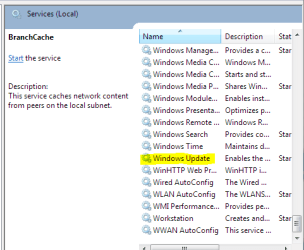
Sorry I meant to have this pic in the post, but that is what it is called.

WU.PNG

Don't know why it wouldn't be there.
 

My Computer

Computer Manufacturer/Model Number
Dell XPS420
OS
Vista Ult 64 bit Seven Ult RTM x64
CPU
Intel Core2 Quad Q6600 2.40 gigahertz
Memory
Crucial Ballistix 4x2GB PC2 6400
Graphics Card(s)
NVIDIA GeForce 8600 GTS 256 MB
Sound Card
Creative SB X-Fi audio
Monitor(s) Displays
HP w2207 + HPvs15
Screen Resolution
1680x1050 + 1024x768
Hard Drives
2-WD5000AAKS-500 GB
WD5000AAV-500 GB external
Keyboard
Microsoft Comfort Curve
Mouse
MX Revolution
Other Info
Wacom Intuos 2 Graphics Tablet
Experience Index=5.5
Service not in list

Unfortunatelly I do not have the service in the list.
Anyone with some ideas of what could be the problem?

Thank you
 

My Computer

OS
Windows 7 Ultimate
CPU
Intel Quad 2.4 GHz
Motherboard
Asrock VSTA
Memory
2 GB
Graphics Card(s)
ATI X800
Monitor(s) Displays
Samsung LCD 19
Hard Drives
320 GB SATA II
Unfortunatelly I do not have the service in the list.
Anyone with some ideas of what could be the problem?

Thank you


Just a thought, Is Windows Activated ?
 

My Computer

Computer type
PC/Desktop
Computer Manufacturer/Model Number
Self Built
OS
Win 10 Pro x64
CPU
Intel I5-2500K @3.3GHz
Motherboard
Asrock P67 Extreme4
Memory
16GB G.Skill Ripjaws X (4x4GB)
Graphics Card(s)
EVGA GeForce 750 Ti SC 2GB
Sound Card
ASUS Xonar DG 5.1 Channels 24-bit 96KHz PCI Interface Sound
Monitor(s) Displays
auria eq2367
Screen Resolution
1920 x 1080
Hard Drives
250GB Samsung 850 EVO SSD
1TB WD Blue
1TB Hitachi
PSU
SeaSonic X 650W 80 Plus Gold
Case
Corsair Obsidian 750D
Cooling
Corsair H60, Three 140mm case fans
Keyboard
Logitech Wireless Keyboard K520
Mouse
Logitech Wireless Mouse M310
Internet Speed
Wave Broadband ~ 100 dn 5 up
Antivirus
Windows Defender, Malwarebytes Premium
Browser
Edge, IE11, Chrome
Other Info
Laptop specs: HP g7-1365dx /
CPU: AMD A6-3420M APU with Radeon(tm) HD Graphics /
RAM: Crucial 8Gb (2x4Gb) /
SSD: Crucial M4-CT128M4SSD2 ATA Device/ FW 000F /
GFX: AMD Radeon HD 6520G /
OS: Windows 10 Pro x64
Just checked

I have just checked and it says that it is activated and genuine
 

My Computer

OS
Windows 7 Ultimate
CPU
Intel Quad 2.4 GHz
Motherboard
Asrock VSTA
Memory
2 GB
Graphics Card(s)
ATI X800
Monitor(s) Displays
Samsung LCD 19
Hard Drives
320 GB SATA II
seems like I found the problem, the service was not registred and I had to register it mannualy with regsvr32.exe
 

My Computer

OS
Windows 7 Ultimate
CPU
Intel Quad 2.4 GHz
Motherboard
Asrock VSTA
Memory
2 GB
Graphics Card(s)
ATI X800
Monitor(s) Displays
Samsung LCD 19
Hard Drives
320 GB SATA II
can you post a screenshot of what you are seeing on windows update.
 

My Computer

Computer type
PC/Desktop
Computer Manufacturer/Model Number
Self Built
OS
Win 10 Pro x64
CPU
Intel I5-2500K @3.3GHz
Motherboard
Asrock P67 Extreme4
Memory
16GB G.Skill Ripjaws X (4x4GB)
Graphics Card(s)
EVGA GeForce 750 Ti SC 2GB
Sound Card
ASUS Xonar DG 5.1 Channels 24-bit 96KHz PCI Interface Sound
Monitor(s) Displays
auria eq2367
Screen Resolution
1920 x 1080
Hard Drives
250GB Samsung 850 EVO SSD
1TB WD Blue
1TB Hitachi
PSU
SeaSonic X 650W 80 Plus Gold
Case
Corsair Obsidian 750D
Cooling
Corsair H60, Three 140mm case fans
Keyboard
Logitech Wireless Keyboard K520
Mouse
Logitech Wireless Mouse M310
Internet Speed
Wave Broadband ~ 100 dn 5 up
Antivirus
Windows Defender, Malwarebytes Premium
Browser
Edge, IE11, Chrome
Other Info
Laptop specs: HP g7-1365dx /
CPU: AMD A6-3420M APU with Radeon(tm) HD Graphics /
RAM: Crucial 8Gb (2x4Gb) /
SSD: Crucial M4-CT128M4SSD2 ATA Device/ FW 000F /
GFX: AMD Radeon HD 6520G /
OS: Windows 10 Pro x64
seems like I found the problem, the service was not registred and I had to register it mannualy with regsvr32.exe

so you got it fixed?
 

My Computer

Computer type
PC/Desktop
Computer Manufacturer/Model Number
Self Built
OS
Win 10 Pro x64
CPU
Intel I5-2500K @3.3GHz
Motherboard
Asrock P67 Extreme4
Memory
16GB G.Skill Ripjaws X (4x4GB)
Graphics Card(s)
EVGA GeForce 750 Ti SC 2GB
Sound Card
ASUS Xonar DG 5.1 Channels 24-bit 96KHz PCI Interface Sound
Monitor(s) Displays
auria eq2367
Screen Resolution
1920 x 1080
Hard Drives
250GB Samsung 850 EVO SSD
1TB WD Blue
1TB Hitachi
PSU
SeaSonic X 650W 80 Plus Gold
Case
Corsair Obsidian 750D
Cooling
Corsair H60, Three 140mm case fans
Keyboard
Logitech Wireless Keyboard K520
Mouse
Logitech Wireless Mouse M310
Internet Speed
Wave Broadband ~ 100 dn 5 up
Antivirus
Windows Defender, Malwarebytes Premium
Browser
Edge, IE11, Chrome
Other Info
Laptop specs: HP g7-1365dx /
CPU: AMD A6-3420M APU with Radeon(tm) HD Graphics /
RAM: Crucial 8Gb (2x4Gb) /
SSD: Crucial M4-CT128M4SSD2 ATA Device/ FW 000F /
GFX: AMD Radeon HD 6520G /
OS: Windows 10 Pro x64
Same problem

I am having the same problem. the only difference is that i can see windows update service and its running. BIT, cryptographic and windows event log services are also running. I think there is an issue with registry. Any suggestions?
 

My Computer

Computer Manufacturer/Model Number
HP DV8T
OS
Windows 7 Ultimate
CPU
Core i7-720QM
Memory
4 Gb
Graphics Card(s)
GT 230
Hard Drives
320 Gb 7200 RPM
I am having the same problem. the only difference is that i can see windows update service and its running. BIT, cryptographic and windows event log services are also running. I think there is an issue with registry. Any suggestions?

Welcome to SF,

Can you explain a little better what the problem is your having.
 

My Computer

Computer type
PC/Desktop
Computer Manufacturer/Model Number
Self Built
OS
Win 10 Pro x64
CPU
Intel I5-2500K @3.3GHz
Motherboard
Asrock P67 Extreme4
Memory
16GB G.Skill Ripjaws X (4x4GB)
Graphics Card(s)
EVGA GeForce 750 Ti SC 2GB
Sound Card
ASUS Xonar DG 5.1 Channels 24-bit 96KHz PCI Interface Sound
Monitor(s) Displays
auria eq2367
Screen Resolution
1920 x 1080
Hard Drives
250GB Samsung 850 EVO SSD
1TB WD Blue
1TB Hitachi
PSU
SeaSonic X 650W 80 Plus Gold
Case
Corsair Obsidian 750D
Cooling
Corsair H60, Three 140mm case fans
Keyboard
Logitech Wireless Keyboard K520
Mouse
Logitech Wireless Mouse M310
Internet Speed
Wave Broadband ~ 100 dn 5 up
Antivirus
Windows Defender, Malwarebytes Premium
Browser
Edge, IE11, Chrome
Other Info
Laptop specs: HP g7-1365dx /
CPU: AMD A6-3420M APU with Radeon(tm) HD Graphics /
RAM: Crucial 8Gb (2x4Gb) /
SSD: Crucial M4-CT128M4SSD2 ATA Device/ FW 000F /
GFX: AMD Radeon HD 6520G /
OS: Windows 10 Pro x64
I am having the same problem. the only difference is that i can see windows update service and its running. BIT, cryptographic and windows event log services are also running. I think there is an issue with registry. Any suggestions?
It's rather another problem with WU.

Control Panel>>Windows Update and read in Update History with which one hotfixes do you have problem,what error code is returned.
 

My Computer

Computer Manufacturer/Model Number
Custom made
OS
Windows 7 Professional x64 PL
CPU
AMD Athlon 4450e
Motherboard
Giga-Byte GA-MA69G-S3H
Memory
GoodRam DDR2 2x2048MB (FSB 800MHz)
Graphics Card(s)
nVidia GeForce 9600GT (G94-300) 1024 MB
Monitor(s) Displays
SAMSUNG SyncMaster HS2P301688
Hard Drives
Seagate ST3750330AS 750GB
PSU
Corsair 550W
Cooling
AeroCool ExtremeEngine 3T
I've also had that problem it was driving me crazy. i looked everywhere tried re-registering the dll's but got errors the services i had Missing was BITS & Windows Update Service.

The way i solved it was going to that blackviper site was it? and downloaded a default reg file of the services i was missing entered them back in registry... restarted and they were back.
 

My Computer

Computer type
PC/Desktop
OS
Win7 Home Premium x64 SP1, Archlinux x86_64. Elementary Luna
I had the same problem and this fixed it:

start > Run > regsvr32 wuaueng.dll

Restart and try again
 

My Computer

OS
Windows 7 Ultimate x64
Back
Top