Solved windows 7 update stuck at "checking for updates..."

Had the same problem after restoring my computer to factory state Windows 7 Home Premium. Worked for several days to get it fixed, to no avail until today. My Windows Update Agent was v7.6.7600.320 and it just ran on with no results, once for a full 24 hours. I tried the DNS changes, the Fix-It download, and the KB3083710 and KB3102810 fixes, but none resolved the issue. UNTIL I downloaded KB3138612 that installed the very latest version of the Windows Updater v7.6.7601.19161 and now I am working smoothly through several hundred updates. The solution is mentioned in more detail elsewhere in this forum, but it is a simple fix. Thank you, SevenForum contributors!!!

UPDATE: This fix worked until I installed "important" windows updates from April 12, then problems started all over again. Having to roll back to restore point. Even the Windows stand alone updater will not work now.
 
Last edited:

My Computer

Computer type
PC/Desktop
Computer Manufacturer/Model Number
Dell XPS7100
OS
Win 7 Home Premium x64
Antivirus
Bitdefender
Browser
Firefox
April 2016 - Windows Update Stuck

SOLVED:

Windows 7 SP1 64

Extremely frustrated for many days trying every solution posted on the Internet. Then finally I found this comment on Softpedia's website and it absolutely works (very easy - but why should we have to do this?):

To resolve this issue: first install KB3145739 manually. Go to Microsoft website to download and then install, even if your Installed History already shows this update.
Next you should restart and finally you can check for updates in manual mode.
It takes between 5 or 10 minutes.
Comment posted by: Chooky
14 Apr 2016 13:00 CMT

Windows Update Hanging When Downloading April 12 Patches (Scroll down the Comments section until you find a posting by Chooky.)

Hopefully it will help some people avoid hours or days of frustration or drastic, complicated but unnecessary troubleshooting steps.
 

My Computer

Computer type
Laptop
Computer Manufacturer/Model Number
Sony Vaio VGN-FW465J
OS
Windows 7 Home Premium, SP 1 64bit
CPU
Intel Core 2 Duo P8700 @2.53 GHz
Memory
RAM 4GB
Graphics Card(s)
ATI Radeon
Hard Drives
Crucial MX200 SSD 256 GB
Antivirus
MSE
Browser
Firefox
(SOLVED) Windows 7 Stuck at Checking for updates

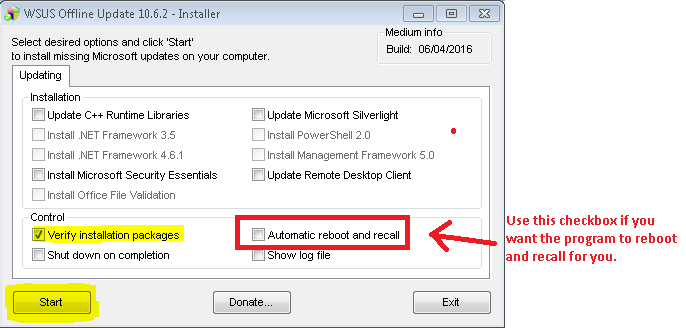
Recently I had the same problem. I had kept my system on update for the whole night. And in the morning it was still showing checking for updates... After searching the web for hours and trying many solutions posted here and other forums. I finally was able to SOLVE the problem by installing windows updates offline tool.This tool allowed me to install all the updates without using the Microsoft's crappy windows update agent. After installing all the updates the windows update started working properly.

The download link to the offline windows update tool I used is WSUS Offline Update - Update Microsoft Windows and Office without an Internet connection

I found a very comprehensive step by step tutorial for using this tool here Checking for updates stuck [Solved] [Windows 7 SP 1, 8.1 &10] - How I Solve

I hope this information would save others some time...
 

My Computer

Computer type
Laptop
Computer Manufacturer/Model Number
Dell
OS
Windows 7 Ultimate x64
This has worked for me every time:

The solution:

Stop the Windows Update Service (wuauserv).
Download and install KB3050265
reboot
Download and install KB3102810
Reboot and check for updates again. All of our machines found their required updates in less than 5 minutes.
 

My Computer

Computer type
PC/Desktop
Computer Manufacturer/Model Number
hp
OS
windows 7 64-bit
Thanks larry garner!!!

I have a windows 7 laptop that would not successfully check for windows updates. I spent 2 days trying about 20 different fixes from many different websites. I tried MS fixit, manual updates, deleting the SoftwareDistribution files, sfc /scannow, checking for malware, and fixing fix BITS all to no avail. Although fixing the BITS service and making sure it was started was probably a good idea. After reading Larry's post, I decided to try the offline update tool he recommended.


It fixed my problem with a hung windows update, but I would like to add a few comments.

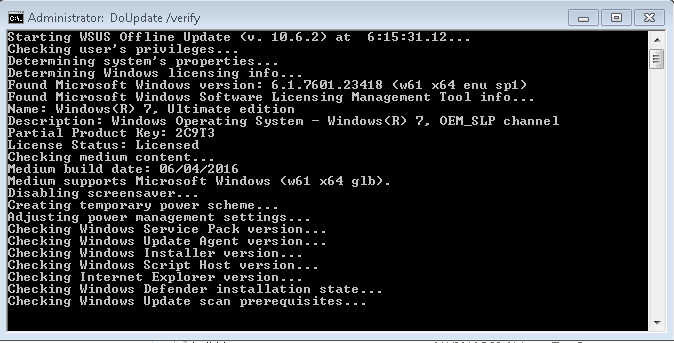
The offline update tool took over an hour to download the tool and install the updates, and used the cmd window to detail the progress, so you were never wondering what was going on.

After running the tool (actually 2 tools in 2 steps) i retried windows update.
windows update check for updates stage was fixed - it took less than 30 minutes to find updates. However, I had a problem when I tried to install the updates, it seemed to hang creating a restore point.
At that point I reran the microsoft fixit tool i think i got from
Troubleshoot problems with installing updates - Windows Help
windows update then worked fine.

Also unexpectedly, windows update found several updates immediately after running the manual update tool, so the tool is apparently not 100%, but at least windows update started working after the manual install.

THANKS LARRY!!!!
 

My Computer

Computer type
PC/Desktop
OS
Windows 7 Home Premium
How do you ever know if it works?

Given that Microsoft designed Windows Update to be unassailably opaque to screw users over as completely as possible, how does anyone determine whether any action taken to fix it worked? How long do I have to leave Windows Update searching before I conclude that it still isn't working and try something else? 24 hours? Three weeks?
 

My Computer

Computer type
PC/Desktop
Computer Manufacturer/Model Number
Custom Build
OS
Windows 7 Home Premium 64 Bit
CPU
Pentium G3220
Motherboard
MSI H81M-E33 V2
Memory
8 GB
Graphics Card(s)
ATI Radeon HD 5450
Hard Drives
Seagate ST1000DM03-1CH162
WDC WD1200SD-01KCC0
Antivirus
AVG
Browser
Google Chrome
Hello!

Here are a couple of Methods that could work for you. Please let me know if your issue does -OR- doesn't get resolved.

Here are 3 Methods that I've found, that worked for people in the past.

Note: Try to make sure you Windows Update is/isn't working by letting it "Checking for updates" for at least 1 hour.

Method 1: Difficulty: Easy

  1. Download the following tool below.
  2. Download this tool: Microsoft Fixit Tool
  3. Run the file once it finishes downloading.
  4. Once the window appears on your screen, click the "Next" Button.
  5. Let the program scan for errors, DO NOT click "Cancel". (This process may take some time.)
  6. Once the program finishes scanning, it will list the following errors that have been "Fixed" or "Not Fixed".
  7. If any errors were "Not Fixed", report them to me here. Left-Click the "Close the troubleshooter" Button.
  8. Restart your computer. Try to update your Windows.

    If Method 1 doesn't work proceed to Method 2.

Method 2: Difficulty: Moderate

  1. Press the Windows Key and the "R" Key simultaneously. [Win+R]
  2. A "Run" Box should appear. Type "services.msc" into the search box and press the "OK" button.
  3. The "Services" window should appear on your screen. Scroll down to "Windows Update" Service in the Services (Local) section.
  4. Right-Click on "Windows Update", then Left-Click "Stop" button. Please wait until the service completely stops. Do not close the Window.
  5. Press the Windows Key and the "R" Key simultaneously. [Win+R] again.
  6. Remove "services.msc" then type "C:\Windows\SoftwareDistribution\" into the search bar then Left-Click "OK". Windows Explorer should appear on your screen.
  7. Delete all contents within this folder. Left-Click + Hold + Drag until you completely highlight all the contents. Let go of Left-Click and press the "Delete" Button and Left-Click "Yes".
  8. Close Windows Explorer and return to the "Services" Window. Right-Click "Windows Update" then Left-Click "Start". Wait for the service to completely start then close the window.
  9. Restart your computer. Then try to update Windows.

    If Method 2 doesn't work proceed to Method 3.
Now this Method doesn't necessarily fix Windows Update right away (does after updates are done) but rather than a bypass or a workaround. I will provide images with this Method sense it's a little tricky.

I hope this works. 99% sure it will! Good luck!

Method 3: Difficulty: Somewhat Hard

  • Please download the following tools below.
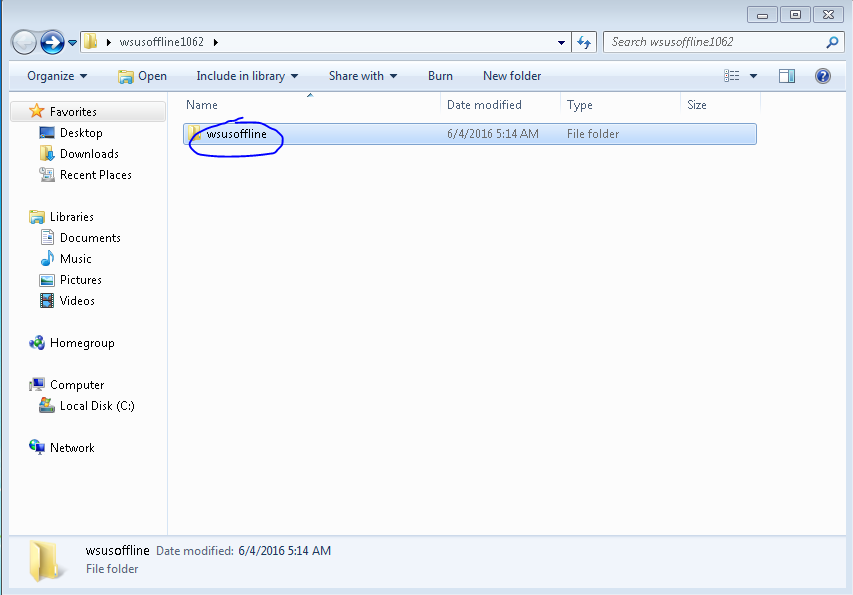
  • Download: WSUS Offline Update
  • Go to your downloads file. (Usually C:\Users\"Profile Name"\Downloads) and Right-Click "Extract All..."
  • The Extract Window should appear on your screen. Click the "Browse" Button on the window. Navigate and Left-Click the "Desktop" icon then press the "OK" Button.
  • Open the new folder that appears on your Desktop.
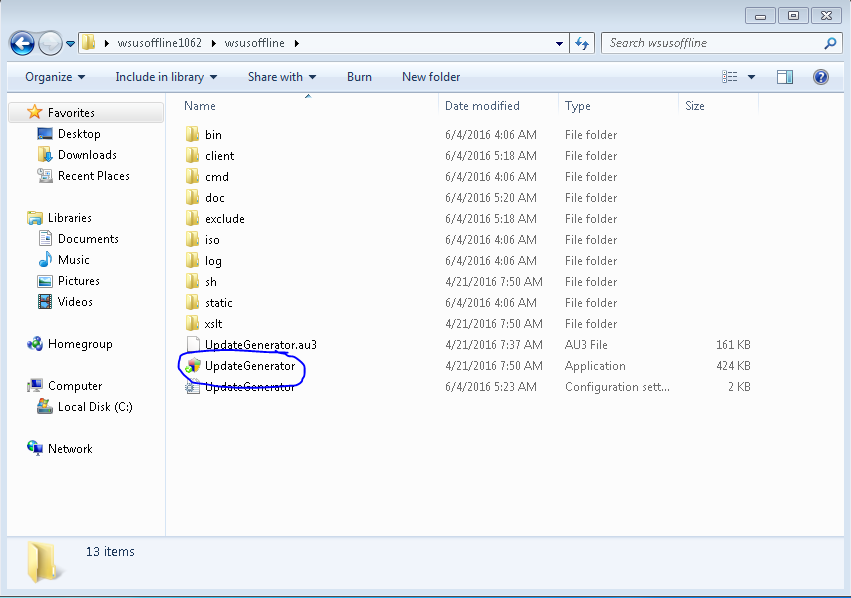
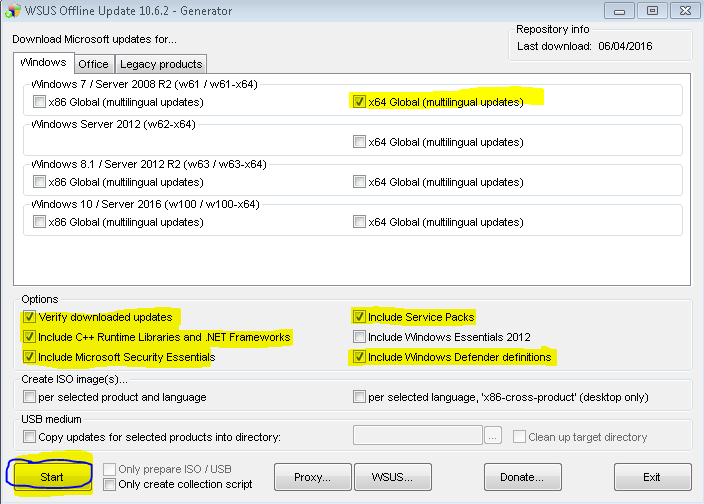
  • Navigate to the following images below.
  • Navigate to...
    MlYebty.png
  • Navigate to...
    sx6B56U.png
  • Checkmark these boxes and click "Start"...
    8hSAMcC.png
  • This cmd will download all Windows Updates from Microsoft's Database. Please do not exit out of the cmd, it will take a while to complete.
    y6K1WI5.png
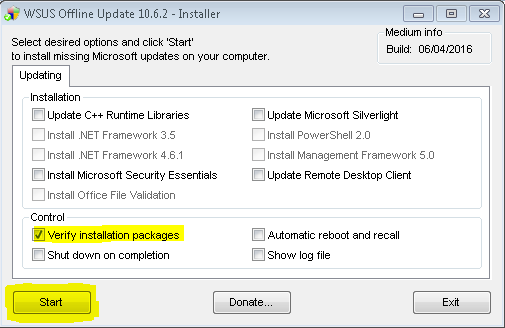
  • After the downloading is done. Close the program and navigate to the following images.
  • Navigate to...
    tLoTbfc.png
  • Navigate to...
    OsVD1N8.png
  • Checkmark the following boxes and click "Start". Checkmark the other boxes once you have SP1 installed.
    gRV6tml.png

    -OR-
    DlOR6NR.png
  • This cmd will install all downloaded updates. You might have to run this installer more than once due to the fact that SP1 has to be installed first. Then Microsoft Security Updates.
    hdNaI0S.png

  • You will have to restart every time the installer completes a certain section of updates.
  • Once most updates are installed, your Windows Updater should be working again. Around 100+ installed.
 
Last edited:

My Computer

Computer type
PC/Desktop
Computer Manufacturer/Model Number
HP
OS
Windows 7 Ultimate x64 (v6.1)
CPU
Intel(R) Core(TM) i5-3570k CPU
Motherboard
ASUS
Memory
8GB x 2
Graphics Card(s)
Nvidia GTX 980
Hard Drives
SSD Samsung 850 EVO - 250 GB
HDD Western Digital - 1 TB
Antivirus
Microsoft Essentials
Browser
IE 11, Google Chrome
I've got two computers running windows 7 SP; one's Home Premium and one is Professional. Both are failing to do anything in regards to windows update. It says "checking for updates..." and hangs there. SCVHOST.exe uses up 25% of CPU all of the time, with WUAUSERV (Windows Update service) being the culprit. I recall that updates are usually released every Tuesday; however this happens every day. Hangs, will not update, uses 25% CPU and this is a problem as one of the laptops overheats.

Ran the FixIt tool and it found nothing; tried again and update still hangs.

I once had success when I left the computer on standby all day, and returned to see it updating. But since then, no joy on either computer; one of which is a relatively fresh install of W7. Any help gratefully appreciated.

P.S. Is this some sort of play by Microsoft to get everyone onto W10? As Windows Update never used to have any issues, before this mass "lets get everyone onto W10" mindset. And I don't need W10 on these systems, as one of my laptops is a dual boot machine with W7 and W10!
 

My Computer

Computer type
Laptop
Computer Manufacturer/Model Number
HP 15-ac153sa
OS
Windows 7 Professional, 64 bit
CPU
Intel Core i7-4510U @ 2.00GHz
Memory
16GB DDR3
Graphics Card(s)
Intel HD 4400 (integrated)
Monitor(s) Displays
Inbuilt 15.6 inch HD display
Screen Resolution
1366x768
Hard Drives
2TB HDD, partitioned as 1TB (Windows 7) and 1TB (Windows 10)
2TB external HDD (portable)
Cooling
1x built in laptop fan
Keyboard
HP Slimline Wired Keyboard
Mouse
HP Optical Wired Mouse
Internet Speed
Virgin Media 250Mbps
Antivirus
Microsoft Windows Defender
Browser
Chrome, Firefox
Other Info
Laptop is set up as dual boot with Windows 7 Professional and Windows 10 Home. Windows 7 preferred.
This has worked for me every time:

The solution:

Stop the Windows Update Service (wuauserv).
Download and install KB3050265
reboot
Download and install KB3102810
Reboot and check for updates again. All of our machines found their required updates in less than 5 minutes.


Thank you, This worked for me. I made an account just to thank you and to let others know that this worked for me. It did still take about 15 minutes before it downloaded them so just be patient.

Fresh install of Windows 7 home premium 64bit with a new SSD. Was driving me nuts, stuck at updating screen on windows update and standalone update (not to mention all the drivers I had to hunt down and install). Like others I have spent the last 2 days searching and reading posts and trying what was advised, let it run , reinstall , turn this off etc. But this worked :party:. Installing 244 updates as I am typing this.
So again thank you.
 

My Computer

Computer type
Laptop
Computer Manufacturer/Model Number
Gateway
OS
Windows 7 Home Premium 64bit
win 7 update hangs fix for me.

I went to Microsoft and searched for kb3135445 picked either 32 or 64 bit download installed it then update worked fine.
 

My Computer

Computer type
PC/Desktop
Computer Manufacturer/Model Number
HP Pavillion
OS
win 7 professional 64 bit
Memory
4 gb
Registered to say thanks Howy.

After encountering the update issue and investigating the maze of possible solutions i installed your fix (12 Feb 2016) https://support.microsoft.com/en-us/kb/3138612
This was the first and only attempt to sort the problem and it worked perfectly.
 

My Computer

Computer type
PC/Desktop
OS
Windows 7 Home Premium 64bit
This has worked for me every time:

The solution:

Stop the Windows Update Service (wuauserv).
Download and install KB3050265
reboot
Download and install KB3102810
Reboot and check for updates again. All of our machines found their required updates in less than 5 minutes.


Thank you, This worked for me. I made an account just to thank you and to let others know that this worked for me. It did still take about 15 minutes before it downloaded them so just be patient.

Fresh install of Windows 7 home premium 64bit with a new SSD. Was driving me nuts, stuck at updating screen on windows update and standalone update (not to mention all the drivers I had to hunt down and install). Like others I have spent the last 2 days searching and reading posts and trying what was advised, let it run , reinstall , turn this off etc. But this worked :party:. Installing 244 updates as I am typing this.
So again thank you.

This solution worked for me. A new install on a new machine (Win 7 Home Premium 64 bit upgraded to Win 7 Professional).

I had the never ending 'checking for updates' stuck for hours.

After installing the updates above, Windows Update ran for around 10 minutes and then started to download the usual deluge of updates. Result.!

Thanks.!
 

My Computer

Computer type
PC/Desktop
Computer Manufacturer/Model Number
Custom
OS
Microsoft Windows 7 Professional 64-bit 7601 Multiprocessor Free Service Pack 1
CPU
Intel(R) Core(TM) i7-4790 CPU @ 3.60GHz
Motherboard
Gigabyte Technology Co., Ltd. B85M-DS3H-A
Memory
32.00 GB
Graphics Card(s)
Intel(R) HD Graphics 4600
Sound Card
Realtek High Definition Audio
Monitor(s) Displays
HP x23LED
Screen Resolution
1920 x 1080 x 32 bits (4294967296 colors) @ 60 Hz
Hard Drives
(1) ST1000DM 003-1SB102 SCSI Disk Device
(2) ASMT 2115 USB Device
(3) WD Ext HDD 1021 USB Device
(4) WD Ext HDD 1021 USB Device
(5) WD Ext HDD 1021 USB Device
Offline update is the only thing that worked for me. Took me about 7 hours and about 3GB of data.
 

My Computer

Computer type
PC/Desktop
OS
Windows 7 Ultimate x64
Hi. My issues were fixed (in Windows 7) with KB3161608 published 21st June 2016. Download and run the standalone installer from https://support.microsoft.com/en-us/kb/3161608 . It is marked as an optional update so will not be installed automatically even whenWindows Update is working ok. Hope it helps.
 

My Computer

Computer type
PC/Desktop
OS
Windows 7 Home Premium 64
This has worked for me every time:

The solution:

Stop the Windows Update Service (wuauserv).
Download and install KB3050265
reboot
Download and install KB3102810
Reboot and check for updates again. All of our machines found their required updates in less than 5 minutes.

I made an account just to say that this solution worked for me. I did a win 7 fresh install, and after sp1, updater stopped working (searching for update never ends). Vickyv says that after this fix updater found the updates withen 5 mins, my system took about 15.

Also, after updater found 165 updates, it hung on 0% for a long time. I just let it sit for about an hour and it all started pouring in.

Edit: Also WTH is with Microsoft and not being able to fresh install win 7 without jumping through hoops?!
 

My Computer

Computer type
PC/Desktop
OS
win 7 x64
"Also WTH is with Microsoft and not being able to fresh install win 7 without jumping through hoops?!"

What hoops are you referring to?
 

My Computer

Computer Manufacturer/Model Number
Put together
OS
Win7 Pro-64 Bit
CPU
i7-2600-3.4GHz
Motherboard
ASRock Z68M
Memory
8 GIG DDR3
Graphics Card(s)
onboard
Sound Card
onboard
Hard Drives
Seagate 1TB 7200RPM
PSU
680 W
Case
black
Cooling
stock fans
Keyboard
Microsoft
Mouse
Microsoft optical
Hi. My issues were fixed (in Windows 7) with KB3161608 published 21st June 2016. Download and run the standalone installer from https://support.microsoft.com/en-us/kb/3161608 . It is marked as an optional update so will not be installed automatically even whenWindows Update is working ok. Hope it helps.

This is what worked for me. Sort of...

When I clicked SteveKt's link i got a notice that KB3161608 was "superseded by July 2016 update rollup for Windows 7 SP1 and Windows Server 2008 R2 SP1 (KB3172605) that was released on July 21, 2016." KB3172605 Is what ended up working for me.

Thanks Steve! ... and everyone else here for taking your time to help us out.
 

My Computer

Computer type
PC/Desktop
OS
windows 10 pro X64
This worked for me

On a laptop which hadn't been updated since March, sitting in a cupboard under the stairs, and after a day of frustration and much searching of the net, I finally got the update process to work using the following method.

1. download the following update https://www.microsoft.com/en-us/download/details.aspx?id=53187 KB3168965 it's the July update to fix the 'windows update slow download' problem, :confused:
2. stop the windows update service via a command prompt run as administrator, click start, type cmd, right click cmd.exe select run as administrator. paste into cmd the following command 'net stop wuauserv' without the quotes, and press enter
3. go to where you downloaded the update KB3168965 double click to run and allow it fully install following the instuctions
4. reboot computer
5. check windows update service has restarted, click start, type services, click services, scroll down to windows update, under status it should say started, if not 'start the service' by clicking start the service at the top left of the open window
6. run windows update and if lucky like me you should recieve updates soon after, although do allow a little time as the update servers seem to be not playing ball with windows 7

Hope this helps someone
 

My Computer

Computer type
PC/Desktop
Computer Manufacturer/Model Number
HP (HPE_083-uk)
OS
Windows 7 Home Premium x64 SP1
CPU
Intel Core i7 860 @ 2.80GHz Lynnfield 45nm Technology
Motherboard
MSI Indio (CPU 1)
Memory
16.0GB Dual-Channel DDR3 @ 663MHz (9-9-9-24)
Graphics Card(s)
2047MB NVIDIA GeForce GT 640
Sound Card
Realtek High Definition Audio
Monitor(s) Displays
DELL U2410 + Acer S240HL
Screen Resolution
1920x1200 + 1280x1024
Hard Drives
119GB Samsung SSD 840 PRO Seri SCSI Disk Device
596GB Hitachi HDT721064SLA360 SCSI Disk Device
1000GB G-Tech Raid 1 Drive
Keyboard
Microsoft Arc
Mouse
Wacom Intuos 4 Tablet + HP Mouse
Internet Speed
speed might be pushing it a bit far! 1.3 KBps D + 0.4 KBps U
Antivirus
Eset NOD32 Antivirus
Browser
Firefox
Worked like a Charm

This has worked for me every time:

The solution:

Stop the Windows Update Service (wuauserv).
Download and install KB3050265
reboot
Download and install KB3102810
Reboot and check for updates again. All of our machines found their required updates in less than 5 minutes.
Make sure the windows update service did not restart if the manual update KB3050265 get's stuck installing.

Thanks for your post Vicky
 

My Computer

Computer type
PC/Desktop
Computer Manufacturer/Model Number
Dell
OS
Windows 7 Professional x86
CPU
Intel Dual Core
This has worked for me every time:

The solution:

Stop the Windows Update Service (wuauserv).
Download and install KB3050265
reboot
Download and install KB3102810
Reboot and check for updates again. All of our machines found their required updates in less than 5 minutes.


Thank you, This worked for me. I made an account just to thank you and to let others know that this worked for me. It did still take about 15 minutes before it downloaded them so just be patient.

Fresh install of Windows 7 home premium 64bit with a new SSD. Was driving me nuts, stuck at updating screen on windows update and standalone update (not to mention all the drivers I had to hunt down and install). Like others I have spent the last 2 days searching and reading posts and trying what was advised, let it run , reinstall , turn this off etc. But this worked :party:. Installing 244 updates as I am typing this.
So again thank you.

I also just made an account to say that this worked for me. Thank you.
 

My Computer

Computer type
PC/Desktop
OS
Windows 7 Ultimate x64
Back
Top