
You are using an out of date browser. It may not display this or other websites correctly.
You should upgrade or use an alternative browser.
You should upgrade or use an alternative browser.
Solved windows 7 update stuck at "checking for updates..."
- Thread starter sleepless
- Start date
Tyler 1118....I too registered just to thank you for solving six days worth of trying to get a Windows 7 Upgrade to update. Method 2 worked for me. I appreciate your detailed advice. Blessings...and thank you again.
My Computer
At a glance
FL windows 7 home 64 bit
- Computer type
- PC/Desktop
- OS
- FL windows 7 home 64 bit
glasskuter
New member
- Local time
- 11:17 AM
- Messages
- 6
How to get Windows Update to Work Right in Windows 7
Like everyone else I've fought the windows update problem for years. I wanted to share what works for me after doing a clean install. It might seem a little convoluted but it has so far worked every time. There are a number of restarts involved but once finished Windows 7 will check for and find updates in a matter of 5 minutes. NOTE- when you manually download these updates make sure you select the proper architecture)
Immediately after doing a clean install of Windows 7 SP1 I manually apply the following updates in this order:
disconnect internet (or stop windows update process. However if you do it this way you have to turn off windows update after every restart)
1. install windows update agent https://support.microsoft.com/en-us/kb/949104
2. install windows update client- KB 3138612 (replaces KB3102810) https://support.microsoft.com/en-us/kb/3138612
3. Install IE11 pre-requisites (These would probably automatically install when you install IE11 but I just manually do it)
https://support.microsoft.com/en-us/kb/2847882
4. install IE11 https://support.microsoft.com/en-us/help/18520/download-internet-explorer-11-offline-installer
5. install IEll cumulative update KB3139929 https://support.microsoft.com/en-us/kb/3139929
B. Then add following sites to internet options-security-trusted sites.(uncheck require server verification) Add the same sites to internet options-privacy-allowed sites.
http://*.windowsupdate.microsoft.com
http://*.windowsupdate.com
http://update.microsoft.com
6. install KB3145739 https://www.microsoft.com/en-us/download/details.aspx?id=51853
7. install KB3153199 https://www.microsoft.com/en-us/download/details.aspx?id=52232
8. install KB3161664 https://www.microsoft.com/en-us/download/details.aspx?id=52794
9. install servicing stack KB3020369 https://support.microsoft.com/en-us/kb/3020369
10- install KB3172605 (includes Kb3161608 and KB3161647) https://support.microsoft.com/en-us/kb/3172605
11. update convenience rollup kb3125574 https://support.microsoft.com/en-us/kb/3125574
Restart update service if it is stopped. Connect internet and check for updates.
Like everyone else I've fought the windows update problem for years. I wanted to share what works for me after doing a clean install. It might seem a little convoluted but it has so far worked every time. There are a number of restarts involved but once finished Windows 7 will check for and find updates in a matter of 5 minutes. NOTE- when you manually download these updates make sure you select the proper architecture)
Immediately after doing a clean install of Windows 7 SP1 I manually apply the following updates in this order:
disconnect internet (or stop windows update process. However if you do it this way you have to turn off windows update after every restart)
1. install windows update agent https://support.microsoft.com/en-us/kb/949104
2. install windows update client- KB 3138612 (replaces KB3102810) https://support.microsoft.com/en-us/kb/3138612
3. Install IE11 pre-requisites (These would probably automatically install when you install IE11 but I just manually do it)
https://support.microsoft.com/en-us/kb/2847882
4. install IE11 https://support.microsoft.com/en-us/help/18520/download-internet-explorer-11-offline-installer
5. install IEll cumulative update KB3139929 https://support.microsoft.com/en-us/kb/3139929
B. Then add following sites to internet options-security-trusted sites.(uncheck require server verification) Add the same sites to internet options-privacy-allowed sites.
http://*.windowsupdate.microsoft.com
http://*.windowsupdate.com
http://update.microsoft.com
6. install KB3145739 https://www.microsoft.com/en-us/download/details.aspx?id=51853
7. install KB3153199 https://www.microsoft.com/en-us/download/details.aspx?id=52232
8. install KB3161664 https://www.microsoft.com/en-us/download/details.aspx?id=52794
9. install servicing stack KB3020369 https://support.microsoft.com/en-us/kb/3020369
10- install KB3172605 (includes Kb3161608 and KB3161647) https://support.microsoft.com/en-us/kb/3172605
11. update convenience rollup kb3125574 https://support.microsoft.com/en-us/kb/3125574
Restart update service if it is stopped. Connect internet and check for updates.
My Computer
At a glance
windows 7 home premium x64
- OS
- windows 7 home premium x64

Hi,
All anyone needs for a clean install are these 3 updates which will get people updated through April of 2016
KB3020369 & KB3172605 & KB3125574 from the catalog
Microsoft Update Catalog
All anyone needs for a clean install are these 3 updates which will get people updated through April of 2016
KB3020369 & KB3172605 & KB3125574 from the catalog
Microsoft Update Catalog
My Computer
At a glance
Win-7-Pro64bit 7-H-Prem-64biti7-5930K 2nd i9-9940x both water blocked VRM'...Trident-z 3200C14 2nd Trident-z 3600C16EVGA 1080ti ftw3 2nd Titan Xp both water blocked
- Computer type
- PC/Desktop
- Computer Manufacturer/Model Number
- Custom assembled by me :}
- OS
- Win-7-Pro64bit 7-H-Prem-64bit
- CPU
- i7-5930K 2nd i9-9940x both water blocked VRM's too
- Motherboard
- ASUS SABERTOOTH X99 2nd ASUS x299 Apex
- Memory
- Trident-z 3200C14 2nd Trident-z 3600C16
- Graphics Card(s)
- EVGA 1080ti ftw3 2nd Titan Xp both water blocked
- Sound Card
- Built-in Realtek
- Monitor(s) Displays
- 1-AOC G2460PG 24"G-Sync 144Hz/ 2nd 1-ASUS VG248QE 24" 144Hz
- Screen Resolution
- 1920 x 1080 144Hz
- Hard Drives
- 2-Samsung M.2 Evo & Evo Plus
2-Samsung 850 EVO 500GB SSD's/ 3-2.5 W.D. Black 1tb-&3-1tb/3-3.5 WD Black 1tb hdd's
- PSU
- EVGA SuperNOVA 1000-P2 2nd 1200-P2
- Case
- 2-Corsair Obsidian Series 450D Black ATX Mid Tower
- Cooling
- Custom water loops
- Keyboard
- Logitech G710+/ 2nd Logitech G910
- Mouse
- 2-RedDragon M901 Perdition 16400 dpi Gaming mouse = wired
- Internet Speed
- Comcast Ping 19ms 89.31mbps download speed 6.12mbps upload
- Antivirus
- Malwarebytes Pro/ Superantispyware Pro
- Browser
- FireFox & Pale moon
- Other Info
- 2nd ASUS X299 Apex/Intel i9-9940x with Custom water loop/7H-Prem-x64/Corsair 450D case/Ram Trident-z 3600C16 4x8gb / Samsung970Evo plus 500gb SSD/Dual ssd EZ swap evo/PSU EVGA SuperNova 1200w-P2 80+Platinum/GPU Titan Xp /8-ML-140 on push-pull on 2-280GTX rads
I have a fresh install of Win 7 x64.
I followed these instructions:
Stop the Windows Update Service (wuauserv).
Download and install KB3050265
reboot
Download and install KB3102810
Reboot and check for updates again. All of our machines found their required updates in less than 5 minutes.
After stopping the Windows update service in services.msc, I ran the first install package and the process stops immediately on "searching for updates on this computer". The process just stalls and doesn't begin.
Help???
I followed these instructions:
Stop the Windows Update Service (wuauserv).
Download and install KB3050265
reboot
Download and install KB3102810
Reboot and check for updates again. All of our machines found their required updates in less than 5 minutes.
After stopping the Windows update service in services.msc, I ran the first install package and the process stops immediately on "searching for updates on this computer". The process just stalls and doesn't begin.
Help???
My Computer
At a glance
Win 7 64Intel Core i7 920 @ 2.67GHz6.0GB Triple-Channel DDR3 @ 534MHz (7-7-7-20)HIS ATI Radeon HD 4890 Series (ATI)
- OS
- Win 7 64
- CPU
- Intel Core i7 920 @ 2.67GHz
- Motherboard
- ASUSTeK Computer INC. P6T DELUXE V2 (LGA1366)
- Memory
- 6.0GB Triple-Channel DDR3 @ 534MHz (7-7-7-20)
- Graphics Card(s)
- HIS ATI Radeon HD 4890 Series (ATI)
- Sound Card
- SoundMAX Integrated Digital HD Audio
- Monitor(s) Displays
- 60" LG60ps11
- Screen Resolution
- 1920x1080
- Hard Drives
- 156GB INTEL SSDSA2M160G2GC ATA Device (IDE)
977GB SAMSUNG SAMSUNG HD103UJ ATA Device (IDE)
625GB Western Digital WDC WD6401AALS-00L3B2 ATA Device
- PSU
- Corsair 750w
- Case
- Cooler Master Storm Sniper
- Keyboard
- Logitech Wave/MX 5000
- Mouse
- Logitech MX518
- Internet Speed
- 15/1mb
Hi,
These are the only updates needed KB3020369 & KB3172605.
These are the only updates needed KB3020369 & KB3172605.
My Computer
At a glance
Win-7-Pro64bit 7-H-Prem-64biti7-5930K 2nd i9-9940x both water blocked VRM'...Trident-z 3200C14 2nd Trident-z 3600C16EVGA 1080ti ftw3 2nd Titan Xp both water blocked
- Computer type
- PC/Desktop
- Computer Manufacturer/Model Number
- Custom assembled by me :}
- OS
- Win-7-Pro64bit 7-H-Prem-64bit
- CPU
- i7-5930K 2nd i9-9940x both water blocked VRM's too
- Motherboard
- ASUS SABERTOOTH X99 2nd ASUS x299 Apex
- Memory
- Trident-z 3200C14 2nd Trident-z 3600C16
- Graphics Card(s)
- EVGA 1080ti ftw3 2nd Titan Xp both water blocked
- Sound Card
- Built-in Realtek
- Monitor(s) Displays
- 1-AOC G2460PG 24"G-Sync 144Hz/ 2nd 1-ASUS VG248QE 24" 144Hz
- Screen Resolution
- 1920 x 1080 144Hz
- Hard Drives
- 2-Samsung M.2 Evo & Evo Plus
2-Samsung 850 EVO 500GB SSD's/ 3-2.5 W.D. Black 1tb-&3-1tb/3-3.5 WD Black 1tb hdd's
- PSU
- EVGA SuperNOVA 1000-P2 2nd 1200-P2
- Case
- 2-Corsair Obsidian Series 450D Black ATX Mid Tower
- Cooling
- Custom water loops
- Keyboard
- Logitech G710+/ 2nd Logitech G910
- Mouse
- 2-RedDragon M901 Perdition 16400 dpi Gaming mouse = wired
- Internet Speed
- Comcast Ping 19ms 89.31mbps download speed 6.12mbps upload
- Antivirus
- Malwarebytes Pro/ Superantispyware Pro
- Browser
- FireFox & Pale moon
- Other Info
- 2nd ASUS X299 Apex/Intel i9-9940x with Custom water loop/7H-Prem-x64/Corsair 450D case/Ram Trident-z 3600C16 4x8gb / Samsung970Evo plus 500gb SSD/Dual ssd EZ swap evo/PSU EVGA SuperNova 1200w-P2 80+Platinum/GPU Titan Xp /8-ML-140 on push-pull on 2-280GTX rads
Thanks so much, worked perfectly.
My Computer
At a glance
Windows 7 Professional 64 bit
- Computer type
- Laptop
- OS
- Windows 7 Professional 64 bit
I have a fresh install of Win 7 x64.
I followed these instructions:
Stop the Windows Update Service (wuauserv).
Download and install KB3050265
reboot
Download and install KB3102810
Reboot and check for updates again. All of our machines found their required updates in less than 5 minutes.
After stopping the Windows update service in services.msc, I ran the first install package and the process stops immediately on "searching for updates on this computer". The process just stalls and doesn't begin.
Help???
I did not stop wuauserv in services.msc. I opened the command line as an administrator and typed
net stop wuauserv
It will say it successfully stopped the service. Then I proceeded with
Download and install KB3050265
reboot
Download and install KB3102810
Reboot and check for updates again.
Give it a try
My Computer
At a glance
Windows 7 Professional 64 bit
- Computer type
- Laptop
- OS
- Windows 7 Professional 64 bit
DanStafford62
New member
Thank you, This worked for me. I made an account just to thank you and to let others know that this worked for me. It did still take about 15 minutes before it downloaded them so just be patient.
Fresh install of Windows 7 home premium 64bit with a new SSD. Was driving me nuts, stuck at updating screen on windows update and standalone update (not to mention all the drivers I had to hunt down and install). Like others I have spent the last 2 days searching and reading posts and trying what was advised, let it run , reinstall , turn this off etc. But this worked. Installing 244 updates as I am typing this.
So again thank you.
I also just made an account to say that this worked for me. Thank you.
THANK YOU, THANK YOU, THANK YOU!! - After four days of searching, you have finally freed me from limbo.
My Computer
At a glance
Win 10 64-bit (Have customers running multipl...Intel Core i38GB
- Computer type
- Laptop
- Computer Manufacturer/Model Number
- ASUS
- OS
- Win 10 64-bit (Have customers running multiple versions)
- CPU
- Intel Core i3
- Memory
- 8GB
- Hard Drives
- 1 TB SSD
- Antivirus
- Avast Free
- Browser
- Chrome, Firefox, Opera
albert12336
New member
- Local time
- 5:17 PM
- Messages
- 1
works like a charm
Thank you, This worked for me. I was stuck on this issue for a couple of days.
I made an account just to thank you and to let others know that this worked for me.
Thank you, This worked for me. I was stuck on this issue for a couple of days.
I made an account just to thank you and to let others know that this worked for me.
My Computer
At a glance
Windows 7 Ultimate x64, Windows 10 Profession...i5-2410m
- Computer type
- Laptop
- Computer Manufacturer/Model Number
- Acer
- OS
- Windows 7 Ultimate x64, Windows 10 Professional x64
- CPU
- i5-2410m
how to fix Windows update being stuck in Windows 7
Quote: Originally Posted by vickyv
This has worked for me every time: The solution:
Stop the Windows Update Service (wuauserv).
(either Control Alt Delete, click Start Task Master, Processes tab, click on wuau…,
click End Process button.) Or
(reboot)
Control Panel, System & Security, Windows Update, Turn automatic updating on or off, drop down menu under Important updates: click Never check for updates (not recommended), click OK, reboot.
https://www.microsoft.com/, in the Search Microsoft.com type KB3050265, ENTER, click onf Update for Windows 7 for x64-base Systems (KB3050265), www.microsoft.com/en-my/download/details.aspx?id=47351, click on Download button, click on arrow in upper tight corner, click on the download to install.
Download and install KB3050265, reboot
Download and install KB3102810, Reboot and check for updates again.
Quote: Originally Posted by vickyv
This has worked for me every time: The solution:
Stop the Windows Update Service (wuauserv).
(either Control Alt Delete, click Start Task Master, Processes tab, click on wuau…,
click End Process button.) Or
(reboot)
Control Panel, System & Security, Windows Update, Turn automatic updating on or off, drop down menu under Important updates: click Never check for updates (not recommended), click OK, reboot.
https://www.microsoft.com/, in the Search Microsoft.com type KB3050265, ENTER, click onf Update for Windows 7 for x64-base Systems (KB3050265), www.microsoft.com/en-my/download/details.aspx?id=47351, click on Download button, click on arrow in upper tight corner, click on the download to install.
Download and install KB3050265, reboot
Download and install KB3102810, Reboot and check for updates again.
My Computer
At a glance
Window 7 Home Premium, 64 bit
- Computer type
- PC/Desktop
- OS
- Window 7 Home Premium, 64 bit

- Local time
- 2:17 AM
- Messages
- 199
Thank you Tyler1118, I used the wsusoffline method you so clearly described, and after more than a year of no updates, and endlessly trying every method I could find to repair Windows Update, none of which worked, you have solved my problem.
My Computer
At a glance
Windows 7 Home Premium 64 bit3.20 gigahertz Intel Core i7-3930K16.0 GBNVIDIA GeForce GTX 680 2GB
- Computer type
- PC/Desktop
- Computer Manufacturer/Model Number
- Custom Built
- OS
- Windows 7 Home Premium 64 bit
- CPU
- 3.20 gigahertz Intel Core i7-3930K
- Motherboard
- Board: ASUS P9X79 PRO Rev 1.xx
- Memory
- 16.0 GB
- Graphics Card(s)
- NVIDIA GeForce GTX 680 2GB
- Sound Card
- NVIDIA High Definition Audio
- Monitor(s) Displays
- CMO CMC 22 W
- Screen Resolution
- 1680x1050
- Hard Drives
- ATA SanDisk SDSSDX12 SCSI Disk Device (120.03 GB)
ATA ST2000DM001-1CH1 SCSI Disk Device (2000.40 GB)
- Case
- Coolermaster HAF XM Case with Window
- Cooling
- Coolermaster Hyper 212 EVO CPU Cooler
- Keyboard
- Microsoft
- Mouse
- Microsoft

FairyLunar
New member
- Local time
- 11:17 AM
- Messages
- 23
I have a question. Do I need to download both KB3050265 and KB3102810? Or, can I get away with just doing KB3102810?
My Computer
At a glance
7 Home Premium x64
- Computer type
- PC/Desktop
- Computer Manufacturer/Model Number
- HP
- OS
- 7 Home Premium x64
Hi,I have a question. Do I need to download both KB3050265 and KB3102810? Or, can I get away with just doing KB3102810?
KB3020369 & KB3172605 is all that is needed

KB3020369
Win-7 32 bit
https://download.microsoft.com/down...B0A-35769CBBE6B0/Windows6.1-KB3020369-x86.msu
Win-7 64 bit
https://download.microsoft.com/down...020-EC41D56B074F/Windows6.1-KB3020369-x64.msu
KB3172605 main article page with all versions,
https://support.microsoft.com/en-us/kb/3172605
KB3172605
Win-7 32 bit
https://download.microsoft.com/down...A9C-6B30C3E1735A/Windows6.1-KB3172605-x86.msu
Win-7 64 bit
https://download.microsoft.com/down...67F-C713F7821374/Windows6.1-KB3172605-x64.msu
My Computer
At a glance
Win-7-Pro64bit 7-H-Prem-64biti7-5930K 2nd i9-9940x both water blocked VRM'...Trident-z 3200C14 2nd Trident-z 3600C16EVGA 1080ti ftw3 2nd Titan Xp both water blocked
- Computer type
- PC/Desktop
- Computer Manufacturer/Model Number
- Custom assembled by me :}
- OS
- Win-7-Pro64bit 7-H-Prem-64bit
- CPU
- i7-5930K 2nd i9-9940x both water blocked VRM's too
- Motherboard
- ASUS SABERTOOTH X99 2nd ASUS x299 Apex
- Memory
- Trident-z 3200C14 2nd Trident-z 3600C16
- Graphics Card(s)
- EVGA 1080ti ftw3 2nd Titan Xp both water blocked
- Sound Card
- Built-in Realtek
- Monitor(s) Displays
- 1-AOC G2460PG 24"G-Sync 144Hz/ 2nd 1-ASUS VG248QE 24" 144Hz
- Screen Resolution
- 1920 x 1080 144Hz
- Hard Drives
- 2-Samsung M.2 Evo & Evo Plus
2-Samsung 850 EVO 500GB SSD's/ 3-2.5 W.D. Black 1tb-&3-1tb/3-3.5 WD Black 1tb hdd's
- PSU
- EVGA SuperNOVA 1000-P2 2nd 1200-P2
- Case
- 2-Corsair Obsidian Series 450D Black ATX Mid Tower
- Cooling
- Custom water loops
- Keyboard
- Logitech G710+/ 2nd Logitech G910
- Mouse
- 2-RedDragon M901 Perdition 16400 dpi Gaming mouse = wired
- Internet Speed
- Comcast Ping 19ms 89.31mbps download speed 6.12mbps upload
- Antivirus
- Malwarebytes Pro/ Superantispyware Pro
- Browser
- FireFox & Pale moon
- Other Info
- 2nd ASUS X299 Apex/Intel i9-9940x with Custom water loop/7H-Prem-x64/Corsair 450D case/Ram Trident-z 3600C16 4x8gb / Samsung970Evo plus 500gb SSD/Dual ssd EZ swap evo/PSU EVGA SuperNova 1200w-P2 80+Platinum/GPU Titan Xp /8-ML-140 on push-pull on 2-280GTX rads
FairyLunar
New member
- Local time
- 11:17 AM
- Messages
- 23
Thank you! I appreciate it!
 What order should I download them in?
My Computer
At a glance
7 Home Premium x64
- Computer type
- PC/Desktop
- Computer Manufacturer/Model Number
- HP
- OS
- 7 Home Premium x64
Hi,
Read left to right and you'll be in the correct order
Read left to right and you'll be in the correct order
My Computer
At a glance
Win-7-Pro64bit 7-H-Prem-64biti7-5930K 2nd i9-9940x both water blocked VRM'...Trident-z 3200C14 2nd Trident-z 3600C16EVGA 1080ti ftw3 2nd Titan Xp both water blocked
- Computer type
- PC/Desktop
- Computer Manufacturer/Model Number
- Custom assembled by me :}
- OS
- Win-7-Pro64bit 7-H-Prem-64bit
- CPU
- i7-5930K 2nd i9-9940x both water blocked VRM's too
- Motherboard
- ASUS SABERTOOTH X99 2nd ASUS x299 Apex
- Memory
- Trident-z 3200C14 2nd Trident-z 3600C16
- Graphics Card(s)
- EVGA 1080ti ftw3 2nd Titan Xp both water blocked
- Sound Card
- Built-in Realtek
- Monitor(s) Displays
- 1-AOC G2460PG 24"G-Sync 144Hz/ 2nd 1-ASUS VG248QE 24" 144Hz
- Screen Resolution
- 1920 x 1080 144Hz
- Hard Drives
- 2-Samsung M.2 Evo & Evo Plus
2-Samsung 850 EVO 500GB SSD's/ 3-2.5 W.D. Black 1tb-&3-1tb/3-3.5 WD Black 1tb hdd's
- PSU
- EVGA SuperNOVA 1000-P2 2nd 1200-P2
- Case
- 2-Corsair Obsidian Series 450D Black ATX Mid Tower
- Cooling
- Custom water loops
- Keyboard
- Logitech G710+/ 2nd Logitech G910
- Mouse
- 2-RedDragon M901 Perdition 16400 dpi Gaming mouse = wired
- Internet Speed
- Comcast Ping 19ms 89.31mbps download speed 6.12mbps upload
- Antivirus
- Malwarebytes Pro/ Superantispyware Pro
- Browser
- FireFox & Pale moon
- Other Info
- 2nd ASUS X299 Apex/Intel i9-9940x with Custom water loop/7H-Prem-x64/Corsair 450D case/Ram Trident-z 3600C16 4x8gb / Samsung970Evo plus 500gb SSD/Dual ssd EZ swap evo/PSU EVGA SuperNova 1200w-P2 80+Platinum/GPU Titan Xp /8-ML-140 on push-pull on 2-280GTX rads
FairyLunar
New member
- Local time
- 11:17 AM
- Messages
- 23
Hi,
Read left to right and you'll be in the correct order
Kay thanks. Hopefully this fixes the never ending search for updates. Haha.
My Computer
At a glance
7 Home Premium x64
- Computer type
- PC/Desktop
- Computer Manufacturer/Model Number
- HP
- OS
- 7 Home Premium x64
Hi,
It should fix the update system yes
Just make sure the update service is not running when you attempt to install either one you're missing
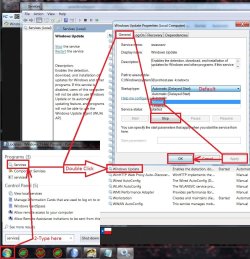
It should fix the update system yes
Just make sure the update service is not running when you attempt to install either one you're missing
My Computer
At a glance
Win-7-Pro64bit 7-H-Prem-64biti7-5930K 2nd i9-9940x both water blocked VRM'...Trident-z 3200C14 2nd Trident-z 3600C16EVGA 1080ti ftw3 2nd Titan Xp both water blocked
- Computer type
- PC/Desktop
- Computer Manufacturer/Model Number
- Custom assembled by me :}
- OS
- Win-7-Pro64bit 7-H-Prem-64bit
- CPU
- i7-5930K 2nd i9-9940x both water blocked VRM's too
- Motherboard
- ASUS SABERTOOTH X99 2nd ASUS x299 Apex
- Memory
- Trident-z 3200C14 2nd Trident-z 3600C16
- Graphics Card(s)
- EVGA 1080ti ftw3 2nd Titan Xp both water blocked
- Sound Card
- Built-in Realtek
- Monitor(s) Displays
- 1-AOC G2460PG 24"G-Sync 144Hz/ 2nd 1-ASUS VG248QE 24" 144Hz
- Screen Resolution
- 1920 x 1080 144Hz
- Hard Drives
- 2-Samsung M.2 Evo & Evo Plus
2-Samsung 850 EVO 500GB SSD's/ 3-2.5 W.D. Black 1tb-&3-1tb/3-3.5 WD Black 1tb hdd's
- PSU
- EVGA SuperNOVA 1000-P2 2nd 1200-P2
- Case
- 2-Corsair Obsidian Series 450D Black ATX Mid Tower
- Cooling
- Custom water loops
- Keyboard
- Logitech G710+/ 2nd Logitech G910
- Mouse
- 2-RedDragon M901 Perdition 16400 dpi Gaming mouse = wired
- Internet Speed
- Comcast Ping 19ms 89.31mbps download speed 6.12mbps upload
- Antivirus
- Malwarebytes Pro/ Superantispyware Pro
- Browser
- FireFox & Pale moon
- Other Info
- 2nd ASUS X299 Apex/Intel i9-9940x with Custom water loop/7H-Prem-x64/Corsair 450D case/Ram Trident-z 3600C16 4x8gb / Samsung970Evo plus 500gb SSD/Dual ssd EZ swap evo/PSU EVGA SuperNova 1200w-P2 80+Platinum/GPU Titan Xp /8-ML-140 on push-pull on 2-280GTX rads
FairyLunar
New member
- Local time
- 11:17 AM
- Messages
- 23
Hi,
It should fix the update system yes
Just make sure the update service is not running when you attempt to install either one you're missing
<33 Thank you so much! And I'll make sure to do that! :'D
My Computer
At a glance
7 Home Premium x64
- Computer type
- PC/Desktop
- Computer Manufacturer/Model Number
- HP
- OS
- 7 Home Premium x64
Hi,
I forgot to add the screen shot but edited and did
I forgot to add the screen shot but edited and did
My Computer
At a glance
Win-7-Pro64bit 7-H-Prem-64biti7-5930K 2nd i9-9940x both water blocked VRM'...Trident-z 3200C14 2nd Trident-z 3600C16EVGA 1080ti ftw3 2nd Titan Xp both water blocked
- Computer type
- PC/Desktop
- Computer Manufacturer/Model Number
- Custom assembled by me :}
- OS
- Win-7-Pro64bit 7-H-Prem-64bit
- CPU
- i7-5930K 2nd i9-9940x both water blocked VRM's too
- Motherboard
- ASUS SABERTOOTH X99 2nd ASUS x299 Apex
- Memory
- Trident-z 3200C14 2nd Trident-z 3600C16
- Graphics Card(s)
- EVGA 1080ti ftw3 2nd Titan Xp both water blocked
- Sound Card
- Built-in Realtek
- Monitor(s) Displays
- 1-AOC G2460PG 24"G-Sync 144Hz/ 2nd 1-ASUS VG248QE 24" 144Hz
- Screen Resolution
- 1920 x 1080 144Hz
- Hard Drives
- 2-Samsung M.2 Evo & Evo Plus
2-Samsung 850 EVO 500GB SSD's/ 3-2.5 W.D. Black 1tb-&3-1tb/3-3.5 WD Black 1tb hdd's
- PSU
- EVGA SuperNOVA 1000-P2 2nd 1200-P2
- Case
- 2-Corsair Obsidian Series 450D Black ATX Mid Tower
- Cooling
- Custom water loops
- Keyboard
- Logitech G710+/ 2nd Logitech G910
- Mouse
- 2-RedDragon M901 Perdition 16400 dpi Gaming mouse = wired
- Internet Speed
- Comcast Ping 19ms 89.31mbps download speed 6.12mbps upload
- Antivirus
- Malwarebytes Pro/ Superantispyware Pro
- Browser
- FireFox & Pale moon
- Other Info
- 2nd ASUS X299 Apex/Intel i9-9940x with Custom water loop/7H-Prem-x64/Corsair 450D case/Ram Trident-z 3600C16 4x8gb / Samsung970Evo plus 500gb SSD/Dual ssd EZ swap evo/PSU EVGA SuperNova 1200w-P2 80+Platinum/GPU Titan Xp /8-ML-140 on push-pull on 2-280GTX rads
Similar threads
- Replies
- 4
- Views
- 25K
- Replies
- 6
- Views
- 58K
- Replies
- 2
- Views
- 4K

- Replies
- 9
- Views
- 27K