Windows 7 Updater, error code 0x8007370B

JBMorri

New member
Local time
12:27 PM
Messages
5
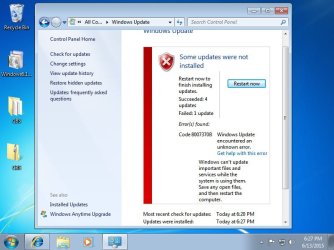
I'm having trouble updating my newly installed Windows 7 sp1. I've tried almost every automated fix or remidy I could find but nothing has worked. I'm able to sometimes download a couple updates at a time but other times I just get a stalled install or an error code. I had the same 0x8007370B error before the clean install I did which leads me to believe the install disk could be at fault. I would really appreciate some help! :)

Edit: Ran the windows update troubleshooter again and got the error code: 0x80070246
 

Attachments

  • Error code.jpg
    Error code.jpg
    57.9 KB · Views: 0
Last edited:

My Computer

Computer type
PC/Desktop
Computer Manufacturer/Model Number
custom build
OS
Windows 7 Home Premium 64bit
CPU
Intel i5 4670k
Motherboard
Gigabyte g1. sniper z87
Memory
16gb
Graphics Card(s)
Radeon 7950
Hard Drives
1tb hardrive
500gb samsung ssd
Antivirus
windows security essentials
Browser
internet explorer
You appear to have a corrupt registry.
Code:
2015-06-13 17:34:56, Info                  CSI    00000023 Ignoring duplicate ownership for directory [l:46{23}]"\??\C:\Windows\SchCache" in component Microsoft-Windows-Active-Directory-Services-Interface-LDAP-Provider, Version = 6.1.7600.16385, pA = PROCESSOR_ARCHITECTURE_AMD64 (9), Culture neutral, VersionScope = 1 nonSxS, PublicKeyToken = {l:8 b:31bf3856ad364e35}, Type neutral, TypeName neutral, PublicKey neutral
2015-06-13 17:34:57, Error                 CSI    [EMAIL="00000024@2015/6/13:22:34:57.091"]00000024@2015/6/13:22:34:57.091[/EMAIL] (F) d:\win7sp1_gdr\base\lstring\lblob.cpp(2362): Error STATUS_ILLEGAL_CHARACTER originated in function RtlCompareEncodedLBlobs expression: __rv.UcsCharacter != (0xffffffff)
[gle=0x80004005]
2015-06-13 17:34:57, Error                 CSI    [EMAIL="00000025@2015/6/13:22:34:57.278"]00000025@2015/6/13:22:34:57.278[/EMAIL] (F) d:\win7sp1_gdr\base\wcp\cdf\cdf_builder.cpp(148): Error STATUS_ILLEGAL_CHARACTER originated in function Windows::Cdf::Rtl::CSingleInstanceTable<class Windows::Cdf::Rtl::CStringTableTraits,struct _CDF_STRINGID>::FindOrAdd expression: this->FindOrInsertIfNotPresent(In, tmp, &pFound, &fFound)
[gle=0x80004005]
2015-06-13 17:34:57, Error                 CSI    00000026 (F) STATUS_ILLEGAL_CHARACTER #629023# from CFileInstaller::CommitChanges(...)[gle=0xd0000161]
2015-06-13 17:34:57, Error                 CSI    00000027 (F) STATUS_ILLEGAL_CHARACTER #629022# from PrimitiveInstaller::CCoordinator::FinalizeChanges(...)[gle=0xd0000161]

The problem is that I'm not sure exactly where the problem is.

From the looks of it, there is more than just the one error...
Code:
2015-06-13 16:37:11, Info                  CBS    Appl: Partial install Status testing, package: Package_for_KB2506212_SP1~31bf3856ad364e35~amd64~~6.1.1.2, partially installed (true/false), 0
2015-06-13 16:37:11, Info                  CBS    Appl: Partial install Status testing, package: Package_for_KB2506212~31bf3856ad364e35~amd64~~6.1.1.2, partially installed (true/false), 0
2015-06-13 16:37:11, Info                  CBS    Session: 30451233_456427137 initialized by client WindowsUpdateAgent.
2015-06-13 16:37:12, Error                 CSI    00000191 (F) Unable to parse processor architecture: [l:10{5}]"wow64"
[gle=0x80004005]
2015-06-13 16:37:12, Error                 CSI    [EMAIL="00000192@2015/6/13:21:37:12.335"]00000192@2015/6/13:21:37:12.335[/EMAIL] (F) d:\win7sp1_gdr\base\wcp\identity\id_authority_helpers.cpp(1548): Error STATUS_SXS_INVALID_IDENTITY_ATTRIBUTE_VALUE originated in function Windows::Identity::Rtl::Implementation::id_AddBuiltinToBuiltinAttributes expression: IsValid
[gle=0x80004005]
2015-06-13 16:37:12, Error                 CSI    00000193 (F) STATUS_SXS_INVALID_IDENTITY_ATTRIBUTE_VALUE #1765915# from Windows::Identity::Rtl::Implementation::CRtlIdentityAuthority::IRtlIdentityAuthority_Parse(flags = 0, string = [l:340{170}]"Microsoft-Windows-Security-Digest,culture=neutral,version=6.1.7601.22712,processorArchitecture=wow64,publicKeyToken=31bf3856ad364e35,buildType=release,versionScope=nonSxS")
[gle=0xd0150016]
2015-06-13 16:37:12, Info                  CBS    Failed to get definition identity. [HRESULT = 0x8007370a - ERROR_SXS_INVALID_IDENTITY_ATTRIBUTE_VALUE]
2015-06-13 16:37:12, Info                  CBS    Failed to get definition identity [HRESULT = 0x8007370a - ERROR_SXS_INVALID_IDENTITY_ATTRIBUTE_VALUE]
2015-06-13 16:37:12, Info                  CBS    Failed to initialize BranchFlagAndOwnerString [HRESULT = 0x8007370a - ERROR_SXS_INVALID_IDENTITY_ATTRIBUTE_VALUE]
2015-06-13 16:37:12, Info                  CBS    Failed to populate update with information. [HRESULT = 0x8007370a - ERROR_SXS_INVALID_IDENTITY_ATTRIBUTE_VALUE]
2015-06-13 16:37:12, Info                  CBS    Failed to translate parsed manifest into package/update objects [HRESULT = 0x8007370a - ERROR_SXS_INVALID_IDENTITY_ATTRIBUTE_VALUE]
2015-06-13 16:37:12, Info                  CBS    Failed to initialize internal package for package: Package_49_for_KB2973351~31bf3856ad364e35~amd64~~6.1.1.1 [HRESULT = 0x8007370a - ERROR_SXS_INVALID_IDENTITY_ATTRIBUTE_VALUE]
2015-06-13 16:37:12, Info                  CBS    Delay load failed for package: Package_for_KB2973351~31bf3856ad364e35~amd64~~6.1.1.1 [HRESULT = 0x8007370a - ERROR_SXS_INVALID_IDENTITY_ATTRIBUTE_VALUE]
2015-06-13 16:37:12, Error                 CBS    Delay Initialization Failed [HRESULT = 0x8007370a - ERROR_SXS_INVALID_IDENTITY_ATTRIBUTE_VALUE]


I need to have alook at your COMPONENTS registry hive


Please copy theC:\Windows\System32\config\COMPONENTS file (no extension) to your desktop andthen compress it - upload the compressed file to your favoured fileshare site(preferably Dropbox or OneDrive) and post a link.

Once you've done that, I suggest that you test your RAM for problems...
http://www.sevenforums.com/tutorials/105647-ram-test-memtest86.html
 

My Computer

Computer type
Laptop
Computer Manufacturer/Model Number
Asus K52F or Lenovo B51-80
OS
Win 7 x64 Home Premium (and x86 VirtualBox VM)/Win10
CPU
i3 370M/i7 6500U
Motherboard
Asus/Lenovo
Memory
8GB - finally :)/8GB
Graphics Card(s)
it's an i3, dude!/dual Intel&nVidia
Sound Card
onboard
Monitor(s) Displays
15.6" built-in
Screen Resolution
1366x768/1920x1080
Hard Drives
750GB Seagate internal
Sundry external drives attached to other computers on the local network
1TB SSD on the Lenovo
PSU
n/a
Internet Speed
as much as I can get - usually on a dongle/phone, so <1MB/s
Antivirus
MSE/Defender
Browser
IE11/12/Edge/Chrome/FF(if I must)

My Computer

Computer type
PC/Desktop
Computer Manufacturer/Model Number
custom build
OS
Windows 7 Home Premium 64bit
CPU
Intel i5 4670k
Motherboard
Gigabyte g1. sniper z87
Memory
16gb
Graphics Card(s)
Radeon 7950
Hard Drives
1tb hardrive
500gb samsung ssd
Antivirus
windows security essentials
Browser
internet explorer
I reckon three full passes of Memtest is enough - although the BSOD guys recommend 8 full passes to be sure.
I'll see what I can find with this, and get back to you when I can.
 

My Computer

Computer type
Laptop
Computer Manufacturer/Model Number
Asus K52F or Lenovo B51-80
OS
Win 7 x64 Home Premium (and x86 VirtualBox VM)/Win10
CPU
i3 370M/i7 6500U
Motherboard
Asus/Lenovo
Memory
8GB - finally :)/8GB
Graphics Card(s)
it's an i3, dude!/dual Intel&nVidia
Sound Card
onboard
Monitor(s) Displays
15.6" built-in
Screen Resolution
1366x768/1920x1080
Hard Drives
750GB Seagate internal
Sundry external drives attached to other computers on the local network
1TB SSD on the Lenovo
PSU
n/a
Internet Speed
as much as I can get - usually on a dongle/phone, so <1MB/s
Antivirus
MSE/Defender
Browser
IE11/12/Edge/Chrome/FF(if I must)
I think the problem is in the download, rather than the registry (or at least, I hope it is!)


Thiscould be due to corruption in the SoftwareDistribution folder - the problemwith that the conventional cure can lead to problems later on, ifnot handled properly, and you will lose your Update history (but the updateswill still be installed, and viewable in the Installed Updates listing).


Openan Elevated Command Prompt

Runthe following commands


NET STOP WUAUSERV

REN C:\WINDOWS\SoftwareDistribution SDOLD

NET START WUAUSERV


reboot

thenwait 10 minutes, and open Windows Updates, and run a Check for Updates.


Installonly the oldest update found - and reboot once installed

thengo back to Windows updates and install the others.

If it doesn't install, please post new CBS.log and windowsupdate.log files.
 

My Computer

Computer type
Laptop
Computer Manufacturer/Model Number
Asus K52F or Lenovo B51-80
OS
Win 7 x64 Home Premium (and x86 VirtualBox VM)/Win10
CPU
i3 370M/i7 6500U
Motherboard
Asus/Lenovo
Memory
8GB - finally :)/8GB
Graphics Card(s)
it's an i3, dude!/dual Intel&nVidia
Sound Card
onboard
Monitor(s) Displays
15.6" built-in
Screen Resolution
1366x768/1920x1080
Hard Drives
750GB Seagate internal
Sundry external drives attached to other computers on the local network
1TB SSD on the Lenovo
PSU
n/a
Internet Speed
as much as I can get - usually on a dongle/phone, so <1MB/s
Antivirus
MSE/Defender
Browser
IE11/12/Edge/Chrome/FF(if I must)
Alright! I will do exactly as explain.

What if i have about 170 updates to do? Should I still only do one and then all the others or would there be another order maybe I should take?
 

My Computer

Computer type
PC/Desktop
Computer Manufacturer/Model Number
custom build
OS
Windows 7 Home Premium 64bit
CPU
Intel i5 4670k
Motherboard
Gigabyte g1. sniper z87
Memory
16gb
Graphics Card(s)
Radeon 7950
Hard Drives
1tb hardrive
500gb samsung ssd
Antivirus
windows security essentials
Browser
internet explorer
Here's my usual methodology - and yes, install just the oldest one found first, then proceed as below.

Note - between eachof the below batches of updates, reboot at least once, even if the machineauto-rebooted during the updates. After the update, do a new Check for Updates.Add any remaining updates or failed updates to the next batch.

1) Install all 'Security Update for Windows'

Reboot

Check for Updates

(some will have failed, and some new ones will have appeared)

2) Install the remaining/new 'Security Update for Windows'

Reboot

Check for Updates

3) Install all ordinary 'Update for Windows'

Reboot

Check for Updates

4) install updatesfor IE8 - but NOT IE 9/10/11

Reboot

Check for Updates

5) install all other updates EXCEPT .NET ones and IE9/10/11

Reboot

Check for Updates

repeat 5 until there's nothing left in the main window except the .NET and IE upgrades

6) Install all Security Updates for .NET - but nothing else

Reboot

Check for Updates

7) Install all other.NET updates

Reboot

Check for Updates

8) Install IE10 ifoffered - IE11 should wait if it's still an Optional update.

9) Install the IE10 updates, then install IE11 and up
 

My Computer

Computer type
Laptop
Computer Manufacturer/Model Number
Asus K52F or Lenovo B51-80
OS
Win 7 x64 Home Premium (and x86 VirtualBox VM)/Win10
CPU
i3 370M/i7 6500U
Motherboard
Asus/Lenovo
Memory
8GB - finally :)/8GB
Graphics Card(s)
it's an i3, dude!/dual Intel&nVidia
Sound Card
onboard
Monitor(s) Displays
15.6" built-in
Screen Resolution
1366x768/1920x1080
Hard Drives
750GB Seagate internal
Sundry external drives attached to other computers on the local network
1TB SSD on the Lenovo
PSU
n/a
Internet Speed
as much as I can get - usually on a dongle/phone, so <1MB/s
Antivirus
MSE/Defender
Browser
IE11/12/Edge/Chrome/FF(if I must)
What should I do if the download or install hangs for a couple hours? Like do I stop it or just leave it alone or is there a special way to stop it?
 

My Computer

Computer type
PC/Desktop
Computer Manufacturer/Model Number
custom build
OS
Windows 7 Home Premium 64bit
CPU
Intel i5 4670k
Motherboard
Gigabyte g1. sniper z87
Memory
16gb
Graphics Card(s)
Radeon 7950
Hard Drives
1tb hardrive
500gb samsung ssd
Antivirus
windows security essentials
Browser
internet explorer
Which update are we talking about?
Please post your C:\Windows\windowsupdate.log file
 

My Computer

Computer type
Laptop
Computer Manufacturer/Model Number
Asus K52F or Lenovo B51-80
OS
Win 7 x64 Home Premium (and x86 VirtualBox VM)/Win10
CPU
i3 370M/i7 6500U
Motherboard
Asus/Lenovo
Memory
8GB - finally :)/8GB
Graphics Card(s)
it's an i3, dude!/dual Intel&nVidia
Sound Card
onboard
Monitor(s) Displays
15.6" built-in
Screen Resolution
1366x768/1920x1080
Hard Drives
750GB Seagate internal
Sundry external drives attached to other computers on the local network
1TB SSD on the Lenovo
PSU
n/a
Internet Speed
as much as I can get - usually on a dongle/phone, so <1MB/s
Antivirus
MSE/Defender
Browser
IE11/12/Edge/Chrome/FF(if I must)
I was just asking in general. But the oldest update failed to install with the error code 8007370B
 

My Computer

Computer type
PC/Desktop
Computer Manufacturer/Model Number
custom build
OS
Windows 7 Home Premium 64bit
CPU
Intel i5 4670k
Motherboard
Gigabyte g1. sniper z87
Memory
16gb
Graphics Card(s)
Radeon 7950
Hard Drives
1tb hardrive
500gb samsung ssd
Antivirus
windows security essentials
Browser
internet explorer
Back
Top