windows 7 very slow and a lot of "not respoding ", please read !

mido2man

New member
Local time
11:48 PM
Messages
29
windows 7 very slow and a lot of "not respoding ", please read !

windows7 , is running very slow , and I get a lot of " not responding " on IE, Microsoft office , very much on every thing I open, I run sfc/scannow , nothing has changed , but I have notice when I run JETCLEAN , the windows runs smooth , but after I restart it , it run slow again back so I have to run JETCLEAN again , I have Malwarebytes and its clean , I run Emsisoft and its clean .
there is not a lot of software running on services or on start up .
I have notice when I run JETCLEAN in the registry clean , there is a lot of empty register value and MRU Cache MRUListEx keep repeating . I don't know if this is the problem
what is the problem ?

HERE IS SOME FILES IF IT WILL HELP
-System Event Viewer
https://onedrive.live.com/redir?resid=e332be9194dbdae!235&authkey=!AGPQH97w6WVHS80&ithint=file,evtx

- Application Event Viewer
https://onedrive.live.com/redir?resid=e332be9194dbdae!236&authkey=!AIe8-BHIkkRvM74&ithint=file,evtx

- windows log from sfc/scannow CBS.log
https://onedrive.live.com/redir?resid=e332be9194dbdae!237&authkey=!AJRdKAyA3YCfYx4&ithint=file,log

- Windows dump file is empty !!!

-Also another message pop up " windows memory has stopped working " pic attached
- https://onedrive.live.com/redir?res...authkey=!AMd9ybaZ5i4O8vM&v=3&ithint=photo,JPG

-I get this message a lot " windows control panel has stopped working "
https://onedrive.live.com/redir?res...authkey=!ALNjFcplqUYBwLI&v=3&ithint=photo,JPG

- when I try to install windows security essentials I get this message
https://onedrive.live.com/redir?res...authkey=!AJAuMZcex9u0zgk&v=3&ithint=photo,jpg

I hope this helps to find what is the problem
Thanks a head
 

My Computer My Computer

At a glance

windows 7 64bit
Computer type
Laptop
Computer Manufacturer/Model Number
Toshiba
OS
windows 7 64bit
Hello and welcome midoman can you please let us know some system specs and I would like to know the Toshiba model too. Now on the back of the machine you will find a label and it will have on it PART No: can you please let me know what that is too.

Now I like a lot of the others am not overly keen on any programs that claim to increase the performance of your machine and that one you have is or looks like one of those. The only program most of us use is CCleaner for clearing out the temp files etc but it is your choice of course.

In the meantime you can run these in safe mode for starters
http://www.sevenforums.com/tutorials/1538-sfc-scannow-command-system-file-checker.html
http://www.sevenforums.com/tutorials/433-disk-check.html < if necessary include the /f and /r in the command line as per Option2
Let us know this stuff before we go on.

PS I meant to add the Onedrive pics are very hard to see so can you use this for pics please
How to Use the Snipping Tool in Vista
 

My Computer My Computer

At a glance

Desk1 7 Home Prem / Desk2 10 Pro / Main lap A...Desk1 i5 3750K / Laptop i7 GTX 860M / Desk2 i...Desk1 8GB (1866) / Desk2 16GB (1333) / Laptop...Desk 1& 2NVidia GTX 650 & Laptops on board Intel
Computer type
PC/Desktop
Computer Manufacturer/Model Number
Own build (new) Desk1 / Asus ROG Win 7 / Desk2 1st build
OS
Desk1 7 Home Prem / Desk2 10 Pro / Main lap Asus ROG 10 Pro 2 laptop Toshiba 7 Pro Asus P2520 7 & 10
CPU
Desk1 i5 3750K / Laptop i7 GTX 860M / Desk2 i5 2500
Motherboard
Desk1 Asus P877-V / Desk2 Gigabyte H67 UD3H / Laptop ?
Memory
Desk1 8GB (1866) / Desk2 16GB (1333) / Laptop 8Gb DDR3
Graphics Card(s)
Desk 1& 2NVidia GTX 650 & Laptops on board Intel
Sound Card
Desk 1 & 2 -XONAR DG Realtek High Def audio Laptop
Monitor(s) Displays
Desk 1 Benq HD 2450 / Desk2 Philips 24" / Laptop 17.5"
Screen Resolution
1920x1080 D1 & D2 & Laptop 1
Hard Drives
Desk1 Samsung 120GB 830 SSD
Asus ROG 256GB 850 Pro SSD
Desk2 Samsung 840 256 SSD
Toshiba 120GB EVO
PSU
Desk 1 Corsair HX 1050/ Laptop ? / Desk 2 Corsair HX 650
Case
Desk 1 Cooler HAF XM ? Toshiba laptop / Desk2 Coolermaster
Cooling
Fans on all Desk1 -2 Desk2 - all Coolermasters 5 Laptop ?
Keyboard
Desk 1 MS Sidewinder X6 Desk 2 MS Sidewinder X 4
Mouse
Desk 1&2 - Gigabyte MS 900 gamer - laptop - Logitec wireless
Internet Speed
ADSL2+
Other Info
One other Desktop (tester) and spare Toshba laptop both with SSD's
Running Kaspersky 2016 ISS on all machines config'd identically
Logitec audio stereo systems on each machine (x3)
Canon MG5250MFC
Router/modem TP-Link running WPA2SK

My Computer My Computer

At a glance

windows 7 64bit
Computer type
Laptop
Computer Manufacturer/Model Number
Toshiba
OS
windows 7 64bit
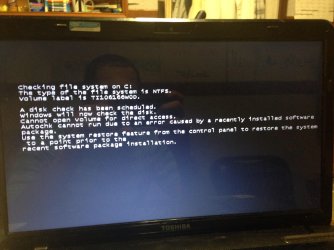
Disk check can not be done due to softwear change recently .
I dont know what is that mean !!!
 

Attachments

  • image.jpg
    image.jpg
    593.2 KB · Views: 0

My Computer My Computer

At a glance

windows 7 64bit
Computer type
Laptop
Computer Manufacturer/Model Number
Toshiba
OS
windows 7 64bit
Now are you running that chkdsk in safe mode? (power on and tap F8 as you do so) if not then do so because it will only use the Windows filing system and not any other non (OS) essential software you have on the computer.

Now just have a think back to what you have installed recently too because of that message - it may need uninstalling.
 

My Computer My Computer

At a glance

Desk1 7 Home Prem / Desk2 10 Pro / Main lap A...Desk1 i5 3750K / Laptop i7 GTX 860M / Desk2 i...Desk1 8GB (1866) / Desk2 16GB (1333) / Laptop...Desk 1& 2NVidia GTX 650 & Laptops on board Intel
Computer type
PC/Desktop
Computer Manufacturer/Model Number
Own build (new) Desk1 / Asus ROG Win 7 / Desk2 1st build
OS
Desk1 7 Home Prem / Desk2 10 Pro / Main lap Asus ROG 10 Pro 2 laptop Toshiba 7 Pro Asus P2520 7 & 10
CPU
Desk1 i5 3750K / Laptop i7 GTX 860M / Desk2 i5 2500
Motherboard
Desk1 Asus P877-V / Desk2 Gigabyte H67 UD3H / Laptop ?
Memory
Desk1 8GB (1866) / Desk2 16GB (1333) / Laptop 8Gb DDR3
Graphics Card(s)
Desk 1& 2NVidia GTX 650 & Laptops on board Intel
Sound Card
Desk 1 & 2 -XONAR DG Realtek High Def audio Laptop
Monitor(s) Displays
Desk 1 Benq HD 2450 / Desk2 Philips 24" / Laptop 17.5"
Screen Resolution
1920x1080 D1 & D2 & Laptop 1
Hard Drives
Desk1 Samsung 120GB 830 SSD
Asus ROG 256GB 850 Pro SSD
Desk2 Samsung 840 256 SSD
Toshiba 120GB EVO
PSU
Desk 1 Corsair HX 1050/ Laptop ? / Desk 2 Corsair HX 650
Case
Desk 1 Cooler HAF XM ? Toshiba laptop / Desk2 Coolermaster
Cooling
Fans on all Desk1 -2 Desk2 - all Coolermasters 5 Laptop ?
Keyboard
Desk 1 MS Sidewinder X6 Desk 2 MS Sidewinder X 4
Mouse
Desk 1&2 - Gigabyte MS 900 gamer - laptop - Logitec wireless
Internet Speed
ADSL2+
Other Info
One other Desktop (tester) and spare Toshba laptop both with SSD's
Running Kaspersky 2016 ISS on all machines config'd identically
Logitec audio stereo systems on each machine (x3)
Canon MG5250MFC
Router/modem TP-Link running WPA2SK
i did uninstall all the softwear i installed since i had this problem , i finally get check disk to run if i check " scan for and attempt recovery of bad sectors , and there is no errors or problems , but when i check auto fix file system errors , i still unable to run this , even in safemode .
 

My Computer My Computer

At a glance

windows 7 64bit
Computer type
Laptop
Computer Manufacturer/Model Number
Toshiba
OS
windows 7 64bit
Ok hopefully you have all the data you need backed up because it looks like you may have to reinstall using the factory reset by Toshiba. This is because if safe mode will not run properly then there is something quite wrong with that machine.

To be perfectly honest with you I have had three Toshibas now and for each one I have bought an OEM version of Windows (Home Premium) and installed it onto either a cleaned drive or a new one usually the latter and also an SSD. I did this because I was sick of the Toshiba bloatware and constant problems with those machines.

Having said that you could try this http://www.sevenforums.com/tutorials/681-startup-repair.html
 

My Computer My Computer

At a glance

Desk1 7 Home Prem / Desk2 10 Pro / Main lap A...Desk1 i5 3750K / Laptop i7 GTX 860M / Desk2 i...Desk1 8GB (1866) / Desk2 16GB (1333) / Laptop...Desk 1& 2NVidia GTX 650 & Laptops on board Intel
Computer type
PC/Desktop
Computer Manufacturer/Model Number
Own build (new) Desk1 / Asus ROG Win 7 / Desk2 1st build
OS
Desk1 7 Home Prem / Desk2 10 Pro / Main lap Asus ROG 10 Pro 2 laptop Toshiba 7 Pro Asus P2520 7 & 10
CPU
Desk1 i5 3750K / Laptop i7 GTX 860M / Desk2 i5 2500
Motherboard
Desk1 Asus P877-V / Desk2 Gigabyte H67 UD3H / Laptop ?
Memory
Desk1 8GB (1866) / Desk2 16GB (1333) / Laptop 8Gb DDR3
Graphics Card(s)
Desk 1& 2NVidia GTX 650 & Laptops on board Intel
Sound Card
Desk 1 & 2 -XONAR DG Realtek High Def audio Laptop
Monitor(s) Displays
Desk 1 Benq HD 2450 / Desk2 Philips 24" / Laptop 17.5"
Screen Resolution
1920x1080 D1 & D2 & Laptop 1
Hard Drives
Desk1 Samsung 120GB 830 SSD
Asus ROG 256GB 850 Pro SSD
Desk2 Samsung 840 256 SSD
Toshiba 120GB EVO
PSU
Desk 1 Corsair HX 1050/ Laptop ? / Desk 2 Corsair HX 650
Case
Desk 1 Cooler HAF XM ? Toshiba laptop / Desk2 Coolermaster
Cooling
Fans on all Desk1 -2 Desk2 - all Coolermasters 5 Laptop ?
Keyboard
Desk 1 MS Sidewinder X6 Desk 2 MS Sidewinder X 4
Mouse
Desk 1&2 - Gigabyte MS 900 gamer - laptop - Logitec wireless
Internet Speed
ADSL2+
Other Info
One other Desktop (tester) and spare Toshba laptop both with SSD's
Running Kaspersky 2016 ISS on all machines config'd identically
Logitec audio stereo systems on each machine (x3)
Canon MG5250MFC
Router/modem TP-Link running WPA2SK
Back
Top