Windows 7 + Vista Advice needed please

Thanks...i feel like i need to be an octopus sometimes:rolleyes: i have 7 explorer windows open right now with all sorts of things i have to research today including spec details for my car,tropical fish info, etc,etc
motherrboard is Asus p5q pro turbo
regards Alan


Sounds like you need more than 1 monitor mate!
 

My Computer My Computer

Computer Manufacturer/Model Number
* BFK Customs *
OS
W 7 64-bit Ultimate
CPU
Intel Q9550 Yorkfield
Motherboard
ASUS P5Q Pro
Memory
8GB Dominator 8500C5D
Graphics Card(s)
ATI : XFX 5870
Sound Card
Realtek HD Audio 7-1
Monitor(s) Displays
1x 47" LCD HDMI & 3x 26" LCD HDMI
Screen Resolution
1920x1080P & 1920x1200
Hard Drives
1x 80GB Intel X25-M G2 SSD : 1x 500GB & 1x 640GB WD Caviar Black(s)
PSU
Corsair 620HX
Case
Cooler Master RC-690
Cooling
Tuniq Tower 120, 2x 140mm and 3x 120mm case fans
Keyboard
Microsoft 500
Mouse
Razer Diamondback 3G
Internet Speed
14 Mb/s
Other Info
1x Koutech 3Gb/s SATA HDD Hot Swap Rack
:) Worse thing is im missing the Liverpool match :cry:
 

My Computer My Computer

Computer Manufacturer/Model Number
HOME BUILT
OS
windows 7
CPU
Q6600
Motherboard
ASUS P5Q PRO TURBO
Memory
6g 800MHZ 240PIN DDR2 PC6400
Graphics Card(s)
GEFORCE 8800 GT 512MB
Sound Card
ONBOARD
Monitor(s) Displays
37 INCH 1280X720
Hard Drives
1XCAVIAR 500GB
1XWD 500GB
1XWD320GB
1XSAMSUNG 1TB ALL DRIVES SATA11
PSU
UNKNOWN
Case
TSUNAMI DREAM
Cooling
UNKNOWN
Internet Speed
20meg fibre optic
Other Info
1TB WD external hard drive
1x320gb Seagate external hard drive
BIOS Boot Menu on that Asus model is accessed by tapping F8 at bootup. Google is your friend,.

You can always copy your files off the Vista drive onto USB flash stick or DVD, then power down and swap in the Win7 HD to import files.

In that case, I would copy your User files (Documents, Pictures, Videos, etc) onto stick/DVD, then from Win7 explorer, open each backed up folder, "Select All" from Organize menu, then drag the group to that folder in Explorer bar on left side.

Be aware that the left-hand Explorer tree will begin expanding to open sub-files as you drag the file grouping from it's folder over there. To avoid having this flummox your Drag operation, refuse to let go of the left click until Explorer stops expanding and you have cursor on the exact folder you want to copy to.
 

My Computer My Computer

Computer Manufacturer/Model Number
* BFK Customs *
OS
W 7 64-bit Ultimate
CPU
Intel Q9550 Yorkfield
Motherboard
ASUS P5Q Pro
Memory
8GB Dominator 8500C5D
Graphics Card(s)
ATI : XFX 5870
Sound Card
Realtek HD Audio 7-1
Monitor(s) Displays
1x 47" LCD HDMI & 3x 26" LCD HDMI
Screen Resolution
1920x1080P & 1920x1200
Hard Drives
1x 80GB Intel X25-M G2 SSD : 1x 500GB & 1x 640GB WD Caviar Black(s)
PSU
Corsair 620HX
Case
Cooler Master RC-690
Cooling
Tuniq Tower 120, 2x 140mm and 3x 120mm case fans
Keyboard
Microsoft 500
Mouse
Razer Diamondback 3G
Internet Speed
14 Mb/s
Other Info
1x Koutech 3Gb/s SATA HDD Hot Swap Rack
Thankyou for the advice,
i am going to buy a printer this week so i can print your posts and then have the pc in question on and have your info to hand rather than having to keep switching between computers which i can only have one online at a time, im using my old pc for last few days for internet, thankyou... Alan
 

My Computer My Computer

Computer Manufacturer/Model Number
HOME BUILT
OS
windows 7
CPU
Q6600
Motherboard
ASUS P5Q PRO TURBO
Memory
6g 800MHZ 240PIN DDR2 PC6400
Graphics Card(s)
GEFORCE 8800 GT 512MB
Sound Card
ONBOARD
Monitor(s) Displays
37 INCH 1280X720
Hard Drives
1XCAVIAR 500GB
1XWD 500GB
1XWD320GB
1XSAMSUNG 1TB ALL DRIVES SATA11
PSU
UNKNOWN
Case
TSUNAMI DREAM
Cooling
UNKNOWN
Internet Speed
20meg fibre optic
Other Info
1TB WD external hard drive
1x320gb Seagate external hard drive
Be sure to post back to this same thread to keep us informed.
 

My Computer My Computer

Computer Manufacturer/Model Number
* BFK Customs *
OS
W 7 64-bit Ultimate
CPU
Intel Q9550 Yorkfield
Motherboard
ASUS P5Q Pro
Memory
8GB Dominator 8500C5D
Graphics Card(s)
ATI : XFX 5870
Sound Card
Realtek HD Audio 7-1
Monitor(s) Displays
1x 47" LCD HDMI & 3x 26" LCD HDMI
Screen Resolution
1920x1080P & 1920x1200
Hard Drives
1x 80GB Intel X25-M G2 SSD : 1x 500GB & 1x 640GB WD Caviar Black(s)
PSU
Corsair 620HX
Case
Cooler Master RC-690
Cooling
Tuniq Tower 120, 2x 140mm and 3x 120mm case fans
Keyboard
Microsoft 500
Mouse
Razer Diamondback 3G
Internet Speed
14 Mb/s
Other Info
1x Koutech 3Gb/s SATA HDD Hot Swap Rack
Will do...im itching to start using win7 and enjoy my extra ram and i have spent the weekend on 6 year old pc with xp :rolleyes:
 

My Computer My Computer

Computer Manufacturer/Model Number
HOME BUILT
OS
windows 7
CPU
Q6600
Motherboard
ASUS P5Q PRO TURBO
Memory
6g 800MHZ 240PIN DDR2 PC6400
Graphics Card(s)
GEFORCE 8800 GT 512MB
Sound Card
ONBOARD
Monitor(s) Displays
37 INCH 1280X720
Hard Drives
1XCAVIAR 500GB
1XWD 500GB
1XWD320GB
1XSAMSUNG 1TB ALL DRIVES SATA11
PSU
UNKNOWN
Case
TSUNAMI DREAM
Cooling
UNKNOWN
Internet Speed
20meg fibre optic
Other Info
1TB WD external hard drive
1x320gb Seagate external hard drive
:( Hi...new problem...when trying to boot it says no drives found then missing bootmgr so i have to restart -tap f8 and boot in vista. Should i wait to get my printer so i can print the answer before i worry about it or is there an easy solution. Win7 would boot fine before i put the vista drive back in.
Thanks for any replies
 

My Computer My Computer

Computer Manufacturer/Model Number
HOME BUILT
OS
windows 7
CPU
Q6600
Motherboard
ASUS P5Q PRO TURBO
Memory
6g 800MHZ 240PIN DDR2 PC6400
Graphics Card(s)
GEFORCE 8800 GT 512MB
Sound Card
ONBOARD
Monitor(s) Displays
37 INCH 1280X720
Hard Drives
1XCAVIAR 500GB
1XWD 500GB
1XWD320GB
1XSAMSUNG 1TB ALL DRIVES SATA11
PSU
UNKNOWN
Case
TSUNAMI DREAM
Cooling
UNKNOWN
Internet Speed
20meg fibre optic
Other Info
1TB WD external hard drive
1x320gb Seagate external hard drive

My Computer My Computer

Computer Manufacturer/Model Number
* BFK Customs *
OS
W 7 64-bit Ultimate
CPU
Intel Q9550 Yorkfield
Motherboard
ASUS P5Q Pro
Memory
8GB Dominator 8500C5D
Graphics Card(s)
ATI : XFX 5870
Sound Card
Realtek HD Audio 7-1
Monitor(s) Displays
1x 47" LCD HDMI & 3x 26" LCD HDMI
Screen Resolution
1920x1080P & 1920x1200
Hard Drives
1x 80GB Intel X25-M G2 SSD : 1x 500GB & 1x 640GB WD Caviar Black(s)
PSU
Corsair 620HX
Case
Cooler Master RC-690
Cooling
Tuniq Tower 120, 2x 140mm and 3x 120mm case fans
Keyboard
Microsoft 500
Mouse
Razer Diamondback 3G
Internet Speed
14 Mb/s
Other Info
1x Koutech 3Gb/s SATA HDD Hot Swap Rack
Thanks...can i do that when it wont boot win7? I only have the black screen and boot mgr message and nothing else. Sorry if thats a silly question. Even worse i am expecting visitors soon so will have to leave the pc for a while (i hope they dont stay too long);)
 

My Computer My Computer

Computer Manufacturer/Model Number
HOME BUILT
OS
windows 7
CPU
Q6600
Motherboard
ASUS P5Q PRO TURBO
Memory
6g 800MHZ 240PIN DDR2 PC6400
Graphics Card(s)
GEFORCE 8800 GT 512MB
Sound Card
ONBOARD
Monitor(s) Displays
37 INCH 1280X720
Hard Drives
1XCAVIAR 500GB
1XWD 500GB
1XWD320GB
1XSAMSUNG 1TB ALL DRIVES SATA11
PSU
UNKNOWN
Case
TSUNAMI DREAM
Cooling
UNKNOWN
Internet Speed
20meg fibre optic
Other Info
1TB WD external hard drive
1x320gb Seagate external hard drive
Just post one from Vista, that's what you're in right, that'll tell us what we need to know.
 

My Computer My Computer

Computer Manufacturer/Model Number
* BFK Customs *
OS
W 7 64-bit Ultimate
CPU
Intel Q9550 Yorkfield
Motherboard
ASUS P5Q Pro
Memory
8GB Dominator 8500C5D
Graphics Card(s)
ATI : XFX 5870
Sound Card
Realtek HD Audio 7-1
Monitor(s) Displays
1x 47" LCD HDMI & 3x 26" LCD HDMI
Screen Resolution
1920x1080P & 1920x1200
Hard Drives
1x 80GB Intel X25-M G2 SSD : 1x 500GB & 1x 640GB WD Caviar Black(s)
PSU
Corsair 620HX
Case
Cooler Master RC-690
Cooling
Tuniq Tower 120, 2x 140mm and 3x 120mm case fans
Keyboard
Microsoft 500
Mouse
Razer Diamondback 3G
Internet Speed
14 Mb/s
Other Info
1x Koutech 3Gb/s SATA HDD Hot Swap Rack
Well if i go to computer from start tab it only lists the slave and the drive with vista so i had better check that the win7 drive is connected (dislodged wire?) i will have to turn the pc off before i go messing.
 

My Computer My Computer

Computer Manufacturer/Model Number
HOME BUILT
OS
windows 7
CPU
Q6600
Motherboard
ASUS P5Q PRO TURBO
Memory
6g 800MHZ 240PIN DDR2 PC6400
Graphics Card(s)
GEFORCE 8800 GT 512MB
Sound Card
ONBOARD
Monitor(s) Displays
37 INCH 1280X720
Hard Drives
1XCAVIAR 500GB
1XWD 500GB
1XWD320GB
1XSAMSUNG 1TB ALL DRIVES SATA11
PSU
UNKNOWN
Case
TSUNAMI DREAM
Cooling
UNKNOWN
Internet Speed
20meg fibre optic
Other Info
1TB WD external hard drive
1x320gb Seagate external hard drive
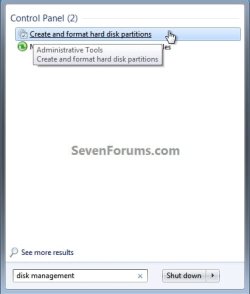
Please have a look at post #29 in this same thread again to see how to get to disk management.
 

My Computer My Computer

Computer Manufacturer/Model Number
* BFK Customs *
OS
W 7 64-bit Ultimate
CPU
Intel Q9550 Yorkfield
Motherboard
ASUS P5Q Pro
Memory
8GB Dominator 8500C5D
Graphics Card(s)
ATI : XFX 5870
Sound Card
Realtek HD Audio 7-1
Monitor(s) Displays
1x 47" LCD HDMI & 3x 26" LCD HDMI
Screen Resolution
1920x1080P & 1920x1200
Hard Drives
1x 80GB Intel X25-M G2 SSD : 1x 500GB & 1x 640GB WD Caviar Black(s)
PSU
Corsair 620HX
Case
Cooler Master RC-690
Cooling
Tuniq Tower 120, 2x 140mm and 3x 120mm case fans
Keyboard
Microsoft 500
Mouse
Razer Diamondback 3G
Internet Speed
14 Mb/s
Other Info
1x Koutech 3Gb/s SATA HDD Hot Swap Rack
Right ...i have not had much of a chance to play because of our visitors but after a lot of searching it looks like classic view was complicating things for me (i am a newb with all this stuff). Theres a whole world of stuff that can be done which had no idea about because i have never needed to know. Give me a broken car and i know what to do. Got into disk management but i cant get my print screen button to work:mad: I will look for an app to take screenshot in a bit
 
Last edited:

My Computer My Computer

Computer Manufacturer/Model Number
HOME BUILT
OS
windows 7
CPU
Q6600
Motherboard
ASUS P5Q PRO TURBO
Memory
6g 800MHZ 240PIN DDR2 PC6400
Graphics Card(s)
GEFORCE 8800 GT 512MB
Sound Card
ONBOARD
Monitor(s) Displays
37 INCH 1280X720
Hard Drives
1XCAVIAR 500GB
1XWD 500GB
1XWD320GB
1XSAMSUNG 1TB ALL DRIVES SATA11
PSU
UNKNOWN
Case
TSUNAMI DREAM
Cooling
UNKNOWN
Internet Speed
20meg fibre optic
Other Info
1TB WD external hard drive
1x320gb Seagate external hard drive
Why not just the snipping tool as I do; start menu, accessories, snipping tool.


snip.PNG
 

My Computer My Computer

Computer Manufacturer/Model Number
* BFK Customs *
OS
W 7 64-bit Ultimate
CPU
Intel Q9550 Yorkfield
Motherboard
ASUS P5Q Pro
Memory
8GB Dominator 8500C5D
Graphics Card(s)
ATI : XFX 5870
Sound Card
Realtek HD Audio 7-1
Monitor(s) Displays
1x 47" LCD HDMI & 3x 26" LCD HDMI
Screen Resolution
1920x1080P & 1920x1200
Hard Drives
1x 80GB Intel X25-M G2 SSD : 1x 500GB & 1x 640GB WD Caviar Black(s)
PSU
Corsair 620HX
Case
Cooler Master RC-690
Cooling
Tuniq Tower 120, 2x 140mm and 3x 120mm case fans
Keyboard
Microsoft 500
Mouse
Razer Diamondback 3G
Internet Speed
14 Mb/s
Other Info
1x Koutech 3Gb/s SATA HDD Hot Swap Rack
Well ...im learning albeit slowly and life will be easier when i get a printer.
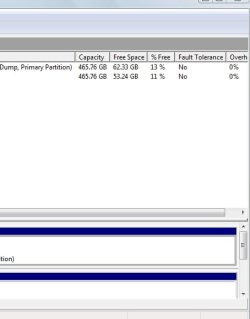
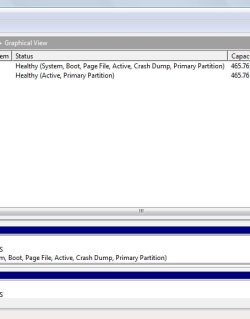
Anyway i discovered that my Vista Basic has no snipper so i got one from elsewhere after a bit of googling, I hope this attachment is what you wanted to see, im having trouble with the size restriction so the snap is in three parts:o,... no doubt there is an easier way of doing it. I cant thank you enough for your patience and all the advice you are giving me.
 

Attachments

  • Snap1.jpg
    Snap1.jpg
    33.9 KB · Views: 4
  • snap2.jpg
    snap2.jpg
    18.8 KB · Views: 7
  • snap3.jpg
    snap3.jpg
    18 KB · Views: 3

My Computer My Computer

Computer Manufacturer/Model Number
HOME BUILT
OS
windows 7
CPU
Q6600
Motherboard
ASUS P5Q PRO TURBO
Memory
6g 800MHZ 240PIN DDR2 PC6400
Graphics Card(s)
GEFORCE 8800 GT 512MB
Sound Card
ONBOARD
Monitor(s) Displays
37 INCH 1280X720
Hard Drives
1XCAVIAR 500GB
1XWD 500GB
1XWD320GB
1XSAMSUNG 1TB ALL DRIVES SATA11
PSU
UNKNOWN
Case
TSUNAMI DREAM
Cooling
UNKNOWN
Internet Speed
20meg fibre optic
Other Info
1TB WD external hard drive
1x320gb Seagate external hard drive
OK, from what I can piece together :roflmao:


If that snip was taken from within Vista, it's C: and it's the "System" partition but it's not marked as active; if that is correct, un-plug the other HDD (with Win_7 on it) and mark Vista as acitve and run a startup repair so it will be "System, Active" so it can boot independently; then un-plug the Vista drive and plug the other HDD back in and run a startup repair on that one also so it will boot independently; then you can use the F8 key at PC startup to toggle between the 2 OSs.


Partition - Mark as Active

Startup Repair


Also this is supposed to be an excellent alternative snip tool; I think you can get it free.


FastStone Capture
 

My Computer My Computer

Computer Manufacturer/Model Number
* BFK Customs *
OS
W 7 64-bit Ultimate
CPU
Intel Q9550 Yorkfield
Motherboard
ASUS P5Q Pro
Memory
8GB Dominator 8500C5D
Graphics Card(s)
ATI : XFX 5870
Sound Card
Realtek HD Audio 7-1
Monitor(s) Displays
1x 47" LCD HDMI & 3x 26" LCD HDMI
Screen Resolution
1920x1080P & 1920x1200
Hard Drives
1x 80GB Intel X25-M G2 SSD : 1x 500GB & 1x 640GB WD Caviar Black(s)
PSU
Corsair 620HX
Case
Cooler Master RC-690
Cooling
Tuniq Tower 120, 2x 140mm and 3x 120mm case fans
Keyboard
Microsoft 500
Mouse
Razer Diamondback 3G
Internet Speed
14 Mb/s
Other Info
1x Koutech 3Gb/s SATA HDD Hot Swap Rack
Helo..i gotta make dinner soon so i will get involved later as long as nobody turns up. After i took those snips i swapped two sata connections over on the motherboard (the win7 drive and i didnt notice which drive the other sata lead was from because they are both 500gb. win7 is on 1tb) just to see if it would see the win7 drive but there was no difference:( other than it booted straight to vista
without having to tap f8 which it has not since instaling win7. Still doesnt see the win7 drive. I would go into bios to tell it to boot from win7 drive but if the drive is not being seen there is no point i think. The tool i used was Snapashot (free)
 

My Computer My Computer

Computer Manufacturer/Model Number
HOME BUILT
OS
windows 7
CPU
Q6600
Motherboard
ASUS P5Q PRO TURBO
Memory
6g 800MHZ 240PIN DDR2 PC6400
Graphics Card(s)
GEFORCE 8800 GT 512MB
Sound Card
ONBOARD
Monitor(s) Displays
37 INCH 1280X720
Hard Drives
1XCAVIAR 500GB
1XWD 500GB
1XWD320GB
1XSAMSUNG 1TB ALL DRIVES SATA11
PSU
UNKNOWN
Case
TSUNAMI DREAM
Cooling
UNKNOWN
Internet Speed
20meg fibre optic
Other Info
1TB WD external hard drive
1x320gb Seagate external hard drive
So leave the 1TB HDD plugged in and un-plug the others to find which HDD Vista is on, then you can do as posted above, once you know the Vista HDD only leave that one hooked up and do the startup repair then un-hook the Vista drive and ONLY plug in the W_7 HDD and do the startup repair on it.
 

My Computer My Computer

Computer Manufacturer/Model Number
* BFK Customs *
OS
W 7 64-bit Ultimate
CPU
Intel Q9550 Yorkfield
Motherboard
ASUS P5Q Pro
Memory
8GB Dominator 8500C5D
Graphics Card(s)
ATI : XFX 5870
Sound Card
Realtek HD Audio 7-1
Monitor(s) Displays
1x 47" LCD HDMI & 3x 26" LCD HDMI
Screen Resolution
1920x1080P & 1920x1200
Hard Drives
1x 80GB Intel X25-M G2 SSD : 1x 500GB & 1x 640GB WD Caviar Black(s)
PSU
Corsair 620HX
Case
Cooler Master RC-690
Cooling
Tuniq Tower 120, 2x 140mm and 3x 120mm case fans
Keyboard
Microsoft 500
Mouse
Razer Diamondback 3G
Internet Speed
14 Mb/s
Other Info
1x Koutech 3Gb/s SATA HDD Hot Swap Rack
Neither of the drives shown in the Screenshot is a 1tb.

The C: drive which appears to be Vista is already System Active and is booting fine so it doesn't require a Repair.

Plug in only the 1tb Win7 HD which will not independently boot, set it as first HD to boot in BIOS Setup (after DVD drive) then follow the tutorials in post #37 to mark Win7 partition Active from the Win7 DVD Repair console or Repair CD Command Line, then run Startup Repair up to 3 separate times with reboots until it starts.

Now power down to plug back in the Vista, upon restart tap F8 repeatedly and select the Vista hD to boot to make sure it will still boot as it should. Then restart to make sure Win7 will start on its own since it is set as first HD to boot.
 
Last edited:
Back
Top