windows 7 warning for outlook express users

Yeah, it's not really any different. I'm using WLM in Vista, mainly because I don't like TB anymore and because i'm one of the few who like to have my accounts separated, not all into one inbox. That's why I don't use Vista's Windows Mail.
But it it just as simple as OE used to be. It just looks different.
 

My Computer My Computer

Computer Manufacturer/Model Number
Toshiba Satellite L455D
OS
Windows 7 Home Premium
CPU
Amd Semperon 2.10GHz
Memory
2 Gig
Graphics Card(s)
ATI Radeon 3100
Sound Card
Realtek
Monitor(s) Displays
15.6 inch
Screen Resolution
1366x768
Hard Drives
250gig
Mouse
Logitech Wireless
Internet Speed
16/2 cable
save all in OE and Outlook

I guess whoever responded that you can SAVE ALL in OE and Outlook. They probabaly don't understand because they don't know OE. You can't SAVE ALL in Outlook. The option doesn't exist. You have to go about it in some roundabout way unconnected with Outlook's options. The SAVE AS only works in Outlook saving one file. SAVE ALL doesn't exist in Outlook.

My gripe is they got rid of OE instead of improving it. Outlook is not an email program it is an appointments, calendar, email program. OE was just the email part of it and that's all many want. Now I hear suggestions to load Windows Mail - a program they didn't continue.

Comparing cars to OS is ridiculous. Look at software. MS Office has improved over the years, but it's an improved version each time, not a whole new world. They continuously improve it and adds features, as does QBooks and others. These new OS are not improvements meant to improve on the old, they are improvements meant to get you to buy a ndw computer and/or new OS. If you don't understand that MS has a goal of selling new computers, then you don't understand anything they are doing.
 

My Computer My Computer

OS
windows 7
I guess whoever responded that you can SAVE ALL in OE and Outlook. They probabaly don't understand because they don't know OE. You can't SAVE ALL in Outlook. The option doesn't exist. You have to go about it in some roundabout way unconnected with Outlook's options. The SAVE AS only works in Outlook saving one file. SAVE ALL doesn't exist in Outlook.

"Whoever" is me; I generally prefer being addressed by name.

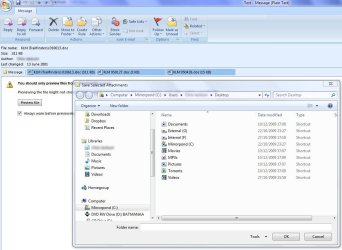
You most certainly and definitely can SAVE ALL in Outlook. See the screenshot below, where I am saving all three attachments simultaneously to the desktop. Your quadruple assertion that it cannot be done is wrong to the power of four my friend.
 

Attachments

  • Capture1.jpg
    Capture1.jpg
    103.7 KB · Views: 12
Last edited:

My Computer My Computer

Computer Manufacturer/Model Number
Custom
OS
Windows 7 Enterprise x64
CPU
Intel i7 920
Motherboard
Asus P6T Deluxe v2
Memory
6 GB
Graphics Card(s)
nVidia GTX260 + nVidia 3D
Sound Card
Onboard
Monitor(s) Displays
Samsung SyncMaster 2233RZ
Screen Resolution
1680 x 1050
Hard Drives
1 x 64GB SSD primary
2 x 1 TB (mirrored)
PSU
700W
Other Info
Edimax 802.11n Wireless PCI Card
Netgear DG834G router
You have to go about it in If you don't understand that MS has a goal of selling new computers, then you don't understand anything they are doing.

This is garbage, Manufacturers have a goal in selling new computers, M$ merely supply the software that runs on them, as do all the other software companies,
You say you can't compare them to cars, of course you can, car manufacturers built cars to sell, but you have to put fuel in them to make them run, for CARS read COMPUTERS, for FUEL read SOFTWARE.

Its not rocket science.
 

My Computer My Computer

Computer Manufacturer/Model Number
Home build.
OS
Vista Ultimate 32 bit, Win 7 Pro 32 bit, Win 7 Pro 64 bit
CPU
Intel i5 CPU 750 @ 2.67 GHZ, OC 3.7 GHZ
Motherboard
Asus P7P55D
Memory
4 Gig
Graphics Card(s)
Nvidia GeForce GTS450
Monitor(s) Displays
Acer 24"
Screen Resolution
1440 x 900
Hard Drives
1000 GIG
1000 GIG
PSU
650
Case
Antec Nine Hundred Two
Internet Speed
14 MB (APPROX)
save all

yes, clunkfish, you are right, it is there (and I thank you for that) - and like just about everything else in Outlook, it's some extra steps -

Again Outlook is not an email program. It is an appointments/calendar/email program and there is so much crap in it that if all you want is an email program, you are out of luck. I am on email all day in my business, which is handled almost entirely through email (a magazine) and after ten years of OE, Outlook is still driving down the road in a motorhome when all I want is a car to get around in. I just want transportation, not a living room and bathroom with shower and all these other distractions. I would pay for OE easy, but my efforts are for nought, I am sure. I come from DOS and still use keyboard shortcuts all day because they are faster than the mouse in many ways. Now I have Outlook and have even more steps added to my daily routine dealing with email. That's not progress to me.
 

My Computer My Computer

OS
windows 7
Save all

I saved all my attachments as instructed by Clunkfish in a folder. It was 6 steps to save all instead of 2 in OE. That's the problem. Everything is more work.

Am I dreaming thinking someone will wake up to all this? Probabaly.
 

My Computer My Computer

OS
windows 7
Back
Top