Windows 7 will not boot

MattD00

New member
Member
Local time
7:06 PM
Messages
29
I run a dual boot between windows 7 and Linux on my desktop.
I today I removed Ubuntu 11.04 as I don't like the new unity interface.
I then used my windows 7 CD to fix the master boot record. I decided to try out a new Linux distro called Moon OS so installed it in the partition which previously had Ubuntu no it. Moon OS installed fine. Later on I decided to boot into windows I got to the grub menu selected windows 7 the screen went black as if it where about to boot but then just came back to the grub menu page. I went back onto Linux and windows is still on my hard drive. I booted the pc back up using my super grub CD to see if that would work but the same thing happened. I have no idea why Windows will not boot as I have installed many different Linux distributions alongside windows 7 on this pc and have had no problem with it what so ever. Does anyone know what the problem is
 

My Computer

OS
Windows 7 ultimate 32bit
Try reinstalling GRUB.

Linux loves to damage Windows; it is like having a virus on your PC.
 

My Computer

OS
ME/XP/Vista/Win7
well I just tried fixing the master boot record running bootsect /nt60 Sys /mbr didn't go down well now I have to use super grub to get the boot menu.
 

My Computer

OS
Windows 7 ultimate 32bit
well I just tried fixing the master boot record running bootsect /nt60 Sys /mbr didn't go down well now I have to use super grub to get the boot menu.

Yes, linux is like a root virus.
 

My Computer

OS
ME/XP/Vista/Win7
So you suggest reinstalling grub
 

My Computer

OS
Windows 7 ultimate 32bit
Best yet is to use separate HD's booted via BIOS boot order or one-time Boot Menu, to avoid GRUB altogether.
 
Whiles in the command prompt running of the recovery CD I realised that my C and D partitions have switched so all my system files are now on D and programs on C well the partitions them selves have not switched just the drive letters this is really strange any why do revert it.
 

My Computer

OS
Windows 7 ultimate 32bit
that may be the case for optical drives and some hard drive partitions but surely it goes against protocol changing the letter for the C: drive or partition. I am pretty sure this is why windows is not wanting to boot as the current C: partition is not my actual C: partition is there any why to switch them round again.
 

My Computer

OS
Windows 7 ultimate 32bit
that may be the case for optical drives and some hard drive partitions but surely it goes against protocol changing the letter for the C: drive or partition. I am pretty sure this is why windows is not wanting to boot as the current C: partition is not my actual C: partition is there any why to switch them round again.

If you have partitions before the partition letter C: this can read differently.
 

My Computer

OS
ME/XP/Vista/Win7
I burned the program to disk and tried to sort out the dive letters but the C: partition is still coming up as D: and so on.

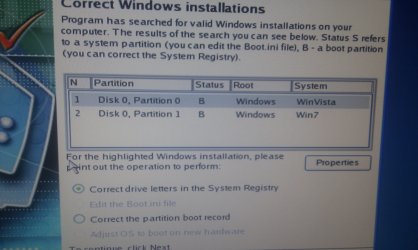
I am not 100% sure what I need to do see I look some screenshots to see if anything could be figured out from them.

IMAG0007.jpg

It comes up saying windows 7 and vista when I don't even have vista installed

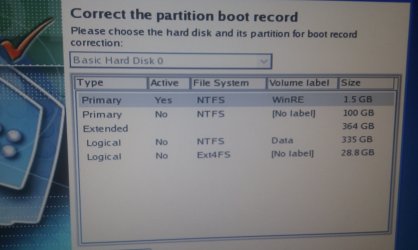
IMAG0008.jpg

This shows the partions I have on my Hard Drive. The 2nd one down is the C: partition with all the System Files. There is then an extended partition which is my D: drive which has then been partitioned for my Linux install.

IMAG0009.jpg

I tried renaming the volumes here but I didn't get much luck when it came to fixing the problem.

If you want anymore screenshots I can provide them.
 

My Computer

OS
Windows 7 ultimate 32bit
As you installed Vista first, than Windows 7.
In Recovery Console, Vista would be C: Windows 7 would be D:
 

My Computer

OS
ME/XP/Vista/Win7
My PC did have vista on to begin with but I formated the hard drive and did was windows 7 clean install. But in the recovery Console when i type 'C: dir' It lists all the directories from the D partition which i keep all my programs and files in.
 

My Computer

OS
Windows 7 ultimate 32bit
It shows correctly that Win7 is C, the 100gb which you say you have System files on.

The Logical extended is D which is your data partition, correct?

Use free Partition Wizard bootable CD to mark Win7 partition Active, then highlight HD and from disk tab choose Rebuild MBR. This may preclude the need to run three Startup Repairs from DVD Repair console to repair or rewrite the System files to WIn7.

Post back camera snap of maximized PW window.

Once you have Win7 started you can set up your Dual Boot as recommended here: Dual-Boot Windows 7 and Ubuntu in Perfect Harmony

As Theog indicates all bets are off with GRUB on the HD. You should have wiped the HD to get it out of the boot sector because it is corruption itself to Win7.
 
So i burnt that program to CD booted it up and it showed that my Partition with all my data in it was now unallocated space. I went to boot back into Linux but as the partition was unallocated the operating system was no existent. I have no idea what has just happened as I was running Linux burnt the CD using Linux and then rebooted the machine. The CD ran and saw that all the space was unallocated without even pressing anything how could this of happened.
 

My Computer

OS
Windows 7 ultimate 32bit
Run the Partition Recovery Wizard from PW CD Wizards tab. It will normally find and restore deleted partitions if they have not been wiped from the HD.

Once you restore the WIn7 partition, mark it Active and run Rebuild MBR from DIsk tab after highlighting the HD with PW CD. If it won't start then boot the DVD Repair console to run Startup Repair up to 3 separate times with reboots until Win7 starts.

You can attempt to Explore the partition from PW by rightclicking on it. IF files are seen then they can be rescued: Copy & Paste - in Windows Recovery Console. Files should always be backed up during any repartitioning or reinstall.

Again, all bets are off since GRUB was not wiped from the HD before reinstall.
 
I managed to recover everything of my D: partition and set the C: partition to active using diskpart with the windows repair disk.

I then fixed the master boot record with the PW CD

but still no luck windows is not booting.

This is all the operating system detected by super grub
IMAG0011.jpg

This is my partitions listed in diskpart after making C: active
IMAG0010.jpg

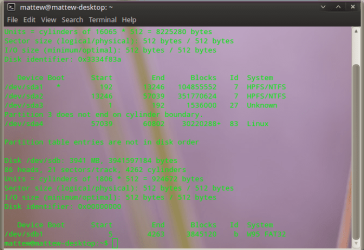
I also ran Fdisk in the linux terminal to view the partitions table
fdisk.png
 

My Computer

OS
Windows 7 ultimate 32bit
Back
Top