Windows 7 will not boot

I managed to recover everything of my D: partition and set the C: partition to active using diskpart with the windows repair disk.

I then fixed the master boot record with the PW CD

but still no luck windows is not booting.

Did you run Startup Repair up to 3 separate times with reboots from the DVD Repair console?

Often a Recovery partition in first place will be marked Active at factory to enable it's hotkeys to work. I would also try Repairs with Recovery marked Active. It may also boot into Factory REcovery so be prepared with what you want to do with that.

Irreparable Windows 7 is common with GRUB on the HD.

You can copy out your files: Copy & Paste - in Windows Recovery Console

Dual boot Ubuntu-Win7 via the Windows boot manager.

Dual-Boot Windows 7 and Ubuntu in Perfect Harmony
 
Reinstalling with a Factory Recovery Partition will not delete GRUB.
 

My Computer

OS
ME/XP/Vista/Win7
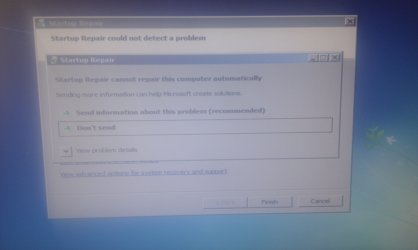
Yeah I tried the start up repair option but it didn't work i was just given this message.

IMAG0013.jpg

When booting the CD I get the option of these two partitions tried it with both and get the same message

IMAG0012.jpg

When using the super grub boot disk the only OS that is found is windows vista in the WinRE partition where no OS is installed.
 

My Computer

OS
Windows 7 ultimate 32bit
Highlight the Win7 listing in your second screenshot, click through to Recovery Tools list to run Startup Repair repeatedly.

If you can see the partition which had GRUB and delete it, Repairs might work if they don't otherwise. DiskPart Command-Line Options
 
Yes that is what I have been doing but i keep on getting that error
 

My Computer

OS
Windows 7 ultimate 32bit
You have wiped the partition which had GRUB? What did you use to do this?
 
If you have recovery discs (like me), use those. If not then a clean install.
 

My Computer

Computer Manufacturer/Model Number
HP
OS
Windows 7 Home Premium 64-bit Service Pack 1
CPU
intel core 2 duo x64
Memory
4Gb Ram
Monitor(s) Displays
1
Screen Resolution
1600x900
Mouse
Microsoft Compact Optical Mouse 500 v 2.0
Internet Speed
1MB
Other Info
Using Opera 11
bootsect /nt60 all I ran that form the command line on the repair disk and that got rid of the grub OS selection screen.
 

My Computer

OS
Windows 7 ultimate 32bit
That command which is also automated in Startup Repair only attempts to recode the boot sector to default to Win7 boot manager. It is not at all the same as wiping the HD (sure macro solution) or doing a partition-specific wipe of the partition which contains GRUB (possible micro solution) to stop it from conflicting with and corrupting the Win7 boot manager.

The tool to do the partition-specific wipe is free Partition Wizard Use the Bootable CD
using Option 3 in the tutorial linked.
 
Not 100% sure where grub was installed I think it was on the windows partition.
 

My Computer

OS
Windows 7 ultimate 32bit
Highlight the Win7 listing in your second screenshot, click through to Recovery Tools list to run Startup Repair repeatedly.

If you can see the partition which had GRUB and delete it, Repairs might work if they don't otherwise. DiskPart Command-Line Options

GRUB is installed to a HIDDEN Partition which can not be seen from Windows, Linux, or MAC partitioning tools.
 

My Computer

OS
ME/XP/Vista/Win7
get a windows 7 disc boot off it. press r to enter the recovery console and type fixmbr this will fix your master boot record and remove grub
 

My Computer

Computer Manufacturer/Model Number
HP
OS
Windows 7 Home Premium 64-bit Service Pack 1
CPU
intel core 2 duo x64
Memory
4Gb Ram
Monitor(s) Displays
1
Screen Resolution
1600x900
Mouse
Microsoft Compact Optical Mouse 500 v 2.0
Internet Speed
1MB
Other Info
Using Opera 11
Back
Top