Windows 7 wireless connection Limited Access :/

skizum

New member
Local time
1:37 AM
Messages
3
So, my laptop was running low on virtual memory lately and i thought about end processing all the unnecessary programs i have installed and it seemed to work… but… one day, i actually decided to end process everything in "Performance>Resource Monitor" tab… and i think i might have done something wrong that my laptop had suddenly restarted on its own and i get this error "Limited Access" whenever i tried to connect…:(
I tried to restore it and seems to work perfectly fine until i did a restart…it was back….this error just won't go away and i have no access online at all...:cry:
Can anyone give me any idea or solution to this matter ? :( Or if you ever had same problem and got it solved ?

Thank You.

Sony VAIO
Model : VPCEA36FA
Windows 7 Home Premium 64x

Network Adapters :
Intel® WiFi Link 1000 BGN
Marvell Yukon 88E8059 PCI-E Gigabit Ethernet Controller
Microsoft Virtual WiFi Miniport Adapter

Let me know if any more information is needed.
 

My Computer

Computer type
PC/Desktop
OS
Windows 7 Home Premium 64x
So, my laptop was running low on virtual memory lately and i thought about end processing all the unnecessary programs i have installed and it seemed to work… but… one day, i actually decided to end process everything in "Performance>Resource Monitor" tab… and i think i might have done something wrong that my laptop had suddenly restarted on its own and i get this error "Limited Access" whenever i tried to connect…:(
I tried to restore it and seems to work perfectly fine until i did a restart…it was back….this error just won't go away and i have no access online at all...:cry:
Can anyone give me any idea or solution to this matter ? :( Or if you ever had same problem and got it solved ?

Thank You.

Sony VAIO
Model : VPCEA36FA
Windows 7 Home Premium 64x

Network Adapters :
Intel® WiFi Link 1000 BGN
Marvell Yukon 88E8059 PCI-E Gigabit Ethernet Controller
Microsoft Virtual WiFi Miniport Adapter

Let me know if any more information is needed.

With system restore you can return those settings back to default.
http://www.sevenforums.com/tutorials/700-system-restore.html
 

My Computer

Computer type
PC/Desktop
Computer Manufacturer/Model Number
Home built
OS
Windows 7 Ult, Windows 8.1 Pro,
CPU
Q9650-4.275GHz, E8600 4.5GHz, E6750-3.8GHz
Motherboard
Evga 780i FTW
Memory
G.Skill PC2 9600 1200Mhz 5 5 5 15 2T
Graphics Card(s)
GTX480
Sound Card
Asus Xonar D2
Monitor(s) Displays
HannsG
Screen Resolution
1680X1050
Hard Drives
GSkill Phoenix Pro 120GB SSD
PSU
ThermalTake Toughpower 1000Watt modular
Case
ThermalTake XaserV
Cooling
Xigmatek S1283
Keyboard
Logitech G15
Mouse
Logitech G9
Internet Speed
T1
So, my laptop was running low on virtual memory lately and i thought about end processing all the unnecessary programs i have installed and it seemed to work… but… one day, i actually decided to end process everything in "Performance>Resource Monitor" tab… and i think i might have done something wrong that my laptop had suddenly restarted on its own and i get this error "Limited Access" whenever i tried to connect…:(
I tried to restore it and seems to work perfectly fine until i did a restart…it was back….this error just won't go away and i have no access online at all...:cry:
Can anyone give me any idea or solution to this matter ? :( Or if you ever had same problem and got it solved ?

Thank You.

Sony VAIO
Model : VPCEA36FA
Windows 7 Home Premium 64x

Network Adapters :
Intel® WiFi Link 1000 BGN
Marvell Yukon 88E8059 PCI-E Gigabit Ethernet Controller
Microsoft Virtual WiFi Miniport Adapter

Let me know if any more information is needed.

With system restore you can return those settings back to default.
http://www.sevenforums.com/tutorials/700-system-restore.html

Hi chev65,
Thank you for your reply :)

As i've mentioned above, i've already done that and it worked perfectly fine…until a restart was made..it was back to 'Limited Access' :(
Ive tried to restore again multiple times but no luck..
Any more solution ?
Id be really thankful :)
 

My Computer

Computer type
PC/Desktop
OS
Windows 7 Home Premium 64x
So, my laptop was running low on virtual memory lately and i thought about end processing all the unnecessary programs i have installed and it seemed to work… but… one day, i actually decided to end process everything in "Performance>Resource Monitor" tab… and i think i might have done something wrong that my laptop had suddenly restarted on its own and i get this error "Limited Access" whenever i tried to connect…:(
I tried to restore it and seems to work perfectly fine until i did a restart…it was back….this error just won't go away and i have no access online at all...:cry:
Can anyone give me any idea or solution to this matter ? :( Or if you ever had same problem and got it solved ?

Thank You.

Sony VAIO
Model : VPCEA36FA
Windows 7 Home Premium 64x

Network Adapters :
Intel® WiFi Link 1000 BGN
Marvell Yukon 88E8059 PCI-E Gigabit Ethernet Controller
Microsoft Virtual WiFi Miniport Adapter

Let me know if any more information is needed.

With system restore you can return those settings back to default.
http://www.sevenforums.com/tutorials/700-system-restore.html

Hi chev65,
Thank you for your reply :)

As i've mentioned above, i've already done that and it worked perfectly fine…until a restart was made..it was back to 'Limited Access' :(
Ive tried to restore again multiple times but no luck..
Any more solution ?
Id be really thankful :)

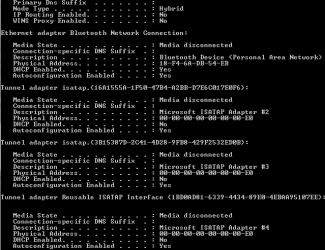
If you can post a screen shot of the ipconfig/all it would be helpful. :)

Just paste into an elevated command prompt >
Code:
ipconfig/all
 

My Computer

Computer type
PC/Desktop
Computer Manufacturer/Model Number
Home built
OS
Windows 7 Ult, Windows 8.1 Pro,
CPU
Q9650-4.275GHz, E8600 4.5GHz, E6750-3.8GHz
Motherboard
Evga 780i FTW
Memory
G.Skill PC2 9600 1200Mhz 5 5 5 15 2T
Graphics Card(s)
GTX480
Sound Card
Asus Xonar D2
Monitor(s) Displays
HannsG
Screen Resolution
1680X1050
Hard Drives
GSkill Phoenix Pro 120GB SSD
PSU
ThermalTake Toughpower 1000Watt modular
Case
ThermalTake XaserV
Cooling
Xigmatek S1283
Keyboard
Logitech G15
Mouse
Logitech G9
Internet Speed
T1
With system restore you can return those settings back to default.
http://www.sevenforums.com/tutorials/700-system-restore.html

Hi chev65,
Thank you for your reply :)

As i've mentioned above, i've already done that and it worked perfectly fine…until a restart was made..it was back to 'Limited Access' :(
Ive tried to restore again multiple times but no luck..
Any more solution ?
Id be really thankful :)

If you can post a screen shot of the ipconfig/all it would be helpful. :)

Just paste into an elevated command prompt >
Code:
ipconfig/all

I hope this helps :confused:
 

Attachments

  • Picture 2014-05-28 17_08_04.png
    Picture 2014-05-28 17_08_04.png
    30 KB · Views: 8

My Computer

Computer type
PC/Desktop
OS
Windows 7 Home Premium 64x
Back
Top