Connection dropping in Windows 7 - Wireless

Vudal

New member
Local time
11:26 AM
Messages
10
Location
\
Alright, where to start..

First off, this is a wireless issue regarding a TP-Link WN851ND PCI card, and Windows 7 Home Premium 64bit.

(Router: Netgear WNDR3400V2)

This is a 100% FRESH install of Windows 7, and fresh install of the drivers the PCI card uses.
(I haven't even bothered to install anything else yet because of it, the only other things installed are Mobo drivers).

Now with this card, I've only used on Windows 10 (Worked great), and ArchLinux/Lubuntu (Still works great).

I can rule out my router / PCI card as it works fine in Linux distros but to no avail within Windows 7, so far I've completely disabled the firewall (Including in Adv Settings entirely, and disabled all blocking rules of inbound/outbound connections), I've 'tinkered' with the PCI card's settings and the settings of my Router (when I initially thought it could be my router before testing on Linux), and I've 'tinkered' with Network & Sharing Centers settings / adapters.

I've changed the DNS / IP around quite a bit aswell.

I initially saw this:
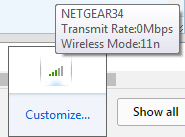
BLoH0vY.png
; Which had me wondering if it was the card when I can now rule out that it isn't.

I then figured, 'Hey! maybe it's a corruption issue with Windows 7 / the Driver' and decided to do a fresh install of both, and again to no avail. I even tried moving over a driver from TP-link's website from my Linux distro and that driver hasn't worked either.

Here's an in-depth look of my issue (Took me 1h 30m to install google chrome gg).

The download speed will initially start out at around 120-200KB/s and then slowly dip all the way down until 0. (At which point it will struggle to get anywhere past 10kb/s).
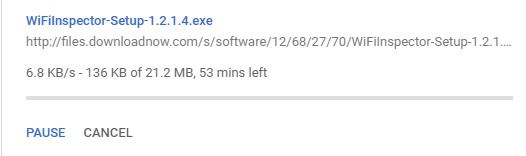
VnFdlHW.png


I currently cannot get Xirrus however, here's my IPConfig snip.
Code:
Windows IP Configuration

   Host Name . . . . . . . . . . . . : 0day-PC
   Primary Dns Suffix  . . . . . . . : 
   Node Type . . . . . . . . . . . . : Hybrid
   IP Routing Enabled. . . . . . . . : No
   WINS Proxy Enabled. . . . . . . . : No

Wireless LAN adapter Wireless Network Connection:

   Connection-specific DNS Suffix  . : 
   Description . . . . . . . . . . . : TP-LINK 300Mbps Wireless N Adapter
   Physical Address. . . . . . . . . : 18-A6-F7-A3-57-B2
   DHCP Enabled. . . . . . . . . . . : Yes
   Autoconfiguration Enabled . . . . : Yes
   Link-local IPv6 Address . . . . . : fe80::c554:770f:599d:fd51%11(Preferred) 
   IPv4 Address. . . . . . . . . . . : 10.0.0.2(Preferred) 
   Subnet Mask . . . . . . . . . . . : 255.255.255.0
   Lease Obtained. . . . . . . . . . : Sunday, March 19, 2017 12:45:28 AM
   Lease Expires . . . . . . . . . . : Monday, March 20, 2017 12:45:32 AM
   Default Gateway . . . . . . . . . : 10.0.0.1
   DHCP Server . . . . . . . . . . . : 10.0.0.1
   DHCPv6 IAID . . . . . . . . . . . : 236496631
   DHCPv6 Client DUID. . . . . . . . : 00-01-00-01-20-5F-B2-24-18-A6-F7-A3-57-B2
   DNS Servers . . . . . . . . . . . : 10.0.0.1
   NetBIOS over Tcpip. . . . . . . . : Enabled

Tunnel adapter isatap.{BB6B0ABC-9A21-479E-A602-70DFBA416CE6}:

   Media State . . . . . . . . . . . : Media disconnected
   Connection-specific DNS Suffix  . : 
   Description . . . . . . . . . . . : Microsoft ISATAP Adapter
   Physical Address. . . . . . . . . : 00-00-00-00-00-00-00-E0
   DHCP Enabled. . . . . . . . . . . : No
   Autoconfiguration Enabled . . . . : Yes

Tunnel adapter Teredo Tunneling Pseudo-Interface:

   Connection-specific DNS Suffix  . : 
   Description . . . . . . . . . . . : Teredo Tunneling Pseudo-Interface
   Physical Address. . . . . . . . . : 00-00-00-00-00-00-00-E0
   DHCP Enabled. . . . . . . . . . . : No
   Autoconfiguration Enabled . . . . : Yes
   IPv6 Address. . . . . . . . . . . : 2001:0:9d38:78cf:2009:3815:f5ff:fffd(Preferred) 
   Link-local IPv6 Address . . . . . : fe80::2009:3815:f5ff:fffd%12(Preferred) 
   Default Gateway . . . . . . . . . : ::
   NetBIOS over Tcpip. . . . . . . . : Disabled

The only thing installed on this PC from out of it's state is 2013 version of Windows 7 updates, and my PCI card's driver.

I've spent most of my life with PCs so my background knowledge is fairly decent on the Windows side (Linux preferred) however, I'm officially out of ideas and so are my friends.

PC specs itself are listed on my profile, and yes this thread was made on this PC because I can use browsing fine just not download anything.

Any and all help is appreciated, will work on getting Xirrus ASAP.

Edit: Xirrus screenshot below.
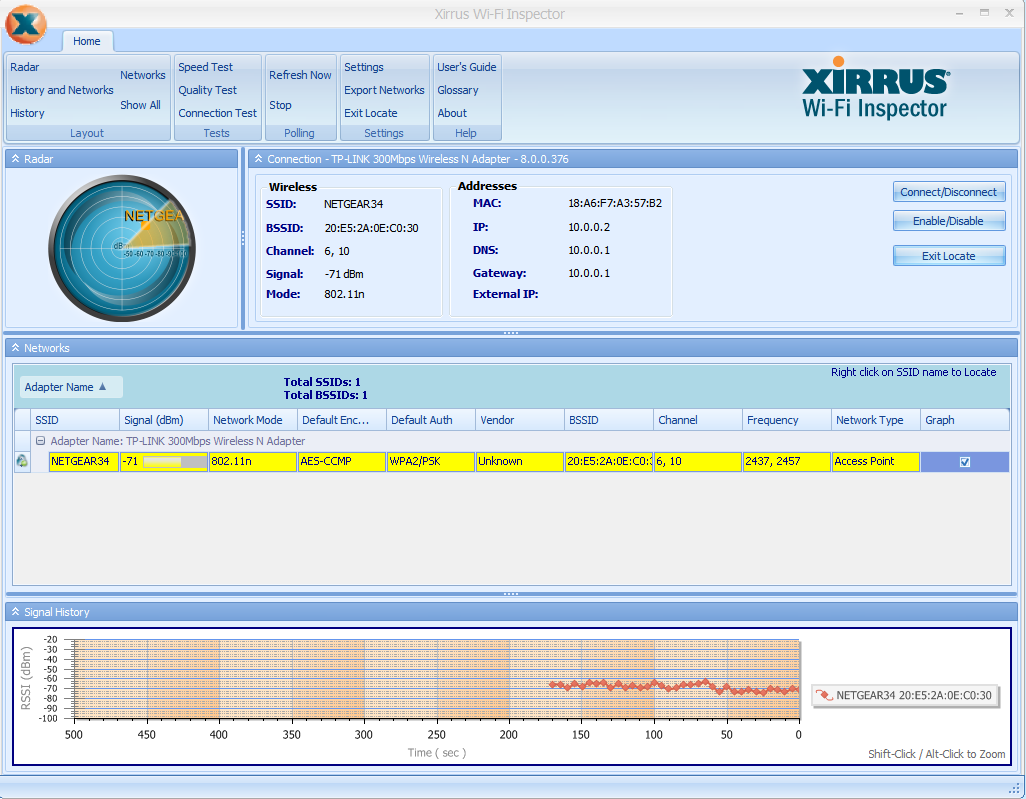
CsutCgo.png
 
Last edited:

My Computer

Computer type
PC/Desktop
Computer Manufacturer/Model Number
Custom
OS
Windows 7 Home Premium 64Bit
CPU
AMD FX 8300 8-core @ 3.2GHz
Motherboard
Gigabyte 78LMT-USB3.0 (Rev 6.0)
Memory
20GB DDR3 G.Skill Ripjaws X (2x8GB / 1x 4GB) 1333MHz
Graphics Card(s)
EVGA GTX 750Ti FTW Edition w/ ACX 2.0
Sound Card
On-board
Monitor(s) Displays
Phillips 32" HDTV
Screen Resolution
1824x1026
Hard Drives
Western Digital 1.0TB HDD / 7500RPM
Toshiba 1.0TB HDD / 7500RPM
PSU
Rosewill Glacier 500M Modular 500W PSU
Case
In Win 303 Black / Tempered Glass Window
Cooling
3 Blue-LED 2100RPM 80MM fans
Keyboard
CM Storm Devestator Blue
Mouse
CM Storm Devestator Blue
Internet Speed
700KBs / 7Mbps.
Antivirus
Malware Bytes / Bit Defender / Kaspersky (3 Stages)
Browser
Google Chrome
I've just had to reinstall W7 Home Premium SP1 myself due to Avast last upgrade upset both lap top and this pc. Laptop is Toshiba and they got it finxed for me remotely. But pc is Gigabyte I bought off E Bay so have to fix it myself.
I had problems downloading on speed and also with set up of TP link, same one as above and had to install and then uninstall and try again.
Noticed then all fine except for one thing.
Teredo tunneling adapter says cannot start Code 10. Now downloading max for my ADSL2 higher than before even. Check yours may help. Just a thought as I'm not more than average.
 

My Computer

Computer type
PC/Desktop
Computer Manufacturer/Model Number
Gigabyte
OS
Windows 7 Home Premium (x64)bit build 7601
CPU
Intel Premium G2030 3000MHz
Motherboard
Gigabyte H61M-USB3H Intel 61 Cougar Point
Memory
4GBytes single channel
Graphics Card(s)
Ivy Intel Bridge-DT GT1 Intergrated graphics control
Hard Drives
Hitachi HDS 721010CLA630 1000GB
Keyboard
MS 3000 USB
Mouse
MS optical
Internet Speed
ADSL2 12MB average
Antivirus
Avast
Browser
Firefox, Opera, IE11
I've just had to reinstall W7 Home Premium SP1 myself due to Avast last upgrade upset both lap top and this pc. Laptop is Toshiba and they got it finxed for me remotely. But pc is Gigabyte I bought off E Bay so have to fix it myself.
I had problems downloading on speed and also with set up of TP link, same one as above and had to install and then uninstall and try again.
Noticed then all fine except for one thing.
Teredo tunneling adapter says cannot start Code 10. Now downloading max for my ADSL2 higher than before even. Check yours may help. Just a thought as I'm not more than average.


Could you explain precisely what you did to the Tunneling Adapter to fix it?

I saw the adapter and then wondered what in the world it was because I hadn't seen it on Windows 10 when I first got the card and uninstalled it before doing the fresh install.

As of now, it's not even in my adapter list on Network & Sharing Center, and when it is it just shows a red connection bar layout.

Edit:

Googled the error you had said and followed some guides, my adapter in device manager doesn't appear with a warning icon whatsoever.

Snip:

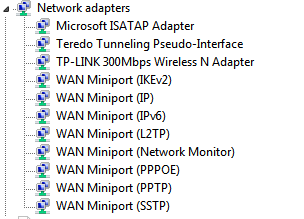
z4GC1NF.png
 

My Computer

Computer type
PC/Desktop
Computer Manufacturer/Model Number
Custom
OS
Windows 7 Home Premium 64Bit
CPU
AMD FX 8300 8-core @ 3.2GHz
Motherboard
Gigabyte 78LMT-USB3.0 (Rev 6.0)
Memory
20GB DDR3 G.Skill Ripjaws X (2x8GB / 1x 4GB) 1333MHz
Graphics Card(s)
EVGA GTX 750Ti FTW Edition w/ ACX 2.0
Sound Card
On-board
Monitor(s) Displays
Phillips 32" HDTV
Screen Resolution
1824x1026
Hard Drives
Western Digital 1.0TB HDD / 7500RPM
Toshiba 1.0TB HDD / 7500RPM
PSU
Rosewill Glacier 500M Modular 500W PSU
Case
In Win 303 Black / Tempered Glass Window
Cooling
3 Blue-LED 2100RPM 80MM fans
Keyboard
CM Storm Devestator Blue
Mouse
CM Storm Devestator Blue
Internet Speed
700KBs / 7Mbps.
Antivirus
Malware Bytes / Bit Defender / Kaspersky (3 Stages)
Browser
Google Chrome
Not sure what I did to be truthful. Muddled through as always. Did a lot of looking up fm M$ and checking as hadnt heard of this one. Tried to get new driver one time but said drive up to date. Maybe that did it?
Give it a go. Or can in the end if stuck to ask M$ on desk. But have to pay usually. I used them when upgrade using a family pack from XP to W7. The 64 bit disc was faulty as had no end of problems and they had a look around inside and said needed to do a new install to fix it cost $88. But worth it. And recently they helped me with another problem free as have an Aussie office now. If you cant find how to fix maybe try them.
 

My Computer

Computer type
PC/Desktop
Computer Manufacturer/Model Number
Gigabyte
OS
Windows 7 Home Premium (x64)bit build 7601
CPU
Intel Premium G2030 3000MHz
Motherboard
Gigabyte H61M-USB3H Intel 61 Cougar Point
Memory
4GBytes single channel
Graphics Card(s)
Ivy Intel Bridge-DT GT1 Intergrated graphics control
Hard Drives
Hitachi HDS 721010CLA630 1000GB
Keyboard
MS 3000 USB
Mouse
MS optical
Internet Speed
ADSL2 12MB average
Antivirus
Avast
Browser
Firefox, Opera, IE11
Not sure what I did to be truthful. Muddled through as always. Did a lot of looking up fm M$ and checking as hadnt heard of this one. Tried to get new driver one time but said drive up to date. Maybe that did it?
Give it a go. Or can in the end if stuck to ask M$ on desk. But have to pay usually. I used them when upgrade using a family pack from XP to W7. The 64 bit disc was faulty as had no end of problems and they had a look around inside and said needed to do a new install to fix it cost $88. But worth it. And recently they helped me with another problem free as have an Aussie office now. If you cant find how to fix maybe try them.

Haha, last thing I'd be doing is paying money for a faulty driver/OS compatability issue.

Would cut my losses and just sell my steam and move back to linux at that point.

Currently talking to TP-Link on Live Support, tried the Atheros AR9227 driver and got the same result but worse dBm signal. Guessing we're all stumped at this point.

-Live Support lady moved me over to Email support as they have a more experienced worker there, I guess.

gg so far.
 

My Computer

Computer type
PC/Desktop
Computer Manufacturer/Model Number
Custom
OS
Windows 7 Home Premium 64Bit
CPU
AMD FX 8300 8-core @ 3.2GHz
Motherboard
Gigabyte 78LMT-USB3.0 (Rev 6.0)
Memory
20GB DDR3 G.Skill Ripjaws X (2x8GB / 1x 4GB) 1333MHz
Graphics Card(s)
EVGA GTX 750Ti FTW Edition w/ ACX 2.0
Sound Card
On-board
Monitor(s) Displays
Phillips 32" HDTV
Screen Resolution
1824x1026
Hard Drives
Western Digital 1.0TB HDD / 7500RPM
Toshiba 1.0TB HDD / 7500RPM
PSU
Rosewill Glacier 500M Modular 500W PSU
Case
In Win 303 Black / Tempered Glass Window
Cooling
3 Blue-LED 2100RPM 80MM fans
Keyboard
CM Storm Devestator Blue
Mouse
CM Storm Devestator Blue
Internet Speed
700KBs / 7Mbps.
Antivirus
Malware Bytes / Bit Defender / Kaspersky (3 Stages)
Browser
Google Chrome
Hi Vudal,
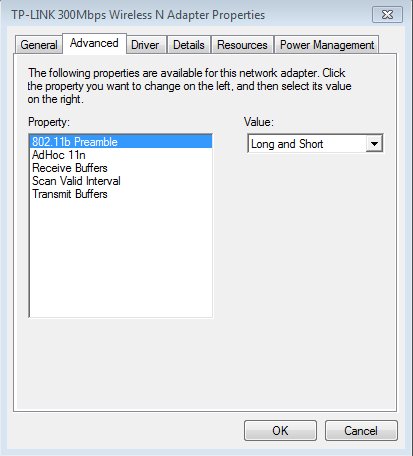
what settings are showing under the advanced tab.

Roy
 

My Computer

Computer type
PC/Desktop
Computer Manufacturer/Model Number
medionl/Aspire 6930G/acer x55a
OS
W7 home premium 32bit/W7HP 64bit/w10 tp insider ring
CPU
E5300 dual core
Motherboard
medion MS7366
Memory
3gb
Graphics Card(s)
Nvidia Geforce 7100 Nforce 630i
Monitor(s) Displays
avixc
Internet Speed
n (isp resticted to 72)
Antivirus
mse/pands
Browser
palemoon
Other Info
Belkin Fd7050 n USB using Railink RT2870 drivers, more upto date
Guessing you mean for the PCI card under Device Manager.

wXgWWcM.png


Edit: [MENTION=362659]samuria[/MENTION], did all of that and rebooted. Still 100% the same.

New IPConfig all snip:

Code:
Windows IP Configuration

   Host Name . . . . . . . . . . . . : 0day-PC
   Primary Dns Suffix  . . . . . . . : 
   Node Type . . . . . . . . . . . . : Hybrid
   IP Routing Enabled. . . . . . . . : No
   WINS Proxy Enabled. . . . . . . . : No

Wireless LAN adapter Wireless Network Connection:

   Connection-specific DNS Suffix  . : 
   Description . . . . . . . . . . . : TP-LINK 300Mbps Wireless N Adapter
   Physical Address. . . . . . . . . : 18-A6-F7-A3-57-B2
   DHCP Enabled. . . . . . . . . . . : Yes
   Autoconfiguration Enabled . . . . : Yes
   IPv6 Address. . . . . . . . . . . : 2602:304:ae85:d8f9:e501:5e04:6bdd:3e8c(Preferred) 
   Temporary IPv6 Address. . . . . . : 2602:304:ae85:d8f9:151a:ab78:ae9e:4551(Preferred) 
   Link-local IPv6 Address . . . . . : fe80::e501:5e04:6bdd:3e8c%13(Preferred) 
   IPv4 Address. . . . . . . . . . . : 10.0.0.2(Preferred) 
   Subnet Mask . . . . . . . . . . . : 255.255.255.0
   Lease Obtained. . . . . . . . . . : Sunday, March 19, 2017 9:14:10 PM
   Lease Expires . . . . . . . . . . : Monday, March 20, 2017 9:14:13 PM
   Default Gateway . . . . . . . . . : fe80::22e5:2aff:fe0e:c030%13
                                       10.0.0.1
   DHCP Server . . . . . . . . . . . : 10.0.0.1
   DHCPv6 IAID . . . . . . . . . . . : 236496631
   DHCPv6 Client DUID. . . . . . . . : 00-01-00-01-20-5F-B2-24-18-A6-F7-A3-57-B2
   DNS Servers . . . . . . . . . . . : fe80::22e5:2aff:fe0e:c030%13
                                       208.67.222.222
                                       208.67.220.220
   NetBIOS over Tcpip. . . . . . . . : Enabled
 

My Computer

Computer type
PC/Desktop
Computer Manufacturer/Model Number
Custom
OS
Windows 7 Home Premium 64Bit
CPU
AMD FX 8300 8-core @ 3.2GHz
Motherboard
Gigabyte 78LMT-USB3.0 (Rev 6.0)
Memory
20GB DDR3 G.Skill Ripjaws X (2x8GB / 1x 4GB) 1333MHz
Graphics Card(s)
EVGA GTX 750Ti FTW Edition w/ ACX 2.0
Sound Card
On-board
Monitor(s) Displays
Phillips 32" HDTV
Screen Resolution
1824x1026
Hard Drives
Western Digital 1.0TB HDD / 7500RPM
Toshiba 1.0TB HDD / 7500RPM
PSU
Rosewill Glacier 500M Modular 500W PSU
Case
In Win 303 Black / Tempered Glass Window
Cooling
3 Blue-LED 2100RPM 80MM fans
Keyboard
CM Storm Devestator Blue
Mouse
CM Storm Devestator Blue
Internet Speed
700KBs / 7Mbps.
Antivirus
Malware Bytes / Bit Defender / Kaspersky (3 Stages)
Browser
Google Chrome
Looking at that advanced tab its only pulling B, not surprising your d/l speed drops.
B = 11
g = 54
n = 300.

Its gotta be the wrong driver.

Roy

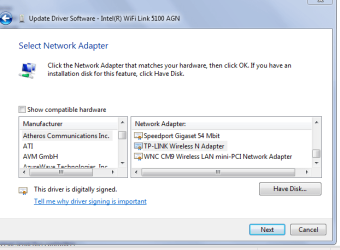
try this one
update driver >> my computer .. ..let me choose .. uncheck show compatable .. scroll to atheros
 

Attachments

  • valwi.PNG
    valwi.PNG
    53.2 KB · Views: 27

My Computer

Computer type
PC/Desktop
Computer Manufacturer/Model Number
medionl/Aspire 6930G/acer x55a
OS
W7 home premium 32bit/W7HP 64bit/w10 tp insider ring
CPU
E5300 dual core
Motherboard
medion MS7366
Memory
3gb
Graphics Card(s)
Nvidia Geforce 7100 Nforce 630i
Monitor(s) Displays
avixc
Internet Speed
n (isp resticted to 72)
Antivirus
mse/pands
Browser
palemoon
Other Info
Belkin Fd7050 n USB using Railink RT2870 drivers, more upto date
Tried the other drivers on the list, now the PCI card's utility software shows transfer rate at 13Mbps - 11Mbps however, still dies out.

And the screenshot was taken when I was using the AR2997 which is the generic driver the support lady had asked me if I tried. Then suggested I try that other than the proprietary driver (Which also had the same settings inside of that window).
 

My Computer

Computer type
PC/Desktop
Computer Manufacturer/Model Number
Custom
OS
Windows 7 Home Premium 64Bit
CPU
AMD FX 8300 8-core @ 3.2GHz
Motherboard
Gigabyte 78LMT-USB3.0 (Rev 6.0)
Memory
20GB DDR3 G.Skill Ripjaws X (2x8GB / 1x 4GB) 1333MHz
Graphics Card(s)
EVGA GTX 750Ti FTW Edition w/ ACX 2.0
Sound Card
On-board
Monitor(s) Displays
Phillips 32" HDTV
Screen Resolution
1824x1026
Hard Drives
Western Digital 1.0TB HDD / 7500RPM
Toshiba 1.0TB HDD / 7500RPM
PSU
Rosewill Glacier 500M Modular 500W PSU
Case
In Win 303 Black / Tempered Glass Window
Cooling
3 Blue-LED 2100RPM 80MM fans
Keyboard
CM Storm Devestator Blue
Mouse
CM Storm Devestator Blue
Internet Speed
700KBs / 7Mbps.
Antivirus
Malware Bytes / Bit Defender / Kaspersky (3 Stages)
Browser
Google Chrome
Found my driver details - working for me. Still not got fix for the tunnel thingy.
Anyway may mean more to you than to myself. here it is.
wd6CDJzFkAB7gAAAABJRU5ErkJggg==

and version is 9.2.0.423 built by WinDDk.
Working for my connection using same TP link.
Maybe surplus as I said - muddle along learning as I go. For instance you taught me to use the snipping tool - so Thanks for that :)
 

My Computer

Computer type
PC/Desktop
Computer Manufacturer/Model Number
Gigabyte
OS
Windows 7 Home Premium (x64)bit build 7601
CPU
Intel Premium G2030 3000MHz
Motherboard
Gigabyte H61M-USB3H Intel 61 Cougar Point
Memory
4GBytes single channel
Graphics Card(s)
Ivy Intel Bridge-DT GT1 Intergrated graphics control
Hard Drives
Hitachi HDS 721010CLA630 1000GB
Keyboard
MS 3000 USB
Mouse
MS optical
Internet Speed
ADSL2 12MB average
Antivirus
Avast
Browser
Firefox, Opera, IE11
Alright so, update time.

Support lady responded with a 'shortened' answer of: Use your adapter on another PC.

That's about it from them.

As for everything else, still no luck. I've even switched to a wired connection and am still facing the issues.

So it's either Windows itself or the PC itself (I doubt the latter).

Still no ideas what to do at this point, probably just going to try and get a copy of Windows 10 and use that since that's what my internet worked on beforehand with the card and ethernet.

Nice to know that not only is WiFi affected by this, but wired aswell.
 

My Computer

Computer type
PC/Desktop
Computer Manufacturer/Model Number
Custom
OS
Windows 7 Home Premium 64Bit
CPU
AMD FX 8300 8-core @ 3.2GHz
Motherboard
Gigabyte 78LMT-USB3.0 (Rev 6.0)
Memory
20GB DDR3 G.Skill Ripjaws X (2x8GB / 1x 4GB) 1333MHz
Graphics Card(s)
EVGA GTX 750Ti FTW Edition w/ ACX 2.0
Sound Card
On-board
Monitor(s) Displays
Phillips 32" HDTV
Screen Resolution
1824x1026
Hard Drives
Western Digital 1.0TB HDD / 7500RPM
Toshiba 1.0TB HDD / 7500RPM
PSU
Rosewill Glacier 500M Modular 500W PSU
Case
In Win 303 Black / Tempered Glass Window
Cooling
3 Blue-LED 2100RPM 80MM fans
Keyboard
CM Storm Devestator Blue
Mouse
CM Storm Devestator Blue
Internet Speed
700KBs / 7Mbps.
Antivirus
Malware Bytes / Bit Defender / Kaspersky (3 Stages)
Browser
Google Chrome
Could this combination be causing the problem.

From system specs.

Antivirus Malware Bytes / Bit Defender / Kaspersky (3 Stages)

Jack
 

My Computer

Computer type
PC/Desktop
Computer Manufacturer/Model Number
Home made Desktop
OS
Windows 10 Pro. 64/ version 1709 Windows 7 Pro/64
CPU
Intel i7-6800K @ 4.3
Motherboard
ASUS X-99 Deluxe II
Memory
Corsair Platinum 16 gig @2400
Graphics Card(s)
EVGA GTX 1070 OC
Monitor(s) Displays
Asus 27" LED LCD/VE278Q
Screen Resolution
1920-1080 or 1280-720 HDMI
Hard Drives
INTEL SSD 730-240 Gb Sata 3.0/
PSU
EVGA Platium 1200W
Case
Phanteks Luxe Tempered Glass 8 fans/ one radiator
Cooling
XSPC/ Water Cooled CPU
Keyboard
Das 4 Professional
Mouse
Logitech M705/MX Anywhere 2-S
Internet Speed
100 mbits
Antivirus
Microsoft Security Essentials/ Malwarebytes Premium 3.0/ SAS
Browser
I.E. 11 default/Firefox/ ISP Time Warner Cable/Spectrum
Other Info
LG BluRay Burner/
Sound system-KLipsch-THX/
Icy Dock ssd Hot Swap bays.
No, those are my usual security layers used when it works haha.

This is a fresh install with Motherboard/PCI card drivers and google chrome installed. That's all that's been added from the base system.
 

My Computer

Computer type
PC/Desktop
Computer Manufacturer/Model Number
Custom
OS
Windows 7 Home Premium 64Bit
CPU
AMD FX 8300 8-core @ 3.2GHz
Motherboard
Gigabyte 78LMT-USB3.0 (Rev 6.0)
Memory
20GB DDR3 G.Skill Ripjaws X (2x8GB / 1x 4GB) 1333MHz
Graphics Card(s)
EVGA GTX 750Ti FTW Edition w/ ACX 2.0
Sound Card
On-board
Monitor(s) Displays
Phillips 32" HDTV
Screen Resolution
1824x1026
Hard Drives
Western Digital 1.0TB HDD / 7500RPM
Toshiba 1.0TB HDD / 7500RPM
PSU
Rosewill Glacier 500M Modular 500W PSU
Case
In Win 303 Black / Tempered Glass Window
Cooling
3 Blue-LED 2100RPM 80MM fans
Keyboard
CM Storm Devestator Blue
Mouse
CM Storm Devestator Blue
Internet Speed
700KBs / 7Mbps.
Antivirus
Malware Bytes / Bit Defender / Kaspersky (3 Stages)
Browser
Google Chrome
As your having the same problem with Ethernet,
its either your ISP throttling you
Your modem firmware, is it upto date,

OR and as Jack said above your AV's

ITS a NO NO to have 2 running at the same time.

Roy

note theres another TP driver in Atheros communications next one down from atheros
 

My Computer

Computer type
PC/Desktop
Computer Manufacturer/Model Number
medionl/Aspire 6930G/acer x55a
OS
W7 home premium 32bit/W7HP 64bit/w10 tp insider ring
CPU
E5300 dual core
Motherboard
medion MS7366
Memory
3gb
Graphics Card(s)
Nvidia Geforce 7100 Nforce 630i
Monitor(s) Displays
avixc
Internet Speed
n (isp resticted to 72)
Antivirus
mse/pands
Browser
palemoon
Other Info
Belkin Fd7050 n USB using Railink RT2870 drivers, more upto date
As your having the same problem with Ethernet,
its either your ISP throttling you
Your modem firmware, is it upto date,

OR and as Jack said above your AV's

ITS a NO NO to have 2 running at the same time.

Roy
d.
note theres another TP driver in Atheros communications next one down from atheros


Tried all drivers on the list. It's not my modem/ISP because it works fine in other OS's. I can load Arch Linux right now and download a large file at my internet plan's speed just fine. That's why it's so weir
 
Last edited:

My Computer

Computer type
PC/Desktop
Computer Manufacturer/Model Number
Custom
OS
Windows 7 Home Premium 64Bit
CPU
AMD FX 8300 8-core @ 3.2GHz
Motherboard
Gigabyte 78LMT-USB3.0 (Rev 6.0)
Memory
20GB DDR3 G.Skill Ripjaws X (2x8GB / 1x 4GB) 1333MHz
Graphics Card(s)
EVGA GTX 750Ti FTW Edition w/ ACX 2.0
Sound Card
On-board
Monitor(s) Displays
Phillips 32" HDTV
Screen Resolution
1824x1026
Hard Drives
Western Digital 1.0TB HDD / 7500RPM
Toshiba 1.0TB HDD / 7500RPM
PSU
Rosewill Glacier 500M Modular 500W PSU
Case
In Win 303 Black / Tempered Glass Window
Cooling
3 Blue-LED 2100RPM 80MM fans
Keyboard
CM Storm Devestator Blue
Mouse
CM Storm Devestator Blue
Internet Speed
700KBs / 7Mbps.
Antivirus
Malware Bytes / Bit Defender / Kaspersky (3 Stages)
Browser
Google Chrome
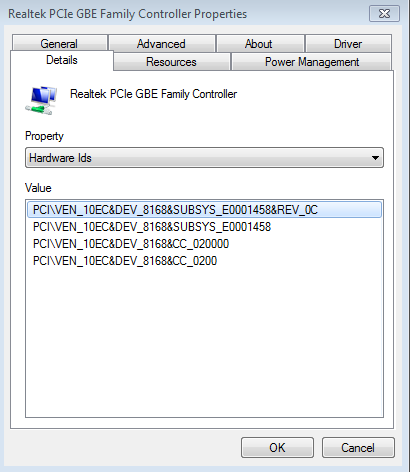
Hi Vudal,
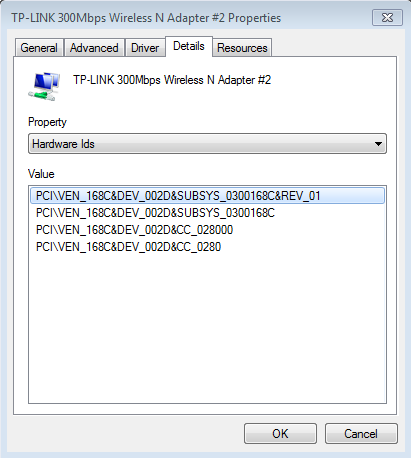
can you open device manager for BOTH,
properties >> Hardware ID's, post them please

should be something like

PCI VEN

Roy

latest driver i can find August 2011
 
Last edited:

My Computer

Computer type
PC/Desktop
Computer Manufacturer/Model Number
medionl/Aspire 6930G/acer x55a
OS
W7 home premium 32bit/W7HP 64bit/w10 tp insider ring
CPU
E5300 dual core
Motherboard
medion MS7366
Memory
3gb
Graphics Card(s)
Nvidia Geforce 7100 Nforce 630i
Monitor(s) Displays
avixc
Internet Speed
n (isp resticted to 72)
Antivirus
mse/pands
Browser
palemoon
Other Info
Belkin Fd7050 n USB using Railink RT2870 drivers, more upto date
z9f0LwP.png


cygzrcQ.png
 

My Computer

Computer type
PC/Desktop
Computer Manufacturer/Model Number
Custom
OS
Windows 7 Home Premium 64Bit
CPU
AMD FX 8300 8-core @ 3.2GHz
Motherboard
Gigabyte 78LMT-USB3.0 (Rev 6.0)
Memory
20GB DDR3 G.Skill Ripjaws X (2x8GB / 1x 4GB) 1333MHz
Graphics Card(s)
EVGA GTX 750Ti FTW Edition w/ ACX 2.0
Sound Card
On-board
Monitor(s) Displays
Phillips 32" HDTV
Screen Resolution
1824x1026
Hard Drives
Western Digital 1.0TB HDD / 7500RPM
Toshiba 1.0TB HDD / 7500RPM
PSU
Rosewill Glacier 500M Modular 500W PSU
Case
In Win 303 Black / Tempered Glass Window
Cooling
3 Blue-LED 2100RPM 80MM fans
Keyboard
CM Storm Devestator Blue
Mouse
CM Storm Devestator Blue
Internet Speed
700KBs / 7Mbps.
Antivirus
Malware Bytes / Bit Defender / Kaspersky (3 Stages)
Browser
Google Chrome
Does your (Arch Linux) also have (Antivirus Malware Bytes / Bit Defender / Kaspersky (3 Stages) installed?

Jack
 

My Computer

Computer type
PC/Desktop
Computer Manufacturer/Model Number
Home made Desktop
OS
Windows 10 Pro. 64/ version 1709 Windows 7 Pro/64
CPU
Intel i7-6800K @ 4.3
Motherboard
ASUS X-99 Deluxe II
Memory
Corsair Platinum 16 gig @2400
Graphics Card(s)
EVGA GTX 1070 OC
Monitor(s) Displays
Asus 27" LED LCD/VE278Q
Screen Resolution
1920-1080 or 1280-720 HDMI
Hard Drives
INTEL SSD 730-240 Gb Sata 3.0/
PSU
EVGA Platium 1200W
Case
Phanteks Luxe Tempered Glass 8 fans/ one radiator
Cooling
XSPC/ Water Cooled CPU
Keyboard
Das 4 Professional
Mouse
Logitech M705/MX Anywhere 2-S
Internet Speed
100 mbits
Antivirus
Microsoft Security Essentials/ Malwarebytes Premium 3.0/ SAS
Browser
I.E. 11 default/Firefox/ ISP Time Warner Cable/Spectrum
Other Info
LG BluRay Burner/
Sound system-KLipsch-THX/
Icy Dock ssd Hot Swap bays.
Does your (Arch Linux) also have (Antivirus Malware Bytes / Bit Defender / Kaspersky (3 Stages) installed?

Jack

No, I don't have any 'Antivirus' software included within my linux distros as it wouldn't help me anyway unless it scans for rootkits.

Plus I don't run wine.

Sorry for the late reply, had some time away due to life but I'm back yet again to try and fix this issue.
 

My Computer

Computer type
PC/Desktop
Computer Manufacturer/Model Number
Custom
OS
Windows 7 Home Premium 64Bit
CPU
AMD FX 8300 8-core @ 3.2GHz
Motherboard
Gigabyte 78LMT-USB3.0 (Rev 6.0)
Memory
20GB DDR3 G.Skill Ripjaws X (2x8GB / 1x 4GB) 1333MHz
Graphics Card(s)
EVGA GTX 750Ti FTW Edition w/ ACX 2.0
Sound Card
On-board
Monitor(s) Displays
Phillips 32" HDTV
Screen Resolution
1824x1026
Hard Drives
Western Digital 1.0TB HDD / 7500RPM
Toshiba 1.0TB HDD / 7500RPM
PSU
Rosewill Glacier 500M Modular 500W PSU
Case
In Win 303 Black / Tempered Glass Window
Cooling
3 Blue-LED 2100RPM 80MM fans
Keyboard
CM Storm Devestator Blue
Mouse
CM Storm Devestator Blue
Internet Speed
700KBs / 7Mbps.
Antivirus
Malware Bytes / Bit Defender / Kaspersky (3 Stages)
Browser
Google Chrome
Back
Top