
Windows 7 without Antivirus

I know about the ram. I'm not really that concerned about it actually that much :) but im concerned about the cpu spikes. It is actually causing noticeable lags in file copying performance and my winsat score decreased slightly.
Ill keep the program....But i still think avs are more troublesome than the rare malware....
 

My Computer

Computer Manufacturer/Model Number
Dell XPS 8000/HP G70 258US
OS
Windows 7 64 bit build 7600
CPU
Intel Core i5 750/Intel Pentium Duo T4200 2.00 ghz
Memory
6 gig/4 gig
Graphics Card(s)
ATI Radeon HD 4350/Intel Graphics Media Accelerator 4500MHD
Sound Card
Realtek/Conexant Smartaudio High Definition Device
Monitor(s) Displays
Two
Screen Resolution
1920x1080/1440x900
Hard Drives
750/250 gig
Internet Speed
24 mb
I know about the ram. I'm not really that concerned about it actually that much :) but im concerned about the cpu spikes. It is actually causing noticeable lags in file copying performance and my winsat score decreased slightly.
Ill keep the program....But i still think avs are more troublesome than the rare malware....

Well, each to their own but I haven't noticed any of what you described.
 

My Computer

Computer Manufacturer/Model Number
Custom | Whitebox
OS
Windows 7 Ultimate, OS X 10.7, Ubuntu 11.04
CPU
Intel E6750 @ 3.80GHz
Motherboard
Gigabyte GA-EP45-UD3L (Revision 1.1)
Memory
2x2GB & 2x1GB (6GB) OCZ Reaper 1066MHz @ 1080MHz
Graphics Card(s)
EVGA nVidia GTX 260 896mb (216 Core) FTW Edition
Sound Card
Realtek ALC888
Monitor(s) Displays
21" VIZIO TV
Screen Resolution
1680x1050 @ 60Hz
Hard Drives
Western Digital WD6401AALS - 640GB
Hitachi HDP725016GLA380 - 160GB
PSU
Corsair 750W
Case
NZXT Nemesis Elite
Cooling
Thermaltake SpinQ
Keyboard
Logitech Wireless S520
Mouse
Logitech Wireless S520 - Microsoft Wireless Arc Mouse
Internet Speed
Download: 20mbps, Upload: 3mbps
I know about the ram. I'm not really that concerned about it actually that much :) but im concerned about the cpu spikes. It is actually causing noticeable lags in file copying performance and my winsat score decreased slightly.
Ill keep the program....But i still think avs are more troublesome than the rare malware....

Well, each to their own but I haven't noticed any of what you described.

All you need to do is highlight your antimalware service. Then, go to internet explorer and switch between pages, or open up a program, or start an installer, or do anything really XD...You will see how the cpu usage changes. It drops back down almost immediately but it was enough to make a difference on my system.

Still, its better than mcaffee, symantec, or avast. ...
 

My Computer

Computer Manufacturer/Model Number
Dell XPS 8000/HP G70 258US
OS
Windows 7 64 bit build 7600
CPU
Intel Core i5 750/Intel Pentium Duo T4200 2.00 ghz
Memory
6 gig/4 gig
Graphics Card(s)
ATI Radeon HD 4350/Intel Graphics Media Accelerator 4500MHD
Sound Card
Realtek/Conexant Smartaudio High Definition Device
Monitor(s) Displays
Two
Screen Resolution
1920x1080/1440x900
Hard Drives
750/250 gig
Internet Speed
24 mb
I know about the ram. I'm not really that concerned about it actually that much :) but im concerned about the cpu spikes. It is actually causing noticeable lags in file copying performance and my winsat score decreased slightly.
Ill keep the program....But i still think avs are more troublesome than the rare malware....

Well, each to their own but I haven't noticed any of what you described.

All you need to do is highlight your antimalware service. Then, go to internet explorer and switch between pages, or open up a program, or start an installer, or do anything really XD...You will see how the cpu usage changes. It drops back down almost immediately but it was enough to make a difference on my system.

Still, its better than mcaffee, symantec, or avast. ...

Eh it jumped to about 6% of CPU usage. Which didn't lag me at all.. maybe something else is happening on your system. Perhaps you have malware! :eek:!
 

My Computer

Computer Manufacturer/Model Number
Custom | Whitebox
OS
Windows 7 Ultimate, OS X 10.7, Ubuntu 11.04
CPU
Intel E6750 @ 3.80GHz
Motherboard
Gigabyte GA-EP45-UD3L (Revision 1.1)
Memory
2x2GB & 2x1GB (6GB) OCZ Reaper 1066MHz @ 1080MHz
Graphics Card(s)
EVGA nVidia GTX 260 896mb (216 Core) FTW Edition
Sound Card
Realtek ALC888
Monitor(s) Displays
21" VIZIO TV
Screen Resolution
1680x1050 @ 60Hz
Hard Drives
Western Digital WD6401AALS - 640GB
Hitachi HDP725016GLA380 - 160GB
PSU
Corsair 750W
Case
NZXT Nemesis Elite
Cooling
Thermaltake SpinQ
Keyboard
Logitech Wireless S520
Mouse
Logitech Wireless S520 - Microsoft Wireless Arc Mouse
Internet Speed
Download: 20mbps, Upload: 3mbps
Hmm, My suspicion is that this is normal behavior directly after installing the av. It will spike for a while. Then, after several reboots and several incidents in which it has finished checking all the system files and everything, its usage will drop down significantly. Ill deal with it for now.
 

My Computer

Computer Manufacturer/Model Number
Dell XPS 8000/HP G70 258US
OS
Windows 7 64 bit build 7600
CPU
Intel Core i5 750/Intel Pentium Duo T4200 2.00 ghz
Memory
6 gig/4 gig
Graphics Card(s)
ATI Radeon HD 4350/Intel Graphics Media Accelerator 4500MHD
Sound Card
Realtek/Conexant Smartaudio High Definition Device
Monitor(s) Displays
Two
Screen Resolution
1920x1080/1440x900
Hard Drives
750/250 gig
Internet Speed
24 mb
Hmm, My suspicion is that this is normal behavior directly after installing the av. It will spike for a while. Then, after several reboots and several incidents in which it has finished checking all the system files and everything, its usage will drop down significantly. Ill deal with it for now.

Have you defragmented recently? Always helps. ;)
 

My Computer

Computer Manufacturer/Model Number
Custom | Whitebox
OS
Windows 7 Ultimate, OS X 10.7, Ubuntu 11.04
CPU
Intel E6750 @ 3.80GHz
Motherboard
Gigabyte GA-EP45-UD3L (Revision 1.1)
Memory
2x2GB & 2x1GB (6GB) OCZ Reaper 1066MHz @ 1080MHz
Graphics Card(s)
EVGA nVidia GTX 260 896mb (216 Core) FTW Edition
Sound Card
Realtek ALC888
Monitor(s) Displays
21" VIZIO TV
Screen Resolution
1680x1050 @ 60Hz
Hard Drives
Western Digital WD6401AALS - 640GB
Hitachi HDP725016GLA380 - 160GB
PSU
Corsair 750W
Case
NZXT Nemesis Elite
Cooling
Thermaltake SpinQ
Keyboard
Logitech Wireless S520
Mouse
Logitech Wireless S520 - Microsoft Wireless Arc Mouse
Internet Speed
Download: 20mbps, Upload: 3mbps
I know about the ram. I'm not really that concerned about it actually that much :) but im concerned about the cpu spikes. It is actually causing noticeable lags in file copying performance and my winsat score decreased slightly.
Ill keep the program....But i still think avs are more troublesome than the rare malware....
I don't see the problem in running your operating system without an antivirus porgram, as long as you strictly follow these guidelines:

  • Format, then install ONLY your operating system
  • Remove all network cards and disable LAN in BIOS
  • Remove/disable all wireless connectivity & dial up modems
  • Remove all CD/DVD/Blu-Ray drives &/or access to them
  • Disable all usb/firewire/eSATA/removable media ports - fill them full of epoxy resin to make sure nothing can be inserted
  • Only buy and install hard drives that have been heat sealed inside anti static bags.
  • Put a padlock on your case so no-one else can install usb headers, drives etc.
  • Have fun with your totally virus free and protected computer!
Seriously though, safe computing other than in the form mentioned above doesn't exist. Most security configurations are a trade off between usability and total lockdown, with the mid point being acceptable on reasonable hardware.

I'm positive that a very high percentage of members on this site would have experienced the loss of important data due to infections in the past. Being unable to recover years of family photos etc. is heartbreaking, and I sincerely hope that it never happens to you.
 

My Computer

OS
XP Pro/Vista Ultimate (64)/Windows 7 Ultimate Signature Edition(64)
CPU
Core 2 Duo E8500 @ stock
Motherboard
Gigabyte EP45-UD3R
Memory
8Gb (4 X 2Gb) Corsair Dominator 1066Mhz DDR2
Graphics Card(s)
XFX ATI Radeon 4870 1Gb
Sound Card
Onboard 7.1
Monitor(s) Displays
BenQ E2200Hd, Asus VW161D, HP L1506
Screen Resolution
1920 X 1080
Hard Drives
Seagate 7200.12 500Gb
2 X Hitachi 1Tb
PSU
CoolerMaster 650 EPD
Case
Thermaltake
Cooling
2 X Noctua 120mm's, Stock Intel
Keyboard
Logitech
Mouse
Logitech
I don't go to any really malicious sites and I find that antiviruses are usually more trouble than they are worth.
I haven't generally found that AV apps cause much trouble at all on computers. As far as malicious sites...I generally don't go to them either, but just clicking on a link from a google search could result it hitting something that you weren't expecting.

Microsoft security essentials takes around 50 mb of ram
Is your computer really starved for RAM? I mean 50MB of ram on my system is less than 1% of my RAM. For comparison sake, I have Google Chrome 4 running right now with this open in 1 tab and one other website in another tab that is using 6 different processes and using 140MB of RAM. And in all honesty, my browser is really just sitting there doing absolutely nothing.
 

My Computer

Computer Manufacturer/Model Number
Self-Built in July 2009
OS
Windows 7 Ultimate x64
CPU
Intel Q9550 2.83Ghz OC'd to 3.40Ghz
Motherboard
Gigabyte GA-EP45-UD3R rev. 1.1, F12 BIOS
Memory
8GB G.Skill PI DDR2-800, 4-4-4-12 timings
Graphics Card(s)
EVGA 1280MB Nvidia GeForce GTX570
Sound Card
Realtek ALC899A 8 channel onboard audio
Monitor(s) Displays
23" Acer x233H
Screen Resolution
1920x1080
Hard Drives
Intel X25-M 80GB Gen 2 SSD
Western Digital 1TB Caviar Black, 32MB cache. WD1001FALS
PSU
Corsair 620HX modular
Case
Antec P182
Cooling
stock
Keyboard
ABS M1 Mechanical
Mouse
Logitech G9 Laser Mouse
Internet Speed
15/2 cable modem
Other Info
Windows and Linux enthusiast. Logitech G35 Headset.
0% defrag , no malware, im running intel core i5 :cry:. Ill wait a few days and I expect the spikes to improve. :)(dangerously optimistic)
btw, Ive found many places online that talks about the cpu spikes with mse. Just google.

Im simply concerned about the loading of the ram at startup. parks. Before the mse, I know that after I type in password, windows almost immediately changes to the desktop (around 2 seconds) After mse, the time is greatly increased (around 10 seconds) I went to mse and disabled the check removable drives option. the time decreased to around 7 or 8 seconds.

@Orpheus: were you being serious? :D about the disable everything suggestion lol
I don't really do much on my computer, no storing massive amounts of family photos, etc (im not an adult!) I simply store schoolwork documents.

"I'm positive that a very high percentage of members on this site would have experienced the loss of important data due to infections in the past."

Really...? :confused:
 

My Computer

Computer Manufacturer/Model Number
Dell XPS 8000/HP G70 258US
OS
Windows 7 64 bit build 7600
CPU
Intel Core i5 750/Intel Pentium Duo T4200 2.00 ghz
Memory
6 gig/4 gig
Graphics Card(s)
ATI Radeon HD 4350/Intel Graphics Media Accelerator 4500MHD
Sound Card
Realtek/Conexant Smartaudio High Definition Device
Monitor(s) Displays
Two
Screen Resolution
1920x1080/1440x900
Hard Drives
750/250 gig
Internet Speed
24 mb
0% defrag , no malware, im running intel core i5 :cry:. Ill wait a few days and I expect the spikes to improve. :)(dangerously optimistic)
btw, Ive found many places online that talks about the cpu spikes with mse. Just google.

Lol wow. If anything I should be getting the spikes, not you.
 

My Computer

Computer Manufacturer/Model Number
Custom | Whitebox
OS
Windows 7 Ultimate, OS X 10.7, Ubuntu 11.04
CPU
Intel E6750 @ 3.80GHz
Motherboard
Gigabyte GA-EP45-UD3L (Revision 1.1)
Memory
2x2GB & 2x1GB (6GB) OCZ Reaper 1066MHz @ 1080MHz
Graphics Card(s)
EVGA nVidia GTX 260 896mb (216 Core) FTW Edition
Sound Card
Realtek ALC888
Monitor(s) Displays
21" VIZIO TV
Screen Resolution
1680x1050 @ 60Hz
Hard Drives
Western Digital WD6401AALS - 640GB
Hitachi HDP725016GLA380 - 160GB
PSU
Corsair 750W
Case
NZXT Nemesis Elite
Cooling
Thermaltake SpinQ
Keyboard
Logitech Wireless S520
Mouse
Logitech Wireless S520 - Microsoft Wireless Arc Mouse
Internet Speed
Download: 20mbps, Upload: 3mbps
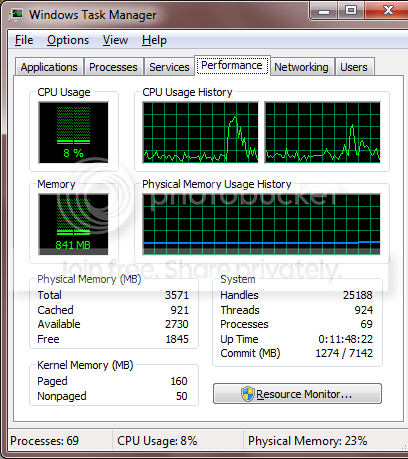
Spikes of 5-6% of your CPU really aren't a big deal either, are they? I mean I am sitting here with my laptop which runs wonderfully, I'm using next to no applications and this is what my task manager looks like.

And the spike that you see there is from when I launched paint.net to grab the image from my screen. But on modern dual and quad core processors you don't even feel those spikes

TaskManager-2.png
 

My Computer

Computer Manufacturer/Model Number
Self-Built in July 2009
OS
Windows 7 Ultimate x64
CPU
Intel Q9550 2.83Ghz OC'd to 3.40Ghz
Motherboard
Gigabyte GA-EP45-UD3R rev. 1.1, F12 BIOS
Memory
8GB G.Skill PI DDR2-800, 4-4-4-12 timings
Graphics Card(s)
EVGA 1280MB Nvidia GeForce GTX570
Sound Card
Realtek ALC899A 8 channel onboard audio
Monitor(s) Displays
23" Acer x233H
Screen Resolution
1920x1080
Hard Drives
Intel X25-M 80GB Gen 2 SSD
Western Digital 1TB Caviar Black, 32MB cache. WD1001FALS
PSU
Corsair 620HX modular
Case
Antec P182
Cooling
stock
Keyboard
ABS M1 Mechanical
Mouse
Logitech G9 Laser Mouse
Internet Speed
15/2 cable modem
Other Info
Windows and Linux enthusiast. Logitech G35 Headset.
Spikes of 5-6% of your CPU really aren't a big deal either, are they? I mean I am sitting here with my laptop which runs wonderfully, I'm using next to no applications and this is what my task manager looks like.

And the spike that you see there is from when I launched paint.net to grab the image from my screen. But on modern dual and quad core processors you don't even feel those spikes

TaskManager-2.png

I never meant it was a big deal. If anything I was stating it was really nothing and had little to no effect on my performance.
 

My Computer

Computer Manufacturer/Model Number
Custom | Whitebox
OS
Windows 7 Ultimate, OS X 10.7, Ubuntu 11.04
CPU
Intel E6750 @ 3.80GHz
Motherboard
Gigabyte GA-EP45-UD3L (Revision 1.1)
Memory
2x2GB & 2x1GB (6GB) OCZ Reaper 1066MHz @ 1080MHz
Graphics Card(s)
EVGA nVidia GTX 260 896mb (216 Core) FTW Edition
Sound Card
Realtek ALC888
Monitor(s) Displays
21" VIZIO TV
Screen Resolution
1680x1050 @ 60Hz
Hard Drives
Western Digital WD6401AALS - 640GB
Hitachi HDP725016GLA380 - 160GB
PSU
Corsair 750W
Case
NZXT Nemesis Elite
Cooling
Thermaltake SpinQ
Keyboard
Logitech Wireless S520
Mouse
Logitech Wireless S520 - Microsoft Wireless Arc Mouse
Internet Speed
Download: 20mbps, Upload: 3mbps
To parks:
I download anime a lot and they are large files :D
The trouble is that I save downloaded episodes to the external hard drive. Usually, I am watching anime while downloading a file. When the file is finished downloading, the windows explorer (copying file to external hdd) appears and loads.
With mse, while the copying of the file to external hdd is happening, the video im watching will lag, until the copying is finished.
Its something really really small and minor, but I guess mse isn't entirely efficient (I wouldn't expect it to. Its already a good program =D) but, minor irks (ex: videos taking longer to load, pages in internet explorer loading a bit slower, etc.)
Ah well...
 

My Computer

Computer Manufacturer/Model Number
Dell XPS 8000/HP G70 258US
OS
Windows 7 64 bit build 7600
CPU
Intel Core i5 750/Intel Pentium Duo T4200 2.00 ghz
Memory
6 gig/4 gig
Graphics Card(s)
ATI Radeon HD 4350/Intel Graphics Media Accelerator 4500MHD
Sound Card
Realtek/Conexant Smartaudio High Definition Device
Monitor(s) Displays
Two
Screen Resolution
1920x1080/1440x900
Hard Drives
750/250 gig
Internet Speed
24 mb
If you are watching the video from your external drive and saving that file to the external drive at the same time...you may be maxing out the USB2 bus as well.

MSE is not necessarily the be-all end all of AV apps. I use Avast on my wife's computer, MSE on my own personal machine, Trend on my machines at work and used to use AVG before MSE. All were a bit different, but mostly ran without me ever being aware of them or without experiencing any issues created by them.

For me, my OS runs from an SSD and my storage drive is a local SATA drive (WD caviar black). Everything else is on on my network and I'm only using a 100 megabit per second switch for everything. I generally don't see many lags or pauses with anything that I do.
 

My Computer

Computer Manufacturer/Model Number
Self-Built in July 2009
OS
Windows 7 Ultimate x64
CPU
Intel Q9550 2.83Ghz OC'd to 3.40Ghz
Motherboard
Gigabyte GA-EP45-UD3R rev. 1.1, F12 BIOS
Memory
8GB G.Skill PI DDR2-800, 4-4-4-12 timings
Graphics Card(s)
EVGA 1280MB Nvidia GeForce GTX570
Sound Card
Realtek ALC899A 8 channel onboard audio
Monitor(s) Displays
23" Acer x233H
Screen Resolution
1920x1080
Hard Drives
Intel X25-M 80GB Gen 2 SSD
Western Digital 1TB Caviar Black, 32MB cache. WD1001FALS
PSU
Corsair 620HX modular
Case
Antec P182
Cooling
stock
Keyboard
ABS M1 Mechanical
Mouse
Logitech G9 Laser Mouse
Internet Speed
15/2 cable modem
Other Info
Windows and Linux enthusiast. Logitech G35 Headset.
you have an sdd? :confused: and a local SATA drive internally?
Ill swap you for my processor ;) XD
 

My Computer

Computer Manufacturer/Model Number
Dell XPS 8000/HP G70 258US
OS
Windows 7 64 bit build 7600
CPU
Intel Core i5 750/Intel Pentium Duo T4200 2.00 ghz
Memory
6 gig/4 gig
Graphics Card(s)
ATI Radeon HD 4350/Intel Graphics Media Accelerator 4500MHD
Sound Card
Realtek/Conexant Smartaudio High Definition Device
Monitor(s) Displays
Two
Screen Resolution
1920x1080/1440x900
Hard Drives
750/250 gig
Internet Speed
24 mb
you have an sdd? :confused: and a local SATA drive internally?
Ill swap you for my processor ;) XD
Thanks for the offer, but I think that I will keep my setup the way that it is. It really wasn't all that extravagant. My Intel X25-M Gen2 80GB was $289 and my 1TB WD Caviar Black was $99. So, less than $400 in my storage on my box.

My CPU is plenty for what I do. It's a quad core Q9550 which at stock is 2.83Ghz..but I'm running it at 3.2 on the stock cooler with no issues whatsoever.
 

My Computer

Computer Manufacturer/Model Number
Self-Built in July 2009
OS
Windows 7 Ultimate x64
CPU
Intel Q9550 2.83Ghz OC'd to 3.40Ghz
Motherboard
Gigabyte GA-EP45-UD3R rev. 1.1, F12 BIOS
Memory
8GB G.Skill PI DDR2-800, 4-4-4-12 timings
Graphics Card(s)
EVGA 1280MB Nvidia GeForce GTX570
Sound Card
Realtek ALC899A 8 channel onboard audio
Monitor(s) Displays
23" Acer x233H
Screen Resolution
1920x1080
Hard Drives
Intel X25-M 80GB Gen 2 SSD
Western Digital 1TB Caviar Black, 32MB cache. WD1001FALS
PSU
Corsair 620HX modular
Case
Antec P182
Cooling
stock
Keyboard
ABS M1 Mechanical
Mouse
Logitech G9 Laser Mouse
Internet Speed
15/2 cable modem
Other Info
Windows and Linux enthusiast. Logitech G35 Headset.
@Orpheus: were you being serious? :D about the disable everything suggestion lol
It's the only way to be completely be sure that you will never get infected, but it wouldn't be much fun would it? :p
I don't really do much on my computer, no storing massive amounts of family photos, etc (im not an adult!) I simply store schoolwork documents.
I'm actually kind of jealous of kids these days, it'd be too easy to use the excuse "I lost my homework due to a virus". At the risk of sounding like an old fart, we had to be much more creative back in my day...
"I'm positive that a very high percentage of members on this site would have experienced the loss of important data due to infections in the past."

Really...? :confused:
Your response got me curious, so I've posted a poll here:
Have you ever lost data due to infections?
I think it'll be interesting to see the results, feel free to post your comments on it :)
 

My Computer

OS
XP Pro/Vista Ultimate (64)/Windows 7 Ultimate Signature Edition(64)
CPU
Core 2 Duo E8500 @ stock
Motherboard
Gigabyte EP45-UD3R
Memory
8Gb (4 X 2Gb) Corsair Dominator 1066Mhz DDR2
Graphics Card(s)
XFX ATI Radeon 4870 1Gb
Sound Card
Onboard 7.1
Monitor(s) Displays
BenQ E2200Hd, Asus VW161D, HP L1506
Screen Resolution
1920 X 1080
Hard Drives
Seagate 7200.12 500Gb
2 X Hitachi 1Tb
PSU
CoolerMaster 650 EPD
Case
Thermaltake
Cooling
2 X Noctua 120mm's, Stock Intel
Keyboard
Logitech
Mouse
Logitech
you have an sdd? :confused: and a local SATA drive internally?
Ill swap you for my processor ;) XD
Internal SATA drives are cheaper than external drives, but obviously not as convenient to carry information around on.
If you want convenience and a reasonable transfer speed, get yourself an eSATA drive, or an internal SATA drive inside an external SATA - eSATA case. You'll also need to have an eSATA port available on your pc to use it, if you don't have one, you can get a PCI eSATA card to fit an ATX motherboard :)
 

My Computer

OS
XP Pro/Vista Ultimate (64)/Windows 7 Ultimate Signature Edition(64)
CPU
Core 2 Duo E8500 @ stock
Motherboard
Gigabyte EP45-UD3R
Memory
8Gb (4 X 2Gb) Corsair Dominator 1066Mhz DDR2
Graphics Card(s)
XFX ATI Radeon 4870 1Gb
Sound Card
Onboard 7.1
Monitor(s) Displays
BenQ E2200Hd, Asus VW161D, HP L1506
Screen Resolution
1920 X 1080
Hard Drives
Seagate 7200.12 500Gb
2 X Hitachi 1Tb
PSU
CoolerMaster 650 EPD
Case
Thermaltake
Cooling
2 X Noctua 120mm's, Stock Intel
Keyboard
Logitech
Mouse
Logitech
:confused:....wwat?? :doh:I got the first part but...ATX? PCI eSATA?
 

My Computer

Computer Manufacturer/Model Number
Dell XPS 8000/HP G70 258US
OS
Windows 7 64 bit build 7600
CPU
Intel Core i5 750/Intel Pentium Duo T4200 2.00 ghz
Memory
6 gig/4 gig
Graphics Card(s)
ATI Radeon HD 4350/Intel Graphics Media Accelerator 4500MHD
Sound Card
Realtek/Conexant Smartaudio High Definition Device
Monitor(s) Displays
Two
Screen Resolution
1920x1080/1440x900
Hard Drives
750/250 gig
Internet Speed
24 mb
:confused:....wwat?? :doh:I got the first part but...ATX? PCI eSATA?
Short for external Serial ATA, essentially an external connection of the SATA standard that is now the widely used form of connector for internal hard drives. Convential SATA 2.0 connectors allow for a theoretical transfer rate of 300mb/s, a stark comparison to the 50-60mb/s per second currently offered under the USB 2.0 standard.

sata+esata.jpg


ATX = standard motherboard format used in desktop/tower cases

PCI = standard expansion card slot on an ATX motherboard - being replaced by PCI-E (see below)
pci-express-card.jpg
 

My Computer

OS
XP Pro/Vista Ultimate (64)/Windows 7 Ultimate Signature Edition(64)
CPU
Core 2 Duo E8500 @ stock
Motherboard
Gigabyte EP45-UD3R
Memory
8Gb (4 X 2Gb) Corsair Dominator 1066Mhz DDR2
Graphics Card(s)
XFX ATI Radeon 4870 1Gb
Sound Card
Onboard 7.1
Monitor(s) Displays
BenQ E2200Hd, Asus VW161D, HP L1506
Screen Resolution
1920 X 1080
Hard Drives
Seagate 7200.12 500Gb
2 X Hitachi 1Tb
PSU
CoolerMaster 650 EPD
Case
Thermaltake
Cooling
2 X Noctua 120mm's, Stock Intel
Keyboard
Logitech
Mouse
Logitech
Back
Top