Windows 7 wont read ext. hdd but xp can ?

kamillokum

New member
Local time
4:36 AM
Messages
4
hi,
I newly installed windows 7 to my computer which had xp before. My problem is that my external hdd is recognized by windows 7 (also by vista in my notebook) but can not be read by both (ntfs par.). The funny thing is my old xp installation and my second linux system in the same computer have no problem reading it at all, also any other xp computer can read it. Any ideas ???
thanks

ps: I can not access the file system. window, says I need to format it, but normally any ntfs under xp should be also readable under 7.
 

My Computer My Computer

At a glance

w7
OS
w7
Hello kamillokum, Welcome!
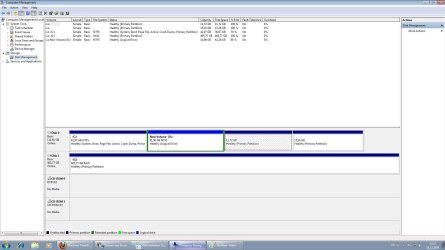
Could you please post a screenshot of your Disk Management?

Thanks,
~Jonathan
 

My Computer My Computer

At a glance

Windows 7 Professional x64Intel i7 2600K OC'd @ 4620 MHz16GB GSkill Sniper 2133 Mhz (4x4GB)EVGA GeForce GTX 480 SuperClocked+
Computer Manufacturer/Model Number
Custom
OS
Windows 7 Professional x64
CPU
Intel i7 2600K OC'd @ 4620 MHz
Motherboard
Asus P8Z68-V Pro
Memory
16GB GSkill Sniper 2133 Mhz (4x4GB)
Graphics Card(s)
EVGA GeForce GTX 480 SuperClocked+
Sound Card
Realtek High Definition Audio
Monitor(s) Displays
2x Acer S273HLbmii 27"
Screen Resolution
2 x 1920x1080
Hard Drives
64GB Crucial M4 SSD

Storage: Hitachi 1TB 5400RPM, Samsung 1.5TB 5400RPM
PSU
Corsair HW Series 750w (modular)
Case
Cooler Master HAF 932 Advanced Blue Edition
Cooling
CM Hyper 212+ CPU cooler, 3x 230mm + 1x 140mm case fans
Keyboard
Logitech MK320 (wireless)
Mouse
Logitech MK320 (wireless)
Internet Speed
30 Mb/s : 2 Mb/s
hi,
as you can see disk 1 is my ext. hdd and looks like in raw, but I can open it with my linux and it was created by windows xp.
thanks
 

Attachments

  • Untitled.jpg
    Untitled.jpg
    128.2 KB · Views: 191

My Computer My Computer

At a glance

w7
OS
w7
I must confess I have never heard of that before. Could you try a Repair Install?

Another possibility is driver issues. Can you make sure that your USB and hard drive drivers are up-to-date?
 

My Computer My Computer

At a glance

Windows 7 Professional x64Intel i7 2600K OC'd @ 4620 MHz16GB GSkill Sniper 2133 Mhz (4x4GB)EVGA GeForce GTX 480 SuperClocked+
Computer Manufacturer/Model Number
Custom
OS
Windows 7 Professional x64
CPU
Intel i7 2600K OC'd @ 4620 MHz
Motherboard
Asus P8Z68-V Pro
Memory
16GB GSkill Sniper 2133 Mhz (4x4GB)
Graphics Card(s)
EVGA GeForce GTX 480 SuperClocked+
Sound Card
Realtek High Definition Audio
Monitor(s) Displays
2x Acer S273HLbmii 27"
Screen Resolution
2 x 1920x1080
Hard Drives
64GB Crucial M4 SSD

Storage: Hitachi 1TB 5400RPM, Samsung 1.5TB 5400RPM
PSU
Corsair HW Series 750w (modular)
Case
Cooler Master HAF 932 Advanced Blue Edition
Cooling
CM Hyper 212+ CPU cooler, 3x 230mm + 1x 140mm case fans
Keyboard
Logitech MK320 (wireless)
Mouse
Logitech MK320 (wireless)
Internet Speed
30 Mb/s : 2 Mb/s
:)))
, thanks I will give that a chance.
 

My Computer My Computer

At a glance

w7
OS
w7
Back it up to an XP system that can see it and format the drive.
 

My Computer My Computer

At a glance

Windows 8.1 PRO3rd Generation Intel Core i7‐3612QM CPU @ 2.1...8GB DDR3NVIDIA GeForce GT 525M (128 bit), 1GB Grpahics
Computer type
PC/Desktop
Computer Manufacturer/Model Number
DELL VOSTRO 3650
OS
Windows 8.1 PRO
CPU
3rd Generation Intel Core i7‐3612QM CPU @ 2.10GHZ
Memory
8GB DDR3
Graphics Card(s)
NVIDIA GeForce GT 525M (128 bit), 1GB Grpahics
Screen Resolution
1920X1080
Hard Drives
750GB 5400RPM
well, the problem seems to be the boot sector, somehow the backup boot sector is damaged, I couldnt fix it yet.
The only problem is my files, I dont have place for 500 gb right now, otherwise you are right that is the best solution.
 

My Computer My Computer

At a glance

w7
OS
w7
Hi together,

fist of all - sorry for my bad english I am german.

So kamillokum did you find out somethin new?

Because, I have the same trouble. I use a Buffalo external USB HD with 500GB. No truble before, now I have connect the HD to a Linux based Satelite-Receiver. After that my Windows 7 (64bit) and my Netbook (Win7 32bit) say i have to format before i can use the disk.
The funny thing is, that i can make a checkdisk on the Win7-PC for this drive and it passe without errors and actual find about 124.000 files during the procedure.

When i connect my drie to Windows XP or the Linux based receiver, all files are there and can access.

Of curse, back it up on XP is the right way - but i also have not engouh space for about 420GB. So there must be a other way, because the data is there, checkdisk passed, driveletter is assigned. There must be a way to fix it. Have anybody a idea of it?

Thanks


Frank
 

My Computer My Computer

At a glance

Windows 7 Ultimate
OS
Windows 7 Ultimate
Back
Top