Windows 7 won't recognise Canon printer.

billyv88

New member
Local time
10:42 AM
Messages
6
I just got a EMachine computer with Window 7 Premium. I tried to hook up a Canon Imagewriter D320 to it and the computer doesn't recognise the printer.

I went to the Canon website and downloaded the driver for the printer. Canon U.S.A. : Support & Drivers : imageCLASS D320
Still no luck getting the printer to work. There is just a noise (the USB sound) when I plug the USB cable into the computer. Doesn't recognise anything.

I also lost the software CD-Rom that came to the computer. Is there anyway to get a replacement for this CD-Rom for reasonable cost?
 

My Computer My Computer

OS
Windows 7
Dear billyv88,
I too visited the canon site for USA and there does not appear to be any compatibility issues with win.7

Kindly uninstall the printer and unplug the USB cable of the canon printer. Now, kindly download and install the printer driver and software AND ONLY THEN CONNECT THE HARDWARE VIA USB (VERY sorry for the bold type, it was purely for emphasis and nothing else).

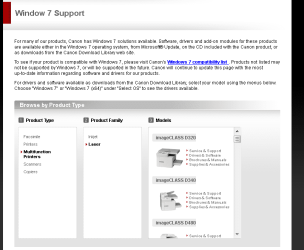
Kindly view this snapshot :


Regards,
Sreedhav
 

Attachments

  • Canon U.S.A.png
    Canon U.S.A.png
    21.4 KB · Views: 168

My Computer My Computer

Computer Manufacturer/Model Number
Sony Vaio C series VPCCB35FN laptop
OS
MS Windows 7 Home Premium 64-bit SP1
CPU
IntelCore [email protected]; Sandy Bridge 32nm Tech.
Motherboard
Sony Vaio Version:C609NJYJ
Memory
4096Mb RAM; Single ChannelDDR3@665MHz; DRAM Freq:662MHz
Graphics Card(s)
AMD Radeon HD 6630M; GPU:Whistler;BIOS Core&mem Clock:123.36
Sound Card
REALTEK High Definition Audio Device; INTEL Display Card
Monitor(s) Displays
Generic PnP Intel HD;Resolution:1920*1040 Pixels; BPP:32bits
Screen Resolution
Current Resolution:1920*1080 Pixels; Monitor Frequency:60Hz
Hard Drives
Internal HD:TOSHIBA MK5061GSY; Real Size:488 GB;NTFS; 3 Partitions; SATA; HEADS:16

External HDD: WD Elements 1023 PORTABLE; Estimated Size: 1TB; NTFS; 3 Partitions
Cooling
Lateral Exhaust with a Cooling Pad Placed Beneath.
Keyboard
Logitech Bluetooth+ Generic Integrated K-B
Mouse
Logitech Bluetooth
Internet Speed
2MBPS
Other Info
1)Trend Micro Titanium Maximum Security Suite Version:3
2)SAS-PRO

3)MBAM--PRO


4)WATERFOX+IE9 +WOT+LINKEXTEND+ DRWEBCUREIT LINK CHECKER

5)SPYWAREBLASTER

6) WINPATROL PLUS

7) SANDBOXIE and
8) A BIT OF COMMON SENSE.
Just wanted to remind you to check ALL CONNECTIONS!(sorry for the bold type, it's meant only for emphasis), and that includes mainly the USB ports! Are you plugging into a USB Hub or directly into a USB Port? Change the USB port or the port in the Hub!

Regards,
Sreedhav:)
 

My Computer My Computer

Computer Manufacturer/Model Number
Sony Vaio C series VPCCB35FN laptop
OS
MS Windows 7 Home Premium 64-bit SP1
CPU
IntelCore [email protected]; Sandy Bridge 32nm Tech.
Motherboard
Sony Vaio Version:C609NJYJ
Memory
4096Mb RAM; Single ChannelDDR3@665MHz; DRAM Freq:662MHz
Graphics Card(s)
AMD Radeon HD 6630M; GPU:Whistler;BIOS Core&mem Clock:123.36
Sound Card
REALTEK High Definition Audio Device; INTEL Display Card
Monitor(s) Displays
Generic PnP Intel HD;Resolution:1920*1040 Pixels; BPP:32bits
Screen Resolution
Current Resolution:1920*1080 Pixels; Monitor Frequency:60Hz
Hard Drives
Internal HD:TOSHIBA MK5061GSY; Real Size:488 GB;NTFS; 3 Partitions; SATA; HEADS:16

External HDD: WD Elements 1023 PORTABLE; Estimated Size: 1TB; NTFS; 3 Partitions
Cooling
Lateral Exhaust with a Cooling Pad Placed Beneath.
Keyboard
Logitech Bluetooth+ Generic Integrated K-B
Mouse
Logitech Bluetooth
Internet Speed
2MBPS
Other Info
1)Trend Micro Titanium Maximum Security Suite Version:3
2)SAS-PRO

3)MBAM--PRO


4)WATERFOX+IE9 +WOT+LINKEXTEND+ DRWEBCUREIT LINK CHECKER

5)SPYWAREBLASTER

6) WINPATROL PLUS

7) SANDBOXIE and
8) A BIT OF COMMON SENSE.
Back
Top