Windows 7 wrong license key after reinstall

chris989

New member
Local time
7:11 PM
Messages
15
Hello All,

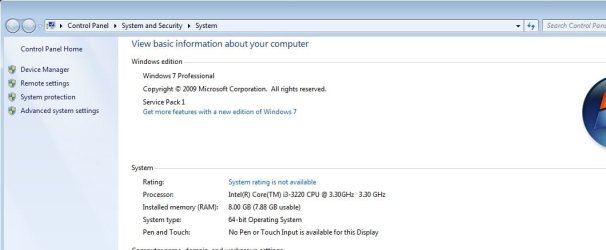
Quick back story, I currently use a HP elite desk I bought from a local computer store. I run two SSD 500 drives and it ran windows 7 (never paid attention to what version).

I upgraded to windows ten, (hated it) rolled back to seven and my troubles began.

I then tried to run windows 10 on the second SSD just to use Turbo Tax software. Finally removed that and formatted the 2nd SSD.

I was back to running 7 on the main SSD but always got an error at start up and could not load/use my Sony Vegas software so last might i found my USB with windows seven on it and reinstalled. I did not do a clean slate, I chose to save files and folders. The problem now is the license for the elite desk is Pro and the version of 7 I installed is home premium.

I have been looking on the net and found a site that list a bunch of keys but none will work. Called the shop were i bought it and they have nothing for windows 7.

Any ideas? eventually i will try to install windows 10 with a dual boot and try to work through all of the irritants but for now i need the 7 back.

Thanks,
Chris
 
Last edited by a moderator:

My Computer

Computer type
PC/Desktop
Computer Manufacturer/Model Number
HP elite desk
OS
Microsoft Windows 7 Home Premium 64-bit 7601 Multiprocessor Free Service Pack 1
CPU
Intel(R) Core(TM) i7-4770 CPU @ 3.40GHz
Motherboard
Hewlett-Packard 1998
Memory
16.00 GB
Graphics Card(s)
(1) AMD Radeon HD 7000 series (2) Intel(R) HD Graphics 460
Sound Card
(1) High Definition Audio Device (2) Realtek High Definiti
Monitor(s) Displays
NEC EA224 NEC EA193
Screen Resolution
(1) 1600 x 900 x 32 bits (4294967296 colors) @ 60 Hz (2) 1
Hard Drives
(1) SanDisk Ultra II 480GB ATA Device

(2) ST500DM002-1BD142 ATA Device
...The problem now is the license for the elite desk is Pro and the version of 7 I installed is home premium.

I have been looking on the net and found a site that list a bunch of keys but none will work. Called the shop were i bought it and they have nothing for windows 7.

Any ideas? eventually i will try to install windows 10 with a dual boot and try to work through all of the irritants but for now i need the 7 back.

You need to install Pro, then you can use your key from the CoA sticker to activate it.

If your install usb will only install Home you can turn it into a universal one that gives a choice of edition to install by deleting ei.cfg from the sources folder (or just rename it to ei.cfg.old).
 

My Computers

System One System Two

  • Computer type
    Laptop
    Computer Manufacturer/Model Number
    Toshiba satellite C650D
    OS
    Windows 7 Home Premium x64
    CPU
    AMD V120
    Memory
    4GB
    Internet Speed
    150 Mbps
    Antivirus
    MSE
    Browser
    IE11, Edge, Firefox
    Other Info
    I also have W7 Pro on my System Two, and several W7 Hyper-V VMs. My other machines run Windows 10/11. Their specs are in my Ten Forums & Eleven Forum profiles.
  • Computer type
    Laptop
    System Manufacturer/Model Number
    Lenovo Thinkpad T430
    OS
    Windows 7 Pro x64
    CPU
    Intel i5-3320M
    Memory
    8 GB
    Hard Drives
    250GB Samsung SSD 860 EVO
    Other Info
    Antivirus: MSE
...The problem now is the license for the elite desk is Pro and the version of 7 I installed is home premium.


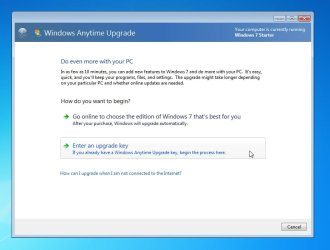
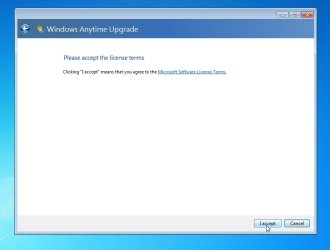
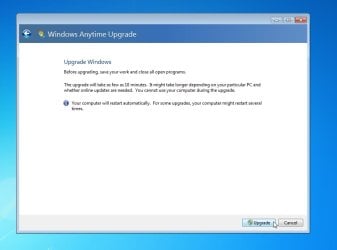
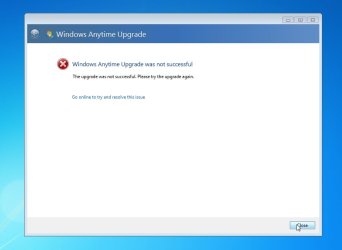
You can enter any win7 pro key into anytime upgrade.

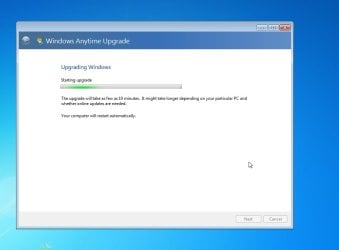
It will run for a minute and say it has failed. It hasn't.

reboot and your Home Prem will compete the upgrade to Pro.

Then you need to activate it.

I have done it several times.
 

My Computers

System One System Two

  • Computer type
    PC/Desktop
    OS
    7 X64
    CPU
    i5 8400
    Motherboard
    gigabyte b365m ds3h
    Memory
    2x8gb 3200mhz
    Hard Drives
    various
    PSU
    pure power 11 400w cm
    Case
    Coolermaster
    Cooling
    cryorig m9i
  • Computer type
    PC/Desktop
    OS
    7x64
    CPU
    g5400
    Motherboard
    ga b365m ds3h
    Memory
    8gb ddr4 2400
    PSU
    xfx pro 450w
SIW2 is correct use the key on the COA

REMOVE the PRO COA key image
 

My Computer

Computer type
PC/Desktop
Computer Manufacturer/Model Number
medionl/Aspire 6930G/acer x55a
OS
W7 home premium 32bit/W7HP 64bit/w10 tp insider ring
CPU
E5300 dual core
Motherboard
medion MS7366
Memory
3gb
Graphics Card(s)
Nvidia Geforce 7100 Nforce 630i
Monitor(s) Displays
avixc
Internet Speed
n (isp resticted to 72)
Antivirus
mse/pands
Browser
palemoon
Other Info
Belkin Fd7050 n USB using Railink RT2870 drivers, more upto date
When you enter a pro key into anytime upgrade it does 2 things

1. It triggers the os to physically upgrade to pro edition

2. It tries to connect through the anytime channel. Because that channel is no longer working, it fails to connect at that point and gives a message claiming it has failed.

However, just reboot and the physical upgrade to Pro works.

You need to activate afterwards.

It I were you, I would use slp activation after the os has upgraded.

- - - Updated - - -

starterx64-2.jpg

starterx64-3.jpg

starterx64-4 - anykey.jpg

starterx64-5.jpg

starterx64-6.jpg

starterx64-7.jpg

starterx64-8.jpg

Reboot and the upgrade completes

starterx64-cropped.jpg
 
Last edited:

My Computers

System One System Two

  • Computer type
    PC/Desktop
    OS
    7 X64
    CPU
    i5 8400
    Motherboard
    gigabyte b365m ds3h
    Memory
    2x8gb 3200mhz
    Hard Drives
    various
    PSU
    pure power 11 400w cm
    Case
    Coolermaster
    Cooling
    cryorig m9i
  • Computer type
    PC/Desktop
    OS
    7x64
    CPU
    g5400
    Motherboard
    ga b365m ds3h
    Memory
    8gb ddr4 2400
    PSU
    xfx pro 450w
If he did use the COA to upgrade to Win10, then key cannot activate Win7 any more.


SIW2 is correct use the key on the COA

REMOVE the PRO COA key image

- - - Updated - - -

SIW2's SLP can be a proper method if re-use Win7 pro.

When you enter any pro key into anytime upgrade it does 2 things

1. It triggers the os to physically upgrade to pro edition

2. It tries to activate that key through the anytime channel. Because that channel is no longer working, it fails to activate at that point.

However, just reboot and the physical upgrade to Pro works.

So you need to activate afterwards.

It I were you, I would use slp activation after the os has upgraded.

- - - Updated - - -
 

My Computers

System One System Two

  • Computer type
    PC/Desktop
    Computer Manufacturer/Model Number
    HP Elite 800 G5
    OS
    Windows 7 Pro 64-bit
    CPU
    I7-9700
    Memory
    32 GB
  • Computer type
    Laptop
    System Manufacturer/Model Number
    ASUS UX305C
    OS
    Windows 7 Pro 64-bit
NO

the W7 key is NOT revoked
 

My Computer

Computer type
PC/Desktop
Computer Manufacturer/Model Number
medionl/Aspire 6930G/acer x55a
OS
W7 home premium 32bit/W7HP 64bit/w10 tp insider ring
CPU
E5300 dual core
Motherboard
medion MS7366
Memory
3gb
Graphics Card(s)
Nvidia Geforce 7100 Nforce 630i
Monitor(s) Displays
avixc
Internet Speed
n (isp resticted to 72)
Antivirus
mse/pands
Browser
palemoon
Other Info
Belkin Fd7050 n USB using Railink RT2870 drivers, more upto date
You can upgrade the edition manually from home to pro through the command line. Note that you can't downgrade versions (ie go from pro to home premium). I have done this on 2008 r2 server. The commands are almost the same with 7 the only difference being the edition.

The commands are here: DISM Windows Server 2008 R2 Change Edition – The Cloud Eh!?

You will initially have to use a generic key then you can activate your own key. The generic keys are here: KMS Client Setup Keys | Microsoft Docs

Your computer will reboot (twice if I remember right) after which you should have professional running under the generic key. You can try a server activation of your key but if that fails you will have to force a phone activation.

Q. How can I force the Windows activation dialog to activate via phone from the command line? | ITPro Today: IT News, How-Tos, Trends, Case Studies, Career Tips, More
 

My Computers

System One System Two

For now I found my 10 year old window 7 32 bit license and It worked.

If I use the anytime upgrade with my pro key it will not force me to windows 10?
 

My Computer

Computer type
PC/Desktop
Computer Manufacturer/Model Number
HP elite desk
OS
Microsoft Windows 7 Home Premium 64-bit 7601 Multiprocessor Free Service Pack 1
CPU
Intel(R) Core(TM) i7-4770 CPU @ 3.40GHz
Motherboard
Hewlett-Packard 1998
Memory
16.00 GB
Graphics Card(s)
(1) AMD Radeon HD 7000 series (2) Intel(R) HD Graphics 460
Sound Card
(1) High Definition Audio Device (2) Realtek High Definiti
Monitor(s) Displays
NEC EA224 NEC EA193
Screen Resolution
(1) 1600 x 900 x 32 bits (4294967296 colors) @ 60 Hz (2) 1
Hard Drives
(1) SanDisk Ultra II 480GB ATA Device

(2) ST500DM002-1BD142 ATA Device
If I use the anytime upgrade with my pro key it will not force me to windows 10?

if you enter a win7 pro key, such as this 74T2M-DKDBC-788W3-H689G-6P6GT it will upgrade to win7 pro.

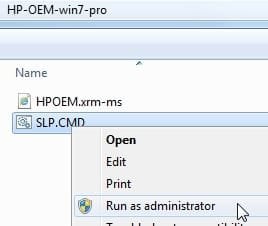
then after reboot, it will need to be activated which can de done like this if your bios has a slic 2 table.

View attachment HP-OEM-win7-pro.zip

hp-oem-runasadmin.jpg
 

My Computers

System One System Two

  • Computer type
    PC/Desktop
    OS
    7 X64
    CPU
    i5 8400
    Motherboard
    gigabyte b365m ds3h
    Memory
    2x8gb 3200mhz
    Hard Drives
    various
    PSU
    pure power 11 400w cm
    Case
    Coolermaster
    Cooling
    cryorig m9i
  • Computer type
    PC/Desktop
    OS
    7x64
    CPU
    g5400
    Motherboard
    ga b365m ds3h
    Memory
    8gb ddr4 2400
    PSU
    xfx pro 450w
Back
Top