
Windows 7 x64 freezing issues like others have had...any other ideas

weshawk5

New member
Local time
12:14 AM
Messages
5
I'm having the same freezing issues that alot of people have had. The system freezes randomly, 10ish seconds later the mouse freezes, and you have to reboot the system by pushing reset on the case. The music loops in the background if there was something playing and im getting no BSOD.

All of the hardware in my pc is x64 compatible and is up to date (AMD quadcore cpu, gtx 280...ect)

Ive tried to fix the problem by researching other posts and nothing has worked, basically this is a last ditch effort before I go back to XP and give 7 another try when SP1 comes out. The problem started when I put windows 7 x64 on my system.

Things ive done/observed...

All drivers are updated and correct.
scanned memory overnight twice (memtest86) - no errors
scanned HDDs - no errors
took out individual components and tried w/o them (sound card, video card)-nothing
BIOS is up to date
adjusted power setting to max- seemed to help but still freezes
no helpful errors in even viewer...only critical is unexpected shutdown

it seems to work better in safe mode but will still freeze.

Freezes are random put they seem to happen more often it alot of data is being transferred or if im doing a lot on my pc at one time. Like if im just playing online poker or on the net it wont freeze as often, but if im trying to listen to music at the same time it will freeze. When I tried to transfer a large amount of music from an external HDD to my pc it would freeze up very quickly.
 

My Computer My Computer

At a glance

Windows 7 Professional 64bit
OS
Windows 7 Professional 64bit
I've experienced same problem on my PC,but I've tried a diferent version of Windows 7,and update it.
Don't turn off automatic updates,install al updates,and see if the problem persists.
 

My Computer My Computer

At a glance

Windows 7 Enterprise x642,3GHz2GB DDR2ATI Radeon HD 2400
Computer Manufacturer/Model Number
AMD Athlon 64x2 dual core 4400+
OS
Windows 7 Enterprise x64
CPU
2,3GHz
Motherboard
ASUS
Memory
2GB DDR2
Graphics Card(s)
ATI Radeon HD 2400
Sound Card
Realtek
Monitor(s) Displays
Benq G900W
Screen Resolution
1440x900
Hard Drives
160 GB
I've experienced same problem on my PC,but I've tried a diferent version of Windows 7,and update it.
Don't turn off automatic updates,install al updates,and see if the problem persists.

What do you mean a different version...

Auto updates in on and everything is up to date.
 

My Computer My Computer

At a glance

Windows 7 Professional 64bit
OS
Windows 7 Professional 64bit
hi all:) welcome to the forums does explorer crash and restart itself when the freezing happens?
 

My Computer My Computer

At a glance

Operating System : Windows 7 Home Premium Edi...Processor : Intel Core 2 Quad Q8300 @ 2500 MHzPhysical Memory :8GB Corsair4x 2GB 800MHz C5 ...Video Card : XFX 6700 AMD
Computer Manufacturer/Model Number
packard bell IXTREME M5722
OS
Operating System : Windows 7 Home Premium Edition 6.01.7600 SP1 (x64)
CPU
Processor : Intel Core 2 Quad Q8300 @ 2500 MHz
Motherboard
Mainboard : Packard Bell (Acer EG43M )
Memory
Physical Memory :8GB Corsair4x 2GB 800MHz C5 DDR2
Graphics Card(s)
Video Card : XFX 6700 AMD
Monitor(s) Displays
Maestro 234DL - BenQ V2220 - BenQ VW2420H
Screen Resolution
Current Display :1920x1080p pixels at 60 Hz in HD LED
Hard Drives
Hard Disks : WDC (1000 GB)
Drive C: (Hard Disk) : 428 GB available on 491 GB
Drive D: (Hard Disk) : 426 GB available on 492 GB
SAMSUNG spinpoint HD103SJ 1000.2 GB
(X 2) KINGSTON SSD NOW V 30GB
PSU
XFX ProSeries 550W PSU
Case
PACKARD BELL IXTREME
Cooling
System Blower Current: 150mA Air Flow16CFM ;Akasa 90mm rear
Keyboard
Gigabyte Aivia K8100
Mouse
TRUST-Wireless Laser Mouse - Carbon edition MI-7770C
Internet Speed
TP-LINK > TL-WN951N / AV500 Gigabit Powerline Adapters
Browser
chrome dev
Other Info
EXTRA COOLING>(FAN CONTROLLER) PC Bay Cooler 3 x 40mm fans; Akasa AK-HD-BL Blue hard drive cooler 2 x 40 mm fan 4500 rpm 29.7 dBA
Bios> American Megatrends Inc.
Version : P01-A1
Date : 08/31/2009
hi all:) welcome to the forums does explorer crash and restart itself when the freezing happens?

If you mean internet explorer...I use fire fox so its never open.

Once it freezes everything locks up and I have never been able to restart it without pushing reset on the case.
 

My Computer My Computer

At a glance

Windows 7 Professional 64bit
OS
Windows 7 Professional 64bit
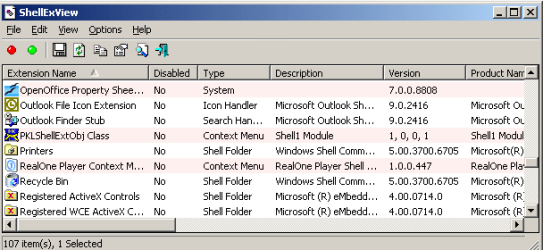
have you added content to the context menus when you have added programs? sometimes explorer.exe will crash because of incompatibility in the shell, i have experienced this with two programs and since not using them problems have stopped i found the culprits using shellxview by nirsoft

extract from write up: Shell Extensions are in-process COM objects which extends the abilities of Windows operating system. Most shell extensions are automatically installed by the operating system, but there are also many other applications that install additional shell extension components. For example: If you install WinZip on your computer, you'll see a special WinZip menu when you right-click on a Zip file. This menu is created by adding a shell extension to the system.
The ShellExView utility displays the details of shell extensions installed on your computer, and allows you to easily disable and enable each shell extension.
you go through the listed items and disable the ones you think may be culprit.
ShellExView can be used for solving context-menu problems in Explorer environment. For more information, read the following article::ar: Right-click is slow or weird behavior caused by context menu handlers

download here :ar:
ShellExView - Shell Extension Manager For Windows
 

Attachments

  • shellxview.PNG
    shellxview.PNG
    8.6 KB · Views: 7
Last edited:

My Computer My Computer

At a glance

Operating System : Windows 7 Home Premium Edi...Processor : Intel Core 2 Quad Q8300 @ 2500 MHzPhysical Memory :8GB Corsair4x 2GB 800MHz C5 ...Video Card : XFX 6700 AMD
Computer Manufacturer/Model Number
packard bell IXTREME M5722
OS
Operating System : Windows 7 Home Premium Edition 6.01.7600 SP1 (x64)
CPU
Processor : Intel Core 2 Quad Q8300 @ 2500 MHz
Motherboard
Mainboard : Packard Bell (Acer EG43M )
Memory
Physical Memory :8GB Corsair4x 2GB 800MHz C5 DDR2
Graphics Card(s)
Video Card : XFX 6700 AMD
Monitor(s) Displays
Maestro 234DL - BenQ V2220 - BenQ VW2420H
Screen Resolution
Current Display :1920x1080p pixels at 60 Hz in HD LED
Hard Drives
Hard Disks : WDC (1000 GB)
Drive C: (Hard Disk) : 428 GB available on 491 GB
Drive D: (Hard Disk) : 426 GB available on 492 GB
SAMSUNG spinpoint HD103SJ 1000.2 GB
(X 2) KINGSTON SSD NOW V 30GB
PSU
XFX ProSeries 550W PSU
Case
PACKARD BELL IXTREME
Cooling
System Blower Current: 150mA Air Flow16CFM ;Akasa 90mm rear
Keyboard
Gigabyte Aivia K8100
Mouse
TRUST-Wireless Laser Mouse - Carbon edition MI-7770C
Internet Speed
TP-LINK > TL-WN951N / AV500 Gigabit Powerline Adapters
Browser
chrome dev
Other Info
EXTRA COOLING>(FAN CONTROLLER) PC Bay Cooler 3 x 40mm fans; Akasa AK-HD-BL Blue hard drive cooler 2 x 40 mm fan 4500 rpm 29.7 dBA
Bios> American Megatrends Inc.
Version : P01-A1
Date : 08/31/2009
hi all:) welcome to the forums does explorer crash and restart itself when the freezing happens?

If you mean internet explorer...I use fire fox so its never open.

Once it freezes everything locks up and I have never been able to restart it without pushing reset on the case.

i mean windows explorer that control's your files etc
 

My Computer My Computer

At a glance

Operating System : Windows 7 Home Premium Edi...Processor : Intel Core 2 Quad Q8300 @ 2500 MHzPhysical Memory :8GB Corsair4x 2GB 800MHz C5 ...Video Card : XFX 6700 AMD
Computer Manufacturer/Model Number
packard bell IXTREME M5722
OS
Operating System : Windows 7 Home Premium Edition 6.01.7600 SP1 (x64)
CPU
Processor : Intel Core 2 Quad Q8300 @ 2500 MHz
Motherboard
Mainboard : Packard Bell (Acer EG43M )
Memory
Physical Memory :8GB Corsair4x 2GB 800MHz C5 DDR2
Graphics Card(s)
Video Card : XFX 6700 AMD
Monitor(s) Displays
Maestro 234DL - BenQ V2220 - BenQ VW2420H
Screen Resolution
Current Display :1920x1080p pixels at 60 Hz in HD LED
Hard Drives
Hard Disks : WDC (1000 GB)
Drive C: (Hard Disk) : 428 GB available on 491 GB
Drive D: (Hard Disk) : 426 GB available on 492 GB
SAMSUNG spinpoint HD103SJ 1000.2 GB
(X 2) KINGSTON SSD NOW V 30GB
PSU
XFX ProSeries 550W PSU
Case
PACKARD BELL IXTREME
Cooling
System Blower Current: 150mA Air Flow16CFM ;Akasa 90mm rear
Keyboard
Gigabyte Aivia K8100
Mouse
TRUST-Wireless Laser Mouse - Carbon edition MI-7770C
Internet Speed
TP-LINK > TL-WN951N / AV500 Gigabit Powerline Adapters
Browser
chrome dev
Other Info
EXTRA COOLING>(FAN CONTROLLER) PC Bay Cooler 3 x 40mm fans; Akasa AK-HD-BL Blue hard drive cooler 2 x 40 mm fan 4500 rpm 29.7 dBA
Bios> American Megatrends Inc.
Version : P01-A1
Date : 08/31/2009
That is typically a sign of a hardware issue. Have you reset the CMOS on your motherboard? Is your HSF mounted properly, and using some form of heat transfer compound? Is your case clean and clear of dust? It is also possible that your PSU is either weak or failing.
 

My Computer My Computer

At a glance

Windows 7 Ultimate x64 SP1Intel Core i7-260012 GB Patriot Extreme DDR3-1333Nvidia GTX 470
OS
Windows 7 Ultimate x64 SP1
CPU
Intel Core i7-2600
Motherboard
Gigabyte GA-P67A-UD3P-B3
Memory
12 GB Patriot Extreme DDR3-1333
Graphics Card(s)
Nvidia GTX 470
Monitor(s) Displays
Dell UltraSharp 2209WA
Hard Drives
OCZ Agility3 240 GB, WD5001AALS, WD7501AALS
PSU
OCZ ModStream 700W
Case
CoolerMaster HAF 912 Advanced
Cooling
CoolerMaster Hyper 212 Plus

My Computer My Computer

At a glance

Operating System : Windows 7 Home Premium Edi...Processor : Intel Core 2 Quad Q8300 @ 2500 MHzPhysical Memory :8GB Corsair4x 2GB 800MHz C5 ...Video Card : XFX 6700 AMD
Computer Manufacturer/Model Number
packard bell IXTREME M5722
OS
Operating System : Windows 7 Home Premium Edition 6.01.7600 SP1 (x64)
CPU
Processor : Intel Core 2 Quad Q8300 @ 2500 MHz
Motherboard
Mainboard : Packard Bell (Acer EG43M )
Memory
Physical Memory :8GB Corsair4x 2GB 800MHz C5 DDR2
Graphics Card(s)
Video Card : XFX 6700 AMD
Monitor(s) Displays
Maestro 234DL - BenQ V2220 - BenQ VW2420H
Screen Resolution
Current Display :1920x1080p pixels at 60 Hz in HD LED
Hard Drives
Hard Disks : WDC (1000 GB)
Drive C: (Hard Disk) : 428 GB available on 491 GB
Drive D: (Hard Disk) : 426 GB available on 492 GB
SAMSUNG spinpoint HD103SJ 1000.2 GB
(X 2) KINGSTON SSD NOW V 30GB
PSU
XFX ProSeries 550W PSU
Case
PACKARD BELL IXTREME
Cooling
System Blower Current: 150mA Air Flow16CFM ;Akasa 90mm rear
Keyboard
Gigabyte Aivia K8100
Mouse
TRUST-Wireless Laser Mouse - Carbon edition MI-7770C
Internet Speed
TP-LINK > TL-WN951N / AV500 Gigabit Powerline Adapters
Browser
chrome dev
Other Info
EXTRA COOLING>(FAN CONTROLLER) PC Bay Cooler 3 x 40mm fans; Akasa AK-HD-BL Blue hard drive cooler 2 x 40 mm fan 4500 rpm 29.7 dBA
Bios> American Megatrends Inc.
Version : P01-A1
Date : 08/31/2009
Perform a SFC Scan

1. Click Start, click All Programs, click Accessories, right-click Command Prompt, and then click Run as administrator. If you are prompted for an administrator password or for a confirmation, type the password, or click Allow

2. Type the following command, and then press ENTER:

sfc /scannow

A message will appear stating that 'The system scan will begin'. Be patient because the scan may take some time

3. If any files require a replace SFC will replace them. You may be asked to insert your Windows 7 DVD for this process to continue

4. If everything is okay you should, after the scan, see the following message "Windows resource protection did not find any integrity violations"

5. After the scan has completed, close the command prompt window, restart the computer and check.

more information here :ar: How to use the System File Checker tool to troubleshoot missing or corrupted system files on Windows Vista or on Windows 7
 

My Computer My Computer

At a glance

Operating System : Windows 7 Home Premium Edi...Processor : Intel Core 2 Quad Q8300 @ 2500 MHzPhysical Memory :8GB Corsair4x 2GB 800MHz C5 ...Video Card : XFX 6700 AMD
Computer Manufacturer/Model Number
packard bell IXTREME M5722
OS
Operating System : Windows 7 Home Premium Edition 6.01.7600 SP1 (x64)
CPU
Processor : Intel Core 2 Quad Q8300 @ 2500 MHz
Motherboard
Mainboard : Packard Bell (Acer EG43M )
Memory
Physical Memory :8GB Corsair4x 2GB 800MHz C5 DDR2
Graphics Card(s)
Video Card : XFX 6700 AMD
Monitor(s) Displays
Maestro 234DL - BenQ V2220 - BenQ VW2420H
Screen Resolution
Current Display :1920x1080p pixels at 60 Hz in HD LED
Hard Drives
Hard Disks : WDC (1000 GB)
Drive C: (Hard Disk) : 428 GB available on 491 GB
Drive D: (Hard Disk) : 426 GB available on 492 GB
SAMSUNG spinpoint HD103SJ 1000.2 GB
(X 2) KINGSTON SSD NOW V 30GB
PSU
XFX ProSeries 550W PSU
Case
PACKARD BELL IXTREME
Cooling
System Blower Current: 150mA Air Flow16CFM ;Akasa 90mm rear
Keyboard
Gigabyte Aivia K8100
Mouse
TRUST-Wireless Laser Mouse - Carbon edition MI-7770C
Internet Speed
TP-LINK > TL-WN951N / AV500 Gigabit Powerline Adapters
Browser
chrome dev
Other Info
EXTRA COOLING>(FAN CONTROLLER) PC Bay Cooler 3 x 40mm fans; Akasa AK-HD-BL Blue hard drive cooler 2 x 40 mm fan 4500 rpm 29.7 dBA
Bios> American Megatrends Inc.
Version : P01-A1
Date : 08/31/2009
That is typically a sign of a hardware issue. Have you reset the CMOS on your motherboard? Is your HSF mounted properly, and using some form of heat transfer compound? Is your case clean and clear of dust? It is also possible that your PSU is either weak or failing.

Yea its clean and clear of dust yes mounted correctly...I will reset the cmos
 

My Computer My Computer

At a glance

Windows 7 Professional 64bit
OS
Windows 7 Professional 64bit
also it is worth looking in event viewer for recent problems
  1. to open Event Viewer: Click the Start button .
  2. In the Search box, type Event Viewer,
  3. and then, in the list of results, double-click Event Viewer.

Event Viewer is an advanced tool that displays detailed information about significant events on your computer. It can be helpful when troubleshooting problems and errors with Windows and other programs.

What information appears in event logs? (Event Viewer)

You must be logged on as an administrator to perform these steps. If you are not logged on as an administrator, you can only change settings that apply to your user account, and some event logs may not be accessible.

Event logs are special files that record significant events on your computer, such as when a user logs on to the computer or when a program encounters an error. Whenever these types of events occur, Windows records the event in an event log that you can read by using Event Viewer. Advanced users might find the details in event logs helpful when troubleshooting problems with Windows and other programs.

Event Viewer tracks information in several different logs. Windows Logs include:

  1. Application (program) events. Events are classified as error, warning, or information, depending on the severity of the event. An error is a significant problem, such as loss of data. A warning is an event that is not necessarily significant, but might indicate a possible future problem. An information event describes the successful operation of a program, driver, or service.
  2. Security-related events. These events are called audits and are described as successful or failed, depending on the event, such as whether a user trying to log on to Windows was successful.
  3. Setup events. Computers that are configured as domain controllers will have additional logs displayed here.
  4. System events. System events are logged by Windows and Windows system services, and are classified as error, warning, or information.
 
Last edited:

My Computer My Computer

At a glance

Operating System : Windows 7 Home Premium Edi...Processor : Intel Core 2 Quad Q8300 @ 2500 MHzPhysical Memory :8GB Corsair4x 2GB 800MHz C5 ...Video Card : XFX 6700 AMD
Computer Manufacturer/Model Number
packard bell IXTREME M5722
OS
Operating System : Windows 7 Home Premium Edition 6.01.7600 SP1 (x64)
CPU
Processor : Intel Core 2 Quad Q8300 @ 2500 MHz
Motherboard
Mainboard : Packard Bell (Acer EG43M )
Memory
Physical Memory :8GB Corsair4x 2GB 800MHz C5 DDR2
Graphics Card(s)
Video Card : XFX 6700 AMD
Monitor(s) Displays
Maestro 234DL - BenQ V2220 - BenQ VW2420H
Screen Resolution
Current Display :1920x1080p pixels at 60 Hz in HD LED
Hard Drives
Hard Disks : WDC (1000 GB)
Drive C: (Hard Disk) : 428 GB available on 491 GB
Drive D: (Hard Disk) : 426 GB available on 492 GB
SAMSUNG spinpoint HD103SJ 1000.2 GB
(X 2) KINGSTON SSD NOW V 30GB
PSU
XFX ProSeries 550W PSU
Case
PACKARD BELL IXTREME
Cooling
System Blower Current: 150mA Air Flow16CFM ;Akasa 90mm rear
Keyboard
Gigabyte Aivia K8100
Mouse
TRUST-Wireless Laser Mouse - Carbon edition MI-7770C
Internet Speed
TP-LINK > TL-WN951N / AV500 Gigabit Powerline Adapters
Browser
chrome dev
Other Info
EXTRA COOLING>(FAN CONTROLLER) PC Bay Cooler 3 x 40mm fans; Akasa AK-HD-BL Blue hard drive cooler 2 x 40 mm fan 4500 rpm 29.7 dBA
Bios> American Megatrends Inc.
Version : P01-A1
Date : 08/31/2009
have you added content to the context menus when you have added programs? sometimes explorer.exe will crash because of incompatibility in the shell, i have experienced this with two programs and since not using them problems have stopped i found the culprits using shellxview by nirsoft

extract from write up: Shell Extensions are in-process COM objects which extends the abilities of Windows operating system. Most shell extensions are automatically installed by the operating system, but there are also many other applications that install additional shell extension components. For example: If you install WinZip on your computer, you'll see a special WinZip menu when you right-click on a Zip file. This menu is created by adding a shell extension to the system.
The ShellExView utility displays the details of shell extensions installed on your computer, and allows you to easily disable and enable each shell extension.
you go through the listed items and disable the ones you think may be culprit.
ShellExView can be used for solving context-menu problems in Explorer environment. For more information, read the following article::ar: Right-click is slow or weird behavior caused by context menu handlers

download here :ar:
ShellExView - Shell Extension Manager For Windows

i will give this a try also...
 

My Computer My Computer

At a glance

Windows 7 Professional 64bit
OS
Windows 7 Professional 64bit

My Computer My Computer

At a glance

Windows 10 Pro. EFI boot partition, full EFI ...i7 4770k 4.4GHz (44-44-43-43 turbo) @ 1.248V16GB (8GBx2) @2200 MHz G.skill Sniper 10-11-1...MSI GTX 970 Gaming 4G
Computer type
PC/Desktop
Computer Manufacturer/Model Number
Home built (GeneO industries)/Model 4
OS
Windows 10 Pro. EFI boot partition, full EFI boot
CPU
i7 4770k 4.4GHz (44-44-43-43 turbo) @ 1.248V
Motherboard
ASUS Maximus VI Hero
Memory
16GB (8GBx2) @2200 MHz G.skill Sniper 10-11-10-30-1, 1.6V
Graphics Card(s)
MSI GTX 970 Gaming 4G
Sound Card
Onboard SupremeFX Audio
Monitor(s) Displays
NEC Spectraview 2490WUXi-SV
Screen Resolution
1920 x 1200
Hard Drives
Samsung 850 Pro 256GB (OS), Samsung 2x 128GB 840 Pro SSD in RAID0, 3x WD Blue 6Gb/s 1TB RAID0, WD 2TB Black external USB 3.0, 2TB WD20EARS Green external USB 3.0, 2x 500GB Seagate and 1 750 GB external USB, 1x 350GB external USB3
PSU
Seasonic X-850 (2012 KM3 model)
Case
Fractal Design Define R4
Cooling
NH-D14, NF-F12, NF-A15; NF-P14, NF-P12,NF-A14, S12A PWM
Keyboard
Cooler Master Storm Quickfire Rapid - Brown
Mouse
Logitech G602
Internet Speed
126.4 Mb/s down, 24.3 Mb/s up
Other Info
USB 3.0 x8 , SATA III x8, eSATA, USB 2.0 x6. Samsung DVD R/W drive.

WEI: CPU 7.8, Memory 7.9, Graphics 7.9, Disk 7.9
Check for solutions to software problems

To check for solutions to problems using Control Panel

Open Problem Reports and Solutions by clicking the Start button , clicking Control Panel, clicking System and Maintenance, and then clicking Problem Reports and Solutions.

Click Check for new solutions.

Windows will notify you if there are any steps you can take to solve problems on your computer.

i have updated post 12 for you :)
 

My Computer My Computer

At a glance

Operating System : Windows 7 Home Premium Edi...Processor : Intel Core 2 Quad Q8300 @ 2500 MHzPhysical Memory :8GB Corsair4x 2GB 800MHz C5 ...Video Card : XFX 6700 AMD
Computer Manufacturer/Model Number
packard bell IXTREME M5722
OS
Operating System : Windows 7 Home Premium Edition 6.01.7600 SP1 (x64)
CPU
Processor : Intel Core 2 Quad Q8300 @ 2500 MHz
Motherboard
Mainboard : Packard Bell (Acer EG43M )
Memory
Physical Memory :8GB Corsair4x 2GB 800MHz C5 DDR2
Graphics Card(s)
Video Card : XFX 6700 AMD
Monitor(s) Displays
Maestro 234DL - BenQ V2220 - BenQ VW2420H
Screen Resolution
Current Display :1920x1080p pixels at 60 Hz in HD LED
Hard Drives
Hard Disks : WDC (1000 GB)
Drive C: (Hard Disk) : 428 GB available on 491 GB
Drive D: (Hard Disk) : 426 GB available on 492 GB
SAMSUNG spinpoint HD103SJ 1000.2 GB
(X 2) KINGSTON SSD NOW V 30GB
PSU
XFX ProSeries 550W PSU
Case
PACKARD BELL IXTREME
Cooling
System Blower Current: 150mA Air Flow16CFM ;Akasa 90mm rear
Keyboard
Gigabyte Aivia K8100
Mouse
TRUST-Wireless Laser Mouse - Carbon edition MI-7770C
Internet Speed
TP-LINK > TL-WN951N / AV500 Gigabit Powerline Adapters
Browser
chrome dev
Other Info
EXTRA COOLING>(FAN CONTROLLER) PC Bay Cooler 3 x 40mm fans; Akasa AK-HD-BL Blue hard drive cooler 2 x 40 mm fan 4500 rpm 29.7 dBA
Bios> American Megatrends Inc.
Version : P01-A1
Date : 08/31/2009

My Computer My Computer

At a glance

windows 7 ultimate 64bitIntel Core2 Extreme x9000 2.8GHZ4Gig2 NVidia GeForce 8800M GTX (SLi)
Computer Manufacturer/Model Number
Alienware AREA-51 M17x
OS
windows 7 ultimate 64bit
CPU
Intel Core2 Extreme x9000 2.8GHZ
Motherboard
Asus P965 Intel chipset
Memory
4Gig
Graphics Card(s)
2 NVidia GeForce 8800M GTX (SLi)
Sound Card
onboard
Monitor(s) Displays
17in. built-in, 47in JVC LCD
Screen Resolution
1080p
Hard Drives
2 250Gig Hitachi (RAID 0) @ 7200RPM
Case
17in. laptop
Mouse
touchpad, Logitech Anywhere Mouse cordless laser
Internet Speed
cable
Just throwing this out there; how much wattage does your PSU have?
 

My Computer My Computer

At a glance

Windows 7 Ultimate x64 | Windows XP Pro x86 |...AMD Athlon 64 X2 Dual Core 5200 2.7 GHz3G RAMATI HD Radeon 4670
Computer Manufacturer/Model Number
Started out as an AST180
OS
Windows 7 Ultimate x64 | Windows XP Pro x86 | Windows Vista Ultimate x86
CPU
AMD Athlon 64 X2 Dual Core 5200 2.7 GHz
Motherboard
Acer EM61SM/EM61PM
Memory
3G RAM
Graphics Card(s)
ATI HD Radeon 4670
Screen Resolution
1280x1024
Hard Drives
Western Digital Caviar Black WD1001FALS 1TB 7200 RPM 32MB Cache, 160 GB Seagate
PSU
Corsair 450VX 450W
Keyboard
Microsoft Media Pro 3000
Mouse
Logitech MX310
Back
Top