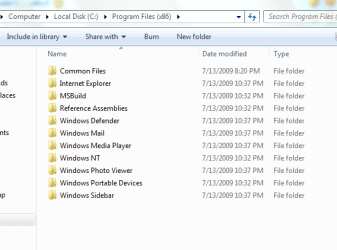
Windows 7 x86 program files folder

Raziel

New member
Local time
4:48 PM
Messages
10
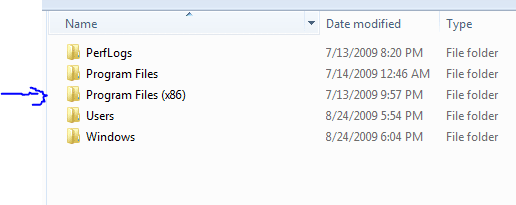
Hi....I used to have windows vista ultimate 32bit, but i noticed that my processor runs smoothly with a 64bit OS so i decided to install windows 7 ultimate 64bit, i booted from the OS dvd and before installing it i used the format option for my unique hard drive, then i installed the new OS....right afer installing it, i went to the C: drive i noticed that there was another program files folder but with x86 on it, and i tried to delete them but i couldn't....HELP :shock:
 

Attachments
  • Capture.PNG
    Capture.PNG
    4 KB · Views: 84
  • Capture2.PNG
    Capture2.PNG
    12.6 KB · Views: 358
Last edited:

My Computer

Computer Manufacturer/Model Number
Me
OS
Windows 7 64bit
CPU
AMD Phenom 9600 2.3 GHz
Motherboard
Asus M3A32-MVP DELUXE/WIFI-AP
Memory
CORSAIR XMS2 (2 x 1GB) DDR2 SDRAM DDR2 800
Graphics Card(s)
Diamond ATI Radeon HD 3870
Monitor(s) Displays
Norwood Micro 19" LCD
Hard Drives
500 GB Seagate 7200 rpm/s
PSU
600 watts
Case
Antec 1200
Cooling
Thermaltake Big Water 760i (Watercooling system)
Keyboard
Razer Lycosa
Mouse
Razer Lachesis
Internet Speed
4 Mb
Not every program is a 64-bit program. The Program Files (x86) folder is where 32-bit programs install onto your Ultimate x64 installation. Don't sweat it and don't try and delete the folder - it's supposed to be there.
 

My Computer

Computer Manufacturer/Model Number
Self-Built
OS
Win 7 RTM 7600 Ultimate 64-bit
CPU
E8500 SLAPK Q814A161
Motherboard
Gigabyte EP35-DS3R
Memory
4GB Gskill PI PC2-8500CL5D
Graphics Card(s)
XFX 8800GTS Extreme 640MB
Sound Card
Creative X-Fi XtremeGamer
Monitor(s) Displays
Samsung 213T
Screen Resolution
1600x1200
Hard Drives
1 x Western Digital SATA 500GB
1 x Maxtor SATA 320GB
Case
Antec Nine Hundred
Cooling
CPU: Xigmatek HDT-S1283
Keyboard
Saitek Eclipse
Mouse
Trackman Marble
Internet Speed
6 Mbps down cable
sorry about my ignorance, THANKS A LOT :p
 

My Computer

Computer Manufacturer/Model Number
Me
OS
Windows 7 64bit
CPU
AMD Phenom 9600 2.3 GHz
Motherboard
Asus M3A32-MVP DELUXE/WIFI-AP
Memory
CORSAIR XMS2 (2 x 1GB) DDR2 SDRAM DDR2 800
Graphics Card(s)
Diamond ATI Radeon HD 3870
Monitor(s) Displays
Norwood Micro 19" LCD
Hard Drives
500 GB Seagate 7200 rpm/s
PSU
600 watts
Case
Antec 1200
Cooling
Thermaltake Big Water 760i (Watercooling system)
Keyboard
Razer Lycosa
Mouse
Razer Lachesis
Internet Speed
4 Mb
that true, thanks a lot:)
 

My Computer

Computer Manufacturer/Model Number
Me
OS
Windows 7 64bit
CPU
AMD Phenom 9600 2.3 GHz
Motherboard
Asus M3A32-MVP DELUXE/WIFI-AP
Memory
CORSAIR XMS2 (2 x 1GB) DDR2 SDRAM DDR2 800
Graphics Card(s)
Diamond ATI Radeon HD 3870
Monitor(s) Displays
Norwood Micro 19" LCD
Hard Drives
500 GB Seagate 7200 rpm/s
PSU
600 watts
Case
Antec 1200
Cooling
Thermaltake Big Water 760i (Watercooling system)
Keyboard
Razer Lycosa
Mouse
Razer Lachesis
Internet Speed
4 Mb
Yea learning help, Unfortunately my Grandfather isnt a learner. He deleted all the files with the same icons even the ones with windows icons.(note this was Win 98 SE) Needless to say I spent WEEKS trying to explain to him not to do that. So about 15 fresh installs later... He finally gave up on clearing up space on his computer by doing that... Thank god. He still doesn't always do the smartest things, but I hope your not one of those people XD
 

My Computer

Computer Manufacturer/Model Number
SMN-Productions
OS
Windows 7 x86/x64, Server 2008r2, Web Server 2008
CPU
i7 v2 3930K Steping stone 2
Motherboard
ASUS Rampage IV Extreme
Memory
G.SKILL Ripjaws Z Series 32GB
Graphics Card(s)
AMD HD 5770
Monitor(s) Displays
Acer 21" and Samsung 20"
Hard Drives
Patriot Pyro 80GB
PSU
1000 Watt
Case
HAF-X
Cooling
4 Fans
Keyboard
Black Widow Ultimate
Just some advise for everyone...If you see a folder/file and you do not know why it is there and you plan to delete...maybe before you try and delete it, (aka. and maybe break your computer,) would it not be wiser to ask about it before hand? @_@ Just a suggestion...?

*doesn't really understand why the OP had the urge to delete an important system directory without first questioning why it was there.*
 

My Computer

Computer type
PC/Desktop
Computer Manufacturer/Model Number
Alienware Aurora ALX R4
OS
Windows 10 Pro (x64)
CPU
Intel Core i7-3930K (3.2GHz - 4.5GHz)
Motherboard
Alienware Aurora-R4 x79
Memory
4x Samsung 4GB PC3-12800 DDR3 (16GB 1600MHz)
Graphics Card(s)
Nvidia Geforce GTX 690
Sound Card
SteelSeries Siberia Elite
Monitor(s) Displays
Dell UltraSharp U3011
Screen Resolution
2560x1600
Hard Drives
Samsung 850 Pro 256 GB, Seagate 1TB Desktop Hybrid HDD, 2x Western Digital 4TB Green HDD
PSU
875W Some Dell PSU <.<
Case
Alienware Aurora ALX
Cooling
Custom Liquid Cooling (EK CPU & GPU blocks) dual EK 480RAD
Keyboard
Logitech G710+ Mechanical
Mouse
Logitech G700s
Internet Speed
Verizon Fios (50 mbps average)
Other Info
Server: Intel NUC D54250WYK: i5-4250U, 16GB, 256 GB mSATA, Windows Server 2012 R2
Dont go deleting things you dont understand, its always adviseable to research them first or you could damage your OS.

Basically as others have said

program files=64-bit applications
program files (86)=32-bit applications
 

My Computer

Computer Manufacturer/Model Number
self built
OS
Windows 7 Professional 64-bit
CPU
Intel E8400 3GHz
Motherboard
Intel DX48BT2
Memory
Kingston PC3-10700H 4Gb
Graphics Card(s)
XFX Radeon HD 5850 BlackEd.
Sound Card
Asus Xonar DG
Monitor(s) Displays
2x Samsung SM-T220HD 22"
Screen Resolution
1680x1050 on two monitors
Hard Drives
OCZ Vertex 2 120gb 3.5" (OS)
Seagate Momentus XT 500gb
Samsung F3 1Tb (games)
2x Samsung F1 1Tb
PSU
Thermaltake ToughPower 850w
Case
Thermaltake Armor
Cooling
Scythe Mugen II
Keyboard
Microsoft Comfort Curve USB
Mouse
Razer Diamondback 3G
Internet Speed
8128/443
You are welcome for the information. I didn't understand it myself, but when I saw certain programs installing into Program Files (x86) that I knew were native 32-bit I figured it out.
 

My Computer

Computer Manufacturer/Model Number
Self-Built
OS
Win 7 RTM 7600 Ultimate 64-bit
CPU
E8500 SLAPK Q814A161
Motherboard
Gigabyte EP35-DS3R
Memory
4GB Gskill PI PC2-8500CL5D
Graphics Card(s)
XFX 8800GTS Extreme 640MB
Sound Card
Creative X-Fi XtremeGamer
Monitor(s) Displays
Samsung 213T
Screen Resolution
1600x1200
Hard Drives
1 x Western Digital SATA 500GB
1 x Maxtor SATA 320GB
Case
Antec Nine Hundred
Cooling
CPU: Xigmatek HDT-S1283
Keyboard
Saitek Eclipse
Mouse
Trackman Marble
Internet Speed
6 Mbps down cable
lol i dont have 1 thing in my 64bit folder and i have alot of stuff is wow crysis or cod4 able to be 64bit?
 

My Computer

OS
windows 7 64bit
CPU
amd 64x2 5500+
Memory
6gs
Graphics Card(s)
sli 9800s
Monitor(s) Displays
2 samsung 22"
PSU
750watt
I have both Crysis and COD4 installed and they are both 32bit in the X86 flder buit run amazing
 

My Computer

Computer Manufacturer/Model Number
Self Built
OS
Windows 7 ultimate 64 bit / XP Home sp3
CPU
intel Core 2 Duo E8400 3.0ghz
Motherboard
Asus P5ND bios 1401
Memory
8 gigs 1066 OCZ Fata1ty
Graphics Card(s)
EVGA GTX 580 Call of Duty Black Ops Edition
Sound Card
Creative Soundblaster Audigy 2zs
Monitor(s) Displays
Asus 24in LCD's 2MS X2
Screen Resolution
1920x1080p @60Hz
Hard Drives
WD Caviar 500 Black/ WD Caviar 200 Blue
PSU
OCZ 700W GameXtreme
Case
NZXT Apollo
Cooling
Corsair H50 CPU/120mm x3 /60mm x2 /Corsair Dominator Ram
Keyboard
Logitech Bluetooth Wireless MX5000
Mouse
Logitech Bluetooth Wireless MX1000
Internet Speed
Download 19.83 Upload 0.97
Other Info
Logitech Z2300 Speakers/ Bose Noise Cancelling Headphones/Avermedia PCI-e Hybrid TV Bravo/Epson NX415 all in one/ 4 Port Powered USB Hub/ LG 10x Bluray Burner /TSST Corp DVDRW External
lol i dont have 1 thing in my 64bit folder and i have alot of stuff is wow crysis or cod4 able to be 64bit?

COD4 is 32-bit but will run fine on your 64-bit computer. I run it on the RTM 64-bit myself with no problems.

No idea about Crysis - never played it.

Be sure you install 64-bit drivers for your video and sound card.
 

My Computer

Computer Manufacturer/Model Number
Self-Built
OS
Win 7 RTM 7600 Ultimate 64-bit
CPU
E8500 SLAPK Q814A161
Motherboard
Gigabyte EP35-DS3R
Memory
4GB Gskill PI PC2-8500CL5D
Graphics Card(s)
XFX 8800GTS Extreme 640MB
Sound Card
Creative X-Fi XtremeGamer
Monitor(s) Displays
Samsung 213T
Screen Resolution
1600x1200
Hard Drives
1 x Western Digital SATA 500GB
1 x Maxtor SATA 320GB
Case
Antec Nine Hundred
Cooling
CPU: Xigmatek HDT-S1283
Keyboard
Saitek Eclipse
Mouse
Trackman Marble
Internet Speed
6 Mbps down cable
thanks a lot all this information helped me a lot
 

My Computer

Computer Manufacturer/Model Number
Me
OS
Windows 7 64bit
CPU
AMD Phenom 9600 2.3 GHz
Motherboard
Asus M3A32-MVP DELUXE/WIFI-AP
Memory
CORSAIR XMS2 (2 x 1GB) DDR2 SDRAM DDR2 800
Graphics Card(s)
Diamond ATI Radeon HD 3870
Monitor(s) Displays
Norwood Micro 19" LCD
Hard Drives
500 GB Seagate 7200 rpm/s
PSU
600 watts
Case
Antec 1200
Cooling
Thermaltake Big Water 760i (Watercooling system)
Keyboard
Razer Lycosa
Mouse
Razer Lachesis
Internet Speed
4 Mb
Back
Top