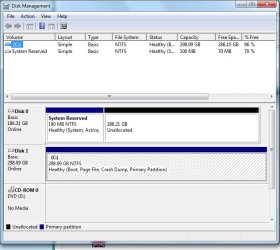
I have two hard drives in this PC. One of them just did something crazy.
This is what I did and this is what happened.
1) Erased whole hard drive from first sector to last. Complete format (Even the bootmgr)
2) Put in the windows 7 64 bit installation DVD. The installation showed two hard drives. HD1 and HD2. All space was unallocated on both of them, so I clicked "New" and created 1 new partition on HD1. I left HD2 alone and did not allocate any space or partition anything. I then installed Windows.
3) Booted into windows and opened up an encryption program that only works if Windows is booting from the drive it's installed in. I received an error saying that Windows IS NOT booting from the same drive it was installed on.
4) I restarted and clicked escape to view the boot menu. I tried booting from the hard drive that windows is installed on AND IT GAVE ME A DISK FAILURE ERROR. I then rebooted and tried to boot from the hard drive that windows IS NOT installed on AND IT BOOTED!!!!!!!!!!! WTF! I JUST WIPED THAT DRIVE!
There is only C:\ on my PC. Windows is installed on HD1 BUT IT'S BOOTING FROM HD2! I didn't even partition anything on HD2 and I JUST WIPED OUT THE WHOLE DRIVE.
I guess what I'm really needing to know is how to find out exactly where windows 7 is booting from so I can figure out why it's booting from HD2 and installed on HD1...and how in the heck did Windows 7 manage to put it's boot loader on a completely different hard drive when I didn't even partition andjust now erased.
This is what I did and this is what happened.
1) Erased whole hard drive from first sector to last. Complete format (Even the bootmgr)
2) Put in the windows 7 64 bit installation DVD. The installation showed two hard drives. HD1 and HD2. All space was unallocated on both of them, so I clicked "New" and created 1 new partition on HD1. I left HD2 alone and did not allocate any space or partition anything. I then installed Windows.
3) Booted into windows and opened up an encryption program that only works if Windows is booting from the drive it's installed in. I received an error saying that Windows IS NOT booting from the same drive it was installed on.
4) I restarted and clicked escape to view the boot menu. I tried booting from the hard drive that windows is installed on AND IT GAVE ME A DISK FAILURE ERROR. I then rebooted and tried to boot from the hard drive that windows IS NOT installed on AND IT BOOTED!!!!!!!!!!! WTF! I JUST WIPED THAT DRIVE!
There is only C:\ on my PC. Windows is installed on HD1 BUT IT'S BOOTING FROM HD2! I didn't even partition anything on HD2 and I JUST WIPED OUT THE WHOLE DRIVE.
I guess what I'm really needing to know is how to find out exactly where windows 7 is booting from so I can figure out why it's booting from HD2 and installed on HD1...and how in the heck did Windows 7 manage to put it's boot loader on a completely different hard drive when I didn't even partition andjust now erased.
My Computer
- OS
- Windows 7