Windows 8: a step backwards!?

Butters

Member
Member
VIP
Local time
4:08 PM
Messages
195
Just thought I'd share this.
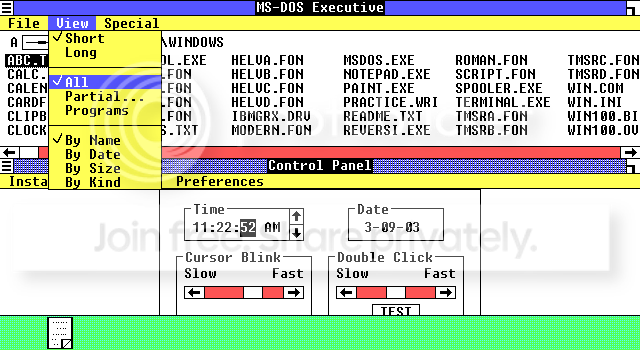
Am I the only one to see this similarity?

b71ce1b4.jpg


3cbb2c0f.png


1a1f0627.png


7724d233.png


I guess the only difference between then and now is that Windows 8 can be used on a tablet. lol (that was a joke in case anyone couldn't tell.)

But seriously, Windows 8 is not something I'm looking forward to. What do you guys think?
 

My Computer

Computer type
Laptop
Computer Manufacturer/Model Number
Dell Inspiron 15 7000 Series
OS
Windows 7 Professional x64
CPU
Intel Core i7-4510U CPU
Memory
8 GB RAM
Graphics Card(s)
Intel(R) HD Graphics (I so wish I could upgrade this)
Screen Resolution
1920x1080
Keyboard
Laptop keyboard
Mouse
Microsoft Mouse
Internet Speed
Nothing to write home about
Antivirus
Malwarebytes Anti Malware
Browser
Pale Moon (Firefox fork)
Other Info
My primary laptop has Windows 10 on it, and my shared desktop (which is actually a laptop being used as a desktop) has Windows 7 Professional on it. I still use both, but I would say I use my laptop a bit more now.
From a mainstream user I can see them adopting it pretty easily. IT people set in their ways not so much. But I also understand the IT's point of view too. It's a hassle changing all these settings that have been easily set in the more traditional windows layout. As far as similarities across all versions of windows. Well duh. It's branding. Signature look. Just like all brands of things.
 

My Computer

Computer type
PC/Desktop
Computer Manufacturer/Model Number
Custom Build
OS
Windows 7 Pro 64bit build 7601 SP1
CPU
Intel Core I5 3570K 3.4Ghz w/ Zalman CNPS9900NT RT
Motherboard
MSI Z77A-G45 Gaming
Memory
G.Skill F3-12800CL9D-8GbXL ; 4Gx2
Graphics Card(s)
EVGA Geforce GTX 770 Superclocked
Sound Card
Creative Sound Blaster Z
Monitor(s) Displays
Dual ViewSonic VX2770Smh-LED Black 27"IPS-Panel
Screen Resolution
1920x1080
Hard Drives
Kingston Hyper X 240GB SSD Win8 Pro 64bit 6GB/s Sata III
Intel 335 Series SSD 240GB Win8 Storage 6GB/s Sata III
Intel 320 Series SSD 600GB Storage 3GB/s Sata II
Western Digital Scorpio Black 1TB - Docked via Esata
PSU
Coolermaster GX 750W
Case
Corsair Vengence C70
Cooling
Coolermaster 120mm and Enermax 140mm
Keyboard
Corsair Vengence K70
Mouse
Logitech G500
Internet Speed
22mbps+
Browser
Firefox, Chrome, IE
Other Info
Swan M50W 2.1 speakers
APC UPS
Thermaltake BlacX HDD Dock
Samsung BD Optical Drive
Netgear WNDR4500
Going to stick with win7 as 8 is bit uncomfortable to navigate (personal choice, don't want to start any arguing)
 

My Computer

Computer type
Laptop
Computer Manufacturer/Model Number
Sony Vaio VPCEH25EN
OS
Windows 8.1u1 x64
CPU
i3
Memory
DDR3 6GB
Graphics Card(s)
Nvidia 410
Screen Resolution
1366*768
Hard Drives
Toshiba 1TB
Internet Speed
Dial Up 56kbps
I'm sticking with Windows 7 as I do not like the idea behind Windows 8.
 

My Computer

Computer Manufacturer/Model Number
Advent
OS
Dual-boot: Windows 7 HP 32-bit SP1 & Windows XP Pro 32-bit SP2.
CPU
AMD Phenom X4 9550 2.8Ghz
Motherboard
FOXCONN A6VMX (Socket 940)
Memory
4.0GB RAM
Graphics Card(s)
256MB On-board ATI Radeon X1200 Series
Sound Card
UnKnown
Monitor(s) Displays
19" TFT Mointor
Screen Resolution
1400 by 900
Hard Drives
500GB Western Digital WDC
Keyboard
HP Keyboard
Internet Speed
Dial-up via Mobile phone (Three)
Other Info
80GB External Hard-drive.

Also I have an old Windows XP Laptop for backup/occasional use etc.
I'm sticking with 7 due to the fact I believe 7 is easier and suits me more, I don't really want to go off my xbox to go on a computer that looks the same, its like a dashboard full of information I mostly don't really look at or need to know in my own opinion.
 

My Computer

Computer type
Laptop
Computer Manufacturer/Model Number
HP
OS
Windows 7 64 Bit Home Premium
CPU
Intel core I3
Motherboard
Unkown
Memory
4Gb
Graphics Card(s)
Ati Mobility Radeon
Sound Card
Default
Monitor(s) Displays
1
Hard Drives
c:/ 277Gb
PSU
Unknown
Case
HP Pavilion DV7
Cooling
Default
Keyboard
Default
Mouse
Default
Internet Speed
50Mb/s VIRGIN MEDIA CABLE (FIBRE-OPTIC)
Other Info
Bought November 2011
I'm using it right now, and I don't have any problems with it. OK, it's a slightly different interface but like Windows 98, XP, Vista and Seven, it just takes a while to get used to.
 

My Computer

Computer type
PC/Desktop
Computer Manufacturer/Model Number
Dwarf Dwf/11/2012 r09/2013
OS
Windows 8.1 Pro RTM x64
CPU
Intel Core-i5-3570K 4-core @ 3.4GHz (Ivy Bridge) (OC 4.4GHz)
Motherboard
ASRock Z77 Extreme4-M
Memory
4 x 4GB DDR3-1600 Corsair Vengeance CMZ8GX3M2A1600C9B (16GB)
Graphics Card(s)
MSI GeForce GTX770 Gaming OC 2GB
Sound Card
Realtek High Definition on board solution (ALC 898)
Monitor(s) Displays
ViewSonic VA1912w Widescreen (VGA)
Screen Resolution
1440x900
Hard Drives
OCZ Agility 3 SSD 120GB SATA III x2 (RAID 0)
Samsung HD501LJ 500GB SATA II x2
Hitachi HDS721010CLA332 1TB SATA II
Iomega 1.5TB Ext USB 2.0
WD 2.0TB Ext USB 3.0
PSU
XFX Pro Series 850W Semi-Modular
Case
Gigabyte IF233
Cooling
1 x 120mm Front Inlet 1 x 120mm Rear Exhaust
Keyboard
Microsoft Comfort Curve Keyboard 3000 (USB)
Mouse
Microsoft Comfort Mouse 3000 for Business (USB)
Internet Speed
NetGear DG834Gv3 ADSL Modem/Router (Ethernet) ~4.0 Mb/s (O2)
Antivirus
Avast! 8.0.1497
Browser
IE 11
Other Info
Optical Drive: HL-DT-ST BD-RE BH10LS30 SATA Bluray
Lexmark S305 Printer/Scanner/Copier (USB)
WEI Score: 8.1/8.1/8.5/8.5/8.25
Asus Eee PC 1011PX Netbook (Windows 7 x86 Starter)
"7" is a lucky number.

Regards,
GEWB
 

My Computer

Computer type
PC/Desktop
Computer Manufacturer/Model Number
(7 different computers booting up to 10 systems)
OS
Linux Mint / XP / Win7 Home, Pro, Ultimate / Win8.1 / Win10
Other Info
Four desktops, two laptops, one notebook and one tablet
sticking with 7,will probably stick a ssd in this machine when I got the cash to make the boost and load times quicker. Only good thing they put in win 8 imo is the faster boots and shutdowns and the way it handles copying and transferring files to be honest. Everything else is about the same but with some features removed and a metro interface with some cloud addons like the Microsoft store and xbox live stuff along with the email client built in. Though for the email client I could just use windows live essentials which has windows live mail which syncs my gmail account and i get my emails that way on my current machine and the only gaming client i care about is steam and have xfire client to chat with my friends online and track my game play hours,basically like a msn for gamers. So no not upgrading anytime soon,will wait for something better in the future.
 

My Computer

Computer type
PC/Desktop
Computer Manufacturer/Model Number
custom build
OS
Windows 10 64bit
CPU
AMD Phenom II X4 925 (Deneb)(2.8GHz) OC 3.4GHz
Motherboard
M5A78L-MLX Plus
Memory
Corsair Vengeance DDR3 4GBX2 (8192MB)
Graphics Card(s)
XFX HD 6870 1GB (OC)- 940MHz core, mem 1150MHz
Monitor(s) Displays
Vizio 26' 1920x1080 / Acer 1336x768
Screen Resolution
1920x1080 60Hz /1336x768
Hard Drives
Kingston Digital 60GB SSDNow V300/500gb HDD Western Digital 7200rpm (/WD 160GB HDD 7200rpm
PSU
CORSAIR CX600 600w
Case
AZZA Orion 202 EVO
Cooling
cooler master hyper TX3 cpu cooler
Keyboard
Razer DeathStalker
Mouse
Logitech Optical Gaming Mouse G400
Antivirus
Defualt on win 10
Browser
Firefox
Other Info
cpu is overclocked in bios
I don't know what it is but some of the latest releases in software just don't appeal to me much and Win8 seems to be one of them
 

My Computer

Computer Manufacturer/Model Number
Proline
OS
Windows 7 Pro 64 bit
CPU
Intel(R) Core(TM) i7 CPU 870 @ 2.93GHz
Motherboard
H55-G43(MS-7638)
Memory
4GB
Graphics Card(s)
NVIDIA GeForce GTX 470
Sound Card
Onboard
Monitor(s) Displays
Proline LCD 19 inch
Screen Resolution
1280 x 1024
Hard Drives
2 x SATA 250 Gig 1 x External 2TB
PSU
RX 730 SS
Case
Proline
Cooling
Standard
Keyboard
PS2
Mouse
PS2
Internet Speed
To embarrassed to tell lol
Only good thing they put in win 8 imo is the faster boots and shutdowns and the way it handles copying and transferring files to be honest. Everything else is about the same but with some features removed and a metro interface with some cloud addons like the Microsoft store and xbox live stuff along with the email client built in.

Miguel, can you tell us, in Windows 8, what features have been removed? That is what concerns me too, because I don't want to lose any features from Windows 7.
 

My Computer

Computer Manufacturer/Model Number
HP Pavillion dv5t (generation 1)
OS
Vista 64 bit and 32 bit (SP2)
CPU
Intel(R) Core(TM)2 Duo Processor T9400 (2.53 GHz
Memory
4GB DDR2 System Memory (2 Dimm)
Graphics Card(s)
512 MB NVIDIA GeForce 9600M GT
Monitor(s) Displays
15.4" diagonal WSXGA+ High-Definition HP BrightView Widescre
Screen Resolution
1680 x 1050
Hard Drives
320GB 5400RPM SATA Hard Drive with HP ProtectSmart Hard Drive Protection
Keyboard
Built-in HP
Mouse
Built in - Synaptics TouchPad V6.5 on PS/2 Port
Internet Speed
Max
Other Info
~ Intel Next-Gen Wireless-N Mini-card w/Bluetooth ~ Blu-Ray ROM DVD+/-R/RW ~ Integ. HDTV Hybrid Tuner ~ 12 Cell Battery ~ MS Office (Home Premium) 2007 ~
I'm sticking with 7 due to the fact I believe 7 is easier and suits me more, I don't really want to go off my xbox to go on a computer that looks the same, its like a dashboard full of information I mostly don't really look at or need to know in my own opinion.

I agree, when the Xbox dashboard is full of mainly advertisements and clutter, at first I found it rather difficult to navigate through the dashboard to find things I'm looking for.

I'm staying with Windows 7, Microsoft will probably run Windows 7 support for a very long time, since with the growing unpopularity of Windows 8 already. Yeah, tablets are growing in demand, but how many people actually use their tablet seriously? Most people I know got a tablet to play games :L
 

My Computer

Computer type
Laptop
I'm sticking with 7 due to the fact I believe 7 is easier and suits me more, I don't really want to go off my xbox to go on a computer that looks the same, its like a dashboard full of information I mostly don't really look at or need to know in my own opinion.

I agree, when the Xbox dashboard is full of mainly advertisements and clutter, at first I found it rather difficult to navigate through the dashboard to find things I'm looking for.

I'm staying with Windows 7, Microsoft will probably run Windows 7 support for a very long time, since with the growing unpopularity of Windows 8 already. Yeah, tablets are growing in demand, but how many people actually use their tablet seriously? Most people I know got a tablet to play games :L

That'll happen regardless given the huge number of IT infrastructure moving to win7 from xp.
 

My Computer

Computer type
PC/Desktop
Computer Manufacturer/Model Number
Custom Build
OS
Windows 7 Pro 64bit build 7601 SP1
CPU
Intel Core I5 3570K 3.4Ghz w/ Zalman CNPS9900NT RT
Motherboard
MSI Z77A-G45 Gaming
Memory
G.Skill F3-12800CL9D-8GbXL ; 4Gx2
Graphics Card(s)
EVGA Geforce GTX 770 Superclocked
Sound Card
Creative Sound Blaster Z
Monitor(s) Displays
Dual ViewSonic VX2770Smh-LED Black 27"IPS-Panel
Screen Resolution
1920x1080
Hard Drives
Kingston Hyper X 240GB SSD Win8 Pro 64bit 6GB/s Sata III
Intel 335 Series SSD 240GB Win8 Storage 6GB/s Sata III
Intel 320 Series SSD 600GB Storage 3GB/s Sata II
Western Digital Scorpio Black 1TB - Docked via Esata
PSU
Coolermaster GX 750W
Case
Corsair Vengence C70
Cooling
Coolermaster 120mm and Enermax 140mm
Keyboard
Corsair Vengence K70
Mouse
Logitech G500
Internet Speed
22mbps+
Browser
Firefox, Chrome, IE
Other Info
Swan M50W 2.1 speakers
APC UPS
Thermaltake BlacX HDD Dock
Samsung BD Optical Drive
Netgear WNDR4500
I've said it before but for me Windows 8 and Metro are no different to Ubuntu and Unity. Don't like either as it really isn't ideal for desktops. My opinion.
 

My Computer

Computer type
PC/Desktop
Computer Manufacturer/Model Number
Own build
OS
Windows 7 x64 Professional
CPU
Intel Core i7-870 Lynnfield 2.93 GHz
Motherboard
Intel Whitesburg P55 LGA1156
Memory
Kingston Hyper X 1333MHz DDR3 4x4Gb
Graphics Card(s)
Nvidia GTS 250
Monitor(s) Displays
AOC Q3279VWF 31.5"
Screen Resolution
2560x1440
Hard Drives
Western Digital 1000GB Hard Drive (SATA 3.0Gb/s, 7200rpm, 32MB Cache)
Verbatim 500GB (External)
PSU
650W
Case
Coolermaster HAF 912
Cooling
Stock
Keyboard
Logitech
Mouse
Logitech
Antivirus
Avira
Browser
Firefox
Other Info
LG OptDrive 24x SATA DVDRW Lightscribe
Only good thing they put in win 8 imo is the faster boots and shutdowns and the way it handles copying and transferring files to be honest. Everything else is about the same but with some features removed and a metro interface with some cloud addons like the Microsoft store and xbox live stuff along with the email client built in.

Miguel, can you tell us, in Windows 8, what features have been removed? That is what concerns me too, because I don't want to lose any features from Windows 7.
Here's some.
Source:
List of features removed in Windows 8 - Wikipedia, the free encyclopedia


LIST:
Shell


  • The Start button has been removed, although it is still accessible as a hotspot in the lower left corner of the screen, and on the charms menu.[1]
  • The Start menu has been removed in favor of a full screen interface called the Start screen.[2]
    • Start screen lacks the global "Recent Documents" menu.[3]
    • Start screen lacks the automatically filling by usage tracking "Most Frequently Used" (MFU) programs list, each with its "Recent Documents" menu.[3][4]
  • The Aero Glass theme which has been featured in Windows Vista and Windows 7 has been removed from Windows 8 in favor of a Metro-style theme.[5]
  • Microsoft Gadgets which has been featured in Windows Vista and Windows 7 has been removed from Windows 8 except for the Sidebar Gadget. [6]
File Explorer


  • The command bar is no longer present, and has been replaced by a new Ribbon UI.

EDIT:

Oh yea here's another article I found showing you what else is removed ,its ridiculous how much they removed

http://www.makeuseof.com/tag/missing-windows-8/
 

My Computer

Computer type
PC/Desktop
Computer Manufacturer/Model Number
custom build
OS
Windows 10 64bit
CPU
AMD Phenom II X4 925 (Deneb)(2.8GHz) OC 3.4GHz
Motherboard
M5A78L-MLX Plus
Memory
Corsair Vengeance DDR3 4GBX2 (8192MB)
Graphics Card(s)
XFX HD 6870 1GB (OC)- 940MHz core, mem 1150MHz
Monitor(s) Displays
Vizio 26' 1920x1080 / Acer 1336x768
Screen Resolution
1920x1080 60Hz /1336x768
Hard Drives
Kingston Digital 60GB SSDNow V300/500gb HDD Western Digital 7200rpm (/WD 160GB HDD 7200rpm
PSU
CORSAIR CX600 600w
Case
AZZA Orion 202 EVO
Cooling
cooler master hyper TX3 cpu cooler
Keyboard
Razer DeathStalker
Mouse
Logitech Optical Gaming Mouse G400
Antivirus
Defualt on win 10
Browser
Firefox
Other Info
cpu is overclocked in bios
Well, the way I see it is that Windows 8 is the beginning of a closed platform for Windows. Windows 8 may not be completely closed, but who knows about future releases of Windows? I think they may even be aiming to combine the Windows and Xbox platforms in the long run; the 2 GUIs are getting to be pretty similar. And as a PC gamer myself, I am not looking forward to this (IF this is what MS is trying to do). Who knows, in the future, we may see Windows on an Xbox.

For me, I'm going to be one of those users who 10 years later is still on XP, except with Win7. And why does Media Center have to be seperate from Windows now? I actually didn't know that until M1GU31 posted that link to the Wikipedia article.
 

My Computer

Computer type
Laptop
Computer Manufacturer/Model Number
Dell Inspiron 15 7000 Series
OS
Windows 7 Professional x64
CPU
Intel Core i7-4510U CPU
Memory
8 GB RAM
Graphics Card(s)
Intel(R) HD Graphics (I so wish I could upgrade this)
Screen Resolution
1920x1080
Keyboard
Laptop keyboard
Mouse
Microsoft Mouse
Internet Speed
Nothing to write home about
Antivirus
Malwarebytes Anti Malware
Browser
Pale Moon (Firefox fork)
Other Info
My primary laptop has Windows 10 on it, and my shared desktop (which is actually a laptop being used as a desktop) has Windows 7 Professional on it. I still use both, but I would say I use my laptop a bit more now.
Only good thing they put in win 8 imo is the faster boots and shutdowns and the way it handles copying and transferring files to be honest. Everything else is about the same but with some features removed and a metro interface with some cloud addons like the Microsoft store and xbox live stuff along with the email client built in.

Miguel, can you tell us, in Windows 8, what features have been removed? That is what concerns me too, because I don't want to lose any features from Windows 7.
Here's some.
Source:
List of features removed in Windows 8 - Wikipedia, the free encyclopedia


LIST:
Shell


  • The Start button has been removed, although it is still accessible as a hotspot in the lower left corner of the screen, and on the charms menu.[1]
  • The Start menu has been removed in favor of a full screen interface called the Start screen.[2]
    • Start screen lacks the global "Recent Documents" menu.[3]
    • Start screen lacks the automatically filling by usage tracking "Most Frequently Used" (MFU) programs list, each with its "Recent Documents" menu.[3][4]
  • The Aero Glass theme which has been featured in Windows Vista and Windows 7 has been removed from Windows 8 in favor of a Metro-style theme.[5]
  • Microsoft Gadgets which has been featured in Windows Vista and Windows 7 has been removed from Windows 8 except for the Sidebar Gadget. [6]
File Explorer


  • The command bar is no longer present, and has been replaced by a new Ribbon UI.
EDIT:

Oh yea here's another article I found showing you what else is removed ,its ridiculous how much they removed

What’s Missing From Windows 8?

Thanks Miguel for going to the trouble of listing all of that. Wow! A lot of BASIC functions have been deleted. And tons of others. Hope the work-around experts are busy trying to find ways to give us our Windows 7 functions back!!!
 

My Computer

Computer Manufacturer/Model Number
HP Pavillion dv5t (generation 1)
OS
Vista 64 bit and 32 bit (SP2)
CPU
Intel(R) Core(TM)2 Duo Processor T9400 (2.53 GHz
Memory
4GB DDR2 System Memory (2 Dimm)
Graphics Card(s)
512 MB NVIDIA GeForce 9600M GT
Monitor(s) Displays
15.4" diagonal WSXGA+ High-Definition HP BrightView Widescre
Screen Resolution
1680 x 1050
Hard Drives
320GB 5400RPM SATA Hard Drive with HP ProtectSmart Hard Drive Protection
Keyboard
Built-in HP
Mouse
Built in - Synaptics TouchPad V6.5 on PS/2 Port
Internet Speed
Max
Other Info
~ Intel Next-Gen Wireless-N Mini-card w/Bluetooth ~ Blu-Ray ROM DVD+/-R/RW ~ Integ. HDTV Hybrid Tuner ~ 12 Cell Battery ~ MS Office (Home Premium) 2007 ~
Well so far for PC I have only seen negatives here so I will be one that will be stuck on Win7 for a very long time or maybe even move over to another OS
 

My Computer

Computer Manufacturer/Model Number
Proline
OS
Windows 7 Pro 64 bit
CPU
Intel(R) Core(TM) i7 CPU 870 @ 2.93GHz
Motherboard
H55-G43(MS-7638)
Memory
4GB
Graphics Card(s)
NVIDIA GeForce GTX 470
Sound Card
Onboard
Monitor(s) Displays
Proline LCD 19 inch
Screen Resolution
1280 x 1024
Hard Drives
2 x SATA 250 Gig 1 x External 2TB
PSU
RX 730 SS
Case
Proline
Cooling
Standard
Keyboard
PS2
Mouse
PS2
Internet Speed
To embarrassed to tell lol
Just ONE step backwards???? :D

Seriously, yes, Win 8 is much inferior to Win 7. The list of removed features is great, notably the start menu and the glass effect. The tablet interface is annoying at best in a real computer, not good for a real productive environment, just for toys. The ribbon in explorer just makes it even more useless than it was in Win7. Classic shell is a MUST in Win8, really.

On the other hand, I can't see any significant improvements (anyone correct me if I'm wrong). Mostly is just the very same Win7 core (which in turn is the very same Vista core) with a few touches, maybe some performance improvements, but not anything surprising. The cons beat the pros for significant margin. Stick to Win7 :p
 

My Computer

Computer type
Laptop
Computer Manufacturer/Model Number
Toshiba Sattelite A665-S6092
OS
Windows 7 Ultimate x64
CPU
Intel Core i7-740QM
Memory
8 GB DDR3
Graphics Card(s)
NVIDIA GeForce 330GT
Screen Resolution
1366x768
Hard Drives
Samsung 840 SSD 500GB
1TB USB3 external HD
Cooling
Coolermaster Notepal U3 notebook cooling pad
Internet Speed
3mbps ASDL
Antivirus
ClamWin 0.98.7
Browser
Opera 12.17 x86 (main), Firefox 38 (sec), IE11 (last resort)
Back
Top