
You are using an out of date browser. It may not display this or other websites correctly.
You should upgrade or use an alternative browser.
You should upgrade or use an alternative browser.
Solved windows 8 cannot install on a dynamic disk?
- Thread starter samjambo
- Start date

An ISO of what?? 
The link I gave didn't have an .iso file download.
http://www.sevenforums.com/installa...vert-os-basic-dynamic-volume.html#post1549946
The link I gave didn't have an .iso file download.
http://www.sevenforums.com/installa...vert-os-basic-dynamic-volume.html#post1549946
My Computer
- Computer type
- PC/Desktop
- Computer Manufacturer/Model Number
- Self built custom
- OS
- 64-bit Windows 11 Pro for Workstations
- CPU
- Intel i7-8700K OC'd to 5 GHz
- Motherboard
- ASUS ROG Maximus XI Formula Z390
- Memory
- 64 GB (4x16GB) G.SKILL TridentZ RGB DDR4 3600 MHz
- Graphics Card(s)
- ASUS ROG-STRIX-GTX1080TI-O11G-GAMING
- Sound Card
- Integrated
- Monitor(s) Displays
- 2 x Samsung Odyssey G7 27"
- Screen Resolution
- 2560x1440
- Hard Drives
- 1TB Samsung 990 PRO M.2,
4TB Samsung 990 PRO PRO M.2,
TerraMaster F8 SSD Plus NAS
- PSU
- Seasonic Prime Titanium 850W
- Case
- Thermaltake Core P3
- Cooling
- Corsair Hydro H115i
- Keyboard
- Logitech wireless K800
- Mouse
- Logitech MX Master 4
- Internet Speed
- 2 Gb/s Download and 100 Mb/s Upload
- Antivirus
- Malwarebyte Anti-Malware Premium
- Browser
- Google Chrome
- Other Info
- Logitech Z625 speaker system,
Logitech BRIO 4K Pro webcam,
HP Color LaserJet Pro MFP M477fdn,
APC SMART-UPS RT 1000 XL - SURT1000XLI,
Galaxy S23 Plus phone
haha..am so sorry.ok,do i need to make the flash bootable? or i just change the boot order?
i got the iso from somewhere..but that version does not allow converting
i got the iso from somewhere..but that version does not allow converting
My Computer
- Computer Manufacturer/Model Number
- hp
- OS
- windows 7 ultimate sp1 x64
- CPU
- core i5 460m
Sam,
I don't mean to sound or be rude, but your going to toast your Windows installation if you keep deviating from the instructions we give you. We don't want to see that happen to you.
After some testing to make sure, I think this should work best for you.
I don't mean to sound or be rude, but your going to toast your Windows installation if you keep deviating from the instructions we give you. We don't want to see that happen to you.
After some testing to make sure, I think this should work best for you.
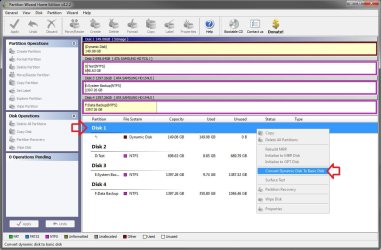
- Run the PWIZ.exe file in the PW folder while in Windows 7.
- Click on No for new updates available.
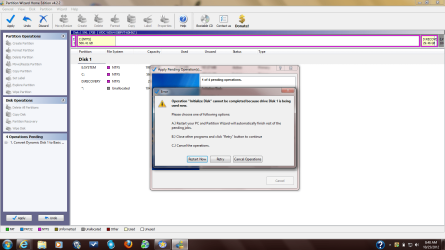
- Right click on your dynamic disk #, and click on Convert to Dynamic Disk to Basic Disk like below.
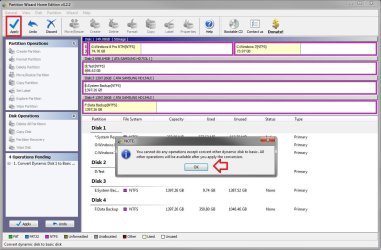
- Click on OK, then click on the blue Apply check icon like below.
- Click on Yes to apply.
- Click on Restart Now to restart the computer for it to convert it back to basic.
My Computer
- Computer type
- PC/Desktop
- Computer Manufacturer/Model Number
- Self built custom
- OS
- 64-bit Windows 11 Pro for Workstations
- CPU
- Intel i7-8700K OC'd to 5 GHz
- Motherboard
- ASUS ROG Maximus XI Formula Z390
- Memory
- 64 GB (4x16GB) G.SKILL TridentZ RGB DDR4 3600 MHz
- Graphics Card(s)
- ASUS ROG-STRIX-GTX1080TI-O11G-GAMING
- Sound Card
- Integrated
- Monitor(s) Displays
- 2 x Samsung Odyssey G7 27"
- Screen Resolution
- 2560x1440
- Hard Drives
- 1TB Samsung 990 PRO M.2,
4TB Samsung 990 PRO PRO M.2,
TerraMaster F8 SSD Plus NAS
- PSU
- Seasonic Prime Titanium 850W
- Case
- Thermaltake Core P3
- Cooling
- Corsair Hydro H115i
- Keyboard
- Logitech wireless K800
- Mouse
- Logitech MX Master 4
- Internet Speed
- 2 Gb/s Download and 100 Mb/s Upload
- Antivirus
- Malwarebyte Anti-Malware Premium
- Browser
- Google Chrome
- Other Info
- Logitech Z625 speaker system,
Logitech BRIO 4K Pro webcam,
HP Color LaserJet Pro MFP M477fdn,
APC SMART-UPS RT 1000 XL - SURT1000XLI,
Galaxy S23 Plus phone
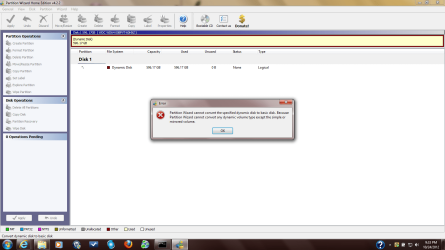
Not good. Do you still have your product key number on the COA sticker on your computer like below?

If so, then you could use the tutorial below to do a clean reinstall of Windows 7 if you like.
Be sure to backup anything that you do not want to lose to another location first. Doing this will completely wipe the HDD clean, and start fresh.
Be sure to backup anything that you do not want to lose to another location first. Doing this will completely wipe the HDD clean, and start fresh.
My Computer
- Computer type
- PC/Desktop
- Computer Manufacturer/Model Number
- Self built custom
- OS
- 64-bit Windows 11 Pro for Workstations
- CPU
- Intel i7-8700K OC'd to 5 GHz
- Motherboard
- ASUS ROG Maximus XI Formula Z390
- Memory
- 64 GB (4x16GB) G.SKILL TridentZ RGB DDR4 3600 MHz
- Graphics Card(s)
- ASUS ROG-STRIX-GTX1080TI-O11G-GAMING
- Sound Card
- Integrated
- Monitor(s) Displays
- 2 x Samsung Odyssey G7 27"
- Screen Resolution
- 2560x1440
- Hard Drives
- 1TB Samsung 990 PRO M.2,
4TB Samsung 990 PRO PRO M.2,
TerraMaster F8 SSD Plus NAS
- PSU
- Seasonic Prime Titanium 850W
- Case
- Thermaltake Core P3
- Cooling
- Corsair Hydro H115i
- Keyboard
- Logitech wireless K800
- Mouse
- Logitech MX Master 4
- Internet Speed
- 2 Gb/s Download and 100 Mb/s Upload
- Antivirus
- Malwarebyte Anti-Malware Premium
- Browser
- Google Chrome
- Other Info
- Logitech Z625 speaker system,
Logitech BRIO 4K Pro webcam,
HP Color LaserJet Pro MFP M477fdn,
APC SMART-UPS RT 1000 XL - SURT1000XLI,
Galaxy S23 Plus phone
You're welcome. Please let us know how it went for what you decide.
My Computer
- Computer type
- PC/Desktop
- Computer Manufacturer/Model Number
- Self built custom
- OS
- 64-bit Windows 11 Pro for Workstations
- CPU
- Intel i7-8700K OC'd to 5 GHz
- Motherboard
- ASUS ROG Maximus XI Formula Z390
- Memory
- 64 GB (4x16GB) G.SKILL TridentZ RGB DDR4 3600 MHz
- Graphics Card(s)
- ASUS ROG-STRIX-GTX1080TI-O11G-GAMING
- Sound Card
- Integrated
- Monitor(s) Displays
- 2 x Samsung Odyssey G7 27"
- Screen Resolution
- 2560x1440
- Hard Drives
- 1TB Samsung 990 PRO M.2,
4TB Samsung 990 PRO PRO M.2,
TerraMaster F8 SSD Plus NAS
- PSU
- Seasonic Prime Titanium 850W
- Case
- Thermaltake Core P3
- Cooling
- Corsair Hydro H115i
- Keyboard
- Logitech wireless K800
- Mouse
- Logitech MX Master 4
- Internet Speed
- 2 Gb/s Download and 100 Mb/s Upload
- Antivirus
- Malwarebyte Anti-Malware Premium
- Browser
- Google Chrome
- Other Info
- Logitech Z625 speaker system,
Logitech BRIO 4K Pro webcam,
HP Color LaserJet Pro MFP M477fdn,
APC SMART-UPS RT 1000 XL - SURT1000XLI,
Galaxy S23 Plus phone

- Local time
- 2:08 PM
- Messages
- 50,634
With HP in order to keep the System, Recovery and OEM Diagnostics tools partitions bootable, it is best to convert C to Logical so that you can add as many adjacent Logical partitions as desired.
As you discovered converting to Dynamic is not an option.
In addition, in order to force it to convert back to Basic using Easeus Home Edition or (better yet) Partition Wizard bootable CD, you'd need to first use the tool to delete the extra partitions you created which tipped it to Dynamic against the warning.
As you discovered converting to Dynamic is not an option.
In addition, in order to force it to convert back to Basic using Easeus Home Edition or (better yet) Partition Wizard bootable CD, you'd need to first use the tool to delete the extra partitions you created which tipped it to Dynamic against the warning.
greg..that was exactly what i was asking shawn..if i have already exceeded the maximum number of partition then i would first have to remove some partitions.
can i just extend the 'c' with space from the other partitions that i will delete?
if i convert 'c' to logical it won't affect booting or recovering from the recovery partition?and which tool do i use to convert to logical..EASEUS doesn't have that option(though they use the exact same version to demonstrate how to convert-most of the functions are greyed out)
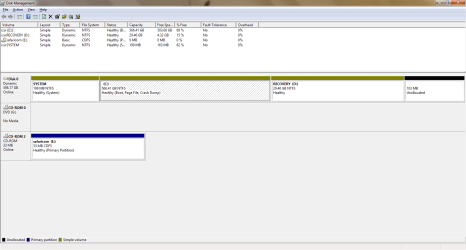
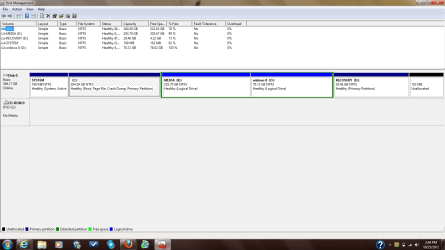
here is what my HD looks like now..i still don't understand why the 103mb(this was the space formerly occupied by HP tools partition) did not extend to the 'c'.
can i just extend the 'c' with space from the other partitions that i will delete?
if i convert 'c' to logical it won't affect booting or recovering from the recovery partition?and which tool do i use to convert to logical..EASEUS doesn't have that option(though they use the exact same version to demonstrate how to convert-most of the functions are greyed out)
here is what my HD looks like now..i still don't understand why the 103mb(this was the space formerly occupied by HP tools partition) did not extend to the 'c'.
Attachments
My Computer
- Computer Manufacturer/Model Number
- hp
- OS
- windows 7 ultimate sp1 x64
- CPU
- core i5 460m

My Computer
- Computer Manufacturer/Model Number
- hp
- OS
- windows 7 ultimate sp1 x64
- CPU
- core i5 460m
My Computer
- Computer Manufacturer/Model Number
- hp
- OS
- windows 7 ultimate sp1 x64
- CPU
- core i5 460m
- Local time
- 2:08 PM
- Messages
- 50,634
From the mess you had, you only needed to delete the excess partitions before Converting. Then you can convert C to Logical and add any adjacent Logical partitions you want.
If you deleted and resized first before Converting you are in uncharted territory. Make sure System Reserved remains marked Active then if Win7 won't start after conversion run Startup Repair - Run 3 Separate Times.
This is the procedure we've been recommending here for nearly three years after early trials of converting the other bootable HP partitions interfered with their boot. C is the only partition on preinstalled HP that's not bootable, and an OS can always be installed to a Logical partition if there is already a Primary boot partition.
I would be remiss if I didn't mention at this point that most tech enthusiasts would never run the bloated HP preinstall but choose to Clean Reinstall - Factory OEM Windows 7
so read it over if you want to continue with a more positive learning experience.
If you deleted and resized first before Converting you are in uncharted territory. Make sure System Reserved remains marked Active then if Win7 won't start after conversion run Startup Repair - Run 3 Separate Times.
This is the procedure we've been recommending here for nearly three years after early trials of converting the other bootable HP partitions interfered with their boot. C is the only partition on preinstalled HP that's not bootable, and an OS can always be installed to a Logical partition if there is already a Primary boot partition.
I would be remiss if I didn't mention at this point that most tech enthusiasts would never run the bloated HP preinstall but choose to Clean Reinstall - Factory OEM Windows 7
so read it over if you want to continue with a more positive learning experience.
finally i got it.. just ran partition magic as shawn had instructed and the HD is now basic..no data loss..now i have the partition to install windows 8 and no more errors while trying to install..
thank you shawn and greg..am so grateful.
thank you shawn and greg..am so grateful.
Attachments
Last edited:
My Computer
- Computer Manufacturer/Model Number
- hp
- OS
- windows 7 ultimate sp1 x64
- CPU
- core i5 460m
That's great news. I'm happy to hear all is well now.
Thank you for the help Greg.
Thank you for the help Greg.
My Computer
- Computer type
- PC/Desktop
- Computer Manufacturer/Model Number
- Self built custom
- OS
- 64-bit Windows 11 Pro for Workstations
- CPU
- Intel i7-8700K OC'd to 5 GHz
- Motherboard
- ASUS ROG Maximus XI Formula Z390
- Memory
- 64 GB (4x16GB) G.SKILL TridentZ RGB DDR4 3600 MHz
- Graphics Card(s)
- ASUS ROG-STRIX-GTX1080TI-O11G-GAMING
- Sound Card
- Integrated
- Monitor(s) Displays
- 2 x Samsung Odyssey G7 27"
- Screen Resolution
- 2560x1440
- Hard Drives
- 1TB Samsung 990 PRO M.2,
4TB Samsung 990 PRO PRO M.2,
TerraMaster F8 SSD Plus NAS
- PSU
- Seasonic Prime Titanium 850W
- Case
- Thermaltake Core P3
- Cooling
- Corsair Hydro H115i
- Keyboard
- Logitech wireless K800
- Mouse
- Logitech MX Master 4
- Internet Speed
- 2 Gb/s Download and 100 Mb/s Upload
- Antivirus
- Malwarebyte Anti-Malware Premium
- Browser
- Google Chrome
- Other Info
- Logitech Z625 speaker system,
Logitech BRIO 4K Pro webcam,
HP Color LaserJet Pro MFP M477fdn,
APC SMART-UPS RT 1000 XL - SURT1000XLI,
Galaxy S23 Plus phone
- Local time
- 2:08 PM
- Messages
- 50,634
You lost the OEM Diagnostics tools partition at the end of the HD because C was not converted to Logical first before adding the two Logical partitions.
This means that bootable diagnostics cannot be run from onboard unless you run HP System Recovery to reinstall the OEM partition then correctly convert to Logical and Resize C to add the new Logical partitions.
At that time you could also choose HP Minimal Recovery to get close to a Clean Reinstall, or you can choose to do the superior Clean Reinstall.
This means that bootable diagnostics cannot be run from onboard unless you run HP System Recovery to reinstall the OEM partition then correctly convert to Logical and Resize C to add the new Logical partitions.
At that time you could also choose HP Minimal Recovery to get close to a Clean Reinstall, or you can choose to do the superior Clean Reinstall.
I lost the HP tools partition because I had deleted it earlier in an attempt to reduce the number of partition. The problem now is getting it back. I can recreate it by reinstalling the HP system diagnostic UEFI but it displays an error saying I already have the maximum number of partitions allowed(4).
can I convert one of the primary drives now?
Shawn great news in deed. Am on windows 8 now.
can I convert one of the primary drives now?
Shawn great news in deed. Am on windows 8 now.
Attachments

My Computer
- Computer Manufacturer/Model Number
- hp
- OS
- windows 7 ultimate sp1 x64
- CPU
- core i5 460m
- Local time
- 2:08 PM
- Messages
- 50,634
I'll repeat it for the third time:
With HP's preinstall, to keep the System Reserved, Recovery and OEM Diagnostics Tools partitions bootable, what works best is to convert C to Logical and then shrink it to add as many adjacent Logical partitions as you want.
Now what exactly is the question?
With HP's preinstall, to keep the System Reserved, Recovery and OEM Diagnostics Tools partitions bootable, what works best is to convert C to Logical and then shrink it to add as many adjacent Logical partitions as you want.
Now what exactly is the question?
Sam,
You would need to create an extended logical partition to use for HP Tools instead since you already have 4 primary partitions. Using METHOD TWO in the tutorial below can help show you how to.
http://www.sevenforums.com/tutorials/146694-partition-extended-logical-drives.html
You would need to create an extended logical partition to use for HP Tools instead since you already have 4 primary partitions. Using METHOD TWO in the tutorial below can help show you how to.
http://www.sevenforums.com/tutorials/146694-partition-extended-logical-drives.html
My Computer
- Computer type
- PC/Desktop
- Computer Manufacturer/Model Number
- Self built custom
- OS
- 64-bit Windows 11 Pro for Workstations
- CPU
- Intel i7-8700K OC'd to 5 GHz
- Motherboard
- ASUS ROG Maximus XI Formula Z390
- Memory
- 64 GB (4x16GB) G.SKILL TridentZ RGB DDR4 3600 MHz
- Graphics Card(s)
- ASUS ROG-STRIX-GTX1080TI-O11G-GAMING
- Sound Card
- Integrated
- Monitor(s) Displays
- 2 x Samsung Odyssey G7 27"
- Screen Resolution
- 2560x1440
- Hard Drives
- 1TB Samsung 990 PRO M.2,
4TB Samsung 990 PRO PRO M.2,
TerraMaster F8 SSD Plus NAS
- PSU
- Seasonic Prime Titanium 850W
- Case
- Thermaltake Core P3
- Cooling
- Corsair Hydro H115i
- Keyboard
- Logitech wireless K800
- Mouse
- Logitech MX Master 4
- Internet Speed
- 2 Gb/s Download and 100 Mb/s Upload
- Antivirus
- Malwarebyte Anti-Malware Premium
- Browser
- Google Chrome
- Other Info
- Logitech Z625 speaker system,
Logitech BRIO 4K Pro webcam,
HP Color LaserJet Pro MFP M477fdn,
APC SMART-UPS RT 1000 XL - SURT1000XLI,
Galaxy S23 Plus phone
Greg, my question is can I convert right now after I made the HD basic?
I've tried with EASEUS but it says it can't convert since 'c' bootable("system or boot partition cannot be coverted").
Shawn you see am not the one to recreate the HP_tools partition. It can only be created by the HP system diagnostic UEFI through reinstallation(its already there so it just overwrites the existing files).
when it reaches the point of recreating the partition it shows an error which says that I already have the maximum number of partitions allowed i.e 4.
I have 3 primary partitions and 1 extended--I hope am getting it right
but method 2 might work(I already have the bootable cd from the .iso file I made)
I've tried with EASEUS but it says it can't convert since 'c' bootable("system or boot partition cannot be coverted").
Shawn you see am not the one to recreate the HP_tools partition. It can only be created by the HP system diagnostic UEFI through reinstallation(its already there so it just overwrites the existing files).
when it reaches the point of recreating the partition it shows an error which says that I already have the maximum number of partitions allowed i.e 4.
I have 3 primary partitions and 1 extended--I hope am getting it right
but method 2 might work(I already have the bootable cd from the .iso file I made)
My Computer
- Computer Manufacturer/Model Number
- hp
- OS
- windows 7 ultimate sp1 x64
- CPU
- core i5 460m