
Solved Windows 8 Dynamic-Basic Drive Conversion Problem

rojagegeo

New member
Local time
9:19 PM
Messages
2
Hi,

I know this is a well discussed topic,but i have been searching for an answer and trying out solutions(in vain) for almost 2hrs.

The problem is that i cant install Windows8,since i have a dynamic drive...
but i cant covert it into basic...
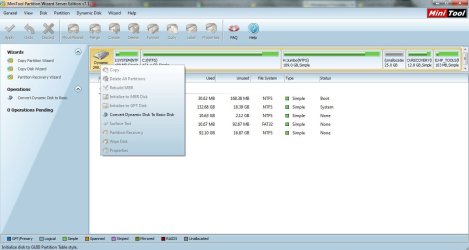
usually everyone has their main disk marked as basic,but mines marked as dynamic..ive attached the image..(x.jpg)
so i downloaded the minitool software ...now my doubt is should i click the convert to basic as shown in fig (v.jpg)? but doesnt doing so delete my windows 7 file or do some damage to the files existing? creating a backup is a viable option,but im just not sure of this whole procedure...

pls help..
 

Attachments
  • v.jpg
    v.jpg
    90.3 KB · Views: 260
  • x.jpg
    x.jpg
    89.4 KB · Views: 177

My Computer

OS
Windows 7 Ultimate x32

My Computer

Computer type
PC/Desktop
Computer Manufacturer/Model Number
Home Built Desktop By DataTech
OS
Windows 7 Ultimate X64 SP1
CPU
Intel i5-2550K, Differing ~4.4-4.8GHz No built in GPU
Motherboard
ASUS P8Z68-V PRO/GEN3
Memory
16GB G.Skill Sniper 1866MHz @ 2133MHz 2x8GB
Graphics Card(s)
ASUS GTX650TIB-DC2OC-2GD5, (650TI Boost)
Sound Card
Onboard Realtek 5-1
Monitor(s) Displays
Samsung P2570HD
Screen Resolution
1920x1080
Hard Drives
Samsung 840 Pro 256GB SSD for OS, 500GB Seagate Constellation (Enterprise drive) for Data
PSU
Corsair HX650W
Case
Inwin Dragon Rider
Cooling
Hyper 212 EVO w/two Noctua fans, push-pull, @1300 RPM
Keyboard
E-Z Eyes, bright yellow keys with large characters
Mouse
steelseries SENSEI Laser Pro Gaming
Internet Speed
48-51Mbs Mbs down, 11 Mbs up Xfinity Cable
Antivirus
Norton Internet Security 2013
Browser
IE 10, Opera, Pale Moon if needed
Other Info
4 case fans, LG BluRay-RE, ASUS DVD-RW, Mr. Fusion power supply, 1.21 gigawatts.
Apparently you ignored repeated warnings that the disk was being converted to Dynamic - meant only for partitions spanned across multiple HD's - when you created H in Disk Management.

The only way to do this non-destructively is to move the data off of H and delete it in Disk Mgmt or using PW CD. It will now convert.

To convert it use PW bootable CD v. 4.2 which is the last version which this feature was offered for free. Download and burn ISO to CD from this link: pw422.zip ISO - Windows Live

Boot the CD, delete H if you have moved the data off and not yet deleted it, click OK. Then click on the Disk # to highlight the HD, from Disk tab select Convert to Basic, OK, Apply both steps.

Once conversion is complete, rightclick on the space where H was and Create New Logical partition. Any addiitonal partiitions can be added adjacent to the Logical using PW CD to Resize left or right, then Create New Logical.
 
Thankyou for your help ,Gregrocker & Britton...

Greg,thanx for the detailed help...unfortunately i got fed up trying to solve the problem and just deleted everything off...thanx to your note (ignoring the warnings of conversion of basic to dynamic) i rectified the mistake....

i was able to install both windows 8 and windows 7...
 

My Computer

OS
Windows 7 Ultimate x32
Very good to hear!
 

My Computer

Computer type
PC/Desktop
Computer Manufacturer/Model Number
Home Built Desktop By DataTech
OS
Windows 7 Ultimate X64 SP1
CPU
Intel i5-2550K, Differing ~4.4-4.8GHz No built in GPU
Motherboard
ASUS P8Z68-V PRO/GEN3
Memory
16GB G.Skill Sniper 1866MHz @ 2133MHz 2x8GB
Graphics Card(s)
ASUS GTX650TIB-DC2OC-2GD5, (650TI Boost)
Sound Card
Onboard Realtek 5-1
Monitor(s) Displays
Samsung P2570HD
Screen Resolution
1920x1080
Hard Drives
Samsung 840 Pro 256GB SSD for OS, 500GB Seagate Constellation (Enterprise drive) for Data
PSU
Corsair HX650W
Case
Inwin Dragon Rider
Cooling
Hyper 212 EVO w/two Noctua fans, push-pull, @1300 RPM
Keyboard
E-Z Eyes, bright yellow keys with large characters
Mouse
steelseries SENSEI Laser Pro Gaming
Internet Speed
48-51Mbs Mbs down, 11 Mbs up Xfinity Cable
Antivirus
Norton Internet Security 2013
Browser
IE 10, Opera, Pale Moon if needed
Other Info
4 case fans, LG BluRay-RE, ASUS DVD-RW, Mr. Fusion power supply, 1.21 gigawatts.
I have same problem, please sort solution
We would need more detailed info and you should start your own thread, this one is solved.
Go through all the steps listed here, if no help, start a new thread. :)
 

My Computer

Computer type
PC/Desktop
Computer Manufacturer/Model Number
Home Built Desktop By DataTech
OS
Windows 7 Ultimate X64 SP1
CPU
Intel i5-2550K, Differing ~4.4-4.8GHz No built in GPU
Motherboard
ASUS P8Z68-V PRO/GEN3
Memory
16GB G.Skill Sniper 1866MHz @ 2133MHz 2x8GB
Graphics Card(s)
ASUS GTX650TIB-DC2OC-2GD5, (650TI Boost)
Sound Card
Onboard Realtek 5-1
Monitor(s) Displays
Samsung P2570HD
Screen Resolution
1920x1080
Hard Drives
Samsung 840 Pro 256GB SSD for OS, 500GB Seagate Constellation (Enterprise drive) for Data
PSU
Corsair HX650W
Case
Inwin Dragon Rider
Cooling
Hyper 212 EVO w/two Noctua fans, push-pull, @1300 RPM
Keyboard
E-Z Eyes, bright yellow keys with large characters
Mouse
steelseries SENSEI Laser Pro Gaming
Internet Speed
48-51Mbs Mbs down, 11 Mbs up Xfinity Cable
Antivirus
Norton Internet Security 2013
Browser
IE 10, Opera, Pale Moon if needed
Other Info
4 case fans, LG BluRay-RE, ASUS DVD-RW, Mr. Fusion power supply, 1.21 gigawatts.
Back
Top