Solved Converting Dynamic drive to Basic drive without data loss.

Reverse

New member
Local time
5:36 AM
Messages
10
I recently installed an SSD in my system, as I was clearing off my secondary disk I messed something up on it. My secondary drive is a 1tb WD Black that had 3 partitions. It had the 100mb System Reserved, a 75gb partition that contained my Windows 7 install and all necessary drivers, and the remaining 856gb was a Data partition that contained everything else (games, pics, music, files...)

I went through my Windows partition and got everything out of it that I needed. When it came to the System partition, i figured I didnt need it anymore so I deleted the volume and extended the 856gb partition. This turned the drive into a Dynamic drive. When I saw this it didnt look right to me so I tried to me so I deleted the 100mb volume again.

This is where everything went wrong. The file system is gone and both the 100mb and 856gb volumes are unusable. Disk Management says they are unformatted and are RAW.

dm_zpsa7630ffb.png


I have tried a bunch of different programs, partition managers, recovery programs, lots of them. Im not really sure what Im doing though, Im not sure the steps that I need to take to fix this.

I think I need to convert it back to a Basic drive, then rebuild the MBR. Ive never had hard drive issues like this so its all brand new territory for me.

My original post about this issue was on another forum and can be found here with more pictures and steps that I have taken.
Deleted NTFS file system, need to restore
 

My Computer

Computer type
PC/Desktop
OS
Windows 7 64

My Computer

Computer type
PC/Desktop
Computer Manufacturer/Model Number
Self built custom
OS
64-bit Windows 11 Pro for Workstations
CPU
Intel i7-8700K OC'd to 5 GHz
Motherboard
ASUS ROG Maximus XI Formula Z390
Memory
64 GB (4x16GB) G.SKILL TridentZ RGB DDR4 3600 MHz
Graphics Card(s)
ASUS ROG-STRIX-GTX1080TI-O11G-GAMING
Sound Card
Integrated
Monitor(s) Displays
2 x Samsung Odyssey G7 27"
Screen Resolution
2560x1440
Hard Drives
1TB Samsung 990 PRO M.2,
4TB Samsung 990 PRO PRO M.2,
TerraMaster F8 SSD Plus NAS
PSU
Seasonic Prime Titanium 850W
Case
Thermaltake Core P3
Cooling
Corsair Hydro H115i
Keyboard
Logitech wireless K800
Mouse
Logitech MX Master 4
Internet Speed
2 Gb/s Download and 100 Mb/s Upload
Antivirus
Malwarebyte Anti-Malware Premium
Browser
Google Chrome
Other Info
Logitech Z625 speaker system,
Logitech BRIO 4K Pro webcam,
HP Color LaserJet Pro MFP M477fdn,
APC SMART-UPS RT 1000 XL - SURT1000XLI,
Galaxy S23 Plus phone
With Partition Wizard 4.2 I get an error

pwizarderror_zpsa9cc8cd0.png


When I use EaseUS Partition Manager, the only Operations available for that disk are "Surface Test" and "View Properties" If I click on the F: partition, the only option available for it is "Delete Volume"

EPM_zpsb741a329.png
 

My Computer

Computer type
PC/Desktop
OS
Windows 7 64

My Computer

Computer type
PC/Desktop
Computer Manufacturer/Model Number
Self built custom
OS
64-bit Windows 11 Pro for Workstations
CPU
Intel i7-8700K OC'd to 5 GHz
Motherboard
ASUS ROG Maximus XI Formula Z390
Memory
64 GB (4x16GB) G.SKILL TridentZ RGB DDR4 3600 MHz
Graphics Card(s)
ASUS ROG-STRIX-GTX1080TI-O11G-GAMING
Sound Card
Integrated
Monitor(s) Displays
2 x Samsung Odyssey G7 27"
Screen Resolution
2560x1440
Hard Drives
1TB Samsung 990 PRO M.2,
4TB Samsung 990 PRO PRO M.2,
TerraMaster F8 SSD Plus NAS
PSU
Seasonic Prime Titanium 850W
Case
Thermaltake Core P3
Cooling
Corsair Hydro H115i
Keyboard
Logitech wireless K800
Mouse
Logitech MX Master 4
Internet Speed
2 Gb/s Download and 100 Mb/s Upload
Antivirus
Malwarebyte Anti-Malware Premium
Browser
Google Chrome
Other Info
Logitech Z625 speaker system,
Logitech BRIO 4K Pro webcam,
HP Color LaserJet Pro MFP M477fdn,
APC SMART-UPS RT 1000 XL - SURT1000XLI,
Galaxy S23 Plus phone
I tried that on Saturday, it came up with something like 80 partitions and I could only look at 4 at a time. It took something like 4 hours to search the drive and most of what showed up on the few that I looked at was from the Windows drive. I guess I need to rerun it and make it search only the F drive.
 

My Computer

Computer type
PC/Desktop
OS
Windows 7 64
Yeah, only searching the F drive will help narrow it down and hopefully save you some time.
 

My Computer

Computer type
PC/Desktop
Computer Manufacturer/Model Number
Self built custom
OS
64-bit Windows 11 Pro for Workstations
CPU
Intel i7-8700K OC'd to 5 GHz
Motherboard
ASUS ROG Maximus XI Formula Z390
Memory
64 GB (4x16GB) G.SKILL TridentZ RGB DDR4 3600 MHz
Graphics Card(s)
ASUS ROG-STRIX-GTX1080TI-O11G-GAMING
Sound Card
Integrated
Monitor(s) Displays
2 x Samsung Odyssey G7 27"
Screen Resolution
2560x1440
Hard Drives
1TB Samsung 990 PRO M.2,
4TB Samsung 990 PRO PRO M.2,
TerraMaster F8 SSD Plus NAS
PSU
Seasonic Prime Titanium 850W
Case
Thermaltake Core P3
Cooling
Corsair Hydro H115i
Keyboard
Logitech wireless K800
Mouse
Logitech MX Master 4
Internet Speed
2 Gb/s Download and 100 Mb/s Upload
Antivirus
Malwarebyte Anti-Malware Premium
Browser
Google Chrome
Other Info
Logitech Z625 speaker system,
Logitech BRIO 4K Pro webcam,
HP Color LaserJet Pro MFP M477fdn,
APC SMART-UPS RT 1000 XL - SURT1000XLI,
Galaxy S23 Plus phone
If you delete one volume from a dynamic disk, does it delete the entire disk? When this all started, I deleted the 100mb partition after it was changed to dynamic. This caused the issues.


Update-
I was able to convert it from dynamic to basic disk by using a Hex editor.
 
Last edited:

My Computer

Computer type
PC/Desktop
OS
Windows 7 64
Good. Were you able to recover your files?
 

My Computer

Computer type
PC/Desktop
Computer Manufacturer/Model Number
Self built custom
OS
64-bit Windows 11 Pro for Workstations
CPU
Intel i7-8700K OC'd to 5 GHz
Motherboard
ASUS ROG Maximus XI Formula Z390
Memory
64 GB (4x16GB) G.SKILL TridentZ RGB DDR4 3600 MHz
Graphics Card(s)
ASUS ROG-STRIX-GTX1080TI-O11G-GAMING
Sound Card
Integrated
Monitor(s) Displays
2 x Samsung Odyssey G7 27"
Screen Resolution
2560x1440
Hard Drives
1TB Samsung 990 PRO M.2,
4TB Samsung 990 PRO PRO M.2,
TerraMaster F8 SSD Plus NAS
PSU
Seasonic Prime Titanium 850W
Case
Thermaltake Core P3
Cooling
Corsair Hydro H115i
Keyboard
Logitech wireless K800
Mouse
Logitech MX Master 4
Internet Speed
2 Gb/s Download and 100 Mb/s Upload
Antivirus
Malwarebyte Anti-Malware Premium
Browser
Google Chrome
Other Info
Logitech Z625 speaker system,
Logitech BRIO 4K Pro webcam,
HP Color LaserJet Pro MFP M477fdn,
APC SMART-UPS RT 1000 XL - SURT1000XLI,
Galaxy S23 Plus phone
Working on that now. Some of the recovery tools Ive tried say "Cannot read boot sector" and do nothing. Ive tried rebuilding the MBR.

backtobasic_zps0352cedd.png


This is where Im at now.
 

My Computer

Computer type
PC/Desktop
OS
Windows 7 64
I would also try a live Linux CD or stick. Linux is less fuzzy for reading disks.
 

My Computer

Computer Manufacturer/Model Number
HP, Dell, Gateway, Toshiba - 4 laptops and 2 desktops
OS
Vista, Windows7, Mint Mate, Zorin, Windows 8
CPU
from 1.6GHz Duo to i7
Monitor(s) Displays
2x HP w2207
Hard Drives
5x HDD, 7x SSD, 12x Externals
Keyboard
with trackball - no mices
Mouse
Trackball mice
Internet Speed
DSL 6000
Hi Reverse,

I am glad to note that you used Hex editor to change the dynamic disk to basic. That of course is one of the easiest things one should try first. You probably changed one byte 42 to 07. Right? Now I am just curious to know whether you did it for the third partition also? ( Since you had three partitions, you would have seen three strings of 16 byte length partition data. Since partition 1 and 3 were showing RAW, did you change 42 to 07 in both partition no.1 and partition no.3?)

Usually, when it is a single partition and you change 42 to 07 in the only partition string you see, the drive will immediately change to basic, and not only that it will show the correct format also, say NTFS and you will be able to access it with no further action.

In your case that did not happen that is why I am wondering whether changing the byte for the third partition also could have made it and resolved your problem.

Anyway, that is only a post-mortem, and now that your whole drive shows RAW, you may use two approaches to see whether you can access the drive.

1. Boot from a live Linux CD/pendrive

2. try Partition Recovery Wizard in the recent version of Partition Wizard again
 

My Computer

OS
Windows 7 Home Premium 32 bit
Hi Reverse,

I am glad to note that you used Hex editor to change the dynamic disk to basic. That of course is one of the easiest things one should try first. You probably changed one byte 42 to 07. Right? Now I am just curious to know whether you did it for the third partition also? ( Since you had three partitions, you would have seen three strings of 16 byte length partition data. Since partition 1 and 3 were showing RAW, did you change 42 to 07 in both partition no.1 and partition no.3?)

Usually, when it is a single partition and you change 42 to 07 in the only partition string you see, the drive will immediately change to basic, and not only that it will show the correct format also, say NTFS and you will be able to access it with no further action.

In your case that did not happen that is why I am wondering whether changing the byte for the third partition also could have made it and resolved your problem.

Anyway, that is only a post-mortem, and now that your whole drive shows RAW, you may use two approaches to see whether you can access the drive.

1. Boot from a live Linux CD/pendrive

2. try Partition Recovery Wizard in the recent version of Partition Wizard again

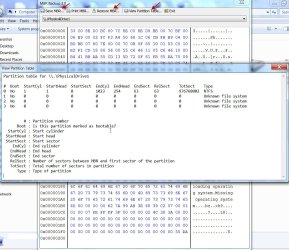
I did not have 3 lines of Hex Data. Im not really sure why, but there was only one line. I changed it to 7, rebooted, and it showed up as a single drive. Im not quite sure why it did this, but it worked nonetheless. 1c0 was the only line that was populated.

hex_zps4b13c1ae.png


I was able to read the drive with Minitool Power Data Recovery. I havnt started sorting through it, but after a 3 hours scan my files were intact, at least many of them. Its a lot of stuff to sort through, and Im not even sure what Im looking for because most of my photos and important stuff is backed up. Im mostly just worried about those few things that do not come to mind until after I reformat the drive and set it back up.
 

My Computer

Computer type
PC/Desktop
OS
Windows 7 64
Yep, in the current status I see only one partition string. ( It may be because you had already used many partitioning/recovery programs including rebuild MBR. I only wish you had backed up the first sector before trying any of it.)

Notwithstanding, you can be rest assured that all your data is still there.

While I do not recommend aborting any recovery process that you have already initiated - let it complete, I would still recommend you try the Partition Recovery Wizard in the latest version of MiniTools Partition Wizard.

Do a Quick scan and if it does not find the partitions, do a Full scan. If all the partitions are found, you will see it reflected in the disk map. If it does reflect your original disk partitions, then you can safely apply the changes and it will rewrite the partition table in the first sector and you should be able to see and access your disk as before ( since it has already become a basic disk)

If it succeeds, nothing like that for you can straight away access your disk, without needing to recover and copy elsewhere.

If it does not, and you are not happy with MiniTools Power Data Recovery which you are running now, you can look into using a Live Linux CD/pendrive - does not take much time to make one- and then PhotoRec.
 
Last edited:

My Computer

OS
Windows 7 Home Premium 32 bit
Yep, in the current status I see only one partition string. ( It may be because you had already used many partitioning/recovery programs including rebuild MBR. I only wish you had backed up the first sector before trying any of it.)

Notwithstanding, you can be rest assured that all your data is still there.

While I do not recommend aborting any recovery process that you have already initiated - let it complete, I would still recommend you try the Partition Recovery Wizard in the latest version of MiniTools Partition Wizard.

Do a Quick scan and if it does not find the partitions, do a Full scan. If all the partitions are found, you will see it reflected in the disk map. If it does reflect your original disk partitions, then you can safely apply the changes and it will rewrite the partition table in the first sector and you should be able to see and access your disk as before ( since it has already become a basic disk)

If it succeeds, nothing like that for you can straight away access your disk, without needing to recover and copy elsewhere.

If it does not, and you are not happy with MiniTools Power Data Recovery which you are running now, you can look into using a Live Linux CD/pendrive - does not take much time to make one- and then PhotoRec.

Yes, I rebuilt the MBR after I got it converted. Ive got Partition Recovery running on it right now like you suggested.
 

My Computer

Computer type
PC/Desktop
OS
Windows 7 64
Ive ran Minitools Power Data Recovery as well as EaseUS Data Recovery on the drive. I cant find anything that I dont have backed up so Im going to wipe it and get it usable again.

Big thanks to everyone for the advice. :thumbsup:
 

My Computer

Computer type
PC/Desktop
OS
Windows 7 64
Glad to know that you successfully confirmed that you have no data to be lost, by whatever means you adopted.

To safeguard against problems of this nature where the HDD turns turtle due a corrupted first sector, I would recommend that you back up the first sector of all your internal and external HDDs. It is easy then to restore the first sector and bring it back to the original condition.

You may use MBR Backup 2.0 MBR Backup 2.0 Released | TrojanHunter Blog for that.

MBRBackup2.jpg

Note: The backed up first sector pertains to that particular partition setup. If you change the partition setup you must take a fresh backup and discard the old one.
 
Last edited:

My Computer

OS
Windows 7 Home Premium 32 bit
Back
Top