windows 8 sound issue

haxo512

New member
Local time
3:17 PM
Messages
24
Hello,
After deciding to give windows 8 another shot and installing windows 8.1 i still stumbled upon the same issue i had before. sound - YouTube In first part of the clip you can hear sound in windows 7 and in second how it sounds in windows 8. While windows 7 sounds perfect, windows 8 has this kind of "in fishtank" sound, not sure how to describe it and also really heavy and loud bass.
Both windows are using the same realtek hd audio drivers. I guess there is something that needs to be either disabled or changed in windows 8, but im not sure where to look for it anymore.

Thanks!
 

My Computer

Computer type
PC/Desktop
OS
Windows 7 Ultimate x64
First, there is a separate forum for Windows 8 www.eightforums.com

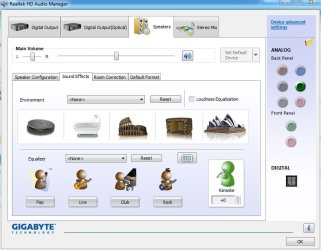
But, it sounds like there are Sound Effects (Enhancements) enabled in RealTek. Check the RealTek HD Audio Manager.
 

Attachments

  • Capture.JPG
    Capture.JPG
    62 KB · Views: 1

My Computer

Computer type
PC/Desktop
Computer Manufacturer/Model Number
My Own Build
OS
Windows 10 64 bit
CPU
Intel i7 6700K
Motherboard
ASUS ROG Maximus VIII Hero
Memory
16GB Corsair Dominator
Graphics Card(s)
Intel CPU Graphics
Sound Card
RealTek
Monitor(s) Displays
27" Dell S2719dgf
Screen Resolution
2560X1440
Hard Drives
1 TB Samsung 850 EVO SSD for Win 10 Pro
500GB Samsung 850 EVO SSD for Win 10 Insider
2 TB drive for backup
PSU
EVGA Supernova 750G2
Case
BeQuiet Silent Base 600
Cooling
Deepcool Captain 120EX
Keyboard
Microsoft Wireless 2000
Mouse
Microsoft wireless
Internet Speed
100 MB/sec (Cable)
Antivirus
Microsoft Defender and Malwarebytes
Browser
Edge/Firefox
Other Info
Cakewalk (Sonar) by BandLab and Studio One 4.1 Pro recording studio software. MOTU 896Mk3 Hybrid recording interface, Frontier Tranzport wireless control unit, Behringer X-Touch Control Surface.
Five USB connected optical drives for CD Audio production using Nero BurningROM
Have been trough all realtek control panel but no luck so far. Also didn't knew about eightforums so thanks for that. Will be posting there from now on.
 

My Computer

Computer type
PC/Desktop
OS
Windows 7 Ultimate x64
I would be looking at the game for a possible update for Windows 8/8.1 compatibility if the sounds are not correct. Some sound drivers or applications must be Windows 8.1 compatible for proper operation.
 

My Computer

Computer type
PC/Desktop
Computer Manufacturer/Model Number
My Own Build
OS
Windows 10 64 bit
CPU
Intel i7 6700K
Motherboard
ASUS ROG Maximus VIII Hero
Memory
16GB Corsair Dominator
Graphics Card(s)
Intel CPU Graphics
Sound Card
RealTek
Monitor(s) Displays
27" Dell S2719dgf
Screen Resolution
2560X1440
Hard Drives
1 TB Samsung 850 EVO SSD for Win 10 Pro
500GB Samsung 850 EVO SSD for Win 10 Insider
2 TB drive for backup
PSU
EVGA Supernova 750G2
Case
BeQuiet Silent Base 600
Cooling
Deepcool Captain 120EX
Keyboard
Microsoft Wireless 2000
Mouse
Microsoft wireless
Internet Speed
100 MB/sec (Cable)
Antivirus
Microsoft Defender and Malwarebytes
Browser
Edge/Firefox
Other Info
Cakewalk (Sonar) by BandLab and Studio One 4.1 Pro recording studio software. MOTU 896Mk3 Hybrid recording interface, Frontier Tranzport wireless control unit, Behringer X-Touch Control Surface.
Five USB connected optical drives for CD Audio production using Nero BurningROM
Game isn't the issue. Narrowed problem down to where i hear the sound fine but when it's recorded it sounds like in second clip. I can record music that is being played on pc with default sound port used and it will sound just like i hear it, but when i use my usb sound card as default, sound is recorded like in second clip. Default sound drivers that windows 8 installed for my sound card also worked ok recording wise, but i had no control panel, so i have to install official drivers for it. Tried both, regular install and installing in compatability mode for windows 7, still no luck. I think that sound isn't being recorded from usb sound card, rather from somewhere else or trough something else, but i don't know how to solve it.
 

My Computer

Computer type
PC/Desktop
OS
Windows 7 Ultimate x64
If you are using the USB sound card, first disable the PC sound card (either in the BIOS or in the Device Manager). If not, there can be conflicts and even the problem you are having.
 

My Computer

Computer type
PC/Desktop
Computer Manufacturer/Model Number
My Own Build
OS
Windows 10 64 bit
CPU
Intel i7 6700K
Motherboard
ASUS ROG Maximus VIII Hero
Memory
16GB Corsair Dominator
Graphics Card(s)
Intel CPU Graphics
Sound Card
RealTek
Monitor(s) Displays
27" Dell S2719dgf
Screen Resolution
2560X1440
Hard Drives
1 TB Samsung 850 EVO SSD for Win 10 Pro
500GB Samsung 850 EVO SSD for Win 10 Insider
2 TB drive for backup
PSU
EVGA Supernova 750G2
Case
BeQuiet Silent Base 600
Cooling
Deepcool Captain 120EX
Keyboard
Microsoft Wireless 2000
Mouse
Microsoft wireless
Internet Speed
100 MB/sec (Cable)
Antivirus
Microsoft Defender and Malwarebytes
Browser
Edge/Firefox
Other Info
Cakewalk (Sonar) by BandLab and Studio One 4.1 Pro recording studio software. MOTU 896Mk3 Hybrid recording interface, Frontier Tranzport wireless control unit, Behringer X-Touch Control Surface.
Five USB connected optical drives for CD Audio production using Nero BurningROM
Im using usb soundcard for headset and pc sound card for my mic as i used it on windows 7 as well. As mentioned with drivers installed by windows for usb sound card everything worked fine. But those drivers are really basic so i have to install real one. Creative Worldwide Support > Sound Blaster Tactic3D Alpha As said by them these drivers support windows 8.1.
 

My Computer

Computer type
PC/Desktop
OS
Windows 7 Ultimate x64
There can be conflicts with two sound cards and both active. If it worked as you describe on Windows 7 you were lucky.
 

My Computer

Computer type
PC/Desktop
Computer Manufacturer/Model Number
My Own Build
OS
Windows 10 64 bit
CPU
Intel i7 6700K
Motherboard
ASUS ROG Maximus VIII Hero
Memory
16GB Corsair Dominator
Graphics Card(s)
Intel CPU Graphics
Sound Card
RealTek
Monitor(s) Displays
27" Dell S2719dgf
Screen Resolution
2560X1440
Hard Drives
1 TB Samsung 850 EVO SSD for Win 10 Pro
500GB Samsung 850 EVO SSD for Win 10 Insider
2 TB drive for backup
PSU
EVGA Supernova 750G2
Case
BeQuiet Silent Base 600
Cooling
Deepcool Captain 120EX
Keyboard
Microsoft Wireless 2000
Mouse
Microsoft wireless
Internet Speed
100 MB/sec (Cable)
Antivirus
Microsoft Defender and Malwarebytes
Browser
Edge/Firefox
Other Info
Cakewalk (Sonar) by BandLab and Studio One 4.1 Pro recording studio software. MOTU 896Mk3 Hybrid recording interface, Frontier Tranzport wireless control unit, Behringer X-Touch Control Surface.
Five USB connected optical drives for CD Audio production using Nero BurningROM
On windows 8 they also work fine both at the same time, but only with drivers windows provide for usb sound card, but who are just too basic and features of sound card are disabled so that isn't a solution. I don't think it's hardware interference but something to do with driver compatibility with windows 8
 

My Computer

Computer type
PC/Desktop
OS
Windows 7 Ultimate x64
Driver compatibility can be an issue for some devices. There are some that will work with Windows 8 but will not work or work correctly with Windows 8.1.
 

My Computer

Computer type
PC/Desktop
Computer Manufacturer/Model Number
My Own Build
OS
Windows 10 64 bit
CPU
Intel i7 6700K
Motherboard
ASUS ROG Maximus VIII Hero
Memory
16GB Corsair Dominator
Graphics Card(s)
Intel CPU Graphics
Sound Card
RealTek
Monitor(s) Displays
27" Dell S2719dgf
Screen Resolution
2560X1440
Hard Drives
1 TB Samsung 850 EVO SSD for Win 10 Pro
500GB Samsung 850 EVO SSD for Win 10 Insider
2 TB drive for backup
PSU
EVGA Supernova 750G2
Case
BeQuiet Silent Base 600
Cooling
Deepcool Captain 120EX
Keyboard
Microsoft Wireless 2000
Mouse
Microsoft wireless
Internet Speed
100 MB/sec (Cable)
Antivirus
Microsoft Defender and Malwarebytes
Browser
Edge/Firefox
Other Info
Cakewalk (Sonar) by BandLab and Studio One 4.1 Pro recording studio software. MOTU 896Mk3 Hybrid recording interface, Frontier Tranzport wireless control unit, Behringer X-Touch Control Surface.
Five USB connected optical drives for CD Audio production using Nero BurningROM
Update:
Manged to get better results, but still not how it should be. Without any of these enabled http://i.imgur.com/qXjFvgE.png in control panel sound that i hear isn't that far from what i hear after in recordings. But when start to enable them sound in recordings goes bad, surround is the one that makes the biggest difference, it's the one that makes it sound like in a "fishtank" in recordings.
Hope that helps to get any further with solution.
I don't want to go back to win7 because of this again. :/
If any more information is needed, please ask.

P.S. I guess i will use this forum for this issue since i don't get any solutions from eightforums
 

My Computer

Computer type
PC/Desktop
OS
Windows 7 Ultimate x64

My Computer

Computer type
PC/Desktop
Computer Manufacturer/Model Number
My Own Build
OS
Windows 10 64 bit
CPU
Intel i7 6700K
Motherboard
ASUS ROG Maximus VIII Hero
Memory
16GB Corsair Dominator
Graphics Card(s)
Intel CPU Graphics
Sound Card
RealTek
Monitor(s) Displays
27" Dell S2719dgf
Screen Resolution
2560X1440
Hard Drives
1 TB Samsung 850 EVO SSD for Win 10 Pro
500GB Samsung 850 EVO SSD for Win 10 Insider
2 TB drive for backup
PSU
EVGA Supernova 750G2
Case
BeQuiet Silent Base 600
Cooling
Deepcool Captain 120EX
Keyboard
Microsoft Wireless 2000
Mouse
Microsoft wireless
Internet Speed
100 MB/sec (Cable)
Antivirus
Microsoft Defender and Malwarebytes
Browser
Edge/Firefox
Other Info
Cakewalk (Sonar) by BandLab and Studio One 4.1 Pro recording studio software. MOTU 896Mk3 Hybrid recording interface, Frontier Tranzport wireless control unit, Behringer X-Touch Control Surface.
Five USB connected optical drives for CD Audio production using Nero BurningROM
Thanks for the link, but im already informed about what these settings does.
Just trying to figure out where something is going wrong. Played back recordings sound so much different from original while in windows 7 with exact same settings original and recording was 1 to 1 the same
 

My Computer

Computer type
PC/Desktop
OS
Windows 7 Ultimate x64
Are you using the same bitrate as you did in Win 7? e.g. 16 bits/44.1Khz or 24 bits/44.1Khz (16 bits/44.1Khz is "CD Quality". And are you saving as wav files or some other format?
 

My Computer

Computer type
PC/Desktop
Computer Manufacturer/Model Number
My Own Build
OS
Windows 10 64 bit
CPU
Intel i7 6700K
Motherboard
ASUS ROG Maximus VIII Hero
Memory
16GB Corsair Dominator
Graphics Card(s)
Intel CPU Graphics
Sound Card
RealTek
Monitor(s) Displays
27" Dell S2719dgf
Screen Resolution
2560X1440
Hard Drives
1 TB Samsung 850 EVO SSD for Win 10 Pro
500GB Samsung 850 EVO SSD for Win 10 Insider
2 TB drive for backup
PSU
EVGA Supernova 750G2
Case
BeQuiet Silent Base 600
Cooling
Deepcool Captain 120EX
Keyboard
Microsoft Wireless 2000
Mouse
Microsoft wireless
Internet Speed
100 MB/sec (Cable)
Antivirus
Microsoft Defender and Malwarebytes
Browser
Edge/Firefox
Other Info
Cakewalk (Sonar) by BandLab and Studio One 4.1 Pro recording studio software. MOTU 896Mk3 Hybrid recording interface, Frontier Tranzport wireless control unit, Behringer X-Touch Control Surface.
Five USB connected optical drives for CD Audio production using Nero BurningROM
Yes using same bitrates, also tried both already. And im using OBS streaming software for tests. Tried other software and nothing changes. So it isn't recording software related, it's what is given to it by windows.
 

My Computer

Computer type
PC/Desktop
OS
Windows 7 Ultimate x64
Update:
Drivers are not the issue as tested, both realtek and creative audio devices provide 1:1 sound as long as no bass/surround sound or any these kind of enhancements are enabled. So by that, as long as no enhancements are enabled for sound i can get a good quality recordings from windows 8. Now i am looking how to solve this issue and being able to make recordings on windows 8 with sound enhancements
 

My Computer

Computer type
PC/Desktop
OS
Windows 7 Ultimate x64
Update:
Another thing that i didn't notice before was driver version showed by device manager http://i.imgur.com/e6iOkrx.png. latest drivers are installed which are 1.2.1.0 of 29.01.2014 while device manager shows 1.1.0.0 from 26.04.2013.
 

My Computer

Computer type
PC/Desktop
OS
Windows 7 Ultimate x64
Back
Top