Windows Backup cannot find the shadow copy

Green Lantern

New member
Local time
9:21 AM
Messages
21
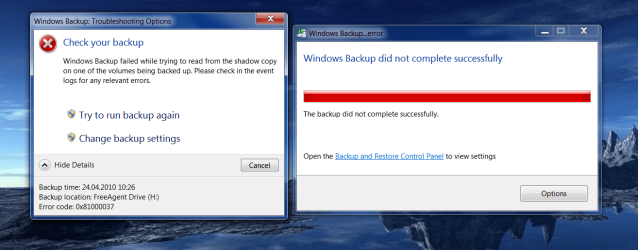
Greetings! I have been using Windows Backup for years with no problems. Today I got a new Buffalo external harddrive with USB V3. I started the backup, then remembered something and stopped the backup in the middle. I have no idea if this has anything to do with my problem. When I was ready to restart the backup I first went to the new drive and deleted the folder that had been created by Windows Backup. Then I restarted the backup. It backed up all the data without a hitch, but when it started to work on the System Image the whole thing stopped and I got the error message: Windows Backup cannot find the shadow copy of the source volume. I tried removing programs, I did a System Restore to a point before I did the first backup. Nothing helped. I attempted backups at least four times with the same result. I haven't a clue how to proceed. Any help would be greatly appreciated. Oh yes, I wanted to also mention that I've been doing backups to my old Seagate drive and have no idea if these are stored on catalog files somewhere that are conflicting. As a test I reconnect the Seagate and tried a backup but it failed with the same error.

I have an HP notebook with Windows 7 Home Premium 64 bit.

Any help with this would be greatly appreciated. I have no idea what else to do at this point.

GL
 

My Computer

OS
Windows 7 64 bit
Not sure about the main problem, but you can download a program like Macrium Reflect Free Edition to make a system image and boot disk to use for backups. It's actually more reliable for backups if you test the boot disk to make sure you'll be able to access your system images.
 

My Computer

Computer Manufacturer/Model Number
Apple Macbook Pro (April 2009)
OS
W7 Ult. x64 | OS X
CPU
Intel Mobile Core 2 Duo 2.93Ghz [T9800 Penryn]
Motherboard
NVIDIA nForce 730i Rev. B1 [Mac-F2268EC8 (U2E1)]
Memory
4096MB Samsung DDR3 Dual Channel [PC3-8500F 1066Mhz]
Graphics Card(s)
NVIDIA GeForce 9600M GT 512MB [G96M Rev. C1]
Sound Card
SB X-Fi Surround 5.1 USB | Onboard Realtek (Disabled)
Monitor(s) Displays
Acer x223wbd 22" | Apple Anti-Glare 17" (Disabled)
Screen Resolution
{Current} 1440x900 {Acer} 1680x1050 {Apple} 1920x1200
Hard Drives
{Internal}
Seagate Momentus 320GB 2.5" 7200RPM [ST9320421AS]

{Externals}
LaCie 320GB USB 2.0 HDD [301284UR]
LaCie 750GB USB 2.0 FW400 eSATA HDD [301314U]
LaCie 1TB USB 2.0 HDD [301304UR]
PSU
Magsafe
Case
Aluminum/Unibody (MBP52)
Cooling
2 x 6000 RPM Fans
Keyboard
Logitech G-15v2 [PN 920-000379]
Mouse
Logitech G-9 [PN 910-000338]
Internet Speed
12Mbps/2.5Mbps w/ 24Mbps Speed Boost [Comcast]
Other Info
Logitech X-540 Speakers [PN 970223-0122]
Sennheiser PC-151 Headset
Thanks for the suggestion. Right now my main interest is finding out what's wrong here to correct any misstep I may have made or system error that could impact the use of a tool such as you mention.

GL
 

My Computer

OS
Windows 7 64 bit
Best would be to delete all the stuff from the Win7 imaging and go with Macrium as suggested. I use it all the time and it is rock solid, easy, fast and transparent. Made a tutorial which you find here: http://www.sevenforums.com/tutorials/73828-imaging-free-macrium.html?ltr=I From all I have seen, the Win7 imaging is just too messy to bother with it. But there are some experts around that seem to know it inside out. Send a PM to Karlsnooks, he may be able to help.
 

My Computer

Computer Manufacturer/Model Number
HP, Dell, Gateway, Toshiba - 4 laptops and 2 desktops
OS
Vista, Windows7, Mint Mate, Zorin, Windows 8
CPU
from 1.6GHz Duo to i7
Monitor(s) Displays
2x HP w2207
Hard Drives
5x HDD, 7x SSD, 12x Externals
Keyboard
with trackball - no mices
Mouse
Trackball mice
Internet Speed
DSL 6000
Look in services (type services.msc in the start search box) and see if Microsoft Software Shadow Copy Provider is disabled.
 

My Computer

Computer type
PC/Desktop
Computer Manufacturer/Model Number
Bruce ... somewhere in his 40's
OS
Windows 7 Ultimate 32bit SP1
CPU
Intel(R) Core(TM)2 Quad CPU @ 2.40GHz, 2400 MHz
Motherboard
INTEL/D975XBX2
Memory
4 GB
Graphics Card(s)
ATI Radeon HD 2600 Pro
Monitor(s) Displays
Samsung SyncMaster 914v
Screen Resolution
1280 x 1024
Hard Drives
2/500GB each ... ST3500630AS ATA Device.
One is not connected
PSU
Rocketfish 700 W
Case
G.Skill Gigabyte Chassis
Keyboard
Standard PS/2 Keyboard
Mouse
Microsoft PS/2 Mouse
Internet Speed
DSL
Antivirus
Avira Internet Security
Browser
IE 11
Other Info
ATI HDMI Audio
Thank you Jacee. I had a look and that process was started. It was set to be started manually.

GL
 

My Computer

OS
Windows 7 64 bit
2010-04-24_104321.png

I am attaching (if I can figure out how) a screen shot of the error message and number.

GL
 

My Computer

OS
Windows 7 64 bit
There is a known issue that having anti virus real time protection on while backing up will give this error code. Also if a file is in quarantine or a user program "secures" it's operation files, permissions won't be granted, thus not backed up and giving this error code also.
 

My Computer

Computer Manufacturer/Model Number
self built
OS
Windows 7 Professional 64
CPU
i7 860
Motherboard
ASUS P7P55D-E Pro /onboard SATA 6Gb/s USB 3.0
Memory
8GB Corsair CMX4GX3M2A1600C9 DDR3 1600
Graphics Card(s)
(2) Nvidia EVGA GTX 470 SLI
Sound Card
Onboard VIA VT1828S 8 channels
Monitor(s) Displays
ASUS VW266H 25.5" HDMI Widescreen LCD and HP vs19 LCD 19"
Screen Resolution
1920 x 1200 : 1280 X 1024 dual
Hard Drives
Intel X25-M 80GB SSD (boot)
Seagate Barracuda 80GB
Western Digital Caviar Black 500GB
Asus DRW-24B1ST/BLK/B/AS
PSU
COOLER MASTER Silent Pro 1000W
Case
LIAN LI Lancool PC-K62
Cooling
Prolimatech Megahalems with Scythe "ULTRA KAZE" 120
Keyboard
Saitek
Mouse
Microsoft Optical comfort mouse 3000
Internet Speed
Comcast Ultra tier 30/5
Hello Sanvean, thanks for the information. I'll try again while disabling the antivirus software. This is a new pc. I've been using the Microsoft Backup Utility for years with other systems, all with AV SW installed. But new is new. Who knows. I'll try. As for the other point you mention, I considered that myself and turned off Synch Toy and another online backup program that I felt might "lock files" in some way. It had no effect. I couldn't think of any other programs in that category. Certainly none that I haven't been using for years in this context with no difficulties.

Thanks again!

GL
 

My Computer

OS
Windows 7 64 bit
Your welcome, another cause can be compressed files.
A pain isn't it? :D

Win7 is about permissions now, which can be good or ummm well you get the picture..!

PS: Just remembered in the backup options, manual settings uncheck App data, that can be one sore point (Programs not giving file/folder permissions). This is off the top of my head, so I apologise if it isn't more precise.

Also check your permissions on your new backup drive, you might not have control/permission (there's that word again lol).

I have to do some stuff, but I'll be back in a bit, to check on your progress.

You can also clean out bad backups with this:
Type 'vssadmin delete shadows /all' from an elevated command prompt.
 
Last edited:

My Computer

Computer Manufacturer/Model Number
self built
OS
Windows 7 Professional 64
CPU
i7 860
Motherboard
ASUS P7P55D-E Pro /onboard SATA 6Gb/s USB 3.0
Memory
8GB Corsair CMX4GX3M2A1600C9 DDR3 1600
Graphics Card(s)
(2) Nvidia EVGA GTX 470 SLI
Sound Card
Onboard VIA VT1828S 8 channels
Monitor(s) Displays
ASUS VW266H 25.5" HDMI Widescreen LCD and HP vs19 LCD 19"
Screen Resolution
1920 x 1200 : 1280 X 1024 dual
Hard Drives
Intel X25-M 80GB SSD (boot)
Seagate Barracuda 80GB
Western Digital Caviar Black 500GB
Asus DRW-24B1ST/BLK/B/AS
PSU
COOLER MASTER Silent Pro 1000W
Case
LIAN LI Lancool PC-K62
Cooling
Prolimatech Megahalems with Scythe "ULTRA KAZE" 120
Keyboard
Saitek
Mouse
Microsoft Optical comfort mouse 3000
Internet Speed
Comcast Ultra tier 30/5
Your welcome, another cause can be compressed files.
A pain isn't it? :D

Win7 is about permissions now, which can be good or ummm well you get the picture..!

PS: Just remembered in the backup options, manual settings uncheck App data, that can be one sore point (Programs not giving file/folder permissions). This is off the top of my head, so I apologise if it isn't more precise.

Also check your permissions on your new backup drive, you might not have control/permission (there's that word again lol).

I have to do some stuff, but I'll be back in a bit, to check on your progress.

You can also clean out bad backups with this:
Type 'vssadmin delete shadows /all' from an elevated command prompt.


Thanks Savean, I really appreciate the tips. I told you I'd try turning off the AV and see what happens. Well, it worked! Ran the whole backup including system image creation without a hitch. I hope it's not a coincidence, just when I'm getting excited here. :D

One thing you mentioned interests me a great deal. I have often wondered if these "system images" are stored anywhere and if it wouldn't be smart to clear them out once in a while, especially when you start a whole new backup set or move to a new HD. Is there anywhere I could look to get more of an education on that point? Also you mention running from an "elevated command prompt". I confess I have no clue what that is unless you mean I should do it on a mountaintop.:sarc:

Thanks again.

GL
 

My Computer

OS
Windows 7 64 bit
Cool glad it worked, AV is the general cause, but sometimes app permissions come into play.

As you know, backup is targeted/selected user files, while Imaging is a "snapshot" of a hard disk (everything).
The system doesn't by default save images, unless you did it manually or schedule it. There is a confusion, because the term "back up" is generally applied to a group of processes that copy files for secure storage.

Thru that backup/imaging wizard, you can manually delete older copies. If a scheduled task is applied, windows will continue to fill the drive, then overwrite the oldest copy when it becomes full, ect..,

An elevated command prompt is a prompt with admin permissions. Right click the prompt and select "run as administrator" this will elevate the process thus giving control/ permission at a higher level. Lol and yes run it from a mountain. :geek:

Glad I could help and welcome to sevenforums!
 

My Computer

Computer Manufacturer/Model Number
self built
OS
Windows 7 Professional 64
CPU
i7 860
Motherboard
ASUS P7P55D-E Pro /onboard SATA 6Gb/s USB 3.0
Memory
8GB Corsair CMX4GX3M2A1600C9 DDR3 1600
Graphics Card(s)
(2) Nvidia EVGA GTX 470 SLI
Sound Card
Onboard VIA VT1828S 8 channels
Monitor(s) Displays
ASUS VW266H 25.5" HDMI Widescreen LCD and HP vs19 LCD 19"
Screen Resolution
1920 x 1200 : 1280 X 1024 dual
Hard Drives
Intel X25-M 80GB SSD (boot)
Seagate Barracuda 80GB
Western Digital Caviar Black 500GB
Asus DRW-24B1ST/BLK/B/AS
PSU
COOLER MASTER Silent Pro 1000W
Case
LIAN LI Lancool PC-K62
Cooling
Prolimatech Megahalems with Scythe "ULTRA KAZE" 120
Keyboard
Saitek
Mouse
Microsoft Optical comfort mouse 3000
Internet Speed
Comcast Ultra tier 30/5
Thank you again Sanvean. I'm of course pleased that I have the security of a back up again but it is a bit of a pain to not be able to schedule the task. I can't imagine that everyone running Microsoft Secuity Essentials has this conflict with the Windows Backup Utility. Do you have any idea how I could rig things so it would just roll off like in the good ole days?

GL
 

My Computer

OS
Windows 7 64 bit
Green Lantern,
Sorry to rain on your parade; I'm currently looking for/evaluating other solutions to the backup problem, including scheduling of both full & incremental or differential backups. I've also run into the "37" error caused by AV programs quarantining suspect files, so don't feel alone there. MS has been rather unresponsive in this regard, their attitude seemingly being, "It works fine."
You might look at a message I posted to this forum & to the MS forum in Jan. without getting a reply; other messages in this thread also might be of help:

http://www.sevenforums.com/performa...ws-backup-vs-3rd-party-backup-solution-4.html

Zig:geek:
 
Last edited:

My Computer

Computer Manufacturer/Model Number
Self-built
OS
Win XP,Vista (32-bit), Win 7 (64-bit)
Interesting post Zig. Thanks. I'll have to take a look at Macronis.

GL
 

My Computer

OS
Windows 7 64 bit
Green Lantern,
I just found this review site:

Best Free Drive Imaging Program

Everyone likes Macrium, but I'd prefer to have incremental and/or differential backups, as well as full
(or image) backups.

Zig
 

My Computer

Computer Manufacturer/Model Number
Self-built
OS
Win XP,Vista (32-bit), Win 7 (64-bit)
Absolutely! Incremental and Full are what I use as well as weekly image backups.
 

My Computer

OS
Windows 7 64 bit
Thanks Zig for your input.
Yes Windows 7 backup isn't perfect, just like it's default defragger, movie maker, etc.., all basic tools.
Third party apps are more developed and specific/ focused.
 

My Computer

Computer Manufacturer/Model Number
self built
OS
Windows 7 Professional 64
CPU
i7 860
Motherboard
ASUS P7P55D-E Pro /onboard SATA 6Gb/s USB 3.0
Memory
8GB Corsair CMX4GX3M2A1600C9 DDR3 1600
Graphics Card(s)
(2) Nvidia EVGA GTX 470 SLI
Sound Card
Onboard VIA VT1828S 8 channels
Monitor(s) Displays
ASUS VW266H 25.5" HDMI Widescreen LCD and HP vs19 LCD 19"
Screen Resolution
1920 x 1200 : 1280 X 1024 dual
Hard Drives
Intel X25-M 80GB SSD (boot)
Seagate Barracuda 80GB
Western Digital Caviar Black 500GB
Asus DRW-24B1ST/BLK/B/AS
PSU
COOLER MASTER Silent Pro 1000W
Case
LIAN LI Lancool PC-K62
Cooling
Prolimatech Megahalems with Scythe "ULTRA KAZE" 120
Keyboard
Saitek
Mouse
Microsoft Optical comfort mouse 3000
Internet Speed
Comcast Ultra tier 30/5
solf problem shadow copy

Hello everyone,

First sorry for my poor english.
The solution for the image problem is very simple.

Use acronis to resize the 100MB partition to 200 MB, after that your system is telling you that it can not boot, use your win 7 DVD to repair this problem, just follow the on screen commands and voila everithing is OK.
Your pc will boot again and your back up is working to.
 

My Computer

OS
win 7 64 bit pro
Back
Top