
I'm having a problem with a system image (C: drive and System Reserved drive, that I made with a scheduled Windows Backup) and its size. I have a D: drive where I store it.
First of all, I noticed this in D: drive properties:

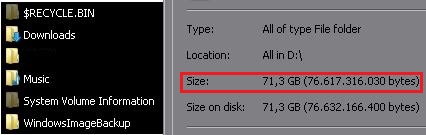
Used space of the whole drive is actually larger than the size of all the individually selected D: drive files, including hidden files.
Then I noticed this:
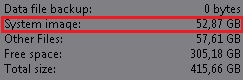

System image size reported by Windows Backup info is clearly larger than the size reported in the backup folder properties.
There's like 35 GB stored somewhere in the disk and I can't find them, how come this is possible? Is there something that I'm missing?
Thanks and sorry for my english.
First of all, I noticed this in D: drive properties:
Used space of the whole drive is actually larger than the size of all the individually selected D: drive files, including hidden files.
Then I noticed this:
System image size reported by Windows Backup info is clearly larger than the size reported in the backup folder properties.
There's like 35 GB stored somewhere in the disk and I can't find them, how come this is possible? Is there something that I'm missing?
Thanks and sorry for my english.
My Computer
At a glance
Windows 7/XP
- OS
- Windows 7/XP


