Windows Backup unable to set up

lbulmer

New member
Local time
7:16 PM
Messages
56
Hi. I've got a brand-new computer, Dell 580, running Windows 7 Professional. Windows Backup won't even set up. I'm getting an error backup application could not start due to an internal error, server execution failed, 0x80080005. I've tried to take ownership of the C:system volume information folder. That didn't help. I did a clean boot. The only service running (other than MS services) were McShield and McAfee Validation Trust. I can't seem to turn them off, and can't turn McAffee off. Even with the clean boot, I'm still getting the error.

Please help! I would think-- or hope -- with a new computer, I wouldn't be having problems!
 

My Computer My Computer

At a glance

windows 7 Professional 64 bit
Computer Manufacturer/Model Number
Dell 580
OS
windows 7 Professional 64 bit

My Computer My Computer

At a glance

Windows 7x64 Home Premium SP1Intel i7 2600kG.Skill Ripjaws (DDR3-1600) 2x4GBNvidia GeForce GTS 450; Intel HD Graphics 300...
Computer type
PC/Desktop
Computer Manufacturer/Model Number
Own build
OS
Windows 7x64 Home Premium SP1
CPU
Intel i7 2600k
Motherboard
ASUS P8Z68 Deluxe
Memory
G.Skill Ripjaws (DDR3-1600) 2x4GB
Graphics Card(s)
Nvidia GeForce GTS 450; Intel HD Graphics 3000(GT2+)
Monitor(s) Displays
Dell Ultrasharp IPS panel U2311H, Samsung SyncMaster P2350
Screen Resolution
1920x1080
Hard Drives
Samsung 850 Pro SSD 256GB, Samsung SSD 840 120GB, Seagates 1TB Barracuda ST31000528AS x2
PSU
Seasonic M12II 520W
Case
Lian Li Lancool PC-K60
Cooling
Case: 1x120mm, 3x140mm CPU: Hyper 212+
Keyboard
Logitech MK520 (wireless)
Mouse
Logitech MK520
Internet Speed
6-7 Mbps
Antivirus
Norton Security Premium, Malwarebytes on 2 (MSE on 3rd PC)
Browser
FireFox
Other Info
Audio: Logitech Z523 2.1
Welcome to Seven Forums lbulmer. Make sure these two services are set to automatic and are started:

Volume Shadow Copy
Microsoft Software Shadow Copy Provider

Start> In search box type services.msc and press enter> Double click on the service name and set startup type to automatic (if not already)> Right click each and click on Start (if not already)> Reboot and try again.

A Guy
 

My Computer My Computer

At a glance

Windows 10 Home x64INTEL Core i5-750 Quad-Core 3.37GHzHyperX Fury Black Series 8GB (2 x 4GB) 1866MhzEVGA GeForce GTX 750 Superclocked 1GB 128-Bit...
Computer type
PC/Desktop
OS
Windows 10 Home x64
CPU
INTEL Core i5-750 Quad-Core 3.37GHz
Motherboard
ASUS P7P55D
Memory
HyperX Fury Black Series 8GB (2 x 4GB) 1866Mhz
Graphics Card(s)
EVGA GeForce GTX 750 Superclocked 1GB 128-Bit GDDR5
Monitor(s) Displays
LG 32MA68HY 32" IPS
Screen Resolution
1920 x 1080
Hard Drives
Samsung 840 Evo 120GB, SEAGATE 500GB Barracuda® 7200.12, SATA 3 Gb/s, 7200 RPM, 16MB cache
PSU
ANTEC TruePower New TP-550, 80 PLUS, 550W
Case
ANTEC Three Hundred Illusion
Cooling
COOLER MASTER Hyper 212 Plus, 4 x 120mm 1 x 140mm Noctua's
Internet Speed
85 + Mbps
Antivirus
Avast
Browser
Vivaldi
Welcome to Seven Forums lbulmer. Make sure these two services are set to automatic and are started:

Volume Shadow Copy
Microsoft Software Shadow Copy Provider

Start> In search box type services.msc and press enter> Double click on the service name and set startup type to automatic (if not already)> Right click each and click on Start (if not already)> Reboot and try again.

A Guy
Interesting both of mine have been set to Manual and I use Windows imaging and file/folder backup all the time. (System protection on for OS partition).

I don't know the full consequences of these settings so I'm not saying mine are correct. This reference
http://technet.microsoft.com/en-us/library/cc734254%28v=ws.10%29.aspx
suggests the startup type should be manual. A gray area for me.
 
Last edited:

My Computer My Computer

At a glance

Windows 7x64 Home Premium SP1Intel i7 2600kG.Skill Ripjaws (DDR3-1600) 2x4GBNvidia GeForce GTS 450; Intel HD Graphics 300...
Computer type
PC/Desktop
Computer Manufacturer/Model Number
Own build
OS
Windows 7x64 Home Premium SP1
CPU
Intel i7 2600k
Motherboard
ASUS P8Z68 Deluxe
Memory
G.Skill Ripjaws (DDR3-1600) 2x4GB
Graphics Card(s)
Nvidia GeForce GTS 450; Intel HD Graphics 3000(GT2+)
Monitor(s) Displays
Dell Ultrasharp IPS panel U2311H, Samsung SyncMaster P2350
Screen Resolution
1920x1080
Hard Drives
Samsung 850 Pro SSD 256GB, Samsung SSD 840 120GB, Seagates 1TB Barracuda ST31000528AS x2
PSU
Seasonic M12II 520W
Case
Lian Li Lancool PC-K60
Cooling
Case: 1x120mm, 3x140mm CPU: Hyper 212+
Keyboard
Logitech MK520 (wireless)
Mouse
Logitech MK520
Internet Speed
6-7 Mbps
Antivirus
Norton Security Premium, Malwarebytes on 2 (MSE on 3rd PC)
Browser
FireFox
Other Info
Audio: Logitech Z523 2.1
MJF, I don't know what you mean by "disk management." I haven't even been able to get to a screen to change settings because the error occurs while I'm trying to get into backup to set it up.

A Guy: I changed the settings to automatic, rebooted, and still no go.
 

My Computer My Computer

At a glance

windows 7 Professional 64 bit
Computer Manufacturer/Model Number
Dell 580
OS
windows 7 Professional 64 bit
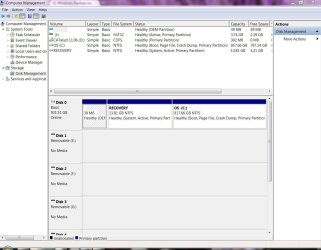
To help out what mjf said, Click on the start button and in the search bar type in compmgmt.msc a window will open and under storage click Disk Management. Take a screen shot of that and post it.


Who is taking ownership? Make sure it is SYSTEM that has Ownership of the "System Volume Information" and try to delete the backup catalog.

Hope this Helps
Ryan
 

My Computer My Computer

At a glance

Windows Seven x642.2 GHz Dual Core4GBATI Mobility RADEON HD 3470
Computer Manufacturer/Model Number
HP Pavilion dv5 Notebook PC
OS
Windows Seven x64
CPU
2.2 GHz Dual Core
Motherboard
Quanta 3600
Memory
4GB
Graphics Card(s)
ATI Mobility RADEON HD 3470
Sound Card
ATI
Monitor(s) Displays
Laptop
Hard Drives
ATA Hitachi HTS543215 (5400RPM)
Case
Laptop
Cooling
Fan
Internet Speed
Basic DSL 1.5 up and Down
I've attached the disk management screenshot.

When I go to System Volume Information, properties, security, owner, it says: Unable to display current owner. The options to change owner to are administrators and my name.
 

Attachments

  • disk management.JPG
    disk management.JPG
    111.9 KB · Views: 41

My Computer My Computer

At a glance

windows 7 Professional 64 bit
Computer Manufacturer/Model Number
Dell 580
OS
windows 7 Professional 64 bit
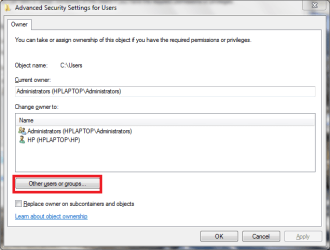
See if this option is available under owner if it is click: "Other Users or Groups" in the Advance Security Settings Window. Make Sure this is only the System Volume Information
Owner.PNG

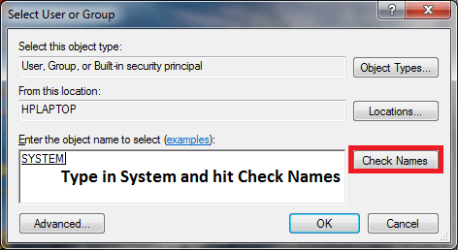
Then another Window comes up Type in "System" (without quotes) in the Object Name Text Box. Hit Check Names. If it is a correct object it will Underline and capitalize the name. Hit OK twice.
OwnerN.PNG

Also make sure the backup catalog is deleted if there is one.

Hope this Helps
Ryan
 

My Computer My Computer

At a glance

Windows Seven x642.2 GHz Dual Core4GBATI Mobility RADEON HD 3470
Computer Manufacturer/Model Number
HP Pavilion dv5 Notebook PC
OS
Windows Seven x64
CPU
2.2 GHz Dual Core
Motherboard
Quanta 3600
Memory
4GB
Graphics Card(s)
ATI Mobility RADEON HD 3470
Sound Card
ATI
Monitor(s) Displays
Laptop
Hard Drives
ATA Hitachi HTS543215 (5400RPM)
Case
Laptop
Cooling
Fan
Internet Speed
Basic DSL 1.5 up and Down
Okay. I did all that. SYSTEM comes up as available. I choose it, click okay till I'm out of the screen. When I go back into the properties, though, it's back to saying unable to display current owner and SYSTEM is gone again. I also tried clicking the box to change the owner on all subfolders, but it says access is denied.
 

My Computer My Computer

At a glance

windows 7 Professional 64 bit
Computer Manufacturer/Model Number
Dell 580
OS
windows 7 Professional 64 bit
Does your McAfee version have QuickClean?

Looking at some other forums it does seem that McAfee might be causing the issue..(I am not sure if there is a fix)

https://community.mcafee.com/message/1110
complete system backup does not work - Vista Forums

You could try disabling System Restore, Restart the computer and try the backup.
You could also try disabling McAfee and try the Windows Backup..
Also try going into the built-in Administrator Account (http://www.sevenforums.com/tutorials/507-built-administrator-account-enable-disable.html ) and try same steps what I said earlier.

McAfee might have deleted some System Restore Files or if you did a QuickClean a McAfee feature, thus causing Windows to produce that error. Try the above suggestions, I'll see if I can find additional information.
 

My Computer My Computer

At a glance

Windows Seven x642.2 GHz Dual Core4GBATI Mobility RADEON HD 3470
Computer Manufacturer/Model Number
HP Pavilion dv5 Notebook PC
OS
Windows Seven x64
CPU
2.2 GHz Dual Core
Motherboard
Quanta 3600
Memory
4GB
Graphics Card(s)
ATI Mobility RADEON HD 3470
Sound Card
ATI
Monitor(s) Displays
Laptop
Hard Drives
ATA Hitachi HTS543215 (5400RPM)
Case
Laptop
Cooling
Fan
Internet Speed
Basic DSL 1.5 up and Down
MJF, I don't know what you mean by "disk management." I haven't even been able to get to a screen to change settings because the error occurs while I'm trying to get into backup to set it up.

A Guy: I changed the settings to automatic, rebooted, and still no go.
What do you mean -
1) You cannot get into the Backup & Restore screen. (type "backup and restore" in start box)
2) You cannot enter "change settings"

I use McAfee Total Protection 2010 for 12 months without a problem but I never ran any "clean" type utilities from it. Anything's possible but I find it hard to see why McAfee would interfere with 1) or 2) above.

You appear to have tried the other suggestions that is use "services.msc" to turn McAfee off. There are a couple of the McAfee components you can't turn off. - Correct?
You have tried a Clean boot as per these type of instructions
Unable to complete backup - Error 0x80080005 - Microsoft Answers
Correct?
 

My Computer My Computer

At a glance

Windows 7x64 Home Premium SP1Intel i7 2600kG.Skill Ripjaws (DDR3-1600) 2x4GBNvidia GeForce GTS 450; Intel HD Graphics 300...
Computer type
PC/Desktop
Computer Manufacturer/Model Number
Own build
OS
Windows 7x64 Home Premium SP1
CPU
Intel i7 2600k
Motherboard
ASUS P8Z68 Deluxe
Memory
G.Skill Ripjaws (DDR3-1600) 2x4GB
Graphics Card(s)
Nvidia GeForce GTS 450; Intel HD Graphics 3000(GT2+)
Monitor(s) Displays
Dell Ultrasharp IPS panel U2311H, Samsung SyncMaster P2350
Screen Resolution
1920x1080
Hard Drives
Samsung 850 Pro SSD 256GB, Samsung SSD 840 120GB, Seagates 1TB Barracuda ST31000528AS x2
PSU
Seasonic M12II 520W
Case
Lian Li Lancool PC-K60
Cooling
Case: 1x120mm, 3x140mm CPU: Hyper 212+
Keyboard
Logitech MK520 (wireless)
Mouse
Logitech MK520
Internet Speed
6-7 Mbps
Antivirus
Norton Security Premium, Malwarebytes on 2 (MSE on 3rd PC)
Browser
FireFox
Other Info
Audio: Logitech Z523 2.1
I mean that I get the error when I initially try to set up the backup. It doesn't allow me to go anywhere.

My McAfee does have that Quick Clean, but I never used it.

Yes, I did try the clean boot. I unchecked all the services to start with, but the McAfee services were still running and wouldn't turn off.
 

My Computer My Computer

At a glance

windows 7 Professional 64 bit
Computer Manufacturer/Model Number
Dell 580
OS
windows 7 Professional 64 bit
you need to be more specific. You get into Change settings then exactly what do you do that brings up the error.
Also what are you trying to backup to (ext HDD, DVD).

I would suggest you consider an alternative imaging program at this stage.
I use it as an additional safeguard and many people prefer it outright (free Macrium Reflect). A good product.
http://www.macrium.com/reflectfree.asp
 

My Computer My Computer

At a glance

Windows 7x64 Home Premium SP1Intel i7 2600kG.Skill Ripjaws (DDR3-1600) 2x4GBNvidia GeForce GTS 450; Intel HD Graphics 300...
Computer type
PC/Desktop
Computer Manufacturer/Model Number
Own build
OS
Windows 7x64 Home Premium SP1
CPU
Intel i7 2600k
Motherboard
ASUS P8Z68 Deluxe
Memory
G.Skill Ripjaws (DDR3-1600) 2x4GB
Graphics Card(s)
Nvidia GeForce GTS 450; Intel HD Graphics 3000(GT2+)
Monitor(s) Displays
Dell Ultrasharp IPS panel U2311H, Samsung SyncMaster P2350
Screen Resolution
1920x1080
Hard Drives
Samsung 850 Pro SSD 256GB, Samsung SSD 840 120GB, Seagates 1TB Barracuda ST31000528AS x2
PSU
Seasonic M12II 520W
Case
Lian Li Lancool PC-K60
Cooling
Case: 1x120mm, 3x140mm CPU: Hyper 212+
Keyboard
Logitech MK520 (wireless)
Mouse
Logitech MK520
Internet Speed
6-7 Mbps
Antivirus
Norton Security Premium, Malwarebytes on 2 (MSE on 3rd PC)
Browser
FireFox
Other Info
Audio: Logitech Z523 2.1
Specific? I click on "Set Up Backup" and get the error code. That's it! I don't even get as far as "Change Settings."
 

My Computer My Computer

At a glance

windows 7 Professional 64 bit
Computer Manufacturer/Model Number
Dell 580
OS
windows 7 Professional 64 bit
Welcome to Seven Forums lbulmer. Make sure these two services are set to automatic and are started:

Volume Shadow Copy
Microsoft Software Shadow Copy Provider

Start> In search box type services.msc and press enter> Double click on the service name and set startup type to automatic (if not already)> Right click each and click on Start (if not already)> Reboot and try again.

A Guy
Interesting both of mine have been set to Manual and I use Windows imaging and file/folder backup all the time. (System protection on for OS partition).

I don't know the full consequences of these settings so I'm not saying mine are correct. This reference
Event ID 13
suggests the startup type should be manual. A gray area for me.

Yes, manual is the original setting. The change was to see if the problem was changed or fixed. A Guy
 

My Computer My Computer

At a glance

Windows 10 Home x64INTEL Core i5-750 Quad-Core 3.37GHzHyperX Fury Black Series 8GB (2 x 4GB) 1866MhzEVGA GeForce GTX 750 Superclocked 1GB 128-Bit...
Computer type
PC/Desktop
OS
Windows 10 Home x64
CPU
INTEL Core i5-750 Quad-Core 3.37GHz
Motherboard
ASUS P7P55D
Memory
HyperX Fury Black Series 8GB (2 x 4GB) 1866Mhz
Graphics Card(s)
EVGA GeForce GTX 750 Superclocked 1GB 128-Bit GDDR5
Monitor(s) Displays
LG 32MA68HY 32" IPS
Screen Resolution
1920 x 1080
Hard Drives
Samsung 840 Evo 120GB, SEAGATE 500GB Barracuda® 7200.12, SATA 3 Gb/s, 7200 RPM, 16MB cache
PSU
ANTEC TruePower New TP-550, 80 PLUS, 550W
Case
ANTEC Three Hundred Illusion
Cooling
COOLER MASTER Hyper 212 Plus, 4 x 120mm 1 x 140mm Noctua's
Internet Speed
85 + Mbps
Antivirus
Avast
Browser
Vivaldi
Ibulmer,

If you tired all the steps that I posted earlier

You could try disabling System Restore, Restart the computer and try the backup.
You could also try disabling McAfee and try the Windows Backup..
Also try going into the built-in Administrator Account (http://www.sevenforums.com/tutorials...e-disable.html ) and try same steps what I said earlier.

Run this How to use the System File Checker tool to troubleshoot missing or corrupted system files on Windows Vista or on Windows 7

Post back any details... (I'll see if I can find more information)
 

My Computer My Computer

At a glance

Windows Seven x642.2 GHz Dual Core4GBATI Mobility RADEON HD 3470
Computer Manufacturer/Model Number
HP Pavilion dv5 Notebook PC
OS
Windows Seven x64
CPU
2.2 GHz Dual Core
Motherboard
Quanta 3600
Memory
4GB
Graphics Card(s)
ATI Mobility RADEON HD 3470
Sound Card
ATI
Monitor(s) Displays
Laptop
Hard Drives
ATA Hitachi HTS543215 (5400RPM)
Case
Laptop
Cooling
Fan
Internet Speed
Basic DSL 1.5 up and Down
Okay. I've done all those things and it's still giving me the same error. I think I'll just turn the alert off and forget about it. Thanks so much for all your help!!!!!
 

My Computer My Computer

At a glance

windows 7 Professional 64 bit
Computer Manufacturer/Model Number
Dell 580
OS
windows 7 Professional 64 bit
Just another thought. Could Dell DataSafe be conflicting with this?
 

My Computer My Computer

At a glance

windows 7 Professional 64 bit
Computer Manufacturer/Model Number
Dell 580
OS
windows 7 Professional 64 bit
I fixed it!!! In the event viewer, I found that the Block Level Backup Engine service wouldn't/couldn't start. I went back to the System Volume Infomation folder and change it, as well as each of the the subfolders and files, to SYSTEM owner and full permissions. After I did that, the BLBE service started and I was able to run the backup. YAY!!!
 

My Computer My Computer

At a glance

windows 7 Professional 64 bit
Computer Manufacturer/Model Number
Dell 580
OS
windows 7 Professional 64 bit
I am glad you got it working..

And thanks for the update..

Ryan :)
 
Last edited:

My Computer My Computer

At a glance

Windows Seven x642.2 GHz Dual Core4GBATI Mobility RADEON HD 3470
Computer Manufacturer/Model Number
HP Pavilion dv5 Notebook PC
OS
Windows Seven x64
CPU
2.2 GHz Dual Core
Motherboard
Quanta 3600
Memory
4GB
Graphics Card(s)
ATI Mobility RADEON HD 3470
Sound Card
ATI
Monitor(s) Displays
Laptop
Hard Drives
ATA Hitachi HTS543215 (5400RPM)
Case
Laptop
Cooling
Fan
Internet Speed
Basic DSL 1.5 up and Down
Back
Top