Windows Backup has not been set up.

scoostraw

New member
Local time
8:39 AM
Messages
32
I have my backup scheduled every week - and it has been backing up this way for months now.

Sometimes I will open the control panel so that I can click on the "progress" button to see where the backup is at. Tonight when I did this, I just see "Windows Backup has not been set up."

And when I click on "Set up backup", the wheel just spins and nothing happens.

What could be causing this? And if there is a topic on this already I apologize. I looked but did not find one.

Windows 7 Starter - Toshiba Netbook NB505
 

My Computer My Computer

Computer Manufacturer/Model Number
Toshiba NB505 Netbook
OS
Windows 7 32bit

My Computer My Computer

Computer type
PC/Desktop
Computer Manufacturer/Model Number
Self built custom
OS
64-bit Windows 11 Pro for Workstations
CPU
Intel i7-8700K OC'd to 5 GHz
Motherboard
ASUS ROG Maximus XI Formula Z390
Memory
64 GB (4x16GB) G.SKILL TridentZ RGB DDR4 3600 MHz
Graphics Card(s)
ASUS ROG-STRIX-GTX1080TI-O11G-GAMING
Sound Card
Integrated
Monitor(s) Displays
2 x Samsung Odyssey G7 27"
Screen Resolution
2560x1440
Hard Drives
1TB Samsung 990 PRO M.2,
4TB Samsung 990 PRO PRO M.2,
TerraMaster F8 SSD Plus NAS
PSU
Seasonic Prime Titanium 850W
Case
Thermaltake Core P3
Cooling
Corsair Hydro H115i
Keyboard
Logitech wireless K800
Mouse
Logitech MX Master 4
Internet Speed
2 Gb/s Download and 100 Mb/s Upload
Antivirus
Malwarebyte Anti-Malware Premium
Browser
Google Chrome
Other Info
Logitech Z625 speaker system,
Logitech BRIO 4K Pro webcam,
HP Color LaserJet Pro MFP M477fdn,
APC SMART-UPS RT 1000 XL - SURT1000XLI,
Galaxy S23 Plus phone
If you cannot fix it. you can write a script using WBadmin command to set up a backup. then use Task Scheduler to run the script.
 

My Computer My Computer

Computer type
PC/Desktop
OS
Windows 10 32bit
Hi Brink. Thanks for the reply.

I downloaded the reg file and merged it as was shown. It did not change anything.
 

My Computer My Computer

Computer Manufacturer/Model Number
Toshiba NB505 Netbook
OS
Windows 7 32bit
If you cannot fix it. you can write a script using WBadmin command to set up a backup. then use Task Scheduler to run the script.
Thanks LordSnow. I am not computer literate enough to be familiar with writing scripts.

Besides not being able to do my backup tonight, I am really troubled that this happened. What would come to mind as a possible cause of the scheduled backup being gone - and then not being able to backup manually? I'm worried that I have some malware or virus.
 

My Computer My Computer

Computer Manufacturer/Model Number
Toshiba NB505 Netbook
OS
Windows 7 32bit
If you cannot fix it. you can write a script using WBadmin command to set up a backup. then use Task Scheduler to run the script.
Thanks LordSnow. I am not computer literate enough to be familiar with writing scripts.

Besides not being able to do my backup tonight, I am really troubled that this happened. What would come to mind as a possible cause of the scheduled backup being gone - and then not being able to backup manually? I'm worried that I have some malware or virus.

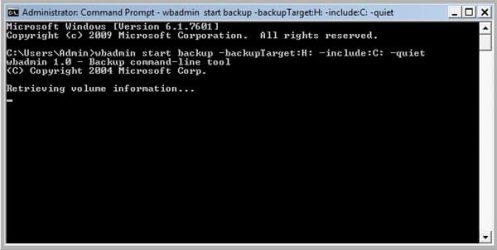
run CMD as administrator, and enter one backup command and press Enter to see if it works.
wbadmin start backup –backupTarget:Z: -include:C: -quiet
(Z means the partition to store the backup)
 

My Computer My Computer

Computer type
PC/Desktop
OS
Windows 10 32bit
Retrieving volume information...

I hear the target hard drive spin up every 15-20 seconds or so. But nothing else is happening.
 

Attachments

  • backup.jpg
    backup.jpg
    43.1 KB · Views: 16

My Computer My Computer

Computer Manufacturer/Model Number
Toshiba NB505 Netbook
OS
Windows 7 32bit
sorry, I don't have a solution for this. I can only guess it should be a vss problem
 

My Computer My Computer

Computer type
PC/Desktop
OS
Windows 10 32bit
Last edited:

My Computer My Computer

Computer type
PC/Desktop
Computer Manufacturer/Model Number
Self built custom
OS
64-bit Windows 11 Pro for Workstations
CPU
Intel i7-8700K OC'd to 5 GHz
Motherboard
ASUS ROG Maximus XI Formula Z390
Memory
64 GB (4x16GB) G.SKILL TridentZ RGB DDR4 3600 MHz
Graphics Card(s)
ASUS ROG-STRIX-GTX1080TI-O11G-GAMING
Sound Card
Integrated
Monitor(s) Displays
2 x Samsung Odyssey G7 27"
Screen Resolution
2560x1440
Hard Drives
1TB Samsung 990 PRO M.2,
4TB Samsung 990 PRO PRO M.2,
TerraMaster F8 SSD Plus NAS
PSU
Seasonic Prime Titanium 850W
Case
Thermaltake Core P3
Cooling
Corsair Hydro H115i
Keyboard
Logitech wireless K800
Mouse
Logitech MX Master 4
Internet Speed
2 Gb/s Download and 100 Mb/s Upload
Antivirus
Malwarebyte Anti-Malware Premium
Browser
Google Chrome
Other Info
Logitech Z625 speaker system,
Logitech BRIO 4K Pro webcam,
HP Color LaserJet Pro MFP M477fdn,
APC SMART-UPS RT 1000 XL - SURT1000XLI,
Galaxy S23 Plus phone
Back
Top