Windows Backup vs 3rd party Backup solution.

musiclover7

New member
Power User
Local time
4:28 PM
Messages
210
Location
Stoughton, WI
Checking out the windows backup option bundled with the OS.. In the past, I have used an older version of Acronis to build backup jobs, etc. The new backup looks to be pretty good initially, but I am wondering if anyone has any experience with how well it performs... I know I have been asking a lot of questions lately, but figured one more would not hurt..
 

My Computer

Computer Manufacturer/Model Number
Custom
OS
Windows 7 Ultimate
CPU
Amd 5400+ dual core overclocked to 3.0 ghz
Motherboard
EVGA 590 sli aM2
Memory
8gb 5-5-5-5-15 g-skill
Graphics Card(s)
Nvidia 9800gt 512mb
Sound Card
M-Audio Delta 2496
Monitor(s) Displays
Acer 22 inch lcd
Screen Resolution
1680 x 1050
Hard Drives
Hmm

4.0 terabytes total..
PSU
650 watts
Case
Antec Sonata II
Cooling
Zallmen Xpu cooler
Keyboard
some rubbish I found in my garage
Mouse
logitech
Internet Speed
caps at about 650kb down, 50kb up . Gigabit local network.
ML

We love the questions. win 7 backup utility works for most ppl. I use it in addition to Acronis. I like the ability to pour an image back to the same or different partitions and for that Acronis fits the bill. For straight backup the OS partition win 7's backup works fine. So its 6 of one half a dozen of the other. If I had to pick one and only one it would be Acronis

Ken
 

My Computer

Computer Manufacturer/Model Number
HP Pavillion dv-7 1005 Tx
OS
Win 8 Release candidate 8400
CPU
[email protected]
Memory
4 gigs
Graphics Card(s)
Nvidia 9600M
Sound Card
HD built-in
Monitor(s) Displays
17" Wxga
Screen Resolution
1440x900
Cooling
none
Internet Speed
45Mb down 5Mb up
So I am sure I understand this.. With win 7 backup, you can now make a full complete backup of the core OS partition to another partition, that can be used to recover the entire system in the event the core OS bites the dust..? In past versions of windows, this could only be accomplished from outside the OS, at least to my knowledge.. this would be a big improvement from my perspective..
 

My Computer

Computer Manufacturer/Model Number
Custom
OS
Windows 7 Ultimate
CPU
Amd 5400+ dual core overclocked to 3.0 ghz
Motherboard
EVGA 590 sli aM2
Memory
8gb 5-5-5-5-15 g-skill
Graphics Card(s)
Nvidia 9800gt 512mb
Sound Card
M-Audio Delta 2496
Monitor(s) Displays
Acer 22 inch lcd
Screen Resolution
1680 x 1050
Hard Drives
Hmm

4.0 terabytes total..
PSU
650 watts
Case
Antec Sonata II
Cooling
Zallmen Xpu cooler
Keyboard
some rubbish I found in my garage
Mouse
logitech
Internet Speed
caps at about 650kb down, 50kb up . Gigabit local network.

My Computer

Computer type
PC/Desktop
Computer Manufacturer/Model Number
Self built custom
OS
64-bit Windows 11 Pro for Workstations
CPU
Intel i7-8700K OC'd to 5 GHz
Motherboard
ASUS ROG Maximus XI Formula Z390
Memory
64 GB (4x16GB) G.SKILL TridentZ RGB DDR4 3600 MHz
Graphics Card(s)
ASUS ROG-STRIX-GTX1080TI-O11G-GAMING
Sound Card
Integrated
Monitor(s) Displays
2 x Samsung Odyssey G7 27"
Screen Resolution
2560x1440
Hard Drives
1TB Samsung 990 PRO M.2,
4TB Samsung 990 PRO PRO M.2,
TerraMaster F8 SSD Plus NAS
PSU
Seasonic Prime Titanium 850W
Case
Thermaltake Core P3
Cooling
Corsair Hydro H115i
Keyboard
Logitech wireless K800
Mouse
Logitech MX Master 4
Internet Speed
2 Gb/s Download and 100 Mb/s Upload
Antivirus
Malwarebyte Anti-Malware Premium
Browser
Google Chrome
Other Info
Logitech Z625 speaker system,
Logitech BRIO 4K Pro webcam,
HP Color LaserJet Pro MFP M477fdn,
APC SMART-UPS RT 1000 XL - SURT1000XLI,
Galaxy S23 Plus phone
What about append another backup with an incremental, or write only files across that have changed on schedule.. Also, are the backups encrypted, and if not can they be? Can they be set to not encrypted? I can figure all this out by playing around of course, just hoping for an explanation here..
 

My Computer

Computer Manufacturer/Model Number
Custom
OS
Windows 7 Ultimate
CPU
Amd 5400+ dual core overclocked to 3.0 ghz
Motherboard
EVGA 590 sli aM2
Memory
8gb 5-5-5-5-15 g-skill
Graphics Card(s)
Nvidia 9800gt 512mb
Sound Card
M-Audio Delta 2496
Monitor(s) Displays
Acer 22 inch lcd
Screen Resolution
1680 x 1050
Hard Drives
Hmm

4.0 terabytes total..
PSU
650 watts
Case
Antec Sonata II
Cooling
Zallmen Xpu cooler
Keyboard
some rubbish I found in my garage
Mouse
logitech
Internet Speed
caps at about 650kb down, 50kb up . Gigabit local network.
There is a whole forum, dedicated to Ghost and other Windows backup programs.

Since around 1997, when Ghost first appeared on the IT scene, I've been using it to backup partitions and whole HD's. Ghost 2003 works a treat on all OS's up to and including XP and is small enough to be run from a floppy disk, but also runs great from a bootable flash drive or CD.

However, Vista and Win-7 throw some new stuff in the game and Ghost 2003 no longer works without you having to jump through hoops and perform some acrobatics.

So for Vista and Win-7, I use either Ghost 11.5 or Acronis 9, run from a boot Flash Drive or CD to backup my Win-7 OS partition.

You MUST have your backup and restore program on some bootable media when your main HD has totally shot craps and is a smoldering ruin.
Having your backup software on C: when it's dead is NO backup at all. Likewise having your backup image file on a second partition of the drive that's just died is NO backup at all.

For a backup of C: to be valid and useful, it MUST be on some other media, than your main HD. An external HD or DVD's is the only safe place for a backup image file.

I've been setting backup schemes for home and business for many years and I know from which I speak.

My own backup DVD's for XP are bootable to Ghost so I have no problem restoring those backup files from just the one DVD. (even to a brand new HD )

I back all my data files that have changed, on a daily basis with a simple batch file incorporating XCOPY to back up new files or files that have changed, to folders on my backup hard drive. I really like to keep things simple and NOT load my PC down with redundant software. Using DOS batch files wherever possible solves this problem.

Cheers Mates!
The Doctor :cool:
 

My Computer

Computer Manufacturer/Model Number
Home Made
OS
Windows XP-Pro-SP3, Windows 7
CPU
AMD, 2X, Dual Core 5200+
Motherboard
MSI K9N Platinum
Memory
6 gig DDR2, Super Talent
Graphics Card(s)
Winfast
Sound Card
On Board AC97
Monitor(s) Displays
19" Envision LCD
Screen Resolution
1024x768
Hard Drives
3x , Maxtor/Seagate SATA2 (160, 160, 200gig)
PSU
Antec Earthwatts 650
Case
Pac Man Mid-Tower
Cooling
11 fans
Keyboard
Generic
Mouse
MS digital
Internet Speed
5 Meg Cable
..you can now create a complete System Restore in all editions of Windows 7 :)
Shawn

It's my understanding that this feature is NOT in Windows 7 Home Premium ??
Am I wrong ??
 

My Computer

Computer Manufacturer/Model Number
HP d4996t (upgraded)
OS
XP MCE .... XP Pro 64 .... W7 U x64
CPU
E6750, 2.67GHz C2D
Memory
4GB, PC2 6400
Graphics Card(s)
GeForce 9400GT
Monitor(s) Displays
Twin Samsung 2443BWT
Screen Resolution
1920x1200
Hard Drives
Many .. 3 Installed
PSU
460W
Internet Speed
Cable

My Computer

Computer type
PC/Desktop
Computer Manufacturer/Model Number
Self built custom
OS
64-bit Windows 11 Pro for Workstations
CPU
Intel i7-8700K OC'd to 5 GHz
Motherboard
ASUS ROG Maximus XI Formula Z390
Memory
64 GB (4x16GB) G.SKILL TridentZ RGB DDR4 3600 MHz
Graphics Card(s)
ASUS ROG-STRIX-GTX1080TI-O11G-GAMING
Sound Card
Integrated
Monitor(s) Displays
2 x Samsung Odyssey G7 27"
Screen Resolution
2560x1440
Hard Drives
1TB Samsung 990 PRO M.2,
4TB Samsung 990 PRO PRO M.2,
TerraMaster F8 SSD Plus NAS
PSU
Seasonic Prime Titanium 850W
Case
Thermaltake Core P3
Cooling
Corsair Hydro H115i
Keyboard
Logitech wireless K800
Mouse
Logitech MX Master 4
Internet Speed
2 Gb/s Download and 100 Mb/s Upload
Antivirus
Malwarebyte Anti-Malware Premium
Browser
Google Chrome
Other Info
Logitech Z625 speaker system,
Logitech BRIO 4K Pro webcam,
HP Color LaserJet Pro MFP M477fdn,
APC SMART-UPS RT 1000 XL - SURT1000XLI,
Galaxy S23 Plus phone
I see now .. Many Thanks

I wonder if it has all the features of Acronis ..
Like mounting a backup image as a Virtual HDD so specific files can be recovered ..
or being able to backup/restore individual partitions ??
 

My Computer

Computer Manufacturer/Model Number
HP d4996t (upgraded)
OS
XP MCE .... XP Pro 64 .... W7 U x64
CPU
E6750, 2.67GHz C2D
Memory
4GB, PC2 6400
Graphics Card(s)
GeForce 9400GT
Monitor(s) Displays
Twin Samsung 2443BWT
Screen Resolution
1920x1200
Hard Drives
Many .. 3 Installed
PSU
460W
Internet Speed
Cable

My Computer

Computer type
PC/Desktop
Computer Manufacturer/Model Number
Self built custom
OS
64-bit Windows 11 Pro for Workstations
CPU
Intel i7-8700K OC'd to 5 GHz
Motherboard
ASUS ROG Maximus XI Formula Z390
Memory
64 GB (4x16GB) G.SKILL TridentZ RGB DDR4 3600 MHz
Graphics Card(s)
ASUS ROG-STRIX-GTX1080TI-O11G-GAMING
Sound Card
Integrated
Monitor(s) Displays
2 x Samsung Odyssey G7 27"
Screen Resolution
2560x1440
Hard Drives
1TB Samsung 990 PRO M.2,
4TB Samsung 990 PRO PRO M.2,
TerraMaster F8 SSD Plus NAS
PSU
Seasonic Prime Titanium 850W
Case
Thermaltake Core P3
Cooling
Corsair Hydro H115i
Keyboard
Logitech wireless K800
Mouse
Logitech MX Master 4
Internet Speed
2 Gb/s Download and 100 Mb/s Upload
Antivirus
Malwarebyte Anti-Malware Premium
Browser
Google Chrome
Other Info
Logitech Z625 speaker system,
Logitech BRIO 4K Pro webcam,
HP Color LaserJet Pro MFP M477fdn,
APC SMART-UPS RT 1000 XL - SURT1000XLI,
Galaxy S23 Plus phone
Surprising how many have never heard of making a system image .

It's going to be a help to those who previously were unaware - at least they will probably let it do it's thing.

I would rather use a 3rd party app. that allows me to choose which partition (s) to image and restore - with decent compression levels - and that I know is reliable.
 

My Computers

System One System Two

  • Computer type
    PC/Desktop
    OS
    7 X64
    CPU
    i5 8400
    Motherboard
    gigabyte b365m ds3h
    Memory
    2x8gb 3200mhz
    Hard Drives
    various
    PSU
    pure power 11 400w cm
    Case
    Coolermaster
    Cooling
    cryorig m9i
  • Computer type
    PC/Desktop
    OS
    7x64
    CPU
    g5400
    Motherboard
    ga b365m ds3h
    Memory
    8gb ddr4 2400
    PSU
    xfx pro 450w
One thing to add of course is that the restore from a previous complete image is one of the repair options available on the windows 7 install disk which may prove invaluable in the event of a total hardware failure :)
 

My Computers

System One System Two

  • Computer type
    PC/Desktop
    Computer Manufacturer/Model Number
    ChillBlast - Custom to my design
    OS
    Windows 11 Pro x64 [Latest Release and Release Preview]
    CPU
    Ryzen 9 5950X, 3.8 - 5.2 MHz
    Motherboard
    Asus Prime X570-Pro
    Memory
    64GB [2 x 32GB] DDR4 3200MHz
    Graphics Card(s)
    4GB NVIDIA GEFORCE GTX 1650 Ti
    Sound Card
    On-board SPDIF to 5.1 System + HDMI [5.1 system]
    Monitor(s) Displays
    32" UHD 32 Bit HDR Monitor + 43" UHD 4K 32Bit HDR TV
    Screen Resolution
    2 x 3840 x 2160 @60Hz
    Hard Drives
    1TB M2 SSD OS, 500GB Fast Access SSD, 2 x 8TB Data + Various Externals from 1TB to 4TB, 10TB NAS
    PSU
    NZXT C750 80 PLUS Gold 750W Modular PSU
    Case
    Workstation Case [Matt Black]
    Cooling
    NZXT Kraken X63 280mm CPU Cooler +2x Quiet Case fans
    Keyboard
    Logitech Wireless MX Keys & K400 + others
    Mouse
    Logitech Wireless MX Master 3S
    Internet Speed
    920 MB Down 50 MB Up
    Antivirus
    BitDefender Total Security Pro
    Browser
    Chrome (always run latest Non-Beta)
    Other Info
    Also run ...
    Laptop - Quad 8GB - Windows 10 Pro x64
    Nexus 7 Android tablet x2
    Samsung 10.2" tablet
    Blackview TAB 8 4G Android Tablet c/w Keyboard
    Wacom Intuos Pro Medium Pen Pad
    Wacom Intuos Pro Small Pen Pad
    Wacom Expresskeys Remote
    Loopdeck+ Graphics Controller
    Shuttle Pro v2 Control
  • Computer type
    Laptop
    System Manufacturer/Model Number
    Dell XPS 17 10750H
    OS
    Windows 11 Pro x64 Latest RP
    CPU
    Intel I7 10750H 5.0GHz
    Motherboard
    Dell XPS
    Memory
    32GB [2x16GB] DDR4 2933 MHz
    Graphics Card(s)
    nVidia GTX1650Ti 4 GB GDDR6
    Sound Card
    Stock [Realtek] 4 Speaker
    Monitor(s) Displays
    17" IPS UHD+ Infinity Edge Touchscreen
    Screen Resolution
    3840 x 2400
    Hard Drives
    2TB M2 NVMe, 4TB External + various 500GB & 1TB External NVMe (also have access to spinner HDD from
    PSU
    Stock
    Case
    Stock XPS Aluminium & Carbon Fibre
    Cooling
    Stock - Active Fan Control
    Keyboard
    Backlit + Various Logitech
    Mouse
    Stock Track Pad + Logitech MX Trackball
    Internet Speed
    72 MB Down 18MB Up
    Browser
    Chrome
    Other Info
    Also run ...
    Laptop - Quad 8GB - Windows 10 Pro x64
    Nexus 7 Android tablet x2
    10.2" tablet
    Sony Z3 Android Smartphone
    Wacom Intuos Pro Medium Pen Pad
    Wacom Intuos Pro Small Pen Pad
    Wacom Expresskeys Remote
    Loopdeck+ Graphics Controller
    Shuttle Pro v2 Control Pad
    10TB NAS
DrWho,
Care to share your batch file?
Thank you..........
 
Last edited:

My Computer

Computer Manufacturer/Model Number
Asus G50V-A2 / Clevo D901C / 3-custom built
OS
XP Pro sp3, Windows 7 Ultimate X64, Ubuntu 12.04 X64
CPU
Intel T9400 2.5 / Intel Q9650 3.0 / Intel Core i7 920
Motherboard
AsusTeK / Clevo / Gigabyte
Memory
4gb / 4gb / 24gb
Graphics Card(s)
Nvidia 9500 GT / Nvidia 9700m GT / Nvidia 9800m GT
Sound Card
Tascam FW1884
Monitor(s) Displays
15.5" / 17" / dual 23"
Screen Resolution
1680x1050 / 1680x1050 / 1920x1080
Hard Drives
2-200gb 7200 / 3-320gb 7200 / 5-Intel ssd
Ghost is an excellent tool that I use daily but I have never found it to be a good backup option. The down side is if you have a lot of data you will be without you computer for hours while it is booted into DOS running ghost.

I have always prefered the fresh install and restore data route. Don't get me wrong an image of your fresh install is a great idea but an image of a system that has been up and running for months ... not so much.

Robocopy works great for daily data backups. Type robocopy /? at a command prompt for details. Here part of the batch file I use to run robocopy.

robocopy C:\Users\user E:\backup\user /MIR /E /B /R:0 /XJ
 

My Computer

Computer Manufacturer/Model Number
ultraplanet - model 23
OS
Windows 7
CPU
P4 3.0 HT
Motherboard
Intel DQ965GF
Memory
4 gigs of Crucial DDR2
Graphics Card(s)
nVidia GeForce 7800GT 256MB 256-bit w/ ACCELS1 Rev 2
Sound Card
on board
Monitor(s) Displays
HP 2509m
Screen Resolution
1920x1080
Hard Drives
2x 320gb Seagate Barracuda's - SATA 3Gbit/s - RAID-0 array
PSU
650 watt
Case
Antec
Cooling
Cool Master
Keyboard
Logitech diNovo Media Desktop
Mouse
see keyboard
Internet Speed
comcast cable
Other Info
7 Ultimate and 7 Pro twice each at home - Gigabit on the Network - Tomato on the Linksys - I freely share my wireless with my neighbors (8-10 additional devices)
I made a back up of C: to an external hard drive using the native W7 back up app and then when I tried to restore the image from booting with the install "disk", although it could "see" the backup, it failed to restore. It may have been a driver issue. I just don't know.

So I went back to my usual method of backing up my laptop which involves making weekly clones of my laptops internal hard drive to an identical laptop hard drive using Acronis TIH 2009. In addition, I also use Acronis to make compressed image backups (.TIB files) every other day to an external USB drive. I have found being able to use Acronis to easily browse those files to come in very handy on occasion.

So in the event of total disaster, I can simply swap out my internal laptop drive with one of my recent clones which takes just a minute or two and I'm up and running as if almost nothing happened. And then I can update as necessary from the more recent .TIB compressed backup. Or I could just restore entirely from the .TIB backup, however, I don't like to rely on this because I have heard people occasionally have problems when trying to restore from those compressed image backups. That's why I only really feel safe with my clones.

I see no reason why a clone of perfectly running system with all installed programs and settings is somehow inferior. If it was good enough to be running in the first place, it is good enough to make and use a cloned back up of it.

Anyway, having good backups of my full system has saved me many times over the years. I couldn't imagine running without a good backup system, whatever one's particular method(s) of choice might be.
 

My Computer

Computer Manufacturer/Model Number
HP DV8t quad
OS
Windows 7 Ultimate x64 (Retail)
CPU
i7-Q 720
Motherboard
Motherboard Chipset Intel Ibex Peak-M PM55, Intel Lynnfield
Memory
6 GB
Graphics Card(s)
nVidia GeForce GT 230M (1GB)
Sound Card
IDT High Definition Audio CODEC
Monitor(s) Displays
18.4 inch HP Infinity FHD (Samsung 184HT03-001)
Screen Resolution
1920 x 1080
Hard Drives
Hitachi 500GB 7200 rpm (x2)
Seagate FreeAgent 1.5 TB External USB (x2)
Thermaltake BlacX eSATA/USB 2.0 3.5/2.5 HD dock
Cooling
Zalman NC-2000 notebook cooling pad
Keyboard
laptop
Mouse
Logitech VX Revolution
Other Info
Backup Unit: Lenovo T61p
Keeping your C: drive clean of junk is the first step in a really good backup routine.

I can still get my entire C: drive backed up to a single DVD, with Ghost 2003, using it's HIGH Compression mode. Takes about 15 to 20 minutes to burn that DVD.
If I backup to a second internal HD, using FAST compression, it only takes about six minutes.

I can run "Ghost Explorer" on any Ghost Backup Image file that I've made over the past ten years and extract any file or folder from that image file. So in effect, I still have every file that I've saved in the past ten years, even though, they are no longer saved on my HD.

I'm still curious...... using MS's backup routine, from Windows 7, how will you do a full recovery if the C: drive completely crashes? How will you boot the PC to run a restore routine?..... and where will you get the backup Image File to restore?
OH, and can you extract a single file out of the backup Image File?

Just curious!

Doc B)
 

My Computer

Computer Manufacturer/Model Number
Home Made
OS
Windows XP-Pro-SP3, Windows 7
CPU
AMD, 2X, Dual Core 5200+
Motherboard
MSI K9N Platinum
Memory
6 gig DDR2, Super Talent
Graphics Card(s)
Winfast
Sound Card
On Board AC97
Monitor(s) Displays
19" Envision LCD
Screen Resolution
1024x768
Hard Drives
3x , Maxtor/Seagate SATA2 (160, 160, 200gig)
PSU
Antec Earthwatts 650
Case
Pac Man Mid-Tower
Cooling
11 fans
Keyboard
Generic
Mouse
MS digital
Internet Speed
5 Meg Cable
Dr Who.. I too have used acronis and ghost to image a partition from outside the OS, and have found this to be very useful. The problem with doing it this way, is it is not practical for the avg Joe Shmow computer user, and also cannot be setup remotely, which is how I try to work on things as much as possible.

To this end, the Windows 7 backup, which allows you to actually backup your OS load from within the OS, is extremely appealing..

My questions though, I am still hoping to get answered.. Can you A) write backups in a non-compressed format, such that you can access those files that were backed up from another computer via explorer. and B) is it possible to append a previous backup.. ie write only changes to the previous backup that have occurred since the last backup job completed..??
 

My Computer

Computer Manufacturer/Model Number
Custom
OS
Windows 7 Ultimate
CPU
Amd 5400+ dual core overclocked to 3.0 ghz
Motherboard
EVGA 590 sli aM2
Memory
8gb 5-5-5-5-15 g-skill
Graphics Card(s)
Nvidia 9800gt 512mb
Sound Card
M-Audio Delta 2496
Monitor(s) Displays
Acer 22 inch lcd
Screen Resolution
1680 x 1050
Hard Drives
Hmm

4.0 terabytes total..
PSU
650 watts
Case
Antec Sonata II
Cooling
Zallmen Xpu cooler
Keyboard
some rubbish I found in my garage
Mouse
logitech
Internet Speed
caps at about 650kb down, 50kb up . Gigabit local network.
Dr Who.. I too have used acronis and ghost to image a partition from outside the OS, and have found this to be very useful. The problem with doing it this way, is it is not practical for the avg Joe Shmow computer user, and also cannot be setup remotely, which is how I try to work on things as much as possible.

To this end, the Windows 7 backup, which allows you to actually backup your OS load from within the OS, is extremely appealing..

My questions though, I am still hoping to get answered.. Can you A) write backups in a non-compressed format, such that you can access those files that were backed up from another computer via explorer. and B) is it possible to append a previous backup.. ie write only changes to the previous backup that have occurred since the last backup job completed..??

Hello Musiclover,

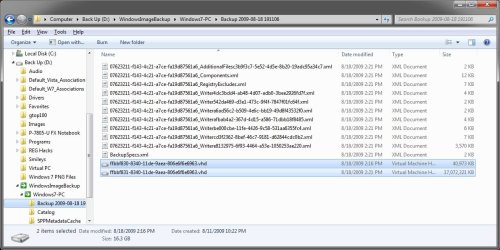
After you create a system image in Windows 7, you can then use the tutorial below to mount the system image to extract specific files from.

http://www.sevenforums.com/tutorials/24771-system-image-extract-files-using-disk-management.html

All backups in Windows 7 are incremental to only save the changes that were made since the last backup.

Hope this helps,
Shawn
 

My Computer

Computer type
PC/Desktop
Computer Manufacturer/Model Number
Self built custom
OS
64-bit Windows 11 Pro for Workstations
CPU
Intel i7-8700K OC'd to 5 GHz
Motherboard
ASUS ROG Maximus XI Formula Z390
Memory
64 GB (4x16GB) G.SKILL TridentZ RGB DDR4 3600 MHz
Graphics Card(s)
ASUS ROG-STRIX-GTX1080TI-O11G-GAMING
Sound Card
Integrated
Monitor(s) Displays
2 x Samsung Odyssey G7 27"
Screen Resolution
2560x1440
Hard Drives
1TB Samsung 990 PRO M.2,
4TB Samsung 990 PRO PRO M.2,
TerraMaster F8 SSD Plus NAS
PSU
Seasonic Prime Titanium 850W
Case
Thermaltake Core P3
Cooling
Corsair Hydro H115i
Keyboard
Logitech wireless K800
Mouse
Logitech MX Master 4
Internet Speed
2 Gb/s Download and 100 Mb/s Upload
Antivirus
Malwarebyte Anti-Malware Premium
Browser
Google Chrome
Other Info
Logitech Z625 speaker system,
Logitech BRIO 4K Pro webcam,
HP Color LaserJet Pro MFP M477fdn,
APC SMART-UPS RT 1000 XL - SURT1000XLI,
Galaxy S23 Plus phone
DR Who,

I'm still curious...... using MS's backup routine, from Windows 7, how will you do a full recovery if the C: drive completely crashes? How will you boot the PC to run a restore routine?..... and where will you get the backup Image File to restore?

Booting the 7 dvd /recovery disc to system recovery options - reveals that one of the options is to restore a system image.

I would still rather use use a 3rd party tool - for the extra flexibility and compression levels available. Some apps. allow restoring the image to different hardware.
 

My Computers

System One System Two

  • Computer type
    PC/Desktop
    OS
    7 X64
    CPU
    i5 8400
    Motherboard
    gigabyte b365m ds3h
    Memory
    2x8gb 3200mhz
    Hard Drives
    various
    PSU
    pure power 11 400w cm
    Case
    Coolermaster
    Cooling
    cryorig m9i
  • Computer type
    PC/Desktop
    OS
    7x64
    CPU
    g5400
    Motherboard
    ga b365m ds3h
    Memory
    8gb ddr4 2400
    PSU
    xfx pro 450w
Anyway, having good backups of my full system has saved me many times over the years. I couldn't imagine running without a good backup system, whatever one's particular method(s) of choice might be.

Agreed :thumbsup:


My questions though, I am still hoping to get answered.. Can you A) write backups in a non-compressed format, such that you can access those files that were backed up from another computer via explorer. and B) is it possible to append a previous backup.. ie write only changes to the previous backup that have occurred since the last backup job completed..??

musiclover7 - Not that I am trying to push the Robocopy thing... I first learned of robocopy here at the sevenforums so can't really take credit. I have spent some time since learning of its wonders figuring out how to use it though.

Robocopy does exactly what you are looking for. The files in the backup are and exact mirror of the original location. No compression or special format or file extension. A .jpg is a .jpg. a .doc is a .doc nothing changes and all are readable as the originals from any computer. After the inital backup robocopy only makes changes (mirror) you delete a file robo deletes it from the backup. You add 50 pictures from your camera robo adds 50 pictures to your backup. Mirror copy.

My backup is around 185 gigs with over 36,000 pictures and 9000 music files between 3 users and 2 computers ... after the original copy to the backup location nightly backup complete in less than 2 minutes. Robocopy checks and adds or deletes files and folders as required to keep the original and backup locations the same. I even sync a second external hard drive with the first about once a month and throw it in the trunk of the car. Offsite backup LOL
 

My Computer

Computer Manufacturer/Model Number
ultraplanet - model 23
OS
Windows 7
CPU
P4 3.0 HT
Motherboard
Intel DQ965GF
Memory
4 gigs of Crucial DDR2
Graphics Card(s)
nVidia GeForce 7800GT 256MB 256-bit w/ ACCELS1 Rev 2
Sound Card
on board
Monitor(s) Displays
HP 2509m
Screen Resolution
1920x1080
Hard Drives
2x 320gb Seagate Barracuda's - SATA 3Gbit/s - RAID-0 array
PSU
650 watt
Case
Antec
Cooling
Cool Master
Keyboard
Logitech diNovo Media Desktop
Mouse
see keyboard
Internet Speed
comcast cable
Other Info
7 Ultimate and 7 Pro twice each at home - Gigabit on the Network - Tomato on the Linksys - I freely share my wireless with my neighbors (8-10 additional devices)
Back
Top