
You are using an out of date browser. It may not display this or other websites correctly.
You should upgrade or use an alternative browser.
You should upgrade or use an alternative browser.
windows cannot access specified device, path or file.
- Thread starter ralphdsm
- Start date

- Local time
- 11:46 PM
- Messages
- 1,258
im running 7 rc1 and this is the first time ive come across this. this is on a local drive and i have ownership of the files but i cannot open them. any idea how to unblock this?
Which files are you trying to access? And can you perhaps take a screenshot of the explorer window that shows which files they are?
My Computer
- Computer type
- PC/Desktop
- Computer Manufacturer/Model Number
- Virtual Machine
- OS
- Windows 7 Professional 32-bit SP1
- CPU
- AMD A4/A6
- Motherboard
- Intel Corporation 440BX Desktop Reference Platform
- Memory
- 3.00GB EDO
- Graphics Card(s)
- VMware SVGA 3D
- Sound Card
- High Definition Audio Device
- Monitor(s) Displays
- Generic Non-PnP Monitor on VMware SVGA 3D
- Screen Resolution
- 1440x900
- Hard Drives
- 1 x 60GB VMware Virtual SATA Hard Drive ATA Device
- Antivirus
- Kaspersky Total Security
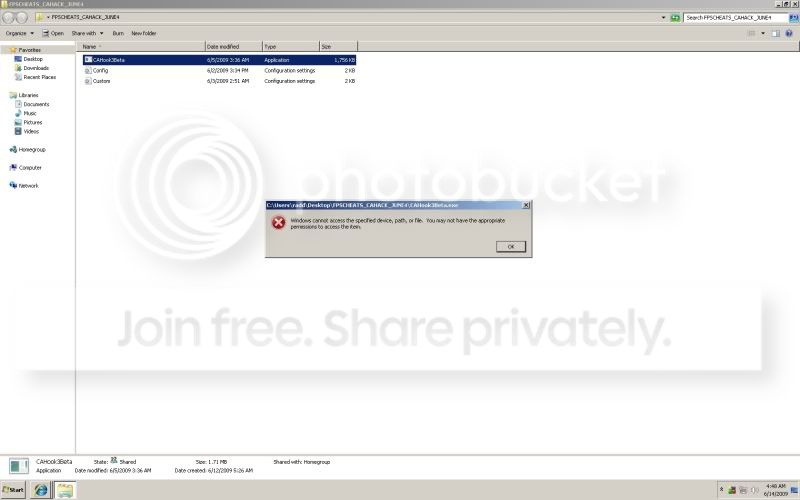

Do you only have the problem with that one program, does everything else work fine?
Maybe the file could be corrupt.
If it is just that file, do you know for sure that it's safe, maybe your anti-virus or even Windows DEP (Data Execution Protection) is blocking it from executing.
It's probably not so much your anti-virus, unless thats broken too. it's more than likely your AV would tell you. but corruption or DEP could cause it.
Maybe the file could be corrupt.
If it is just that file, do you know for sure that it's safe, maybe your anti-virus or even Windows DEP (Data Execution Protection) is blocking it from executing.
It's probably not so much your anti-virus, unless thats broken too. it's more than likely your AV would tell you. but corruption or DEP could cause it.
Last edited:
My Computer
- Computer Manufacturer/Model Number
- Self Built
- OS
- XP Pro SP3 x86/Vista SP2 x64/Win7 x64 Triple-boot
- CPU
- AMD64 X2 AM2 5000+
- Motherboard
- Asus MSN-X Plus
- Memory
- Corsair TWX 2Gb (2x1Gb) DDR2 800Mhz
- Graphics Card(s)
- PCI-X 2.0 Inno3D (NVidia) 9500GT 1Gb DDR2
- Sound Card
- Onboard Realtec ALC662-GR
- Monitor(s) Displays
- Relisys 17' CRT (model unknown)
- Screen Resolution
- 1024x768
- Hard Drives
- 750Gb Samsung 7200-3Gb/s 32Mb Cache SATA
- PSU
- 500W
- Cooling
- Standard AMD CPU Fan, One side, front and rear case fan.
- Keyboard
- Microsoft Multimedia Keyboard
- Mouse
- Samsung Optical
- Internet Speed
- 10M
* Sorry for double posting, but it was more to grab the attention of ppl! *
Yep, It's DEP if you are trying to hack/cheat at Combat Arms. Stop trying to avoid Hacksheild and your problem will go away.
I found this after some Googling, the hacks inject the original executable. > http://img152.imageshack.us/img152/6338/pt2dr9.jpg
(I cant post link to the actual page with the details on in public for the mods/admin because it contains a link to another hack.)
Yep, It's DEP if you are trying to hack/cheat at Combat Arms. Stop trying to avoid Hacksheild and your problem will go away.
I found this after some Googling, the hacks inject the original executable. > http://img152.imageshack.us/img152/6338/pt2dr9.jpg
(I cant post link to the actual page with the details on in public for the mods/admin because it contains a link to another hack.)
My Computer
- Computer Manufacturer/Model Number
- Self Built
- OS
- XP Pro SP3 x86/Vista SP2 x64/Win7 x64 Triple-boot
- CPU
- AMD64 X2 AM2 5000+
- Motherboard
- Asus MSN-X Plus
- Memory
- Corsair TWX 2Gb (2x1Gb) DDR2 800Mhz
- Graphics Card(s)
- PCI-X 2.0 Inno3D (NVidia) 9500GT 1Gb DDR2
- Sound Card
- Onboard Realtec ALC662-GR
- Monitor(s) Displays
- Relisys 17' CRT (model unknown)
- Screen Resolution
- 1024x768
- Hard Drives
- 750Gb Samsung 7200-3Gb/s 32Mb Cache SATA
- PSU
- 500W
- Cooling
- Standard AMD CPU Fan, One side, front and rear case fan.
- Keyboard
- Microsoft Multimedia Keyboard
- Mouse
- Samsung Optical
- Internet Speed
- 10M
first thing i thought after reading whole topic was that it can be an ntfs error.
second after looking at your very big screenshot i think Generator is right and it could be simply your avg antivirus.
if this is not antivirus,dep, or whatever assuming you have full permisions to that files because you created them i guess it is ntfs file system corrupted. chech system event logs
second after looking at your very big screenshot i think Generator is right and it could be simply your avg antivirus.
if this is not antivirus,dep, or whatever assuming you have full permisions to that files because you created them i guess it is ntfs file system corrupted. chech system event logs
My Computer
- OS
- Windows 7
- CPU
- Athlon XP 2000+
- Motherboard
- Asus A7V8X-X
- Memory
- 1,2GB
- Graphics Card(s)
- GF 5600
- Sound Card
- SB Live 5.1
- Monitor(s) Displays
- Samsung 720N
- Screen Resolution
- 1280x1024
- Hard Drives
- Seagate 300GB ATA 100
- PSU
- 300W
Windows cannot access the speicified device, etc. Re: DVD drive
In Windows 7 when I attempted to play a movie in my DVD drive by first double clicking it, I received the message, "Windows cannot access the specified device, etc". After a half hour of trying posted suggestions that didn't work, I right clicked on the DVD drive, then clicked on "open Autoplay" and then clicked on a program that popped up. The movie then began to play. However, I still couldn't play the movie by first double clicking the DVD drive; the error message still popped up. Perhaps this account will assist someone who experiences the same problem. James
In Windows 7 when I attempted to play a movie in my DVD drive by first double clicking it, I received the message, "Windows cannot access the specified device, etc". After a half hour of trying posted suggestions that didn't work, I right clicked on the DVD drive, then clicked on "open Autoplay" and then clicked on a program that popped up. The movie then began to play. However, I still couldn't play the movie by first double clicking the DVD drive; the error message still popped up. Perhaps this account will assist someone who experiences the same problem. James
My Computer
- OS
- Windows 7
- Local time
- 11:46 PM
- Messages
- 1,258
In Windows 7 when I attempted to play a movie in my DVD drive by first double clicking it, I received the message, "Windows cannot access the specified device, etc". After a half hour of trying posted suggestions that didn't work, I right clicked on the DVD drive, then clicked on "open Autoplay" and then clicked on a program that popped up. The movie then began to play. However, I still couldn't play the movie by first double clicking the DVD drive; the error message still popped up. Perhaps this account will assist someone who experiences the same problem. James
When you use the Autoplay option, do you have the "Always do this for..." option checked?
My Computer
- Computer type
- PC/Desktop
- Computer Manufacturer/Model Number
- Virtual Machine
- OS
- Windows 7 Professional 32-bit SP1
- CPU
- AMD A4/A6
- Motherboard
- Intel Corporation 440BX Desktop Reference Platform
- Memory
- 3.00GB EDO
- Graphics Card(s)
- VMware SVGA 3D
- Sound Card
- High Definition Audio Device
- Monitor(s) Displays
- Generic Non-PnP Monitor on VMware SVGA 3D
- Screen Resolution
- 1440x900
- Hard Drives
- 1 x 60GB VMware Virtual SATA Hard Drive ATA Device
- Antivirus
- Kaspersky Total Security
I have had this problem too. I managed to solve it by turning off the network threat protection in my antivirus... That was the only thing that solved it...(I am curently using symatec endpoint protection) Hope this will help
My Computer
- OS
- Windows 7 Ultimate x32
Nashvillain
New member
- Local time
- 5:46 PM
- Messages
- 4
It literally took me around 30hrs to fix this problem so I hope my trial, anguish, and error will help others. It truly is a PERMISSIONS PROBLEM. Go to the PROGRAMS FILES folder in C:, and find the folder for the program you're having this error for. Right click the folder, select properties, choose security tab, click advanced button toward bottom. View what the permissions are for each Name. SYSTEM (FULL CONTROL), ADMINISTRATORS (FULL CONTROL), USERS (READ & EXECUTE), and you may have more, but these are the important ones. If you're missing one of these names (mainly admin or users) you need to add them by choosing CHANGE PERMISSIONS. Click ADD button to add a missing name. If the permissions are wrong choose EDIT. After you have the NAMES in proper and the PERMISSIONS as listed above THIS IS VERY IMPORTAT: check the box that says "REPLACE ALL CHILD OBJECT PERMISSIONS WITH INHERITABLE PERMISSIONS FROM THIS OBJECT." After doing so it will give you a prompt, click yes or ok. When it's done click ok until all the boxes are closed. Now go to program .exe in the folder and try to run the program as ADMIN by right clicking and choosing "RUN AS ADMIN." It should work, if not you may have done something wrong. Go back and check the permissions again, restart the computer and check it again. If the program now works you may have to go to the start menu (press start button, all programs) right click on the program folder in the start menu and repeat all the above for that folder as well (if you want to be able to start the programs from the start menu. Hope this helps! I know others have had this problem, figured it out and didn't take the time to explain how they fixed (PLAIN SELFISH!).
My Computer
- OS
- Windows 7 Ultimate x64
Similar threads
- Replies
- 2
- Views
- 16K
- Replies
- 0
- Views
- 2K
- Replies
- 5
- Views
- 4K