

Taerar
New member
- Local time
- 3:33 PM
- Messages
- 8
Hello everyone,
I am having a problem with my computer atm and will give you the story.
I have a 1 tb HD, installing a fresh install of Windows 7 using an upgrade disc and a very helpful tutorial, since I was unable to install it on the whole drive I had to partition it to a 50gig and the rest as a second drive named Z:\
A week ago the 50GB had filled up so I went about removing some files and wondered why some of my C:\ Users \ May name folders and files were seeming to appear on both my drives when I changed the initial location of all images/music/etc folders to Z:\
I thought if I moved the appdata which was some 10 gigs alone and went about changing the location to the Z:\ with no apparent issue.
A couple of days ago I went to bed with my computer on and woke up with it as if it had shutdown and restarted, I logged in and assumed it was an update thought if this was the case I'd get a popup saying it had updated. I got nothing, so I ran Avast and Malware bytes to see if it was a virus, nothing.
Then I noticed my local area connection icon is stuck with a permanent X on it, even thought I am connecting fine. Now this is the problem..if I click on a program it will open fine do the Admin privlidges thing which I say yes to and its ok. But if I try to open anything like My name/Documents/Pictures/ Music or anything to the right of the start menu I get this error:
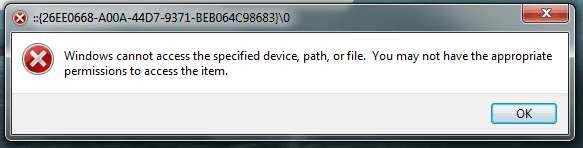
Followed by this one straight after clicking OK.
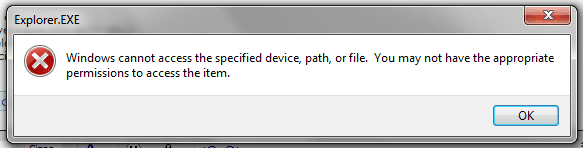
Sometimes if I don't do anything I can access my computer and control panel, which I did yesterday and there are no other accounts on my computer, I have admin access and still was unable to edit the users and settings..not even add another user.
I have checked and went to revert my changes but it seems to have already done as is it's still using my C:\ to store the appdata. I have as of yet to try anything in safe mode. Also I have looked at the microsoft solutions and they're not very helpful.
Thank you for your help ^-^
I am having a problem with my computer atm and will give you the story.
I have a 1 tb HD, installing a fresh install of Windows 7 using an upgrade disc and a very helpful tutorial, since I was unable to install it on the whole drive I had to partition it to a 50gig and the rest as a second drive named Z:\
A week ago the 50GB had filled up so I went about removing some files and wondered why some of my C:\ Users \ May name folders and files were seeming to appear on both my drives when I changed the initial location of all images/music/etc folders to Z:\
I thought if I moved the appdata which was some 10 gigs alone and went about changing the location to the Z:\ with no apparent issue.
A couple of days ago I went to bed with my computer on and woke up with it as if it had shutdown and restarted, I logged in and assumed it was an update thought if this was the case I'd get a popup saying it had updated. I got nothing, so I ran Avast and Malware bytes to see if it was a virus, nothing.
Then I noticed my local area connection icon is stuck with a permanent X on it, even thought I am connecting fine. Now this is the problem..if I click on a program it will open fine do the Admin privlidges thing which I say yes to and its ok. But if I try to open anything like My name/Documents/Pictures/ Music or anything to the right of the start menu I get this error:
Followed by this one straight after clicking OK.
Sometimes if I don't do anything I can access my computer and control panel, which I did yesterday and there are no other accounts on my computer, I have admin access and still was unable to edit the users and settings..not even add another user.
I have checked and went to revert my changes but it seems to have already done as is it's still using my C:\ to store the appdata. I have as of yet to try anything in safe mode. Also I have looked at the microsoft solutions and they're not very helpful.
Thank you for your help ^-^
My Computer
At a glance
Windows 7 64 BitCore 2 Quad Q8200 (Y) 2.33 GHz (95W)7167.2MBNVIDIA GeForce GTX 460 1.00GB
- Computer Manufacturer/Model Number
- HP Pavilion p6045uk Desktop PC
- OS
- Windows 7 64 Bit
- CPU
- Core 2 Quad Q8200 (Y) 2.33 GHz (95W)
- Motherboard
- Asus IPIBL-LB
- Memory
- 7167.2MB
- Graphics Card(s)
- NVIDIA GeForce GTX 460 1.00GB
- Sound Card
- Realtek ALC 888S chipset
- Monitor(s) Displays
- Acer P223w 32bit 59Hz
- Screen Resolution
- 1680x1050
- Hard Drives
- 1 TB 3G 5400 rpm
- PSU
- 500w
- Case
- HP Black Case unit
- Cooling
- Fan and not of the waving kind.
- Keyboard
- Trust SK26-90
- Mouse
- Tesco Value Wheel mouse ;)
- Internet Speed
- Wireless LAN 802.11 b/g/n

