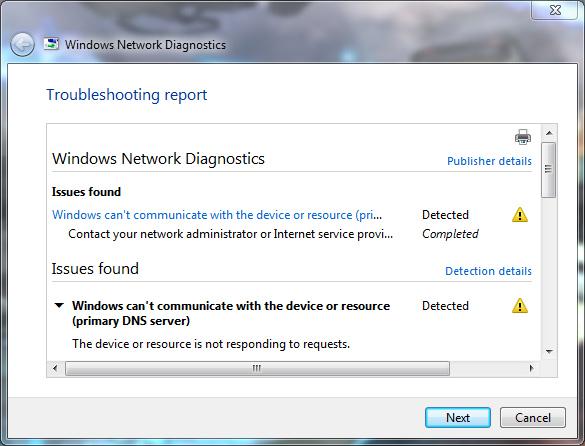
'Windows can't communicate with the device or resource'

Sponge

New member
Local time
8:18 AM
Messages
18
Been having this occur pretty often recently. I'll just be minding my own business browsing the web or playing an online game and all of a sudden my internet would stop working.

I run the 'Troubleshoot problems' and this is the information it keeps giving me.
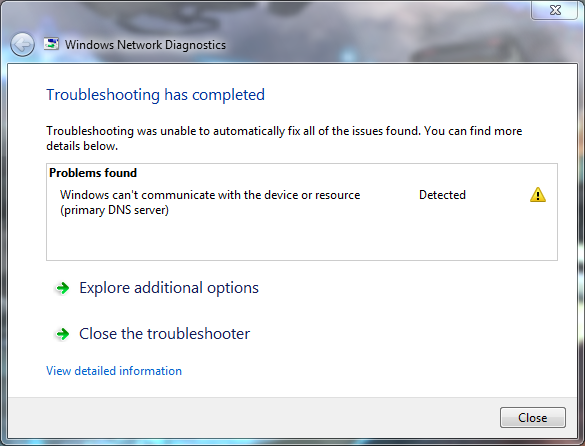
PA8u8i2.png

libLdFq.png


Looking for a fix to prevent it happening again.

Cheers.
 

My Computer

Computer type
PC/Desktop
Computer Manufacturer/Model Number
HP
OS
Windows 7 Professional x64
CPU
Intel Core 2 Duo E8400 @ 3.00GHz
Motherboard
Hewlett-Packard 0AA8h (XU1 PROCESSOR)
Memory
8.00GB Dual-Channel DDR2 @ 398MHz (6-6-6-18)
Graphics Card(s)
2047MB NVIDIA GeForce GTX 750 Ti (EVGA)
Sound Card
High Definition Audio Device
Monitor(s) Displays
SyncMaster (1280x1024@75Hz)
Hard Drives
931GB HITACHI HUA721010KLA330 ATA Device (SATA)
465GB Seagate Expansion USB Device (USB (SATA))
Internet Speed
http://www.speedtest.net/result/5622549473.png
Antivirus
Avast Free Antivirus
Browser
Chrome
Set DNS to 208.67.220.220 & 208.67.222.222 you get the same error if the connection drops is it wireless or cable
 

My Computer

Computer type
PC/Desktop
OS
win 8 32 bit
Set DNS to 208.67.220.220 & 208.67.222.222 you get the same error if the connection drops is it wireless or cable

What do those point to? I've been using Google Public DNS.

And the connection is wired, Ethernet.
 

My Computer

Computer type
PC/Desktop
Computer Manufacturer/Model Number
HP
OS
Windows 7 Professional x64
CPU
Intel Core 2 Duo E8400 @ 3.00GHz
Motherboard
Hewlett-Packard 0AA8h (XU1 PROCESSOR)
Memory
8.00GB Dual-Channel DDR2 @ 398MHz (6-6-6-18)
Graphics Card(s)
2047MB NVIDIA GeForce GTX 750 Ti (EVGA)
Sound Card
High Definition Audio Device
Monitor(s) Displays
SyncMaster (1280x1024@75Hz)
Hard Drives
931GB HITACHI HUA721010KLA330 ATA Device (SATA)
465GB Seagate Expansion USB Device (USB (SATA))
Internet Speed
http://www.speedtest.net/result/5622549473.png
Antivirus
Avast Free Antivirus
Browser
Chrome
Set DNS to 208.67.220.220 & 208.67.222.222 you get the same error if the connection drops is it wireless or cable

Now I'm getting 'The DNS server isn't responding' from the troubleshooting.
 

My Computer

Computer type
PC/Desktop
Computer Manufacturer/Model Number
HP
OS
Windows 7 Professional x64
CPU
Intel Core 2 Duo E8400 @ 3.00GHz
Motherboard
Hewlett-Packard 0AA8h (XU1 PROCESSOR)
Memory
8.00GB Dual-Channel DDR2 @ 398MHz (6-6-6-18)
Graphics Card(s)
2047MB NVIDIA GeForce GTX 750 Ti (EVGA)
Sound Card
High Definition Audio Device
Monitor(s) Displays
SyncMaster (1280x1024@75Hz)
Hard Drives
931GB HITACHI HUA721010KLA330 ATA Device (SATA)
465GB Seagate Expansion USB Device (USB (SATA))
Internet Speed
http://www.speedtest.net/result/5622549473.png
Antivirus
Avast Free Antivirus
Browser
Chrome
Back
Top