Solved Windows can't find the homegroup

Wezc

New member
Local time
8:11 AM
Messages
9
Hello, I'm currently using my laptop with wireless connection.
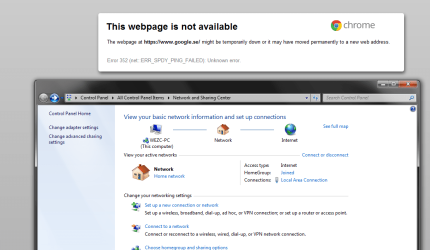
And I need my desktop computer to work, the internet is using wire and it says that I'm connected to the internet but I can't browse the internet, I can see who's online on skype and various things.
All this happened after I installed iTunes. Any solution?

I've tried re-installing the network drivers
I've tried to uninstall bonjour which was a problem to other people with similar problems
I've tried to disable the network adapter and re-enabled it.
I've tried to add a wireless network card into my computer, wouldn't work.
 

My Computer My Computer

OS
Windows 7 Ultimate x64
If you can post a screen shot of your ipconfig/all it would be most helpful. :)

If this problem was caused by iTunes then you should be able to fix it by doing this...
To fix ...
Run MsConfig

Under the Services tab uncheck the service called "##Id_String1.6844[... and then a bunch of numbers]" by Apple
 

My Computer My Computer

Computer type
PC/Desktop
Computer Manufacturer/Model Number
Home built
OS
Windows 7 Ult, Windows 8.1 Pro,
CPU
Q9650-4.275GHz, E8600 4.5GHz, E6750-3.8GHz
Motherboard
Evga 780i FTW
Memory
G.Skill PC2 9600 1200Mhz 5 5 5 15 2T
Graphics Card(s)
GTX480
Sound Card
Asus Xonar D2
Monitor(s) Displays
HannsG
Screen Resolution
1680X1050
Hard Drives
GSkill Phoenix Pro 120GB SSD
PSU
ThermalTake Toughpower 1000Watt modular
Case
ThermalTake XaserV
Cooling
Xigmatek S1283
Keyboard
Logitech G15
Mouse
Logitech G9
Internet Speed
T1
I threw in a screenshot of my connection also :) Thanks for the quick response btw.
 

Attachments

  • skit1.png
    skit1.png
    43.4 KB · Views: 36
  • skit2.png
    skit2.png
    19.2 KB · Views: 32

My Computer My Computer

OS
Windows 7 Ultimate x64
The ipconfig looks fine. If the removing bonjour doesn't help try resetting winsock and we can go from there.

It may help to reset Winsock for windows 7.

1. Click start, type cmd in the Start Search box, right-click cmd.exe, click Run as administrator, and then press Continue.

2. Type netsh winsock reset at the command prompt, and then press ENTER.

Note If the command is typed incorrectly, you will receive an error message. Type the command again. When the command is completed successfully, a confirmation appears, followed by a new command prompt. Then, go to step 3.

3. Type exit, and then press ENTER. You should be prompted to reboot, if not you should reboot and test.
 

My Computer My Computer

Computer type
PC/Desktop
Computer Manufacturer/Model Number
Home built
OS
Windows 7 Ult, Windows 8.1 Pro,
CPU
Q9650-4.275GHz, E8600 4.5GHz, E6750-3.8GHz
Motherboard
Evga 780i FTW
Memory
G.Skill PC2 9600 1200Mhz 5 5 5 15 2T
Graphics Card(s)
GTX480
Sound Card
Asus Xonar D2
Monitor(s) Displays
HannsG
Screen Resolution
1680X1050
Hard Drives
GSkill Phoenix Pro 120GB SSD
PSU
ThermalTake Toughpower 1000Watt modular
Case
ThermalTake XaserV
Cooling
Xigmatek S1283
Keyboard
Logitech G15
Mouse
Logitech G9
Internet Speed
T1
Oh right, forgot to say that I tried that, but I'll try it once more.

Edit: Didn't fix anything
 

My Computer My Computer

OS
Windows 7 Ultimate x64
Have you tried running these ipconfig commands yet?

That iTunes causes so many problems but usually it relates to the bonjour service. Have you uninstall iTunes yet?

ipconfig /release
ipconfig /renew
ipconfig /flushdns

Is the only problem that it can't find the Home group or can you get online with your browser at all?
 

My Computer My Computer

Computer type
PC/Desktop
Computer Manufacturer/Model Number
Home built
OS
Windows 7 Ult, Windows 8.1 Pro,
CPU
Q9650-4.275GHz, E8600 4.5GHz, E6750-3.8GHz
Motherboard
Evga 780i FTW
Memory
G.Skill PC2 9600 1200Mhz 5 5 5 15 2T
Graphics Card(s)
GTX480
Sound Card
Asus Xonar D2
Monitor(s) Displays
HannsG
Screen Resolution
1680X1050
Hard Drives
GSkill Phoenix Pro 120GB SSD
PSU
ThermalTake Toughpower 1000Watt modular
Case
ThermalTake XaserV
Cooling
Xigmatek S1283
Keyboard
Logitech G15
Mouse
Logitech G9
Internet Speed
T1
Going to try uninstalling iTunes, and I'll get back to you. Going to get something to eat, I'm starving.
 

My Computer My Computer

OS
Windows 7 Ultimate x64
That did not work, uninstalled iTunes and I also found Bonjour in the list. So I uninstalled that, and I stopped the Bonjour service before I created this post. Any more ideas?

It can't find the homegroup (it should say something like "Tele2Gateway" instead of "Network") and I can't browse the internet, though I can use skype/steam and other softwares.
 

My Computer My Computer

OS
Windows 7 Ultimate x64
According to your ipconfig you should be online.

iTunes may have somehow corrupted your network driver so uninstalling it and updating it may be worth while.

Are you online or is the problem relating to "can't find Home group"?
 

My Computer My Computer

Computer type
PC/Desktop
Computer Manufacturer/Model Number
Home built
OS
Windows 7 Ult, Windows 8.1 Pro,
CPU
Q9650-4.275GHz, E8600 4.5GHz, E6750-3.8GHz
Motherboard
Evga 780i FTW
Memory
G.Skill PC2 9600 1200Mhz 5 5 5 15 2T
Graphics Card(s)
GTX480
Sound Card
Asus Xonar D2
Monitor(s) Displays
HannsG
Screen Resolution
1680X1050
Hard Drives
GSkill Phoenix Pro 120GB SSD
PSU
ThermalTake Toughpower 1000Watt modular
Case
ThermalTake XaserV
Cooling
Xigmatek S1283
Keyboard
Logitech G15
Mouse
Logitech G9
Internet Speed
T1
According to your ipconfig you should be online.

iTunes may have somehow corrupted your network driver so uninstalling it and updating it may be worth while.

Are you online or is the problem relating to "can't find Home group"?

I am online on skype and steam, but not in my browser. It can't find the website, as you saw in one of the images. And it can't find the homegroup..
 

My Computer My Computer

OS
Windows 7 Ultimate x64
If it's just the browser then usually resetting winsock as I posted earlier will fix it.

Have you run any A/V software to look for infections?

Have you tried to reset your router yet?
 

My Computer My Computer

Computer type
PC/Desktop
Computer Manufacturer/Model Number
Home built
OS
Windows 7 Ult, Windows 8.1 Pro,
CPU
Q9650-4.275GHz, E8600 4.5GHz, E6750-3.8GHz
Motherboard
Evga 780i FTW
Memory
G.Skill PC2 9600 1200Mhz 5 5 5 15 2T
Graphics Card(s)
GTX480
Sound Card
Asus Xonar D2
Monitor(s) Displays
HannsG
Screen Resolution
1680X1050
Hard Drives
GSkill Phoenix Pro 120GB SSD
PSU
ThermalTake Toughpower 1000Watt modular
Case
ThermalTake XaserV
Cooling
Xigmatek S1283
Keyboard
Logitech G15
Mouse
Logitech G9
Internet Speed
T1
I did get a IP-Conflict message earlier. And yes, I did reset my router, and restart it. I even restarted my modem. And I'm pretty sure that I don't have an infection, I've scanned and it found nothing.
 

My Computer My Computer

OS
Windows 7 Ultimate x64
Lets try flushing DNS cache and renewing your IP.

Flush the DNS cache and restore MS's Hosts file ...
Copy and paste these lines in Note pad.

@Echo on
pushd\windows\system32\drivers\etc
attrib -h -s -r hosts
echo 127.0.0.1 localhost>HOSTS
attrib +r +h +s hosts
popd
ipconfig /release
ipconfig /renew
ipconfig /flushdns
netsh winsock reset all
netsh int ip reset all
shutdown -r -t 1
del %0

Save as flush.bat to your desktop. Right click on the flush.bat file to run it as Administrator.

Your computer will reboot itself.
 

My Computer My Computer

Computer type
PC/Desktop
Computer Manufacturer/Model Number
Home built
OS
Windows 7 Ult, Windows 8.1 Pro,
CPU
Q9650-4.275GHz, E8600 4.5GHz, E6750-3.8GHz
Motherboard
Evga 780i FTW
Memory
G.Skill PC2 9600 1200Mhz 5 5 5 15 2T
Graphics Card(s)
GTX480
Sound Card
Asus Xonar D2
Monitor(s) Displays
HannsG
Screen Resolution
1680X1050
Hard Drives
GSkill Phoenix Pro 120GB SSD
PSU
ThermalTake Toughpower 1000Watt modular
Case
ThermalTake XaserV
Cooling
Xigmatek S1283
Keyboard
Logitech G15
Mouse
Logitech G9
Internet Speed
T1
Fixed it, there was something wrong with the cables from the modem to the router. Derp.
 

My Computer My Computer

OS
Windows 7 Ultimate x64
Too bad I can't see that kind of stuff from here LOL. Glad you got it working.

It's interesting how the ipconfig looked good despite the cable problems.
 

My Computer My Computer

Computer type
PC/Desktop
Computer Manufacturer/Model Number
Home built
OS
Windows 7 Ult, Windows 8.1 Pro,
CPU
Q9650-4.275GHz, E8600 4.5GHz, E6750-3.8GHz
Motherboard
Evga 780i FTW
Memory
G.Skill PC2 9600 1200Mhz 5 5 5 15 2T
Graphics Card(s)
GTX480
Sound Card
Asus Xonar D2
Monitor(s) Displays
HannsG
Screen Resolution
1680X1050
Hard Drives
GSkill Phoenix Pro 120GB SSD
PSU
ThermalTake Toughpower 1000Watt modular
Case
ThermalTake XaserV
Cooling
Xigmatek S1283
Keyboard
Logitech G15
Mouse
Logitech G9
Internet Speed
T1
I thought it was strange too..
 

My Computer My Computer

OS
Windows 7 Ultimate x64
Back
Top