Solved windows can't format external hard drive

lebdorz

New member
Member
Local time
3:54 PM
Messages
56
hello I have a problem with formatting my C drive on the external hard drive

well it is not external but it is the main hard drive of my pc and I had to put it on an enclosure and connect it to my laptop in order to backup and format the C on it which used to have a win7 ultimate 32bits

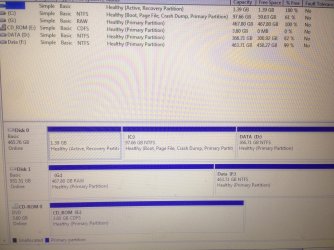
anyway the laptop disk management is reading the external D:/ normally but the external C:/ which is named G:/ on laptop is not readable

tried to format it from disk management many times using Nyfs or exFat and it took more than one hour to finish and tell me: windows couldnt complete format successfully

I read a lot of articles and tried deleting the Volume and making new one.... changing path and name of the volume

but all are giving same error cant format... also tried formatting in safe mode same issue pffft...

any help??? knowing that the other partition on the external hardrive is accessible and the G:/ is showing as RAW
 
Last edited:

My Computer

Computer Manufacturer/Model Number
Intel
OS
7 ultimate x86
CPU
C2D 2.2
Motherboard
G42
Memory
4GB
Graphics Card(s)
Built in
Sound Card
Built in
Monitor(s) Displays
17' LG
Hard Drives
500GB
hello I have a problem with formatting my C drive on the external hard drive
Why are you attempting this--was it giving you problems?

The drive probably is defective and the best way to determine that is not to connect to a laptop using a USB device, but rather to direct-connect it to another PC using SATA (or PATA/IDE if an older drive) and then running the manufacturer's diagnostic on it.
 

My Computer

Computer type
Laptop
Computer Manufacturer/Model Number
Dell Latitude E6540 Laptop
OS
Windows 7 Professional 64bit
CPU
Intel Core i7 4600M @ 2.90GHz
Motherboard
Dell Inc. 0CYT5F (SOCKET 0)
Memory
16.0GB Dual-Channel DDR3 @ 797MHz (11-11-11-28)
Graphics Card(s)
Intel HD Graphics 4600 (Dell) 2048MB ATI AMD Radeon HD 8790M
Sound Card
Realtek High Definition Audio
Monitor(s) Displays
HP ZR30w (2560x1600@60Hz)
Hard Drives
256GB LITEONIT LMT-256M6M-41 mm SATA (SSD)
1TB Samsung SSD 860 EVO mSATA SATA (SSD)
2TB USB 3.0 USB Device
115GB SanDisk Ultra Fit USB
Other Info
Multiple Dell E-Port Plus II Port Replicator/Docking Stations 0Y72NH USB 3.0 + 130W AC Adapters
it was working fine but got a malware which I removed but played around with registry files so got some problems like missing drivers and not accepting any bew usb devices

and becoz I dont have a dvd ron I connected it to Enclosure
 

My Computer

Computer Manufacturer/Model Number
Intel
OS
7 ultimate x86
CPU
C2D 2.2
Motherboard
G42
Memory
4GB
Graphics Card(s)
Built in
Sound Card
Built in
Monitor(s) Displays
17' LG
Hard Drives
500GB
Hi,
What are you attempting to format it as ?
Are you trying to wipe the disk or something to reinstall windows ?
 

My Computer

Computer type
PC/Desktop
Computer Manufacturer/Model Number
Custom assembled by me :}
OS
Win-7-Pro64bit 7-H-Prem-64bit
CPU
i7-5930K 2nd i9-9940x both water blocked VRM's too
Motherboard
ASUS SABERTOOTH X99 2nd ASUS x299 Apex
Memory
Trident-z 3200C14 2nd Trident-z 3600C16
Graphics Card(s)
EVGA 1080ti ftw3 2nd Titan Xp both water blocked
Sound Card
Built-in Realtek
Monitor(s) Displays
1-AOC G2460PG 24"G-Sync 144Hz/ 2nd 1-ASUS VG248QE 24" 144Hz
Screen Resolution
1920 x 1080 144Hz
Hard Drives
2-Samsung M.2 Evo & Evo Plus
2-Samsung 850 EVO 500GB SSD's/ 3-2.5 W.D. Black 1tb-&3-1tb/3-3.5 WD Black 1tb hdd's
PSU
EVGA SuperNOVA 1000-P2 2nd 1200-P2
Case
2-Corsair Obsidian Series 450D Black ATX Mid Tower
Cooling
Custom water loops
Keyboard
Logitech G710+/ 2nd Logitech G910
Mouse
2-RedDragon M901 Perdition 16400 dpi Gaming mouse = wired
Internet Speed
Comcast Ping 19ms 89.31mbps download speed 6.12mbps upload
Antivirus
Malwarebytes Pro/ Superantispyware Pro
Browser
FireFox & Pale moon
Other Info
2nd ASUS X299 Apex/Intel i9-9940x with Custom water loop/7H-Prem-x64/Corsair 450D case/Ram Trident-z 3600C16 4x8gb / Samsung970Evo plus 500gb SSD/Dual ssd EZ swap evo/PSU EVGA SuperNova 1200w-P2 80+Platinum/GPU Titan Xp /8-ML-140 on push-pull on 2-280GTX rads
I just want to format it and install a clean new win7 ... the G:/ partion is showing as RAW whereas the F:/ is accessoble ... and I need to format that G: which contains the windows
 

My Computer

Computer Manufacturer/Model Number
Intel
OS
7 ultimate x86
CPU
C2D 2.2
Motherboard
G42
Memory
4GB
Graphics Card(s)
Built in
Sound Card
Built in
Monitor(s) Displays
17' LG
Hard Drives
500GB
here's a screenshot from disk management ... also Easeus is reading the partition and files normally
 

Attachments

  • image.jpg
    image.jpg
    1.4 MB · Views: 2

My Computer

Computer Manufacturer/Model Number
Intel
OS
7 ultimate x86
CPU
C2D 2.2
Motherboard
G42
Memory
4GB
Graphics Card(s)
Built in
Sound Card
Built in
Monitor(s) Displays
17' LG
Hard Drives
500GB

My Computer

Computer type
PC/Desktop
Computer Manufacturer/Model Number
Custom assembled by me :}
OS
Win-7-Pro64bit 7-H-Prem-64bit
CPU
i7-5930K 2nd i9-9940x both water blocked VRM's too
Motherboard
ASUS SABERTOOTH X99 2nd ASUS x299 Apex
Memory
Trident-z 3200C14 2nd Trident-z 3600C16
Graphics Card(s)
EVGA 1080ti ftw3 2nd Titan Xp both water blocked
Sound Card
Built-in Realtek
Monitor(s) Displays
1-AOC G2460PG 24"G-Sync 144Hz/ 2nd 1-ASUS VG248QE 24" 144Hz
Screen Resolution
1920 x 1080 144Hz
Hard Drives
2-Samsung M.2 Evo & Evo Plus
2-Samsung 850 EVO 500GB SSD's/ 3-2.5 W.D. Black 1tb-&3-1tb/3-3.5 WD Black 1tb hdd's
PSU
EVGA SuperNOVA 1000-P2 2nd 1200-P2
Case
2-Corsair Obsidian Series 450D Black ATX Mid Tower
Cooling
Custom water loops
Keyboard
Logitech G710+/ 2nd Logitech G910
Mouse
2-RedDragon M901 Perdition 16400 dpi Gaming mouse = wired
Internet Speed
Comcast Ping 19ms 89.31mbps download speed 6.12mbps upload
Antivirus
Malwarebytes Pro/ Superantispyware Pro
Browser
FireFox & Pale moon
Other Info
2nd ASUS X299 Apex/Intel i9-9940x with Custom water loop/7H-Prem-x64/Corsair 450D case/Ram Trident-z 3600C16 4x8gb / Samsung970Evo plus 500gb SSD/Dual ssd EZ swap evo/PSU EVGA SuperNova 1200w-P2 80+Platinum/GPU Titan Xp /8-ML-140 on push-pull on 2-280GTX rads
Hello ThrashZone and thanks for ur valuable time helping me in this

well, I didn't really get the ownership thing but I understood that it is like opening the partition as an administrator

anyway, I am able to delete the G: partition the RAW one and make it unallocated, and I tried that many times with no success to make it able to get formatted

-- Do u suggest that I backup the other partition that is still working and delete the G: partition which is not working.. and then Extend the F: with the G: space ???

would that work or just waste the time?
 

My Computer

Computer Manufacturer/Model Number
Intel
OS
7 ultimate x86
CPU
C2D 2.2
Motherboard
G42
Memory
4GB
Graphics Card(s)
Built in
Sound Card
Built in
Monitor(s) Displays
17' LG
Hard Drives
500GB
Hi,
Yes I thought you already backed up everything
But yes again since it shows Raw the files are most likely toast anyway

You could try and see what Linux shows but I'd say it's a long shot
It wouldn't hurt anything more just takes a bit more time
http://www.sevenforums.com/software/198909-lucid-puppy-way-recover-files-non-bootable-computer.html

http://www.sevenforums.com/tutorials/287439-emergency-kit-save-your-files-dead-os.html

After you back up your files use the surface test using mini tool to see what thinks of the hdd
It might have bad sectors which if it does just replace it depending on how many and brand hdd it is.
 

My Computer

Computer type
PC/Desktop
Computer Manufacturer/Model Number
Custom assembled by me :}
OS
Win-7-Pro64bit 7-H-Prem-64bit
CPU
i7-5930K 2nd i9-9940x both water blocked VRM's too
Motherboard
ASUS SABERTOOTH X99 2nd ASUS x299 Apex
Memory
Trident-z 3200C14 2nd Trident-z 3600C16
Graphics Card(s)
EVGA 1080ti ftw3 2nd Titan Xp both water blocked
Sound Card
Built-in Realtek
Monitor(s) Displays
1-AOC G2460PG 24"G-Sync 144Hz/ 2nd 1-ASUS VG248QE 24" 144Hz
Screen Resolution
1920 x 1080 144Hz
Hard Drives
2-Samsung M.2 Evo & Evo Plus
2-Samsung 850 EVO 500GB SSD's/ 3-2.5 W.D. Black 1tb-&3-1tb/3-3.5 WD Black 1tb hdd's
PSU
EVGA SuperNOVA 1000-P2 2nd 1200-P2
Case
2-Corsair Obsidian Series 450D Black ATX Mid Tower
Cooling
Custom water loops
Keyboard
Logitech G710+/ 2nd Logitech G910
Mouse
2-RedDragon M901 Perdition 16400 dpi Gaming mouse = wired
Internet Speed
Comcast Ping 19ms 89.31mbps download speed 6.12mbps upload
Antivirus
Malwarebytes Pro/ Superantispyware Pro
Browser
FireFox & Pale moon
Other Info
2nd ASUS X299 Apex/Intel i9-9940x with Custom water loop/7H-Prem-x64/Corsair 450D case/Ram Trident-z 3600C16 4x8gb / Samsung970Evo plus 500gb SSD/Dual ssd EZ swap evo/PSU EVGA SuperNova 1200w-P2 80+Platinum/GPU Titan Xp /8-ML-140 on push-pull on 2-280GTX rads
just to clear things, The C: and D: are called G: and F: while connected with Enclosure

So, I tried formatting the G: and it is RAW now and not formatting at all, and I just tried Deleting the Volume and Extending the F: which is working and accessible smoothly, but again windows gave me error msg that the operation couldn't be done
 

My Computer

Computer Manufacturer/Model Number
Intel
OS
7 ultimate x86
CPU
C2D 2.2
Motherboard
G42
Memory
4GB
Graphics Card(s)
Built in
Sound Card
Built in
Monitor(s) Displays
17' LG
Hard Drives
500GB
If their is nothing on G or F you want to save just delete what ever partitions the system will allow and reformat the what ever is left.
 

My Computer

Computer type
PC/Desktop
Computer Manufacturer/Model Number
Home made Desktop
OS
Windows 10 Pro. 64/ version 1709 Windows 7 Pro/64
CPU
Intel i7-6800K @ 4.3
Motherboard
ASUS X-99 Deluxe II
Memory
Corsair Platinum 16 gig @2400
Graphics Card(s)
EVGA GTX 1070 OC
Monitor(s) Displays
Asus 27" LED LCD/VE278Q
Screen Resolution
1920-1080 or 1280-720 HDMI
Hard Drives
INTEL SSD 730-240 Gb Sata 3.0/
PSU
EVGA Platium 1200W
Case
Phanteks Luxe Tempered Glass 8 fans/ one radiator
Cooling
XSPC/ Water Cooled CPU
Keyboard
Das 4 Professional
Mouse
Logitech M705/MX Anywhere 2-S
Internet Speed
100 mbits
Antivirus
Microsoft Security Essentials/ Malwarebytes Premium 3.0/ SAS
Browser
I.E. 11 default/Firefox/ ISP Time Warner Cable/Spectrum
Other Info
LG BluRay Burner/
Sound system-KLipsch-THX/
Icy Dock ssd Hot Swap bays.
Hi Layback, I deleted the 2 partitions G: is not accessible at all it is RAW and F: is fine

I deleted them but what then???? I also tried deleting the G: and Expanding F: but windows gave me an error msg that is not possible because it is RAW

one more thing: I plugged the hdd back to main desktop computer and the bios reads it well but it didnt boot at all giving error like boot failure press any key
 
Last edited:

My Computer

Computer Manufacturer/Model Number
Intel
OS
7 ultimate x86
CPU
C2D 2.2
Motherboard
G42
Memory
4GB
Graphics Card(s)
Built in
Sound Card
Built in
Monitor(s) Displays
17' LG
Hard Drives
500GB
So you still have a raw G partition and an F partition?
When you right click G, what choices do you have?
 

My Computer

Computer type
PC/Desktop
Computer Manufacturer/Model Number
Dell, Acer, eMachine
OS
Home Premium and Pro 32 bit and 64 bit (4 computers)
Browser
Palemoon

My Computer

Computer type
PC/Desktop
Computer Manufacturer/Model Number
Skylake Special #666
OS
Windows 10 Pro x64
CPU
Intel Core i7 6700K
Motherboard
Asus Sabertooth Z170 Mark 1
Memory
GSkill TridentZ RGB 16GB 3600 16-16-16-36
Graphics Card(s)
EVGA GTX 980 Ti SC x2
Sound Card
Realtek High Definition
Monitor(s) Displays
AOC G2460PG
Screen Resolution
1920 x 1080 144Hz
Hard Drives
Samsung 860 Pro 256GB, Seagate Barracuda 4TB x2
PSU
EVGA 1000 P2, EVGA White Custom Braided Cables
Case
Corsair Vengeance C70 Gunmetal Black
Cooling
Corsair H100i v2, Corsair ML120 x2, Thermal Grizzly Kryonaut
Keyboard
Logitech G910 Orion Spectrum
Mouse
Logitech G700s
Internet Speed
Verizon Fios Quantum Gateway 75/75
Antivirus
Windows Defender, Malwarebytes Free 3.8.3
Browser
Chrome
Other Info
Corsair SP120 x4, LG Blu-ray Drive, Durabrand HT-395 100 Watt Dolby Digital Amp, Corsair H2100 Wireless 7.1 Headset
hello again

thanks AddRam I will see about that later

SOLVED in few words I got a new Toshiba 1TB and its working smoothly and noiseless with 1 yr warranty for 50$ lol

to whom it may concern, About my faulty hdd I was told that it will not work.. although, yesterday I did delete the C:/ partition and then unallocate about 100gb of it and then I was able to format it and installed win7 normally, but after few hours It went back to same error and now its showing the C and D as RAW so I just went and got a new hdd
 

My Computer

Computer Manufacturer/Model Number
Intel
OS
7 ultimate x86
CPU
C2D 2.2
Motherboard
G42
Memory
4GB
Graphics Card(s)
Built in
Sound Card
Built in
Monitor(s) Displays
17' LG
Hard Drives
500GB
Thanks for letting us know how you solved your problem.
Happy computing.
 

My Computer

Computer type
PC/Desktop
Computer Manufacturer/Model Number
Home made Desktop
OS
Windows 10 Pro. 64/ version 1709 Windows 7 Pro/64
CPU
Intel i7-6800K @ 4.3
Motherboard
ASUS X-99 Deluxe II
Memory
Corsair Platinum 16 gig @2400
Graphics Card(s)
EVGA GTX 1070 OC
Monitor(s) Displays
Asus 27" LED LCD/VE278Q
Screen Resolution
1920-1080 or 1280-720 HDMI
Hard Drives
INTEL SSD 730-240 Gb Sata 3.0/
PSU
EVGA Platium 1200W
Case
Phanteks Luxe Tempered Glass 8 fans/ one radiator
Cooling
XSPC/ Water Cooled CPU
Keyboard
Das 4 Professional
Mouse
Logitech M705/MX Anywhere 2-S
Internet Speed
100 mbits
Antivirus
Microsoft Security Essentials/ Malwarebytes Premium 3.0/ SAS
Browser
I.E. 11 default/Firefox/ ISP Time Warner Cable/Spectrum
Other Info
LG BluRay Burner/
Sound system-KLipsch-THX/
Icy Dock ssd Hot Swap bays.
Back
Top