
Solved windows created a new admin account behind my back

chaosrealm93

New member
Member
VIP
Local time
1:56 PM
Messages
174
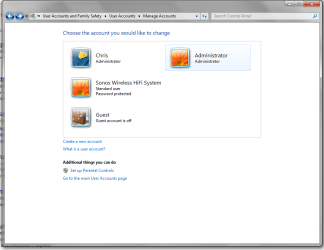
this is so weird.... i went to restart my PC today and came back to seeing 2 accounts on the login screen. this computer has always been mine and i am the only user/admin of the machine.


the "administrator" account is now the "real" admin, in the sense that you cannot delete it, and my account "chris", while also being an admin account, can be deleted.


is there any way to fix this? the only thing i did that was odd was putting the computer to sleep last night over teamviewer, but i dont think it shouldve done anything bad...
 

Attachments
  • Untitled.png
    Untitled.png
    33.8 KB · Views: 1

My Computer My Computer

Computer type
PC/Desktop
OS
Windows 7 Pro 64 bit
CPU
Intel i7 6700k
Motherboard
ASUS Z-170-A
Memory
Kingston HyperX Fury 16GB 2133MHz
Graphics Card(s)
EVGA GTX 1060 6GB
Sound Card
N/A
Monitor(s) Displays
Viewsonic VX2240w
Screen Resolution
1680 x 1050
Hard Drives
Sandisk Ultra II 480GB SSD,
WD Caviar Black 1TB
PSU
Corsair RM750x
Case
Corsair 550D
Cooling
CoolerMaster Hyper 212
Keyboard
$20 Logitech El Cheapo
Mouse
Logitech G500s
Antivirus
avast! free antivirus
Browser
Google Chrome

My Computer My Computer

Computer type
PC/Desktop
OS
Windows 7 Pro 64 bit
CPU
Intel i7 6700k
Motherboard
ASUS Z-170-A
Memory
Kingston HyperX Fury 16GB 2133MHz
Graphics Card(s)
EVGA GTX 1060 6GB
Sound Card
N/A
Monitor(s) Displays
Viewsonic VX2240w
Screen Resolution
1680 x 1050
Hard Drives
Sandisk Ultra II 480GB SSD,
WD Caviar Black 1TB
PSU
Corsair RM750x
Case
Corsair 550D
Cooling
CoolerMaster Hyper 212
Keyboard
$20 Logitech El Cheapo
Mouse
Logitech G500s
Antivirus
avast! free antivirus
Browser
Google Chrome
Usually, the built-in "Administrator" account is disabled by default. This account runs with elevated rights all the time, and has full access to everything.

A normal user account that is an administrator does not run with elevated rights unless you use "Run as administrator" or prompted by UAC to allow something to run elevated. Think of it like a standard account that is able to "Run as administrator" as needed.
 

My Computer My Computer

Computer type
PC/Desktop
Computer Manufacturer/Model Number
Self built custom
OS
64-bit Windows 11 Pro for Workstations
CPU
Intel i7-8700K OC'd to 5 GHz
Motherboard
ASUS ROG Maximus XI Formula Z390
Memory
64 GB (4x16GB) G.SKILL TridentZ RGB DDR4 3600 MHz
Graphics Card(s)
ASUS ROG-STRIX-GTX1080TI-O11G-GAMING
Sound Card
Integrated
Monitor(s) Displays
2 x Samsung Odyssey G7 27"
Screen Resolution
2560x1440
Hard Drives
1TB Samsung 990 PRO M.2,
4TB Samsung 990 PRO PRO M.2,
TerraMaster F8 SSD Plus NAS
PSU
Seasonic Prime Titanium 850W
Case
Thermaltake Core P3
Cooling
Corsair Hydro H115i
Keyboard
Logitech wireless K800
Mouse
Logitech MX Master 4
Internet Speed
2 Gb/s Download and 100 Mb/s Upload
Antivirus
Malwarebyte Anti-Malware Premium
Browser
Google Chrome
Other Info
Logitech Z625 speaker system,
Logitech BRIO 4K Pro webcam,
HP Color LaserJet Pro MFP M477fdn,
APC SMART-UPS RT 1000 XL - SURT1000XLI,
Galaxy S23 Plus phone
Not wishing to worry you, but the hidden administrator appearing without your intervention worries me. It could be something done by someone you know who has access to your system, or it could be something done by some kind of malware

I would advise you perform a deep level /full scan with your Anti-malware just to be sure
 

My Computers My Computers

System One System Two

  • Computer type
    PC/Desktop
    Computer Manufacturer/Model Number
    ChillBlast - Custom to my design
    OS
    Windows 11 Pro x64 [Latest Release and Release Preview]
    CPU
    Ryzen 9 5950X, 3.8 - 5.2 MHz
    Motherboard
    Asus Prime X570-Pro
    Memory
    64GB [2 x 32GB] DDR4 3200MHz
    Graphics Card(s)
    4GB NVIDIA GEFORCE GTX 1650 Ti
    Sound Card
    On-board SPDIF to 5.1 System + HDMI [5.1 system]
    Monitor(s) Displays
    32" UHD 32 Bit HDR Monitor + 43" UHD 4K 32Bit HDR TV
    Screen Resolution
    2 x 3840 x 2160 @60Hz
    Hard Drives
    1TB M2 SSD OS, 500GB Fast Access SSD, 2 x 8TB Data + Various Externals from 1TB to 4TB, 10TB NAS
    PSU
    NZXT C750 80 PLUS Gold 750W Modular PSU
    Case
    Workstation Case [Matt Black]
    Cooling
    NZXT Kraken X63 280mm CPU Cooler +2x Quiet Case fans
    Keyboard
    Logitech Wireless MX Keys & K400 + others
    Mouse
    Logitech Wireless MX Master 3S
    Internet Speed
    920 MB Down 50 MB Up
    Antivirus
    BitDefender Total Security Pro
    Browser
    Chrome (always run latest Non-Beta)
    Other Info
    Also run ...
    Laptop - Quad 8GB - Windows 10 Pro x64
    Nexus 7 Android tablet x2
    Samsung 10.2" tablet
    Blackview TAB 8 4G Android Tablet c/w Keyboard
    Wacom Intuos Pro Medium Pen Pad
    Wacom Intuos Pro Small Pen Pad
    Wacom Expresskeys Remote
    Loopdeck+ Graphics Controller
    Shuttle Pro v2 Control
  • Computer type
    Laptop
    System Manufacturer/Model Number
    Dell XPS 17 10750H
    OS
    Windows 11 Pro x64 Latest RP
    CPU
    Intel I7 10750H 5.0GHz
    Motherboard
    Dell XPS
    Memory
    32GB [2x16GB] DDR4 2933 MHz
    Graphics Card(s)
    nVidia GTX1650Ti 4 GB GDDR6
    Sound Card
    Stock [Realtek] 4 Speaker
    Monitor(s) Displays
    17" IPS UHD+ Infinity Edge Touchscreen
    Screen Resolution
    3840 x 2400
    Hard Drives
    2TB M2 NVMe, 4TB External + various 500GB & 1TB External NVMe (also have access to spinner HDD from
    PSU
    Stock
    Case
    Stock XPS Aluminium & Carbon Fibre
    Cooling
    Stock - Active Fan Control
    Keyboard
    Backlit + Various Logitech
    Mouse
    Stock Track Pad + Logitech MX Trackball
    Internet Speed
    72 MB Down 18MB Up
    Browser
    Chrome
    Other Info
    Also run ...
    Laptop - Quad 8GB - Windows 10 Pro x64
    Nexus 7 Android tablet x2
    10.2" tablet
    Sony Z3 Android Smartphone
    Wacom Intuos Pro Medium Pen Pad
    Wacom Intuos Pro Small Pen Pad
    Wacom Expresskeys Remote
    Loopdeck+ Graphics Controller
    Shuttle Pro v2 Control Pad
    10TB NAS
You wrote on post #1 that you putted the computer to sleep last night over teamviewer.
Teamviewer is a program to allow others to manage your computer from another computer.

Who was on the other computer?
Did you install Teamviewer or only ran it? If installed, did you allow unattended control?
 

My Computers My Computers

System One System Two

  • Computer type
    PC/Desktop
    Computer Manufacturer/Model Number
    custom build
    OS
    Windows 7 HP 64
    CPU
    i5 6600K - 800MHz to 4200MHz
    Motherboard
    GA-Z170-HD3P
    Memory
    4+4G GSkill DDR4 3000
    Graphics Card(s)
    IG - Intel 530
    Monitor(s) Displays
    Samsung 226BW
    Screen Resolution
    1680x1050
    Hard Drives
    (1) -1 SM951 – 128GB M.2 AHCI PCIe SSD drive for Windows 7 and Lubuntu
    (2) -1 WD SATA 3 - 1T for Data
    (3) -1 WD SATA 3 - 1T for backup
    PSU
    Thermaltake 450W TR2 gold
    Keyboard
    Old and good Chicony mechanical keyboard
    Mouse
    Logitech mX performance - 9 buttons (had to disable some)
    Internet Speed
    500Mb/s
    Browser
    Firefox 64
    Other Info
    TinyWall firewall
  • Computer type
    Laptop
    System Manufacturer/Model Number
    Asus Q550LF
    OS
    Windows 7 Pro
    CPU
    i7-4500U 800MHz to 3.0GHz
    Motherboard
    Asus Q550LF
    Memory
    (4+4)G DDR3 1600
    Graphics Card(s)
    IG intel 4400 + NVIDIA GeForce GT 745M
    Sound Card
    Realtek
    Monitor(s) Displays
    LG Display LP156WF4-SPH1
    Screen Resolution
    1920 x 1080
    Hard Drives
    BX500 120G SSD for Windows and programs +
    1T HDD for data
    Internet Speed
    500 Mb/s
    Browser
    Firefox
    Other Info
    TinyWall firewall
Putting the computer to sleep last night over TeamViewer

What does that mean? TeamViewer was running without anybody connected, or somebody was connected and you just put your computer to sleep while connection was still active? Why you downloaded TeamViewer in the first place?

The account you pointed to appears only by invoking it, meaning that the only possibilities are that somebody tampered with your computer while you wasn't near him, or your computer is infected with some kind of malware/RAT.
 
Not wishing to worry you, but the hidden administrator appearing without your intervention worries me. It could be something done by someone you know who has access to your system, or it could be something done by some kind of malware

I would advise you perform a deep level /full scan with your Anti-malware just to be sure

You wrote on post #1 that you putted the computer to sleep last night over teamviewer.
Teamviewer is a program to allow others to manage your computer from another computer.

Who was on the other computer?
Did you install Teamviewer or only ran it? If installed, did you allow unattended control?

What does that mean? TeamViewer was running without anybody connected, or somebody was connected and you just put your computer to sleep while connection was still active? Why you downloaded TeamViewer in the first place?

The account you pointed to appears only by invoking it, meaning that the only possibilities are that somebody tampered with your computer while you wasn't near him, or your computer is infected with some kind of malware/RAT.

I will do a deep scan just in case but I think I know what it is.

I was logged in into my desktop using my MacBook just 3 feet away because I was in bed and was too lazy to get up and use the keyboard and mouse the normal way. I put it to sleep using team viewer. but even before this I remember running a similar command to enable the hidden administrator account.

I was having a problem where I could not delete or move a folder and it kept telling me I did not have the administrator rights. I looked it up online and a potential solution told me to enable the hidden administrator account to bypass this so called error message. But this was quite a while ago and when I went to restart my computer yesterday Jesus had completely slipped my mind

I think it is all good in the end but I will do a scan when I have time just to be sure

thanks for all the help !
 

My Computer My Computer

Computer type
PC/Desktop
OS
Windows 7 Pro 64 bit
CPU
Intel i7 6700k
Motherboard
ASUS Z-170-A
Memory
Kingston HyperX Fury 16GB 2133MHz
Graphics Card(s)
EVGA GTX 1060 6GB
Sound Card
N/A
Monitor(s) Displays
Viewsonic VX2240w
Screen Resolution
1680 x 1050
Hard Drives
Sandisk Ultra II 480GB SSD,
WD Caviar Black 1TB
PSU
Corsair RM750x
Case
Corsair 550D
Cooling
CoolerMaster Hyper 212
Keyboard
$20 Logitech El Cheapo
Mouse
Logitech G500s
Antivirus
avast! free antivirus
Browser
Google Chrome
That appears to be a reason for your issue, if you come across this sort of "you cannot remove this", "you Do not have sufficient Rights to access this" or other such messages, think before you enable the hidden administrator, and in no way should you leave it active when you have used it.

The Hidden administrator is there to allow you to correct errors introduced by malware or the user accidentally.

If you have a file in an area that you do not have access to there are ways to get around this issue, such as right click on Explorer.exe and select to run as administrator, only the explorer.Exe, The "file manager" will be running in a dangerous state, which will work in 95% of cases

If you are running as the hidden administrator your system has no protection against malware, as malware takes the rights of the current user when you are infected. this is not the best idea.

The main reason that I see for users not having enough rights to access or work with some files is that these files are located in areas not meant to be accessed, ( these are the system folders, program files, etc), and they are protected so that a user infected by malware cannot do any damage,

Even a regular administrator has low rights in this area which gives the need for the hidden administrator on rare occasions and as a last resort, unfortunately, some games and program developers think it's 20 years ago and installs user files (settings Etc), in places that have not been correct since the days of windows 95 and XP.

Hopefully you'll take this post as it is meant, It's not meant to scold or bellittle but as a basic explanation of some of the complexities of today's operating systems, All due to the people who write and distribute malware
 

My Computers My Computers

System One System Two

  • Computer type
    PC/Desktop
    Computer Manufacturer/Model Number
    ChillBlast - Custom to my design
    OS
    Windows 11 Pro x64 [Latest Release and Release Preview]
    CPU
    Ryzen 9 5950X, 3.8 - 5.2 MHz
    Motherboard
    Asus Prime X570-Pro
    Memory
    64GB [2 x 32GB] DDR4 3200MHz
    Graphics Card(s)
    4GB NVIDIA GEFORCE GTX 1650 Ti
    Sound Card
    On-board SPDIF to 5.1 System + HDMI [5.1 system]
    Monitor(s) Displays
    32" UHD 32 Bit HDR Monitor + 43" UHD 4K 32Bit HDR TV
    Screen Resolution
    2 x 3840 x 2160 @60Hz
    Hard Drives
    1TB M2 SSD OS, 500GB Fast Access SSD, 2 x 8TB Data + Various Externals from 1TB to 4TB, 10TB NAS
    PSU
    NZXT C750 80 PLUS Gold 750W Modular PSU
    Case
    Workstation Case [Matt Black]
    Cooling
    NZXT Kraken X63 280mm CPU Cooler +2x Quiet Case fans
    Keyboard
    Logitech Wireless MX Keys & K400 + others
    Mouse
    Logitech Wireless MX Master 3S
    Internet Speed
    920 MB Down 50 MB Up
    Antivirus
    BitDefender Total Security Pro
    Browser
    Chrome (always run latest Non-Beta)
    Other Info
    Also run ...
    Laptop - Quad 8GB - Windows 10 Pro x64
    Nexus 7 Android tablet x2
    Samsung 10.2" tablet
    Blackview TAB 8 4G Android Tablet c/w Keyboard
    Wacom Intuos Pro Medium Pen Pad
    Wacom Intuos Pro Small Pen Pad
    Wacom Expresskeys Remote
    Loopdeck+ Graphics Controller
    Shuttle Pro v2 Control
  • Computer type
    Laptop
    System Manufacturer/Model Number
    Dell XPS 17 10750H
    OS
    Windows 11 Pro x64 Latest RP
    CPU
    Intel I7 10750H 5.0GHz
    Motherboard
    Dell XPS
    Memory
    32GB [2x16GB] DDR4 2933 MHz
    Graphics Card(s)
    nVidia GTX1650Ti 4 GB GDDR6
    Sound Card
    Stock [Realtek] 4 Speaker
    Monitor(s) Displays
    17" IPS UHD+ Infinity Edge Touchscreen
    Screen Resolution
    3840 x 2400
    Hard Drives
    2TB M2 NVMe, 4TB External + various 500GB & 1TB External NVMe (also have access to spinner HDD from
    PSU
    Stock
    Case
    Stock XPS Aluminium & Carbon Fibre
    Cooling
    Stock - Active Fan Control
    Keyboard
    Backlit + Various Logitech
    Mouse
    Stock Track Pad + Logitech MX Trackball
    Internet Speed
    72 MB Down 18MB Up
    Browser
    Chrome
    Other Info
    Also run ...
    Laptop - Quad 8GB - Windows 10 Pro x64
    Nexus 7 Android tablet x2
    10.2" tablet
    Sony Z3 Android Smartphone
    Wacom Intuos Pro Medium Pen Pad
    Wacom Intuos Pro Small Pen Pad
    Wacom Expresskeys Remote
    Loopdeck+ Graphics Controller
    Shuttle Pro v2 Control Pad
    10TB NAS
That appears to be a reason for your issue, if you come across this sort of "you cannot remove this", "you Do not have sufficient Rights to access this" or other such messages, think before you enable the hidden administrator, and in no way should you leave it active when you have used it.

The Hidden administrator is there to allow you to correct errors introduced by malware or the user accidentally.

If you have a file in an area that you do not have access to there are ways to get around this issue, such as right click on Explorer.exe and select to run as administrator, only the explorer.Exe, The "file manager" will be running in a dangerous state, which will work in 95% of cases

If you are running as the hidden administrator your system has no protection against malware, as malware takes the rights of the current user when you are infected. this is not the best idea.

The main reason that I see for users not having enough rights to access or work with some files is that these files are located in areas not meant to be accessed, ( these are the system folders, program files, etc), and they are protected so that a user infected by malware cannot do any damage,

Even a regular administrator has low rights in this area which gives the need for the hidden administrator on rare occasions and as a last resort, unfortunately, some games and program developers think it's 20 years ago and installs user files (settings Etc), in places that have not been correct since the days of windows 95 and XP.

Hopefully you'll take this post as it is meant, It's not meant to scold or bellittle but as a basic explanation of some of the complexities of today's operating systems, All due to the people who write and distribute malware

thabks for the tips and advice!

IIRC, the folder wasnt special, it was just some music or pictures. but once in a blue moon the computer likes to act up and not do what i want lol
 

My Computer My Computer

Computer type
PC/Desktop
OS
Windows 7 Pro 64 bit
CPU
Intel i7 6700k
Motherboard
ASUS Z-170-A
Memory
Kingston HyperX Fury 16GB 2133MHz
Graphics Card(s)
EVGA GTX 1060 6GB
Sound Card
N/A
Monitor(s) Displays
Viewsonic VX2240w
Screen Resolution
1680 x 1050
Hard Drives
Sandisk Ultra II 480GB SSD,
WD Caviar Black 1TB
PSU
Corsair RM750x
Case
Corsair 550D
Cooling
CoolerMaster Hyper 212
Keyboard
$20 Logitech El Cheapo
Mouse
Logitech G500s
Antivirus
avast! free antivirus
Browser
Google Chrome
Back
Top