Windows Creates Random Network Connections

KristianK

New member
Local time
12:52 PM
Messages
3
Hello users of Windows 7 Forums. I registered today here, because I am encountering an annoying problem on my computer, to which I haven't found a solution yet, even though I tried to search it on Google and found nothing that works properly.

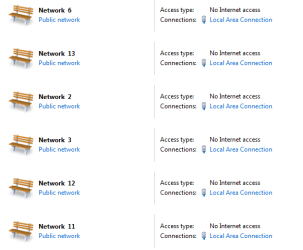
The problem is that I recently installed Windows. I always do it with the network cable unplugged (I don't know if it's related or not), but it seems like that after each restart, the Windows randomly creates network connections. In just one day, they're already 14 of them. You can see it in the screen-shot down below.

Any help or advice will suffice. Thank you in advance.
 

Attachments
  • random networks.PNG
    random networks.PNG
    16.7 KB · Views: 3

My Computer My Computer

At a glance

Windows 7 Ultimate x64
Computer type
PC/Desktop
OS
Windows 7 Ultimate x64
Browser
Google Chrome
Open the Device manager, click View and select "Show hidden devices". Expand the Network Adapters section.

How many adapters are shown?
 

My Computer My Computer

At a glance

Windows 8 Enterprise 32 bitAMD Athlon II P360 2.33 GBATI Mobility Radeon HD4200
Computer type
Laptop
Computer Manufacturer/Model Number
DELL
OS
Windows 8 Enterprise 32 bit
CPU
AMD Athlon II P360 2.3
Memory
3 GB
Graphics Card(s)
ATI Mobility Radeon HD4200
Antivirus
Kaspersky Internet Security 2013
Browser
Mozilla Firefox
Finally, someone thought of replying. Firstly, thanks for showing interest, texhnologic.

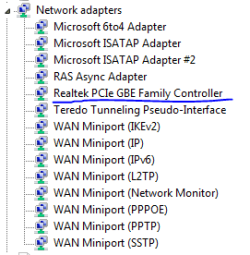
I entered the Device Manager and checked as you asked. Whenever I select the option of showing all hidden devices, this is what I get in the ''Network Adapters '' section.

When the option is unchecked, I can only see the blue underlined one in the image. Hope this helps. Are there supposed to be so many?
 

Attachments

  • capture.PNG
    capture.PNG
    4.2 KB · Views: 12

My Computer My Computer

At a glance

Windows 7 Ultimate x64
Computer type
PC/Desktop
OS
Windows 7 Ultimate x64
Browser
Google Chrome
That's fine, there should be a few hidden.

Can you go to your network adapter settings and turn off your IPv6 connection? Then restart your PC.

You can also try this:

- Go to "Network and Sharing Center"

- Click on the icon (the bench) of your connection under "View your active networks". That will give you the "Set Network Properties" dialogue. There you can change the icon for that network connection.

- Click on "Merge or Delete Network Locations" to see the list of your networks.

You can merge or delete connections here, so in your case, delete all but your active Network and rename it just in case.

Reset PC...hope it helps.
 

My Computer My Computer

At a glance

Windows 8 Enterprise 32 bitAMD Athlon II P360 2.33 GBATI Mobility Radeon HD4200
Computer type
Laptop
Computer Manufacturer/Model Number
DELL
OS
Windows 8 Enterprise 32 bit
CPU
AMD Athlon II P360 2.3
Memory
3 GB
Graphics Card(s)
ATI Mobility Radeon HD4200
Antivirus
Kaspersky Internet Security 2013
Browser
Mozilla Firefox
I apologize for bumping the thread, but I haven't had the chance to reply lately. @texhnologic, I just reinstalled my Windows today and I turned off the IPv6 connection. For now, it is all good.

The funny thing about the random connections is that they cannot be deleted as they're marked as in use. Thank you once again for your help.

Later edit: it doesn't work, it still creates random connections, even with the IPv6 not activated.
 
Last edited:

My Computer My Computer

At a glance

Windows 7 Ultimate x64
Computer type
PC/Desktop
OS
Windows 7 Ultimate x64
Browser
Google Chrome
Back
Top